Zavedení
Thank you for choosing the Hyper Tough 44 Piece Ratcheting Screwdriver Set. This versatile tool kit is designed for various household and work tasks, providing convenience and efficiency. This manual will guide you through the components, setup, operation, maintenance, and troubleshooting of your new screwdriver set.
Komponenty v ceně
Your Hyper Tough 44 Piece Ratcheting Screwdriver Set includes the following items:
- 1 x Reversible Ratcheting Screwdriver Handle
- 1 x Magnetic Extension
- 10 x SAE Nut Drivers (7/32", 3/16", 1/4", 9/32", 5/16", 11/32", 3/8", 7/16", 15/32", 1/2")
- 32 x 1-inch Screwdriver Bits (Slotted, Square, Phillips, Hex, Star)
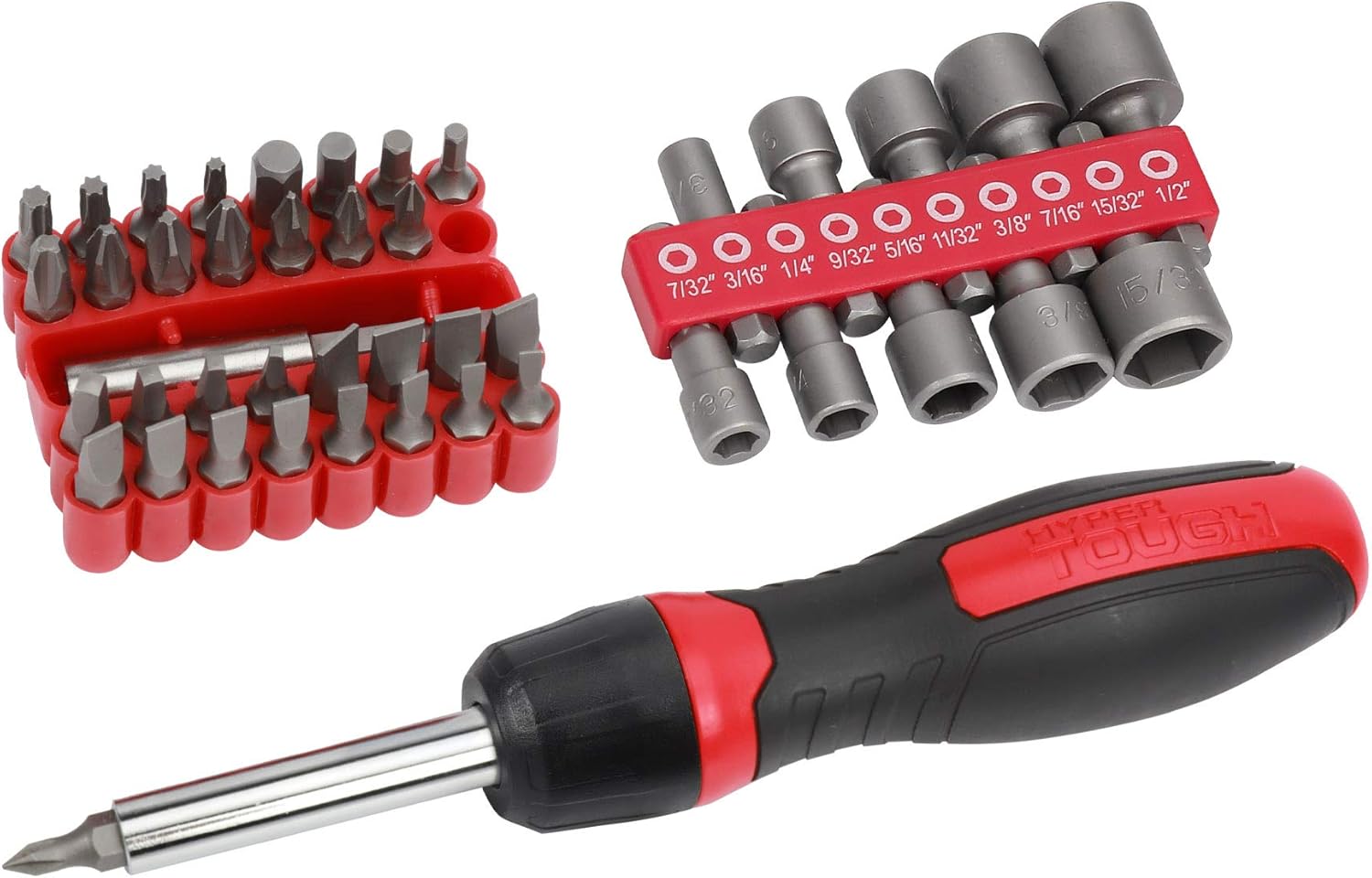
Obrázek 1: Nadview of the Hyper Tough 44 Piece Ratcheting Screwdriver Set, showing the ratcheting handle, a red bit holder with various screwdriver bits, and a red nut driver holder with SAE nut drivers.

Obrázek 2: Detailní view of the 10 SAE nut drivers, clearly labeled with their sizes: 7/32", 3/16", 1/4", 9/32", 5/16", 11/32", 3/8", 7/16", 15/32", and 1/2-inch.
Nastavení a montáž
The Hyper Tough Ratcheting Screwdriver Set is designed for quick and easy assembly. Follow these steps to prepare your tool for use:
- Select the Appropriate Bit or Nut Driver: Identify the correct screwdriver bit (slotted, square, Phillips, hex, or star) or SAE nut driver size required for your task.
- Insert Bit/Nut Driver into Magnetic Extension: If using a screwdriver bit, insert it firmly into the magnetic extension. The magnetic tip will hold the bit securely. For nut drivers, insert the desired nut driver directly onto the magnetic extension.
- Attach Magnetic Extension to Handle: Insert the magnetic extension (with the bit or nut driver attached) into the hexagonal opening at the end of the ratcheting screwdriver handle. Ensure it is fully seated.
- Ověřte zabezpečené připojení: Gently pull on the bit or nut driver to ensure it is securely attached and will not detach during use.
Návod k obsluze
The ratcheting screwdriver handle allows for efficient fastening and loosening of screws and nuts without repositioning your grip.
Using the Ratcheting Mechanism
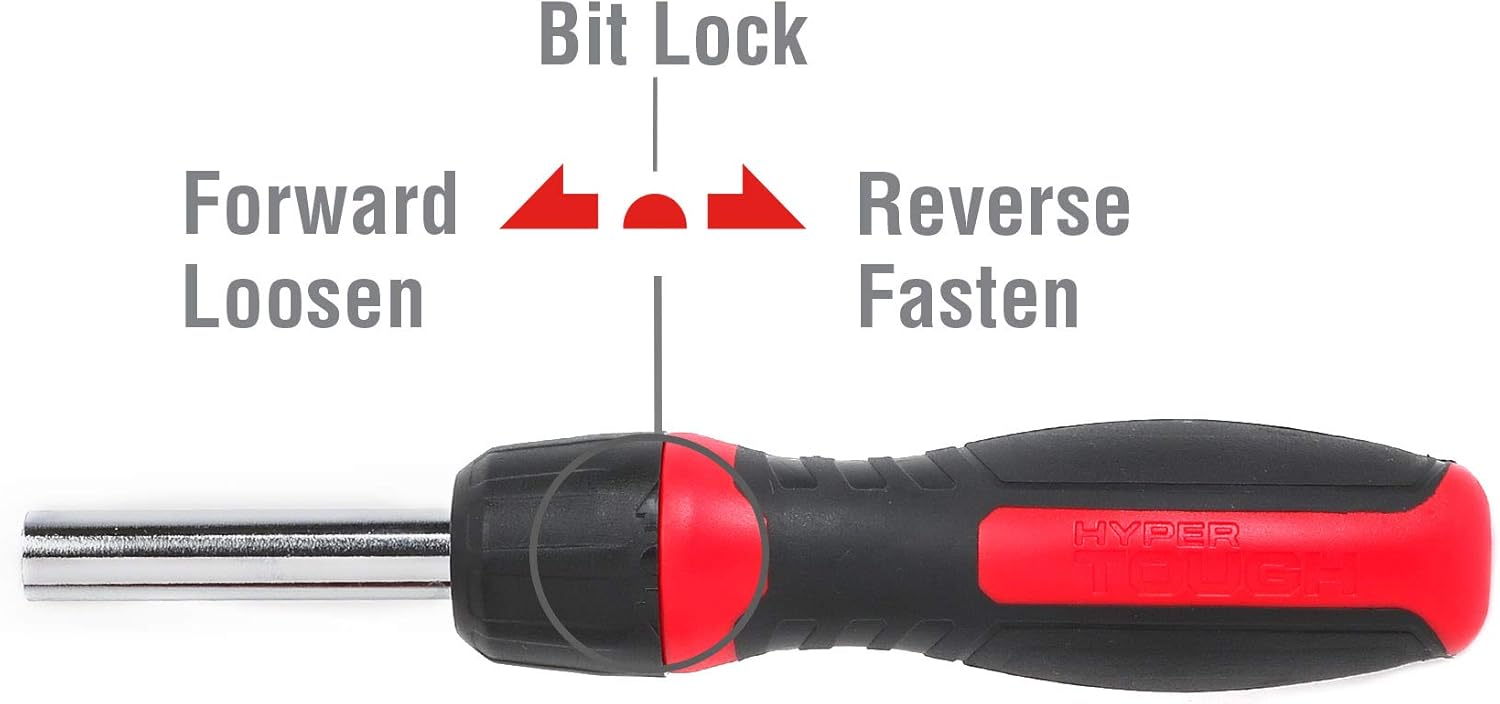
Obrázek 3: Close-up of the ratcheting screwdriver handle, illustrating the three positions of the selector switch: Forward (Loosen), Bit Lock (Fixed), and Reverse (Fasten).
- Forward (Loosen): Slide the selector switch on the handle to the 'Forward' position (typically indicated by an arrow pointing counter-clockwise or 'Loosen'). This setting allows the handle to turn freely in the clockwise direction while engaging the bit for counter-clockwise rotation, ideal for loosening fasteners.
- Reverse (Fasten): Slide the selector switch to the 'Reverse' position (typically indicated by an arrow pointing clockwise or 'Fasten'). This setting allows the handle to turn freely in the counter-clockwise direction while engaging the bit for clockwise rotation, ideal for fastening screws or nuts.
- Bit Lock (Fixed): Position the selector switch in the center. This locks the shaft, turning the ratcheting screwdriver into a traditional fixed screwdriver. This setting is useful for initial tightening, final loosening, or when precise control without ratcheting is desired.
Obecné použití
- Ensure the correct bit or nut driver is securely installed.
- Select the desired ratcheting direction (Forward for loosening, Reverse for fastening) or Bit Lock for fixed operation.
- Apply firm, steady pressure to the handle while turning to prevent stripping the fastener head.
- For stubborn fasteners, use the Bit Lock position to apply maximum torque without the ratcheting action.
Údržba a péče
Proper maintenance will extend the life and performance of your Hyper Tough Ratcheting Screwdriver Set.
- Čištění: After each use, wipe down the handle, bits, and nut drivers with a clean, dry cloth to remove dirt, grease, or debris. For stubborn grime, a slightly damp Lze použít hadřík a poté ihned osušit.
- Skladování: Store all components in their original case or a suitable tool organizer. Keep the set in a dry environment to prevent rust, especially on the metal bits and nut drivers.
- Inspekce: Periodically inspect the bits, nut drivers, and the ratcheting mechanism for any signs of wear, damage, or corrosion. Replace worn or damaged components as necessary.
- Mazání: The internal ratcheting mechanism is generally maintenance-free. Avoid disassembling the handle unless specifically instructed by a qualified technician.
Odstraňování problémů
If you encounter issues with your Hyper Tough Ratcheting Screwdriver Set, refer to the following common problems and solutions:
| Problém | Možná příčina | Řešení |
|---|---|---|
| Ratcheting mechanism slips or does not engage. | Selector switch not fully engaged; internal wear or damage. | Ensure the selector switch is firmly in the 'Forward', 'Reverse', or 'Bit Lock' position. If the issue persists, the mechanism may be worn and require replacement. |
| Bits or nut drivers fall out of the extension. | Magnetic tip weakened; bit not fully inserted. | Ensure the bit/nut driver is pushed all the way into the magnetic extension. If the magnet is weak, the extension may need replacement. |
| Screwdriver bit strips fastener head. | Incorrect bit size; insufficient pressure; worn bit. | Use the correct size and type of bit for the fastener. Apply firm, consistent downward pressure. Replace worn bits. |
| Rust appears on metal components. | Vystavení vlhkosti; nesprávné skladování. | Clean and dry tools thoroughly after use. Store in a dry environment. Lightly oil metal parts if storing for extended periods in humid conditions. |
Specifikace
| Funkce | Detail |
|---|---|
| Značka | Hyper odolný |
| Číslo modelu | 30019 |
| Počet kusů | 44 |
| Head Styles Included | Flat, Hex, Phillips, Square, Torx |
| Materiál | Kov |
| Barva | Červená, černá, stříbrná |
| Hmotnost položky | 1.21 liber (0.55 kilogramů) |
| Rozměry balení | 8.9 x 5.24 x 1.26 palce |
| UPC | 820909600190 |
| Doporučená použití | General repairs, tightening screws |

Obrázek 4: The ratcheting screwdriver handle, illustrating its approximate length of 6 inches (170mm).
Záruka a podpora
For information regarding warranty coverage, product support, or to purchase replacement parts, please refer to the Hyper Tough official webnebo se obraťte na jejich zákaznický servis. Uschovejte si doklad o koupi pro případ reklamace.


