1. Úvod
The IMILAB C21 2.5K Indoor Security Camera provides advanced home monitoring with its high-resolution video, comprehensive 360-degree coverage, and intelligent detection features. Designed for indoor use, it offers peace of mind by keeping you connected to your home, pets, or loved ones from anywhere.
Key features include crystal-clear 2.5K QHD video, 360° pan-tilt-zoom functionality, enhanced night vision, two-way audio communication, and smart AI detection for motion, human, and sound events. It supports both local and cloud storage options and integrates seamlessly with popular voice assistants like Alexa and Google Assistant.
Konec produktuview Video
Official product video introducing the IMILAB C21 Indoor Camera, highlighting its main features and design.
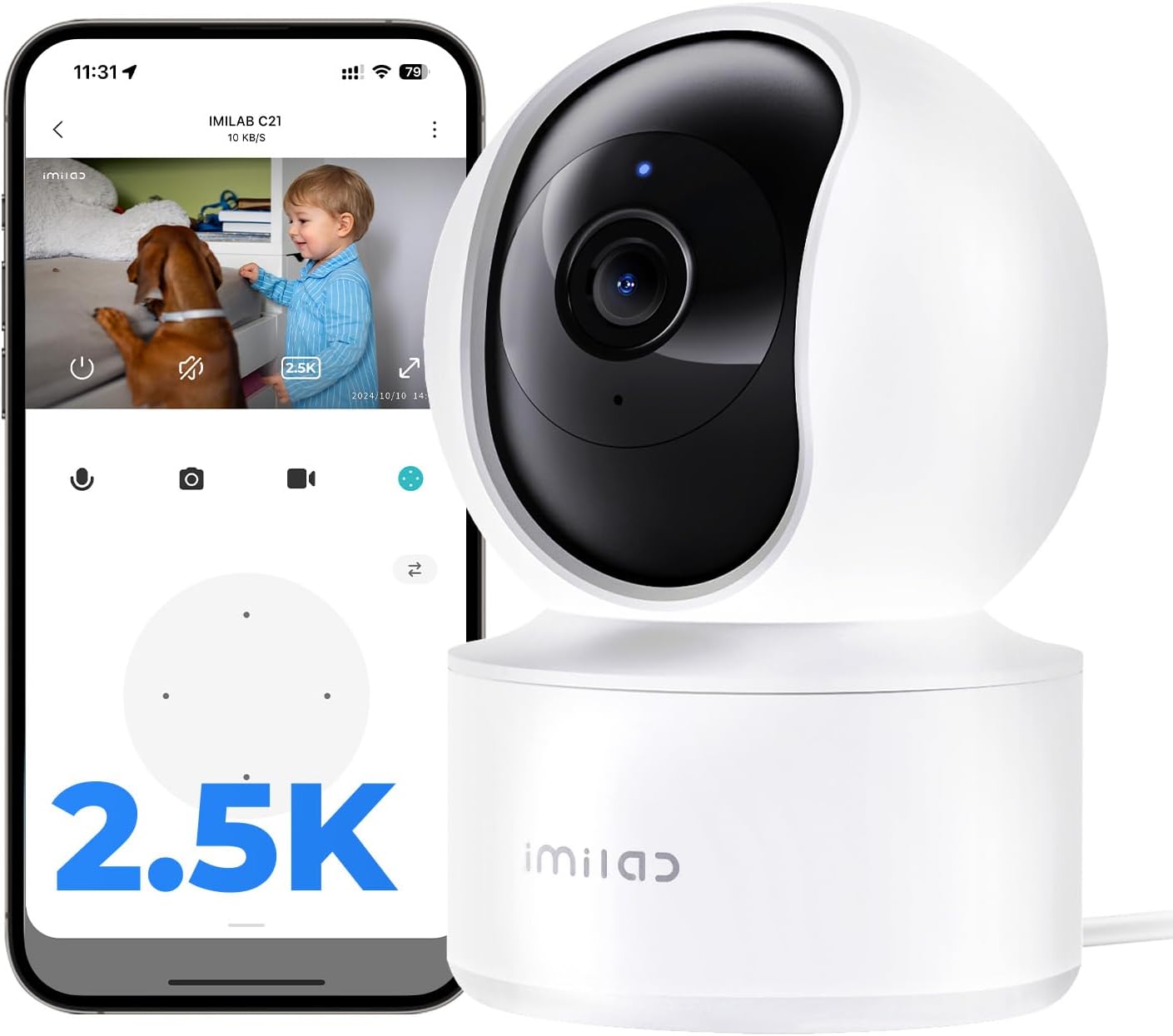
The IMILAB C21 camera, showcasing its compact design and the accompanying mobile application interface for live viewIng.
2. Co je v krabici
Upon unboxing your IMILAB C21 camera, please ensure all the following components are present:
- IMILAB C21 Indoor Pan-Tilt Cam x 1
- Power Adapter & Cable (6.6ft) x 1
- Montážní sada x 1
- Návod k použití a záruční list x 1

All components included in the IMILAB C21 product packaging.
3. Průvodce nastavením
Setting up your IMILAB C21 camera is a straightforward process. Follow these steps to get your camera up and running:
- Zapnutí: Connect the camera to a power source using the provided power adapter and cable. The camera will power on and initiate its self-check.
- Stáhněte si aplikaci: Download the 'Xiaomi Home' or 'Mi Home' app from your device's app store (available for iPhone/Android).
- Přidat zařízení: Open the app, log in or create an account. Tap the '+' icon to add a new device.
- Naskenujte QR kód: Use the app to scan the QR code located at the base of your IMILAB C21 camera. The camera will provide audio prompts to guide you through the pairing process.
- Připojení k Wi-Fi: Follow the in-app instructions to connect your camera to your 2.4GHz Wi-Fi network. Ensure your Wi-Fi signal is strong in the camera's intended location.
- Umístění: Position your camera in the desired indoor location. It can be placed freestanding on a table, shelf, or mounted on a wall or ceiling using the included mounting kit.
Unboxing and Setup Video
An unboxing and setup guide for the IMILAB C21, demonstrating the ease of installation and initial configuration.
4. Návod k obsluze
Once your IMILAB C21 camera is set up, you can access and control its features via the Xiaomi Home/Mi Home app.
4.1 Živě View a ovládání otáčení, naklánění a zoomu (PTZ)
Otevřete aplikaci a vyberte fotoaparát view the live feed. Use the on-screen joystick or swipe gestures to control the camera's 360° horizontal and 90° vertical rotation. You can also pinch to zoom up to 6x magnification to see details.

Žít view of the camera feed on a smartphone, demonstrating the 2.5K QHD clarity and two-way audio functionality.

Visual representation of the camera's 360° panoramic view and pan-tilt-zoom capabilities.
4.2 Obousměrný zvuk
The built-in microphone and speaker allow for two-way communication. Tap the microphone icon in the app to speak through the camera, or listen to audio from the camera's environment.
4.3 Smart AI Detection & Alerts
The camera features advanced AI detection for motion, human figures, and abnormal sounds. When an event is detected, you will receive instant alerts on your phone. The auto-tracking feature can follow detected activity within its field of view.

Example of an AI-powered noise detection alert received on the mobile app.
4.4 Noční vidění
The IMILAB C21 provides 24/7 monitoring with its infrared night vision, ensuring clear footage i za špatných světelných podmínek.
4.5 Možnosti úložiště
You have flexible options for storing your footage:
- MicroSD karta: Insert a MicroSD card (up to 256GB, sold separately) for 24/7 local recording.
- Cloudové úložiště: Utilize the subscription-based cloud storage for motion-triggered event recording. New users may receive free trial periods.

Mobile app interface displaying the available cloud and local MicroSD storage options.
4.6 Integrace hlasového asistenta
The IMILAB C21 is compatible with Amazon Alexa and Google Assistant. You can voice-control your camera, for example, by saying "Alexa, show the camera" to view živý přenos na kompatibilním chytrém displeji.

The IMILAB C21 camera integrated with a smart display, demonstrating voice control capabilities with Amazon Alexa and Google Assistant.
Product Features in Action Video
Krátká videoprezentaceasing the IMILAB C21 camera's features in real-world scenarios.
Never Miss a Thing Video
An official video demonstrating how the IMILAB C21 ensures you don't miss any important moments.
5. Možnosti instalace
The IMILAB C21 camera offers versatile installation options to suit your needs:
- Volné stání: Place the camera on any flat surface like a table, shelf, or cabinet.
- Montáž na stěnu: Use the included mounting kit to securely attach the camera to a wall.
- Držák na strop: The camera can also be inverted and mounted on the ceiling for a wider overhead view. Remember to adjust the image orientation in the app settings if mounting upside down.

Illustrations of the IMILAB C21 camera installed in different positions: on a table, wall-mounted, and ceiling-mounted.
6. Údržba
To ensure optimal performance and longevity of your IMILAB C21 camera, consider the following maintenance tips:
- Vyčistěte objektiv: Gently wipe the camera lens with a soft, dry, lint-free cloth to remove dust or smudges. Avoid abrasive cleaners.
- Stabilní napájení: Ensure the camera is connected to a stable power source and the power cable is not damaged.
- Optimální Wi-Fi signál: Place the camera within good range of your 2.4GHz Wi-Fi router for a stable connection and smooth video streaming.
- Aktualizace firmwaru: Regularly check the Xiaomi Home/Mi Home app for firmware updates to ensure your camera has the latest features and security enhancements.
- Podmínky prostředí: Keep the camera in a dry, indoor environment within its specified operating temperature range. Avoid direct sunlight or extreme temperatures.
7. Řešení problémů
If you encounter any issues with your IMILAB C21 camera, try the following troubleshooting steps:
- Fotoaparát offline: Check the power connection. Ensure your Wi-Fi network is active and the camera is within range. Restart the camera by unplugging and re-plugging it.
- Špatná kvalita videa: Verify your Wi-Fi signal strength. Move the camera closer to the router if necessary. Ensure the lens is clean.
- Žádná upozornění: Check the app's notification settings to ensure they are enabled for motion, human, or sound detection. Adjust sensitivity settings if needed.
- Problémy s obousměrným zvukem: Ujistěte se, že je v aplikaci povoleno nastavení mikrofonu a reproduktoru. Zkontrolujte nastavení hlasitosti zařízení.
- Kamera nereaguje: Try resetting the camera using the reset button (refer to the setup guide for location). This will restore factory settings and require re-pairing with the app.
- Problémy s připojením aplikace: Ujistěte se, že máte aplikaci aktualizovanou na nejnovější verzi. Zkuste vymazat mezipaměť aplikace nebo ji znovu nainstalovat.
For further assistance, please refer to the detailed User Manual PDF or contact customer support.
8. Specifikace
| Funkce | Detail |
|---|---|
| Název modelu | C21 (CMSXJ56B) |
| Vnitřní/venkovní použití | Krytý |
| Rozlišení záznamu videa | 2.5K QHD (2560p) |
| Viewúhel | 360 Degrees (Pan-Tilt-Zoom) |
| Rozsah nočního vidění | 33 stop |
| Protokol připojení | Wi-Fi (2.4 GHz) |
| Typ ovladače | Xiaomi Home/Mi Home App, Google Assistant, Amazon Alexa |
| Možnosti úložiště | Micro SD (až 256 GB), cloudové úložiště |
| Zdroj napájení | Corded Electric (6.6ft cable) |
| Rozměry (D x Š x V) | 2.87 x 2.95 x 4.33 palce |
| Hmotnost položky | 12 unce |
9. Záruka a podpora
IMILAB provides a Záruka 24 měsíců for the C21 Indoor Security Camera, ensuring reliable performance and customer satisfaction.
For detailed information, troubleshooting, or technical assistance, please refer to the comprehensive Uživatelská příručka (PDF) dostupné online.
You may also contact IMILAB customer support directly:
- Telefon: 866-363-8885
- E-mail: help@imilab.com


