Zavedení
The Atomi Smart Color-Changing String Lights offer a versatile and durable lighting solution for both indoor and outdoor environments. These smart lights are designed for ease of use, featuring Wi-Fi connectivity, app control, and voice assistant compatibility. With 18 shatterproof acrylic bulbs across a 36-foot length, they provide vibrant color-changing options and tunable white light, enhancing any space with customizable ambiance.
Obsah balení
- 1 x Atomi Smart Color-Changing String Lights (36ft cord with 18 bulbs)
- Uživatelská příručka
Specifikace
| Funkce | Detail |
|---|---|
| Číslo modelu | AT1603 |
| Délka | 36 stop |
| Počet žárovek | 18 (Acrylic, Shatterproof) |
| Světelný zdroj | LED (RGB-CCT) |
| Lumen výstup | 160 XNUMX lumenů |
| Wattage | 24 wattů |
| Možnosti barev | 16 Million Colors + Tunable White Light |
| Konektivita | Wi-Fi, Bluetooth |
| Kontrolní metoda | Atomi Smart App, Voice Control (Alexa, Google Assistant) |
| Vnitřní/venkovní použití | Venkovní (s krytím IP65) |
| Materiál | Acrylic (bulbs), Heavy-duty weatherproof cord |
| Hmotnost položky | 3.29 libry |
| Rozměry balení | 10 x 7.5 x 6.5 palce |

Figure 1: Key features and specifications of the Atomi Smart String Lights, highlighting LED technology, color options, durable bulbs, and IP65 weather rating.

Figure 2: Detailed dimensions of the Atomi Smart String Lights, illustrating the bulb size (3.15 inches hanging from cord) and the overall 36-foot length with bulb spacing.
Nastavení a instalace
1. Fyzická instalace
- Rozbalit: Carefully remove the string lights from the packaging.
- Umístění: Determine the desired location for your string lights. Ensure the location is within range of a Wi-Fi signal for smart functionality. The lights are IP65 rated, suitable for outdoor use in various weather conditions (rain, sun, wind, snow).
- Montáž: Use appropriate hooks, clips, or ties to securely hang the string lights. Ensure the power adapter is protected from direct water exposure if installed outdoors, although the lights themselves are weatherproof.
- Připojení napájení: Plug the string lights into a standard electrical outlet.

Figure 3: Atomi Smart String Lights enhancing an outdoor patio setting, demonstrating typical installation.

Figure 4: The IP65 rating ensures the lights withstand various weather conditions, as shown with snow accumulation on a bulb.
2. App Setup (Atomi Smart App)
To unlock the full smart features of your string lights, download and configure the Atomi Smart app.
- Stáhnout aplikaci: Hledat "Atomi Smart" in the Apple App Store or Google Play Store and download the application.
- Vytvořit účet: Open the Atomi Smart app and follow the on-screen instructions to create a new account or log in if you already have one.
- Přidat zařízení:
- Ujistěte se, že je vaše mobilní zařízení připojeno k síti Wi-Fi 2.4 GHz.
- V aplikaci klepněte na „Přidat zařízení“ nebo na ikonu „+“.
- Select "Lighting" or "String Lights" from the device list.
- Follow the in-app prompts to connect your string lights to your Wi-Fi network. This typically involves putting the lights into pairing mode (refer to app instructions for specific light blinking patterns).
- Název zařízení: Once connected, you can name your string lights for easy identification and control within the app.
Návod k obsluze
1. Using the Atomi Smart App
The Atomi Smart app provides comprehensive control over your string lights.

Figure 5: The Atomi Smart app interface for controlling light colors and settings.
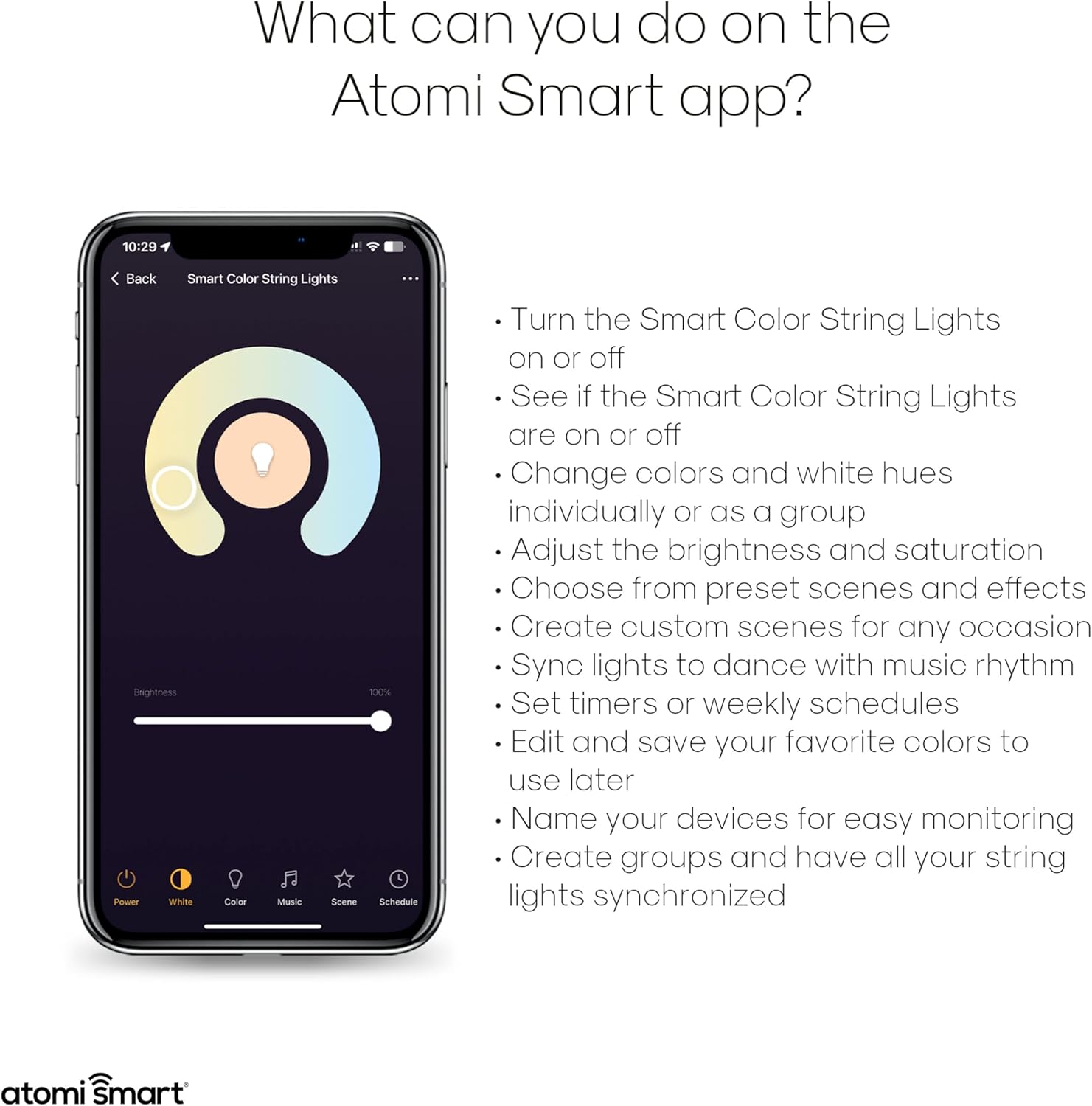
Obrázek 6: Přesview of functions available within the Atomi Smart app for controlling your string lights.
- Zapnutí/vypnutí: Zapínejte nebo vypínejte světla přímo z aplikace.
- Ovládání barev: Select from over 16 million colors. You can change colors individually or group lights for synchronized control.
- Laditelná bílá: Adjust the white light from warm to cool tones.
- Jas a sytost: Fine-tune the intensity and vibrancy of the lights.
- Preset Scenes & Effects: Choose from various built-in lighting scenes and dynamic effects, including Music Sync Mode.
- Vlastní scény: Create and save your own custom lighting scenes for specific occasions.
- Plánování: Set timers or weekly schedules for the lights to turn on/off automatically.
- Seskupení: Create groups of lights to control multiple strands simultaneously.

Obrázek 7: Přample of a built-in scene or custom effect, setting a specific ambiance with red lighting.
2. Integrace hlasového ovládání
The Atomi Smart String Lights are compatible with Amazon Alexa and Google Assistant for convenient voice control.
- Propojit účty:
- Otevřete aplikaci Alexa nebo Google Home.
- Přejděte do sekce „Dovednosti“ (Alexa) nebo „Funguje s Googlem“ (Google Home).
- Hledat and enable the "Atomi Smart" skill/service.
- Log in with your Atomi Smart account credentials to link the accounts.
- Objevte zařízení: Po propojení požádejte hlasového asistenta o „Vyhledání zařízení“ nebo ručně spusťte vyhledávání zařízení v aplikaci.
- Hlasové příkazy: Nyní můžete ovládat světla pomocí hlasových příkazů.ampzahrnují:
- „Alexo, zapni [Název světla]“
- "Hey Google, set [Light Name] to blue"
- "Alexa, dim [Light Name] to 50%"
- „Hej Google, vypni [Název světla]“

Figure 8: The string lights seamlessly integrate with Amazon Alexa and Google Assistant for convenient voice control.
3. Linking Multiple Sets
The Atomi Smart app allows you to link and control multiple string light sets. While the product description states "LINKABLE UP TO 1728FT.", please note that some users have reported that the physical product may not include a female connector for direct daisy-chaining of power. Control linking is primarily done through the Atomi Smart app by grouping devices.
- App Grouping: In the Atomi Smart app, navigate to the device settings or group management section.
- Vytvořit skupinu: Select the option to create a new group and add all desired Atomi Smart String Lights to this group.
- Synchronizované řízení: Once grouped, you can control all lights in the group simultaneously for synchronized color changes, brightness adjustments, and scene activations.
Údržba
- Čištění: Disconnect the lights from power before cleaning. Wipe bulbs and cord with a soft, damp tkanina. Nepoužívejte agresivní chemikálie nebo abrazivní čisticí prostředky.
- Výměna žárovky: The bulbs are designed to be durable and shatterproof. If a bulb needs replacement, contact Atomi Smart customer support for guidance. Do not attempt to replace bulbs with non-Atomi Smart components.
- Skladování: Pokud budete světla skladovat delší dobu, úhledně je smotejte a skladujte na chladném a suchém místě mimo dosah přímého slunečního záření.
- Inspekce: Periodically inspect the cord and bulbs for any signs of damage, wear, or loose connections. Discontinue use if any damage is found and contact customer support.
Odstraňování problémů
| Problém | Možná příčina | Řešení |
|---|---|---|
| Světla se nerozsvítí. | No power; loose connection; app issue. | Ensure lights are securely plugged into a working outlet. Check the app to confirm the lights are not turned off. Try a different outlet. |
| Nelze se připojit k Wi-Fi. | Incorrect Wi-Fi band (not 2.4GHz); wrong password; lights not in pairing mode; weak signal. | Ensure your phone is connected to a 2.4GHz Wi-Fi network. Double-check your Wi-Fi password. Follow app instructions to put lights into pairing mode. Move lights closer to your Wi-Fi router. |
| Hlasové ovládání nefunguje. | Accounts not linked; device not discovered; incorrect commands. | Verify that your Atomi Smart account is correctly linked to Alexa/Google Assistant. Ask your voice assistant to "Discover devices." Use the exact device name configured in the Atomi Smart app. |
| Světla blikají nebo se chovají nepravidelně. | Unstable power; Wi-Fi interference; software glitch. | Unplug the lights for 30 seconds and plug them back in. Check for Wi-Fi interference. Ensure the Atomi Smart app is updated to the latest version. |
| Cannot physically link multiple strands. | Product design may not include a female end connector for daisy-chaining power. | The "linkable" feature primarily refers to app control and grouping. Each strand may require its own power source. If physical linking is critical, verify product specifications or contact Atomi Smart support before purchase. |
Záruka a podpora
Atomi Smart provides a 5letá omezená záruka on all their smart products, including these string lights. For warranty claims, technical support, or any inquiries, please contact Atomi Smart customer service.
Služby zákazníkům: Atomi Smart's professional service team aims to provide 100% satisfaction with a 24-hour quick response.
Refer to the official Atomi Smart webNejnovější informace o podpoře naleznete na webových stránkách nebo na kontaktních informacích uvedených v obalu produktu.


