1. Úvod
This manual provides essential information for the safe operation, maintenance, and troubleshooting of your Coredy R580 Robot Vacuum Cleaner. Please read this manual thoroughly before using the product and retain it for future reference.
The Coredy R580 is a versatile robotic vacuum cleaner designed to simplify your cleaning routine. It features powerful 2000Pa suction, Wi-Fi connectivity for app control, and compatibility with voice assistants like Amazon Alexa and Google Assistant. It supports both sweeping and mopping functions (water tank and mop cloth sold separately) and can transition seamlessly from hard floors to carpets, automatically boosting suction when needed. Its slim design allows it to clean under furniture, and it supports virtual boundaries (strips sold separately) to define cleaning areas.
2. Bezpečnostní pokyny
- Před použitím spotřebiče si přečtěte všechny pokyny.
- Nedovolte dětem hrát si s robotem. Dohlížejte na děti a domácí zvířata, když je robot v provozu.
- Používejte pouze originální napájecí adaptér dodaný výrobcem.
- Nepoužívejte robota v prostředí s otevřeným ohněm nebo křehkými předměty.
- Před čištěním nebo údržbou se ujistěte, že je robot vypnutý a odpojený od sítě.
- Do not immerse the robot or its charging dock in water.
- Nepoužívejte robota na mokrém povrchu nebo v oblastech se stojatou vodou.
- Remove power cords, small objects, and loose rugs from the floor before operation to prevent entanglement.
3. Obsah balení
Po otevření balení se prosím ujistěte, že jsou všechny níže uvedené položky obsaženy a v dobrém stavu:
- Robotický vysavač Coredy R580
- Nabíjecí dok
- Napájecí adaptér
- Boční kartáče (4x)
- High Efficiency Filter (1x extra)
- Dálkové ovládání
- Čisticí kartáč
Note: The 300ML water tank, cleaning mop cloth, and boundary strips are sold separately and are not included in the standard package.
4. Konec produktuview

Obrázek 4.1: Nahoře view of the Coredy R580 Robot Vacuum Cleaner with an accompanying smartphone displaying the control application. The robot is black with bronze accents and features a central power button and home button.
Komponenty robota
- Horní panel: Power/Clean button, Home/Recharge button, Wi-Fi indicator.
- Přední nárazník: Kolizní senzory.
- Boční kartáče: Two rotating brushes for edge and corner cleaning.
- Popelnice: Sbírá trosky.
- Hlavní kartáč: Centrální kartáč pro hloubkové čištění.
- Hnací kola: Pro pohyb po různých površích.
- Kontakty pro nabíjení: For automatic charging with the dock.
- Senzory srázu: Detekuje pády, aby se zabránilo pádu ze schodů.
5. Nastavení
5.1 Nabíjení robota
Before first use, fully charge the robot. Place the charging dock against a wall in an open, uncluttered area. Ensure there is at least 1 meter (3 feet) of clear space to the front and 0.5 meters (1.5 feet) to each side of the charging dock. Connect the power adapter to the charging dock and plug it into a wall outlet. Place the robot on the charging dock, ensuring the charging contacts align. The indicator light on the robot will show charging status.
5.2 Instalace bočních kartáčů
Attach the side brushes by pressing them onto the square posts at the bottom of the robot until they click into place. Ensure the brushes are securely fastened.
5.3 Připojení k Wi-Fi a nastavení aplikace
To utilize smart features, download the Coredy app from your smartphone's app store. Follow the in-app instructions to connect your R580 to your home Wi-Fi network. Note that the robot supports 2.4 GHz Wi-Fi networks only.

Figure 5.1: The Coredy smartphone application allows users to control cleaning, monitor status, schedule cleaning, and access support.
6. Obsluha robotického vysavače
6.1 Spuštění/zastavení čištění
- Ruční spuštění: Press the Power/Clean button on the robot or the remote control.
- Spuštění aplikace: Use the Coredy app to initiate cleaning.
- Hlasový příkaz: If connected to Alexa or Google Assistant, use voice commands like "Alexa, ask Coredy to start cleaning."
- To pause cleaning, press the Power/Clean button again. To send the robot back to the charging dock, press the Home/Recharge button.
6.2 Režimy čištění
- Automatické čištění: Robot automaticky uklízí systematicky.
- Bodové čištění: Robot čistí specifickou oblast ve spirálovitém vzoru.
- Čištění hran: Robot čistí podél zdí a hran nábytku.
6.3 Používání hlasového ovládání
The Coredy R580 is compatible with Amazon Alexa and Google Assistant. Once connected through the Coredy app, you can use simple voice commands to start or stop cleaning.

Figure 6.1: The Coredy R580 can be controlled via voice commands through Amazon Alexa or Google Assistant for hands-free operation.
6.4 Virtual Boundary (Sold Separately)
The R580 supports virtual boundary strips to restrict the robot from entering certain areas. Place the boundary strips on the floor to create invisible barriers. The robot's specialized sensors will detect these strips and avoid crossing them.

Figure 6.2: Virtual boundary strips (sold separately) allow you to define specific areas where the robot vacuum should not clean.
6.5 Sweep and Mop Function (Accessories Sold Separately)
The R580 can perform wet-dry mopping when equipped with the optional 300ML water tank and cleaning mop cloth. Attach the water tank with the mop cloth to the robot for comprehensive cleaning on hard surface floors.
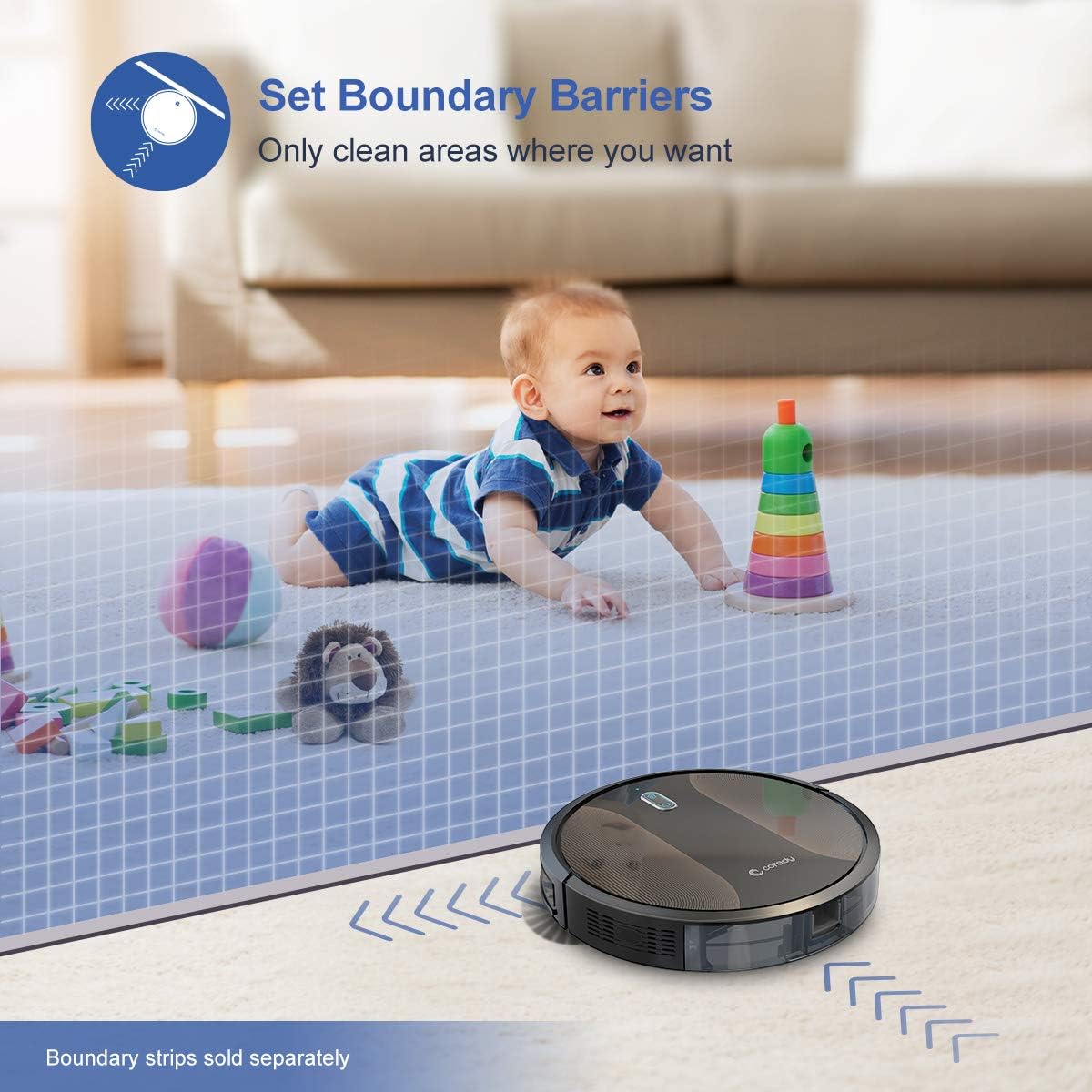
Figure 6.3: The Coredy R580 can be converted for mopping by attaching the optional water tank and mop cloth.
6.6 Boost-Intellect Technology
The robot is equipped with Boost-Intellect Technology, which automatically increases suction power when it detects carpeted surfaces, ensuring a deeper clean across different floor types.

Figure 6.4: Boost-Intellect Technology automatically adjusts suction power when the robot moves from hard floors to carpets.

Figure 6.5: The Coredy R580 provides strong suction power to effectively clean various types of debris from hard floors.
7. Údržba
Regular maintenance is crucial for optimal performance and longevity of your robot vacuum. Perform the following cleaning procedures regularly:
7.1 Vyprázdnění odpadkového koše
Press the dustbin release button and pull out the dustbin. Open the dustbin cover and empty its contents into a trash can. It is recommended to empty the dustbin after each cleaning cycle.
7.2 Čištění hlavního kartáče
Remove the main brush cover and lift out the main brush. Use the provided cleaning tool or a pair of scissors to remove any hair or debris tangled around the brush. Reinstall the main brush and cover.
7.3 Čištění bočních kartáčů
Periodically check the side brushes for tangled hair or debris. Gently pull them off their posts to clean. If they are worn or damaged, replace them with new ones. Push them back onto the posts until they click.
7.4 Čištění filtru
Remove the filter from the dustbin. Tap the filter against a trash can to remove dust. Do not wash the filter with water, as this can damage it. Replace the filter every 2-3 months, or more frequently depending on usage.
7.5 Čištění senzorů a nabíjecích kontaktů
Wipe the cliff sensors (located on the bottom of the robot) and the charging contacts (on the robot and charging dock) with a clean, dry cloth. Keeping these clean ensures proper navigation and charging.
8. Řešení problémů
If your Coredy R580 encounters issues, refer to the following table for common problems and solutions:
| Problém | Možná příčina | Řešení |
|---|---|---|
| Robot se nezapne | Slabá baterie; Vypínač vypnutý | Nabijte robota; Zapněte hlavní vypínač. |
| Robot se nenabíjí | Znečištěné nabíjecí kontakty; Nabíjecí dok není napájen | Očistěte nabíjecí kontakty na robotu a doku; Ujistěte se, že je nabíjecí dok zapojen do zásuvky. |
| Robot se často zasekává | Obstacles (cables, rugs); Cliff sensors dirty | Odstraňte překážky z čisticí cesty; Vyčistěte senzory proti převýšení. |
| Špatný čisticí výkon | Plný odpadkový koš; Zamotané kartáče; Ucpaný filtr | Vyprázdněte nádobu na prach; Vyčistěte hlavní a boční kartáče; Vyčistěte nebo vyměňte filtr. |
| Problémy s připojením Wi-Fi | Nesprávné heslo k Wi-Fi; Router příliš daleko; Síť 5 GHz | Re-enter password; Move robot closer to router; Ensure 2.4GHz network is used. |
If the problem persists after trying the above solutions, please contact Coredy customer support for further assistance.
9. Specifikace
| Funkce | Detail |
|---|---|
| Značka | Coredy |
| Model | R580 |
| Speciální funkce | HEPA Filtration, Pet Tools, Vacuums |
| Barva | Černý |
| Typ filtru | Kazeta |
| Kapacita popelnice | 0.3 litrů |
| Zdroj napájení | Napájení baterií (1 lithium-iontová baterie je součástí balení) |
| Kontrolní metoda | Remote, Voice (Alexa, Google Home), App |
| Form Factor | Robotický |
| Rozměry (D x Š x V) | 16.89 x 13.66 x 4.57 palce |
| Hmotnost položky | 8.91 libry |
| Sací výkon | Až 2000 Pa |
| Úroveň hluku | Pod 65 dB |
10. Záruka a podpora
10.1 Informace o záruce
Coredy products are manufactured to the highest quality standards. For specific warranty details regarding your R580 Robot Vacuum Cleaner, please refer to the warranty card included in your product packaging or visit the official Coredy webZáruka se obvykle vztahuje na vady materiálu a zpracování při běžném používání.
10.2 Zákaznická podpora
If you have any questions, require technical assistance, or need to report an issue with your Coredy R580, please contact Coredy customer support. Contact information can usually be found on the official Coredy website or on the product packaging. Please have your model number (R580) and purchase information ready when contacting support.


