Zavedení
This manual provides essential information for setting up, operating, maintaining, and troubleshooting your ASUS ZenBook Duo 14 UX482 laptop. Please read this guide thoroughly to ensure proper use and to maximize the performance and longevity of your device.
Co je v krabici
Upon unboxing your ASUS ZenBook Duo 14 UX482, verify that all the following items are included:
- ASUS ZenBook Duo 14 UX482EA-DS71T Laptop
- Pouzdro na notebook
- Stojan na notebook
- Stylus
- Napájecí adaptér a kabel
- Uživatelská příručka (tento dokument)
- Záruční list

Obrázek: Přední strana view of the ASUS ZenBook Duo 14 UX482 laptop, showcasing its dual-screen design with the main 14-inch display and the secondary ScreenPad Plus.
Nastavení
1. Počáteční zapnutí
- Connect the power adapter to the laptop's power port and then to a wall outlet.
- Open the laptop lid. The ScreenPad Plus will automatically tilt for ergonomic viewIng.
- Stisknutím tlačítka napájení, které se obvykle nachází na klávesnici, zapněte notebook.
- Postupujte podle pokynů na obrazovce a dokončete proces instalace systému Windows 10 Home.

Obrázek: Boční view of the ASUS ZenBook Duo 14 UX482, illustrating the tilted ScreenPad Plus for improved ergonomics and airflow.
2. Připojení periferií
Your ZenBook Duo 14 UX482 features various ports for connecting external devices:
- Port USB 3.0: Pro standardní USB zařízení.
- USB-C (Thunderbolt) Ports: For high-speed data transfer, display output, and charging.
- Port HDMI: Pro připojení k externím displejům nebo projektorům.
- Audio jack: Pro sluchátka nebo externí reproduktory.

Image: Left side of the ASUS ZenBook Duo 14 UX482, displaying the various input/output ports available for connectivity.
Operating Your ZenBook Duo 14
Main Display and ScreenPad Plus
The ZenBook Duo 14 features a 14-inch Full HD NanoEdge touchscreen as its main display and a 12.6-inch tilting matte touchscreen, the ScreenPad Plus, as a secondary display. These two screens work together to enhance multitasking and productivity.
- Extending Display: Drag windows or applications between the main display and ScreenPad Plus.
- Přepínač aplikací: Use the built-in ScreenPad Plus controls to quickly move applications between screens.
- Task Group: Create groups of applications to launch simultaneously across both displays for specific workflows.
- Rukopis: Utilize the ScreenPad Plus for intuitive text input with the included stylus.
- Quick Key: Automate complex keyboard sequences with a single tap on the ScreenPad Plus.
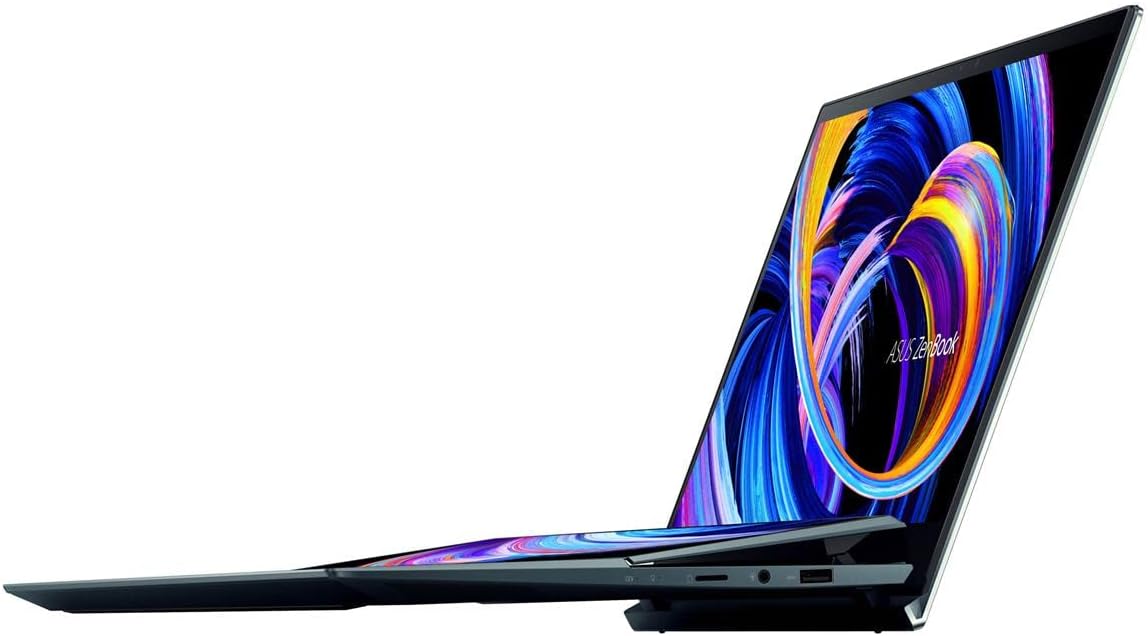
Image: The ASUS ZenBook Duo 14 UX482 with its ScreenPad Plus displaying multiple applications, demonstrating its multitasking capabilities.
Klávesnice a trackpad
The laptop features a full-size backlit keyboard and a precision trackpad located on the right side of the keyboard deck. The unique placement of the trackpad is designed to accommodate the ScreenPad Plus. An included stylus can be used for precise input on both touchscreens.
Intel Evo Platform Features
Your ZenBook Duo 14 is built on the Intel Evo Platform, offering a balance of performance, responsiveness, and battery life. Key benefits include:
- Fast wake from sleep.
- Long-lasting battery life (up to 10.5 hours average).
- Responsive performance with the 11th Gen Intel Core i7 processor and Intel Iris Xe graphics.
- Advanced connectivity with 802.11ax (Wi-Fi 6) and Bluetooth.
Údržba
Čištění a péče
- Use a soft, lint-free cloth to clean the screens and chassis. Avoid abrasive materials.
- Na odolné šmouhy lehceamphadřík vodou nebo čisticím roztokem vhodným pro obrazovky.
- Nestříkejte čisticí prostředky přímo na notebook.
- Keep the laptop away from extreme temperatures, direct sunlight, and liquids.
Správa baterie
- Chcete-li prodloužit životnost baterie, vyvarujte se častého úplného vybíjení.
- Pokud notebook delší dobu nepoužíváte, skladujte jej na chladném a suchém místě.
- Používejte pouze originální napájecí adaptér ASUS.
Aktualizace softwaru
Regularly update your Windows operating system and ASUS drivers to ensure optimal performance, security, and compatibility. Windows updates can be managed through the Windows Settings, and ASUS updates can be found via the MyASUS application or the official ASUS support webmísto.
Odstraňování problémů
This section addresses common issues you might encounter. For more complex problems, refer to the ASUS support webnebo kontaktujte zákaznický servis.
- Notebook se nezapne: Ujistěte se, že je napájecí adaptér bezpečně připojen a baterie je dostatečně nabitá. Zkuste jinou zásuvku.
- ScreenPad Plus not responding: Check if the ScreenPad Plus is enabled in the ASUS ScreenXpert software. Restart the laptop.
- Trackpad issues: If the trackpad is unresponsive, ensure drivers are up to date. A system restart can often resolve temporary glitches.
- Externí displej nebyl detekován: Verify the cable connection (HDMI or USB-C). Ensure the external display is powered on and set to the correct input source. Use Windows display settings to detect and configure the display.
- Pomalý výkon: Zavřete nepotřebné aplikace. Zkontrolujte procesy na pozadí, které spotřebovávají mnoho zdrojů. Zajistěte dostatek volného úložného prostoru.
Specifikace
| Funkce | Detail |
|---|---|
| Název modelu | ZenBook Duo UX482EA-DS71T |
| Hlavní displej | 14-inch FHD (1920 x 1080) NanoEdge Touch Display |
| Sekundární displej | 12.6-inch Tilting ScreenPad Plus Matte Touchscreen |
| Procesor | Intel Core i7-1165G7 (Up to 4.7 GHz, 4 Cores) |
| Grafika | Grafická karta Intel Iris Xe (integrovaná) |
| BERAN | 8 GB LPDDR4X |
| Skladování | 512GB PCIe NVMe M.2 SSD |
| Operační systém | Windows 10 Home (Bezplatný upgrade na Windows 11, pokud bude k dispozici) |
| Bezdrátové připojení | 802.11ax (Wi-Fi 6), Bluetooth |
| Porty | 1x USB 3.0, USB-C (Thunderbolt), HDMI, Audio-out |
| Životnost baterie | Approximately 10.5 Hours (Average) |
| Hmotnost | 3.46 libry |
| Rozměry (DxŠxV) | 12.76 x 8.74 x 0.68 palce |
| Barva | Celestial Blue |
Záruka a podpora
Informace o záruce
Your ASUS ZenBook Duo 14 UX482 comes with a limited warranty. Please refer to the included Warranty Card for detailed terms and conditions, including coverage period and service procedures. Keep your proof of purchase for warranty claims.
Zákaznická podpora
Pro technickou pomoc, stažení ovladačů nebo další informace o produktu navštivte oficiální stránky podpory ASUS. webmísto:
Důležité právní upozornění
The Windows 11 upgrade will be delivered to qualifying devices late 2021 into 2022. Timing varies by device. Certain features require additional hardware (see aka.ms/windows11-spec).
Produktová videa
No official seller-created product videos were found with specific URLs and metadata for embedding in this manual. Please refer to the manufacturer's official webstránky s dostupnými video zdroji.


