1. Úvod
The AOPUTTRIVER AP-770HC is a 6000-count True RMS digital multimeter designed for accurate and reliable electrical measurements. It features auto-ranging capabilities and a variety of functions including voltage, current, resistance, capacitance, frequency, temperature, and Non-Contact Voltage (NCV) detection. This manual provides essential information for the safe and proper use of your multimeter.
2. Bezpečnostní informace
Please read all safety warnings and operating instructions carefully before using this instrument. Failure to comply with safety precautions may result in electric shock, fire, or damage to the meter.
- Always ensure the test leads are properly connected and the function switch is set to the correct range before making any measurements.
- Neměřte objtage vyšší než 1000 V DC nebo 750 V AC.
- Při práci s obvody pod napětím buďte mimořádně opatrní. Zabraňte kontaktu s holými vodiči nebo svorkami.
- Nikdy neměřte proud v obvodu s napětímtage present without first disconnecting power and inserting the meter in series.
- Nepoužívejte měřicí přístroj, pokud se jeví poškozený nebo pokud jsou měřicí vodiče poškozené.
- Vyměňte baterii, když se zobrazí indikátor slabé baterie, abyste zajistili přesné měření.
- Dodržujte místní a národní bezpečnostní předpisy.
3. Obsah balení
Ověřte, zda jsou v balení přítomny všechny níže uvedené položky:
- 1 x AOPUTTRIVER AP-770HC Multimeter
- 2 x měřicí kabely (červený a černý)
- 1 x taška na přenášení
- 1 x 9V (6F22) Battery
- 1 x malý šroubovák
- 1 x teplotní sonda
- 1 x Uživatelská příručka (anglicky)

Image: The package contents, including the multimeter, test leads, carrying bag, battery, screwdriver, temperature probe, and user manual.
4. Konec produktuview
4.1 Rozložení předního panelu
Familiarize yourself with the various components of the multimeter's front panel:
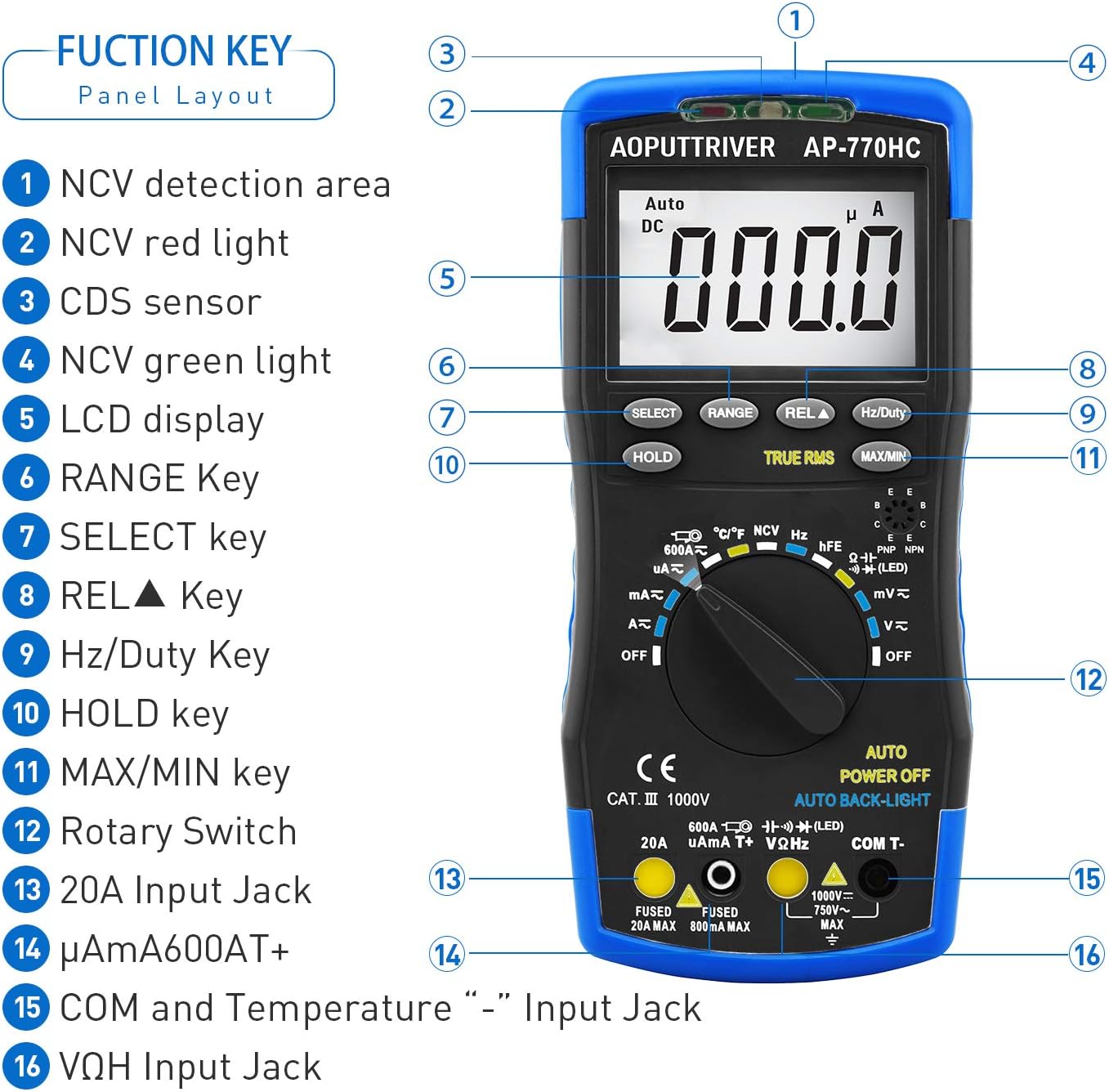
Obrázek: Podrobný view of the multimeter's front panel, highlighting key functional areas and buttons.
- NCV Detection Area
- NCV Red Light Indicator
- CDS Sensor (for Auto Backlight)
- NCV Green Light Indicator
- LCD displej
- Klíč RANGE
- Tlačítko SELECT
- REL▲ Key (Relative Value)
- Klíč Hz/Duty
- Tlačítko HOLD
- Tlačítko MAX/MIN
- Otočný spínač
- Vstupní jack 20A
- μA/mA/600AT+ Input Jack
- COM and Temperature "-" Input Jack
- VΩHz Input Jack
4.2 Fyzické vlastnosti
The AP-770HC is designed for durability and ease of use:
- Dvojitá ochrana: The meter is encased in a protective rubber boot for enhanced durability against drops and impacts.
- Integrovaný stojánek: A built-in stand allows the meter to be propped up for hands-free viewing, rotating 180 degrees for optimal angle.
- Mechanical Blocking System: This safety feature prevents incorrect lead insertion by physically blocking unused input jacks based on the rotary switch position.
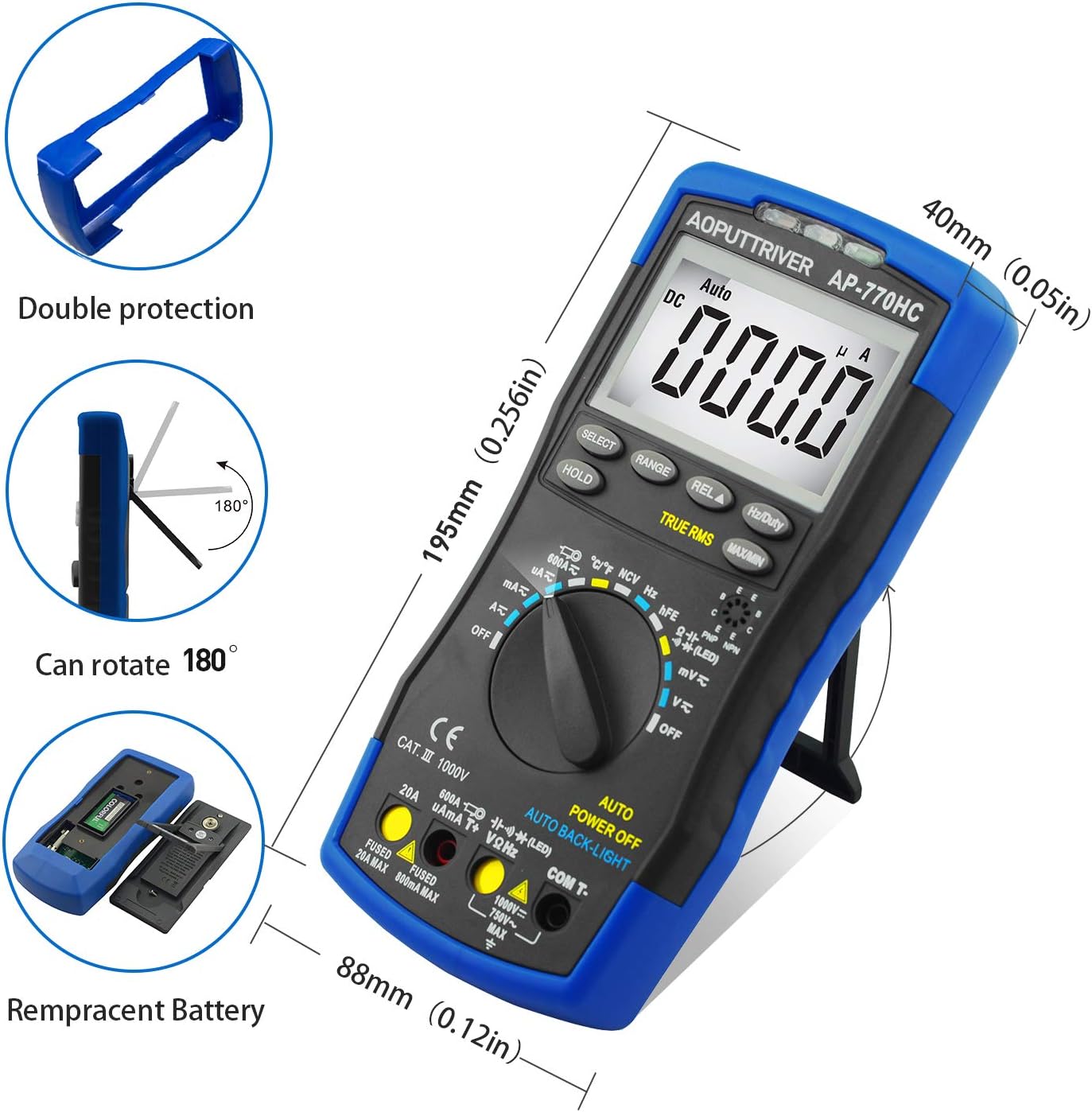
Image: Illustrations of the multimeter's physical attributes, including its dimensions, protective casing, and battery access.
5. Nastavení
5.1 Instalace baterie
The AP-770HC requires one 9V (6F22) battery for operation. To install or replace the battery:
- Ujistěte se, že je multimetr VYPNUTÝ.
- Najděte kryt přihrádky na baterie na zadní straně měřiče.
- Use the provided small screwdriver to loosen the screw securing the battery cover.
- Remove the cover and connect the 9V battery to the battery clip, observing correct polarity.
- Place the battery into the compartment and replace the cover, securing it with the screw.
6. Návod k obsluze
6.1 Obecná obsluha
To begin using the multimeter:
- Insert the test leads into the appropriate input jacks. The black lead typically connects to the COM jack. The red lead connects to the VΩHz jack for voltage, resistance, and other measurements, or to the μA/mA or 20A jack for current measurements.
- Rotate the function switch to the desired measurement mode. The mechanical blocking system will guide you to the correct input jacks for the selected function.
- The meter will automatically select the appropriate range (auto-ranging). For some functions, you can press the RANGE button to manually select a range.
6.2 Měřicí funkce
Below are instructions for common measurement types:
DC svtage Measurement (V∓)
- Set the rotary switch to the V∓ position.
- Připojte červený měřicí vodič do zdířky VΩHz a černý měřicí vodič do zdířky COM.
- Zapojte měřicí vodiče paralelně přes DC napětítage source or component to be measured.
- Přečtěte si svtage hodnota na LCD displeji.
AC svtagMěření e (V∼)
- Nastavte otočný přepínač do polohy V∼.
- Připojte červený měřicí vodič do zdířky VΩHz a černý měřicí vodič do zdířky COM.
- Zapojte měřicí vodiče paralelně přes AC napětítage source or component.
- Přečtěte si svtage hodnota na LCD displeji.
DC/AC Current Measurement (μA, mA, A)
- DŮLEŽITÉ: Disconnect power to the circuit before measuring current.
- Set the rotary switch to the appropriate current range (μA, mA, or A). Use the VYBRAT button to switch between AC and DC current.
- Connect the red test lead to the μA/mA or 20A jack, and the black test lead to the COM jack.
- Insert the multimeter in series with the circuit where current is to be measured.
- Zapněte obvod a odečtěte hodnotu proudu.
Měření odporu (Ω)
- Nastavte otočný přepínač do polohy Ω.
- Připojte červený měřicí vodič do zdířky VΩHz a černý měřicí vodič do zdířky COM.
- Ensure the component to be measured is de-energized.
- Připojte měřicí vodiče k součástce.
- Odečtěte hodnotu odporu.
Test kontinuity
- Set the rotary switch to the continuity/diode position. Press VYBRAT until the continuity symbol (🔊) is displayed.
- Připojte červený měřicí vodič do zdířky VΩHz a černý měřicí vodič do zdířky COM.
- Připojte měřicí vodiče k obvodu nebo součástce.
- If resistance is below approximately 50Ω, the buzzer will sound, indicating continuity.
Test diod
- Set the rotary switch to the continuity/diode position. Press VYBRAT until the diode symbol (→|∣) is displayed.
- Připojte červený měřicí vodič do zdířky VΩHz a černý měřicí vodič do zdířky COM.
- Připojte červený vodič k anodě a černý vodič ke katodě diody.
- Na displeji se zobrazí hlasitost vpředtage drop. Reverse the leads; an open circuit (OL) indicates a good diode.
Měření kapacity
- Set the rotary switch to the capacitance position.
- Připojte červený měřicí vodič do zdířky VΩHz a černý měřicí vodič do zdířky COM.
- Před měřením se ujistěte, že je kondenzátor zcela vybitý.
- Připojte měřicí vodiče přes kondenzátor.
- Odečtěte hodnotu kapacity na displeji.
Frequency/Duty Cycle Measurement (Hz/%)
- Set the rotary switch to the Hz/Duty position.
- Připojte červený měřicí vodič do zdířky VΩHz a černý měřicí vodič do zdířky COM.
- Připojte měřicí vodiče ke zdroji signálu.
- Stiskněte tlačítko Hz/Duty button to toggle between frequency and duty cycle measurements.
Temperature Measurement (℃/℉)
- Set the rotary switch to the temperature position.
- Připojte teplotní sondu ke konektorům VΩHz a COM a dodržte polaritu.
- Umístěte hrot teplotní sondy na předmět, jehož teplotu chcete měřit, nebo do jeho blízkosti.
- Read the temperature on the display. Press the VYBRAT tlačítko pro přepínání mezi stupni Celsia (℃) a Fahrenheita (℉).

Image: The multimeter connected to a temperature probe, demonstrating its use to measure the temperature of a liquid.
Bezkontaktní svtage (NCV) Detekce
- Nastavte otočný přepínač do polohy NCV.
- Move the NCV detection area (top of the meter) close to a live conductor.
- Jestliže svtage greater than 90V (RMS) is detected, the NCV red light will illuminate, and the meter will emit an audible beep.
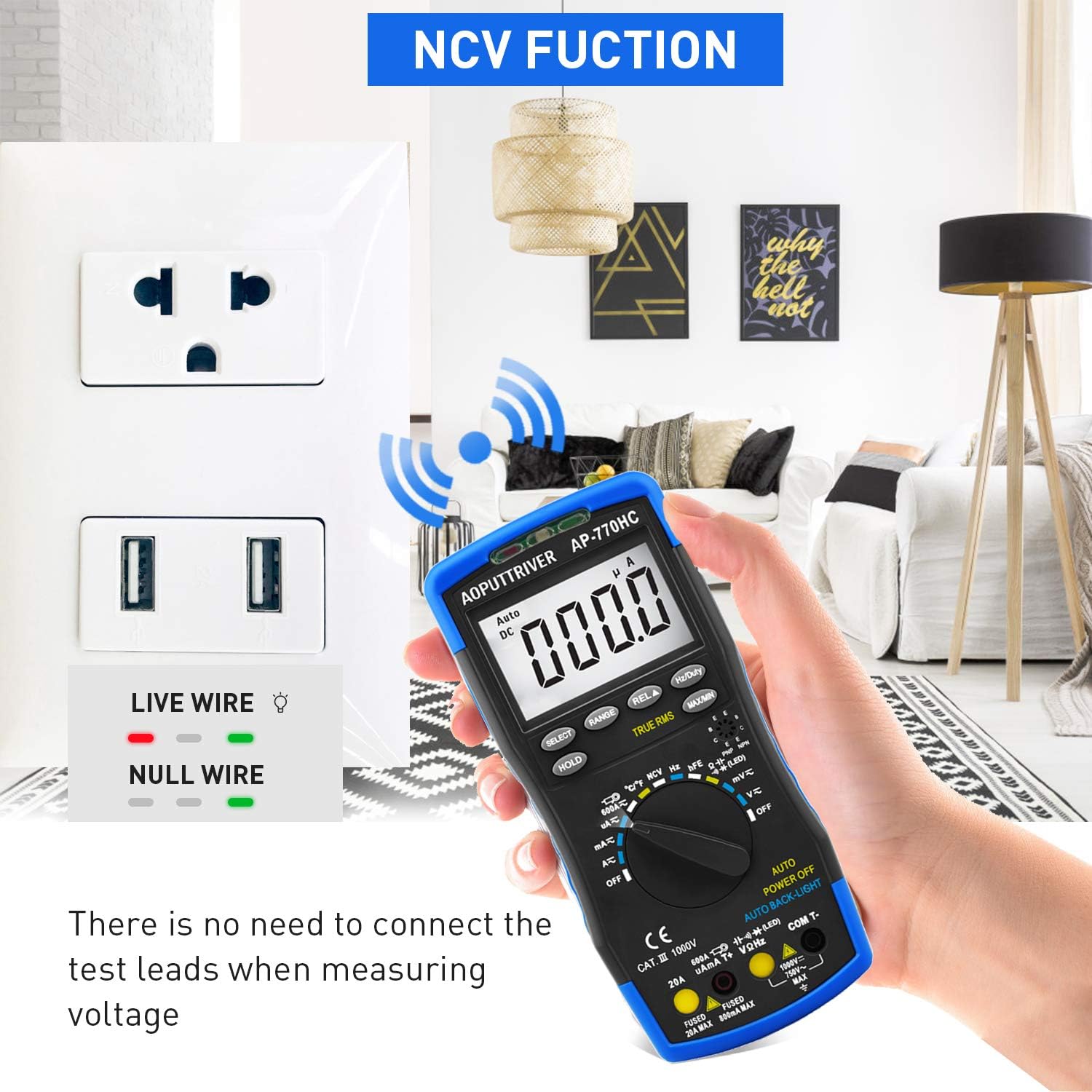
Obrázek: Funkce NCV multimetru v provozu, detekce objemutage near an electrical outlet without physical contact.
6.3 Speciální funkce
- Pozastavení dat (HOLD): Stiskněte tlačítko DRŽET tlačítko pro zmrazení aktuální hodnoty na displeji. Dalším stisknutím tlačítko uvolníte.
- MAX/MIN: Stiskněte tlačítko MAX/MIN button to record the maximum and minimum values during a measurement session. Press again to cycle through MAX, MIN, and current readings.
- True RMS: The AP-770HC features True RMS measurement for accurate readings of non-sinusoidal AC waveforms.
- Automatické vypnutí: Měřič se automaticky vypne po přibližně 15 minutách nečinnosti, aby se šetřila baterie.
- Podsvícení: The display backlight automatically activates in low-light conditions via the CDS sensor.
7. Údržba
7.1 Čištění
Chcete-li multimetr vyčistit, otřete jeho pouzdro čisticím prostředkem.amp hadříkem a jemným čisticím prostředkem. Nepoužívejte abrazivní prostředky ani rozpouštědla. Před použitím se ujistěte, že je měřič zcela suchý.
7.2 Výměna baterie
When the low battery indicator appears on the display, replace the 9V battery as described in Section 5.1. Always use a fresh 9V (6F22) battery.
8. Řešení problémů
If you encounter issues with your AP-770HC multimeter, refer to the following common problems and solutions:
| Problém | Možná příčina | Řešení |
|---|---|---|
| Žádný displej nebo tlumený displej | Dead or low battery; Incorrect battery installation | Replace the 9V battery; Ensure correct polarity during installation. |
| Zobrazuje se „OL“ (přetížení) | Measurement exceeds the selected range; Open circuit | Switch to a higher range (if not in auto-ranging); Check for breaks in the circuit or faulty component. |
| Nepřesné údaje | Low battery; Incorrect function/range selection; Damaged test leads; External interference | Replace battery; Verify function and range; Inspect and replace test leads if damaged; Move away from strong electromagnetic fields. |
| Žádný pípnutí pro signalizaci kontinuity | Open circuit; Resistance too high | Check the circuit for breaks; Ensure resistance is below the continuity threshold. |
9. Specifikace
Technical specifications for the AOPUTTRIVER AP-770HC Digital Multimeter:
| Parametr | Specifikace |
|---|---|
| Zobrazit | 6000 počtů |
| Výběr rozsahu | Automatické nastavení rozsahu |
| DC svtage | 60mV/600mV/6V/60V/600V ±(0.5%+2dgt) / 1000V ±(0.8%+2dgt) |
| AC svtage | 60mV/600mV/6V/60V/600V ±(1.0%+10dgt) / 750V ±(1.5%+3dgt) |
| Stejnosměrný proud | 600μA/6000μA/60mA/600mA ±(1.5%+2dgt); 6A/20A ±(2.5%+5dgt) |
| AC proud | 600μA/6000μA/60mA/600mA ±(1.5%+3dgt); 6A/20A ±(2.5%+5dgt) |
| Odpor | 600Ω~60MΩ |
| Kapacita | 9.999nF~99.99mF |
| Frekvence | 5.12Hz~5.12MHz (0.1%+5dgt) |
| Pracovní cyklus | 0.1%~99.9% |
| Teplota | -20℃~1000℃ (-4℉~1832℉) |
| Skutečné RMS | Ano |
| Funkce NCV | Ano |
| Data Hold | Ano |
| MAX/MIN Value | Ano |
| Automatické vypnutí | Ano |
| Podsvícení displeje | Ano |
| Zdroj napájení | 9V (6F22) Battery |
| Materiál | ABS |
| Hmotnost položky | 1.3 libry |
| Rozměry | 9 x 5.2 x 2.4 palce (balení) |
10. Záruka a podpora
AOPUTTRIVER provides a 2-letá záruka for the AP-770HC Digital Multimeter, along with lifetime technical support.
If you encounter any issues or have questions regarding your product, please do not hesitate to contact AOPUTTRIVER customer support. We are committed to resolving any problems within 24 hours.
For support, please refer to the contact information provided with your purchase or visit the official AOPUTTRIVER webmísto.


