1. Úvod
Thank you for choosing the KLARSTEIN VapoAir Opal Smart Humidifier. This device is designed to improve air quality and comfort in your home by adding moisture to dry air. It features smart control via an app, an ionizer, a large 5-liter water tank, and multiple mist levels. Please read this manual carefully before use to ensure proper operation and maintenance.
2. Bezpečnostní pokyny
- Zvlhčovač vzduchu vždy umístěte na pevný, rovný a vodotěsný povrch mimo dosah přímého slunečního záření a zdrojů tepla.
- Neumisťujte zvlhčovač vzduchu do blízkosti nábytku nebo spotřebičů citlivých na vlhkost.
- Udržujte spotřebič mimo dosah dětí a domácích zvířat.
- Neponořujte jednotku do vody nebo jiných tekutin.
- Před plněním, čištěním nebo přemisťováním zvlhčovače odpojte jeho zástrčku ze zásuvky.
- Používejte pouze čistou, studenou vodu z kohoutku. Doporučuje se destilovaná nebo demineralizovaná voda, aby se zabránilo hromadění minerálů.
- Nepřidávejte esenciální oleje přímo do nádržky na vodu; použijte k tomu určený difuzér aroma.
- Pokud je napájecí kabel poškozen, musí jej vyměnit výrobce, jeho servisní zástupce nebo podobně kvalifikovaná osoba, aby se předešlo nebezpečí.
- Neblokujte vývod mlhy.
3. Obsah balení
Zkontrolujte prosím balení, zda neobsahuje následující položky:
- KLARSTEIN VapoAir Opal Smart Humidifier
- Dálkové ovládání
- Návod k použití
- Cleaning Brush (may be included)
4. Konec produktuview a Komponenty
Seznamte se s hlavními částmi vašeho zvlhčovače vzduchu:

Obrázek: Přední strana view of the KLARSTEIN VapoAir Opal Smart Humidifier, showcasinjeho elegantní design a LED displej.
- Vývod mlhy: Where the mist is released into the air.
- Nádrž na vodu: Removable tank for water storage.
- Základní jednotka: Contains the ultrasonic transducer and heating element.
- Control Panel/LED Display: Touch-sensitive buttons and digital display for settings.
- Tác s aroma difuzérem: Small tray for essential oils (located at the bottom/side).
- Napájecí kabel: Pro připojení k elektrické zásuvce.

Image: The KLARSTEIN VapoAir Opal Smart Humidifier with its dimensions labeled: 23cm (depth), 18cm (width), 37cm (height).
5. Nastavení
5.1 Vybalení
Carefully remove all packaging materials. Retain the packaging for future storage or transport.
5.2 Umístění
Place the humidifier on a flat, stable surface at least 15 cm away from walls and furniture. Ensure the mist outlet is not directed towards any objects or walls.
5.3 Plnění vodní nádrže
- Ujistěte se, že je zvlhčovač odpojený od sítě.
- Carefully lift the water tank from the base unit.
- Invert the water tank and unscrew the cap at the bottom.
- Fill the tank with clean, cool tap water. Distilled or demineralized water is recommended to minimize mineral residue. Do not fill past the MAX line.
- Pevně našroubujte uzávěr zpět.
- Place the filled water tank back onto the base unit, ensuring it is seated correctly. The auto-stop function will prevent operation if the tank is not properly placed or if water is absent.
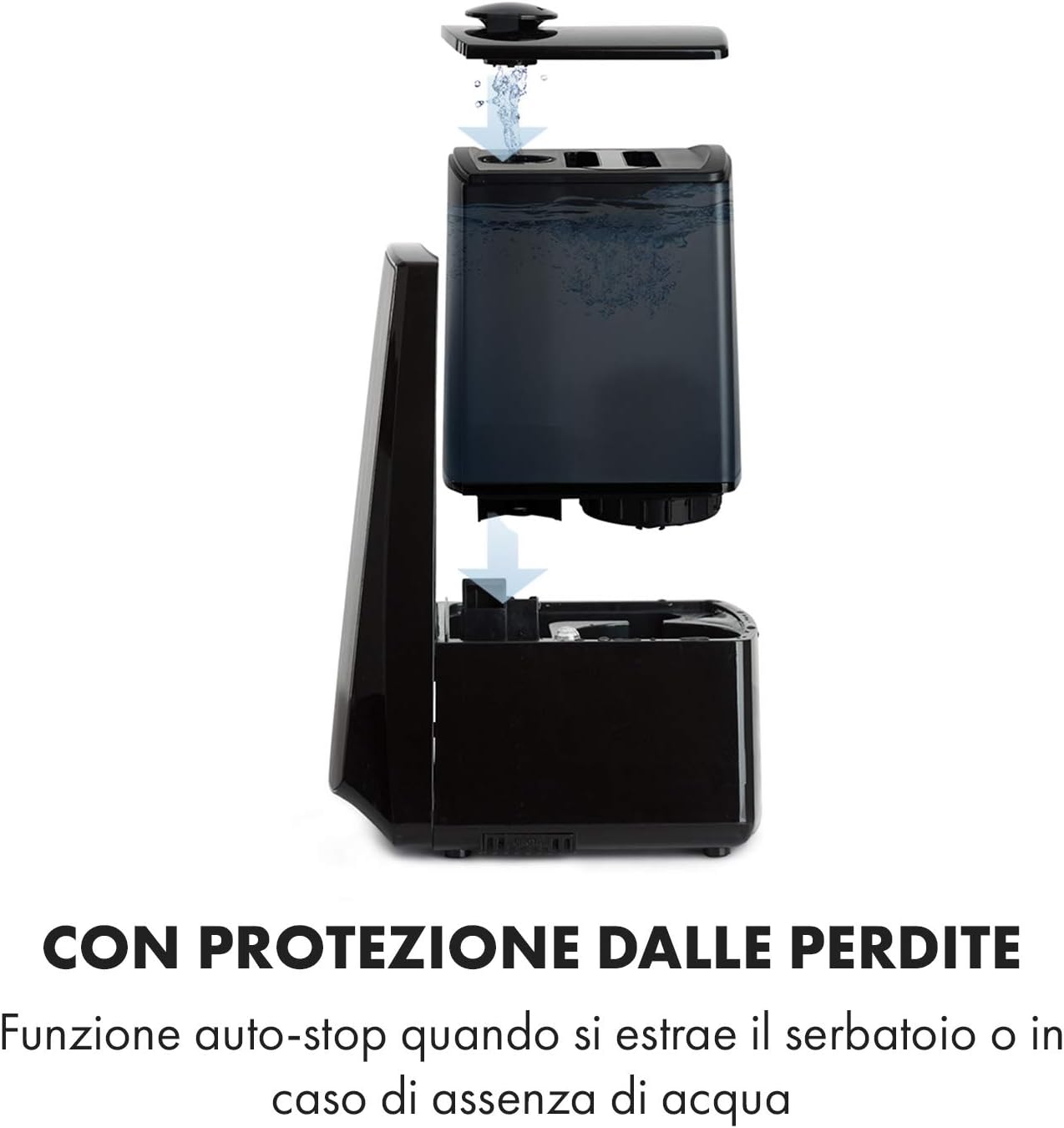
Image: Diagram illustrating the removal and refilling process of the water tank, highlighting the auto-stop feature when the tank is removed or empty.
5.4 Připojení napájení
Zapojte napájecí kabel do vhodné elektrické zásuvky (230 V).
6. Návod k obsluze
6.1 Ovládací panel Overview

Obrázek: Detailní záběr view of the humidifier's LED display and touch controls, showing a hand interacting with the buttons.
The LED display shows current humidity, temperature, and selected settings. The touch buttons allow control over various functions.
6.2 Zapnutí/vypnutí
Stiskněte tlačítko ON/OFF tlačítko na ovládacím panelu nebo dálkovém ovladači pro zapnutí nebo vypnutí jednotky.
6.3 Nastavení úrovně mlhy
The humidifier offers 7 levels of mist output. Press the MLHA button repeatedly to cycle through the mist intensity levels. The current level will be displayed on the screen.
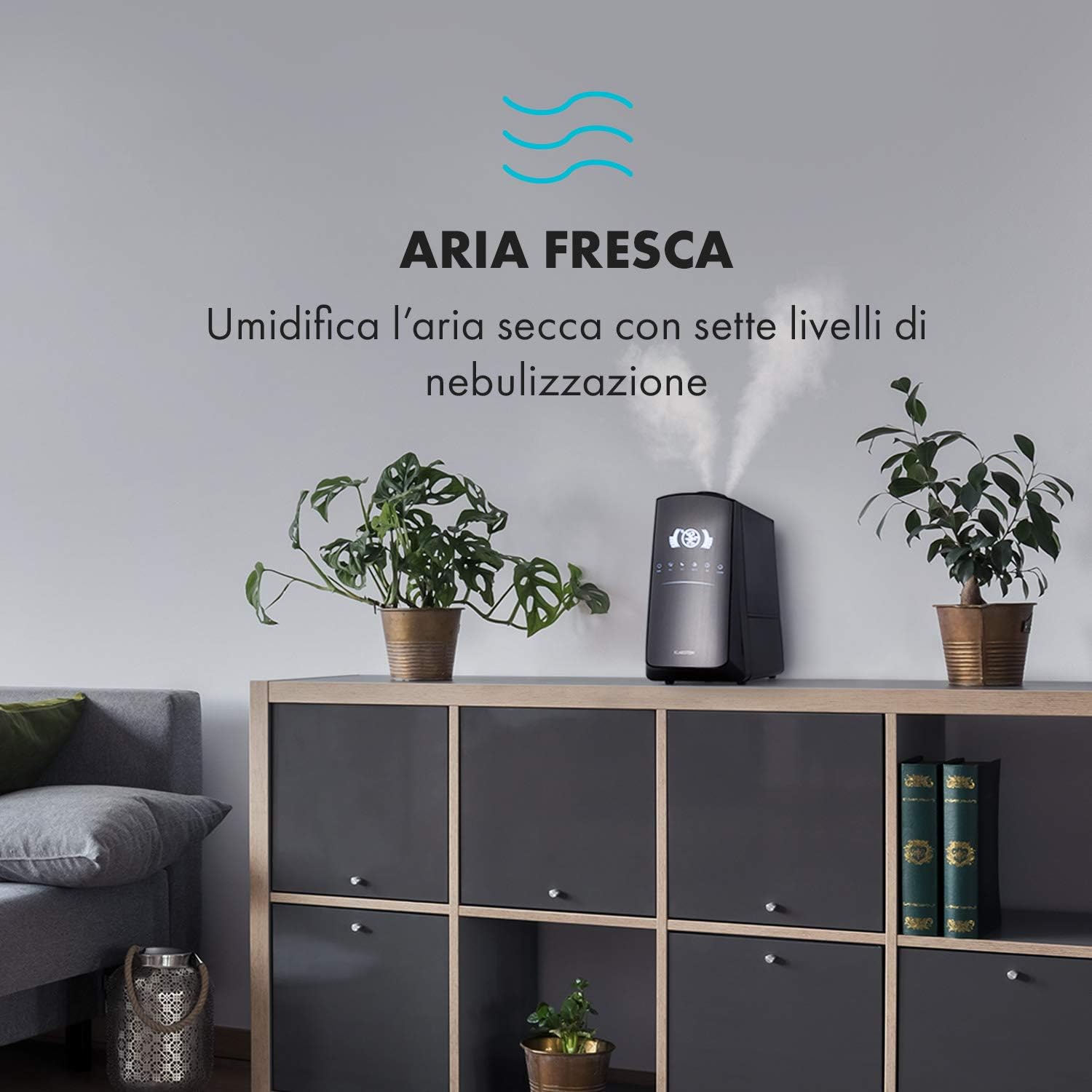
Image: The humidifier operating in a room, releasing mist to humidify the air.
6.4 Humidity Setting (Humidistat)
Stiskněte tlačítko VLHKOST button to set your desired humidity level (e.g., 40% to 80% RH). The unit will automatically maintain this level, turning on and off as needed.
6.5 Teplá/studená mlha
Stiskněte tlačítko TEPLO button to activate the warm mist function. Press again to switch back to cool mist. Warm mist can help raise room temperature slightly and is often preferred in colder climates.

Image: A close-up shot of the mist output, illustrating the option for either cool or warm mist.
6.6 Funkce časovače
Stiskněte tlačítko ČASOVAČ button to set an operating duration from 1 to 12 hours. The unit will automatically turn off after the set time.
6.7 Funkce ionizátoru
Stiskněte tlačítko ION button to activate the ionizer. This function releases negative ions to help purify the air by attracting dust and other particles.
Aroma difuzér 6.8
Pull out the aroma diffuser tray located at the bottom of the unit. Add a few drops of essential oil onto the sponge pad. Slide the tray back in. The mist will carry the aroma into the air.

Image: The integrated aroma diffuser tray, shown pulled out with an essential oil bottle and lemon slices nearby, indicating its use for adding scents.
6.9 Noční režim
Stiskněte tlačítko NOC button to dim the LED display and reduce operational noise for undisturbed sleep.

Image: The humidifier in a modern living space, illustrating its versatile functions like auto mode, heating, health, baby, night mode, and timer.
7. Ovládání aplikací
The KLARSTEIN VapoAir Opal Smart Humidifier can be controlled via a dedicated smartphone application.

Image: A person using a smartphone with the Klarstein app open, showing controls for the humidifier's settings and current humidity levels.
7.1 Stažení aplikace
Hledat the 'Klarstein App Experience' in your smartphone's app store (available for Android and iOS).
7.2 Připojení k Wi-Fi
- Ensure your humidifier is plugged in and turned on.
- Open the Klarstein App and follow the on-screen instructions to add a new device.
- The humidifier requires a Síť Wi-Fi 2.4 GHz for connection. It is not compatible with 5 GHz networks. Ensure your router is configured to support 2.4 GHz or that your phone is connected to the 2.4 GHz band during setup.
- Once connected, you can control all humidifier functions remotely via the app.

Image: A smartphone displaying the Klarstein app interface, indicating smart home control via WiFi for Android and iOS devices.
8. Údržba a čištění
Pravidelné čištění je nezbytné pro optimální výkon a hygienu.
8.1 Denní údržba
- Denně vyprázdněte a propláchněte nádržku na vodu.
- Wipe the inside of the water tank with a clean cloth.
8.2 Týdenní úklid
- Odpojte jednotku před čištěním.
- Vyjměte nádržku na vodu a vylijte veškerou zbývající vodu z nádržky i ze základní jednotky.
- Čištění vodní nádrže: Naplňte nádrž směsí vody a bílého octa (poměr 1:1). Nechte působit 30 minut a poté důkladně opláchněte.
- Čištění základní jednotky: Gently wipe the ultrasonic transducer (the small disc in the center of the base) with a soft brush or cloth to remove mineral deposits. Do not scrape or use abrasive cleaners. You can use a cotton swab dipped in vinegar for hard-to-reach areas.
- Tác s aroma difuzérem: Remove and clean the sponge pad with mild soap and water. Allow it to dry completely before reinserting.
- Wipe all external surfaces with a soft, damp tkanina.
8.3 Skladování
If the humidifier will not be used for an extended period, clean it thoroughly, ensure all parts are dry, and store it in its original packaging in a cool, dry place.
9. Řešení problémů
| Problém | Možná příčina | Řešení |
|---|---|---|
| Žádná mlha nebo nízký výstup mlhy |
|
|
| Jednotka se nezapne |
|
|
| Nepříjemný zápach |
|
|
| Bílý prach kolem jednotky | Hard water with high mineral content | Use distilled or demineralized water. Clean the unit regularly. |
| Problémy s připojením Wi-Fi |
|
|
10. Specifikace
| Funkce | Specifikace |
|---|---|
| Značka | KLARSTEIN |
| Číslo modelu | XJ3-VapoAirOpalSmart |
| Barva | Černý |
| Rozměry (D x Š x V) | 23 x 18 x 37 cm |
| Hmotnost | 2.5 kg |
| Moc | 110 wattů |
| svtage | 230 voltů |
| Kapacita vodní nádrže | 5 litrů |
| Provozní doba | Up to 2 hours (continuous, depending on mist level) |
| Speciální funkce | Remote Control, Timer, App Control, Ionizer, LED Display, 7 Mist Levels, Warm/Cool Mist, Aroma Diffuser |
| Typ pokoje | Obývací pokoj |
11. Záruka a podpora
KLARSTEIN products are covered by a manufacturer's warranty. For detailed warranty information, please refer to the warranty card included with your product or visit the official KLARSTEIN website. For technical support, spare parts, or service inquiries, please contact KLARSTEIN customer service through their official channels.
Uschovejte si prosím doklad o koupi pro uplatnění záruky.