1. Úvod
This instruction manual provides detailed guidance for the installation, operation, and maintenance of your Beghelli Dom-e Wi-Fi Full HD Pan/Tilt Surveillance Camera. Please read this manual thoroughly before using the product to ensure proper functionality and safety. Keep this manual for future reference.

Figure 1: Beghelli Dom-e Wi-Fi Full HD Pan/Tilt Surveillance Camera.
2. Konec produktuview
The Beghelli Dom-e Wi-Fi Camera is a versatile surveillance device designed for indoor use, offering Full HD 1080p resolution and comprehensive monitoring capabilities. It integrates seamlessly into your smart home system via the Dom-e Beghelli application.
Klíčové vlastnosti:
- Rozlišení Full HD 1080p: Poskytuje jasné a podrobné video footage.
- Funkce otáčení a naklápění: Motorized rotation of 355° horizontally and 85° vertically, controllable via the app.
- Noční vidění: Equipped with IR LEDs for clear visibility up to 10 meters in low-light conditions.
- Detekce pohybu: Sends real-time push notifications to your smartphone upon detecting movement, including specific person detection.
- Automatické sledování: The "Tracking" function enables the camera to automatically follow moving subjects.
- Obousměrný zvuk: Built-in microphone and speaker allow for hands-free communication.
- Flexibilní možnosti nahrávání: Record directly to your smartphone, to a MicroSD card (up to 128GB, not included), or via optional cloud storage.
- Wi-Fi připojení: Connects to your home Wi-Fi network (2.4 GHz).
- Šifrování dat: Ensures the security of your video data.
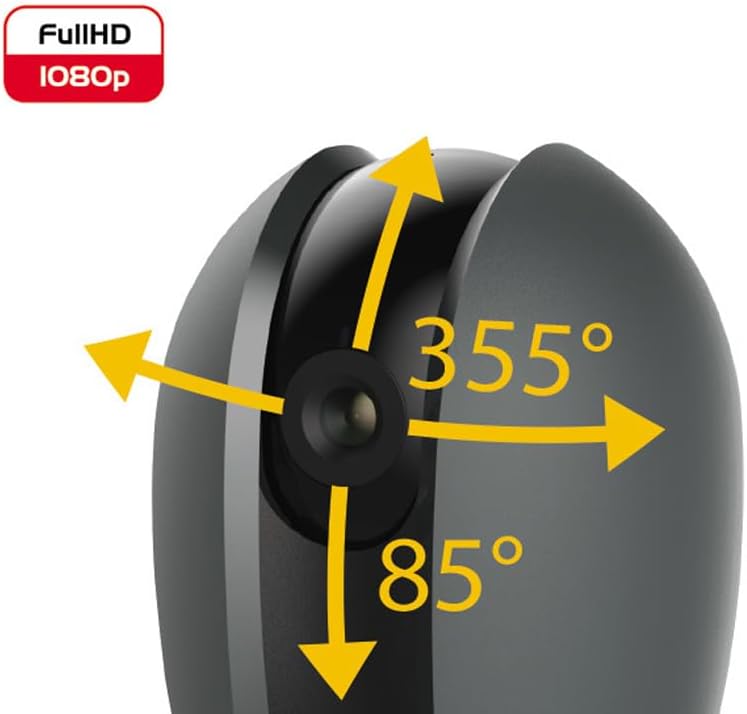
Figure 2: Camera's pan and tilt capabilities.
3. Obsah balení
Ověřte, zda jsou v balení přítomny všechny položky:
- Beghelli Dom-e Wi-Fi Full HD Pan/Tilt Surveillance Camera
- USB Power Adapter (230V – DC 5V/1A)
- Mounting accessories (if included, not explicitly listed but implied by "wall or ceiling installation")
- Návod k použití (tento dokument)

Figure 3: Product packaging for the Beghelli Dom-e Camera.
4. Nastavení
4.1 Napájení kamery
- Connect the provided USB power adapter to the camera's power input.
- Plug the adapter into a standard 230V power outlet. The camera will power on and initiate its startup sequence.
4.2 Instalace mobilní aplikace
The Beghelli Dom-e camera is controlled via the dedicated "Dom-e Beghelli" mobile application.
- Download the "Dom-e Beghelli" app from the Apple App Store (for iOS 8.0 or later) or Google Play Store (for Android 4.2 or later).
- Nainstalujte si aplikaci na smartphone nebo tablet.
- Zaregistrujte si nový účet nebo se přihlaste, pokud již nějaký máte.
4.3 Připojení k Wi-Fi a párování
Ensure your Wi-Fi network is 2.4 GHz (IEEE802.11 b/g/n). The camera does not support 5 GHz networks.
- Open the Dom-e Beghelli app and follow the on-screen instructions to add a new device.
- Select the Beghelli Dom-e camera from the list of available devices.
- Enter your Wi-Fi network name (SSID) and password when prompted.
- The app will guide you through the pairing process, which typically involves scanning a QR code displayed on your phone with the camera, or listening for an audio prompt.
- Once successfully paired, the camera's status indicator will change, and you will see the live feed in the app.

Figure 4: Simplified setup steps via the Dom-e Beghelli app.
4.4 Montáž fotoaparátu
The camera can be installed on a wall or ceiling. Choose a location that provides the desired viewúhlu a je v dosahu vaší sítě Wi-Fi a elektrické zásuvky.
- Mark the drilling points on the desired surface using the mounting template (if provided).
- V případě potřeby vyvrtejte otvory a vložte hmoždinky.
- Secure the mounting bracket (if provided) to the surface.
- Připevněte kameru k montážnímu držáku.
- Adjust the camera's angle manually or via the app after installation.
5. Návod k obsluze
5.1 Živě View a ovládání otáčení/náklonu
- Open the Dom-e Beghelli app and select your camera to view živé vysílání.
- Use the directional controls within the app to pan the camera horizontally (355°) and tilt it vertically (85°) to adjust the viewoblast.
5.2 Detekce pohybu a upozornění
- V aplikaci přejděte do nastavení kamery a povolte detekci pohybu.
- Configure sensitivity levels and detection zones as needed.
- Povolte push notifikace a dostávejte upozornění na svůj smartphone při detekci pohybu.
- The camera also features person detection for more accurate alerts.
5.3 Obousměrný zvuk
- Zatímco viewing the live feed, tap the microphone icon in the app to speak through the camera's speaker.
- The camera's built-in microphone will capture audio from the monitored area, allowing you to listen in.
5.4 Nahrávání a ukládání
- Nahrávání na kartu MicroSD: Insert a MicroSD card (up to 128GB, not included) into the camera's slot for continuous recording or event-triggered recording.
- Smartphone Recording: You can manually record video clips directly to your smartphone while viewživého vysílání.
- Cloudové úložiště: An optional cloud storage service is available via subscription for off-site video backup. Refer to the app for details.
- Plánované nahrávání: Set up specific times for the camera to record automatically through the app settings.
5.5 Noční vidění
The camera automatically switches to night vision mode in low-light conditions, utilizing its IR LEDs to provide clear black-and-white footage up to 10 meters.
6. Mobile Application (Dom-e Beghelli App)
The Dom-e Beghelli app is the central control interface for your camera and other compatible smart home devices. It allows for:
- Remote control of camera pan and tilt.
- Access to live video feed and recorded footage.
- Configuration of motion detection, notifications, and recording schedules.
- Obousměrná audio komunikace.
- Integration with other Dom-e smart home devices (e.g., alarms, smart plugs, lighting).
- Voice control compatibility with Google Assistant and Amazon Alexa (if associated with a compatible smartphone).

Figure 5: The Dom-e Beghelli app interface for camera control.
7. Specifikace
| Funkce | Specifikace |
|---|---|
| Číslo modelu | 60021 |
| Rezoluce | Full HD 1080p (2 Megapixels) |
| Senzor | CMOS 1/2.9" |
| Čočka | 3.6 mm / f2.0 / 105° |
| Rychlost závěrky | 1/25 - 1/100,000 sec |
| Rotace pánve | 355 ° vodorovně |
| Otáčení náklonu | 85 ° svisle |
| Rozsah nočního vidění | Up to 10 meters (IR LEDs) |
| Zvuk | Two-way, hands-free (in/out) |
| Skladování | MicroSD card up to 128GB (not included), Smartphone, Cloud (optional subscription) |
| Wi-Fi standard | IEEE802.11 b/g/n (2.4 GHz) |
| Frekvenční pásmo | 2.4 GHz - 2.4835 GHz |
| Vstup napájení | 230V – DC 5V/1A (USB adapter included) |
| Maximální spotřeba energie | 4.5 W |
| Rozměry (D x Š x V) | 63 x 58 x 96 mm (Product description) / 7 x 7 x 11 cm (Specifications) |
| Hmotnost | 330 gramů |
| Materiál | Plast |
| Kompatibilita operačního systému | Apple iPhone iOS 8.0 or later / Android 4.2 or later |
| Doporučené použití | Vnitřní bezpečnost |
Note: Some dimensions may vary slightly between product description and specifications list.
8. Údržba
8.1 Čištění
- Před čištěním se ujistěte, že je fotoaparát vypnutý a odpojený od sítě.
- K otření těla fotoaparátu použijte měkký, suchý hadřík.
- For the lens, use a specialized lens cleaning cloth to avoid scratches.
- Nepoužívejte tekuté čisticí prostředky, aerosoly ani abrazivní rozpouštědla.
8.2 Aktualizace softwaru
Periodically check the Dom-e Beghelli app for firmware updates. Keeping your camera's firmware updated ensures optimal performance, security, and access to new features.
9. Řešení problémů
| Problém | Řešení |
|---|---|
| Kamera se nezapíná | Ensure the USB power adapter is securely connected to the camera and a working power outlet. Verify the outlet has power. |
| Nelze se připojit k Wi-Fi |
|
| Žádný živý video přenos |
|
| Detekce pohybu nefunguje |
|
| Cannot reconnect after Wi-Fi password change | If your Wi-Fi password changes, you will likely need to reset the camera and re-pair it with the app using the new Wi-Fi credentials. Refer to the app for device reset instructions. |
10. Záruka a podpora
For warranty information and technical support, please refer to the documentation provided with your purchase or contact Beghelli customer service directly. You can typically find contact details on the Beghelli official website or within the Dom-e Beghelli application.
Manufacturer: Beghelli
Model: 60021


