1. Úvod
The GBF Wireless Video Door Phone & Doorbell WiFi Intercom System Kit provides a comprehensive solution for home security and access control. This advanced system allows you to remotely view and communicate with visitors at your door, whether you are at home or away, using your mobile iOS or Android device. It integrates a 1080P HD camera, a smart keypad for access control, and multiple WiFi IP indoor monitors for seamless communication and monitoring.
Key features include remote access via a dedicated mobile application, advanced motion detection with customizable areas and schedules, and the ability to generate temporary or permanent access PINs through the smart keypad. The system also supports integration with existing door locks and gates, offering versatile control options. With its durable construction and user-friendly interface, this intercom system enhances the security and convenience of your premises.
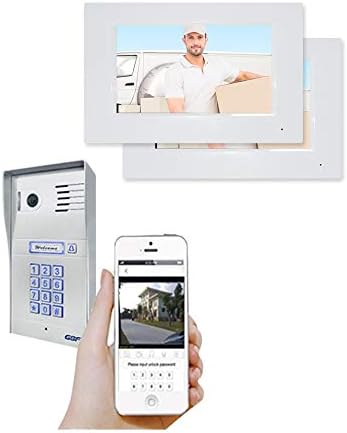
Obrázek 1.1: Přesview of the GBF Wireless Video Door Phone and Doorbell WiFi Intercom System Kit components.
2. Co je v krabici
Po otevření balení se prosím ujistěte, že jsou součástí balení všechny následující komponenty:
- One GBF outdoor station PL963PMPOE
- Three GBF WiFi IP indoor monitor MR920
3. Specifikace
The following table outlines the technical specifications of the GBF Wireless Video Door Phone & Doorbell WiFi Intercom System Kit:
| Funkce | Specifikace |
|---|---|
| Kompatibilní zařízení | Smartphone |
| Zdroj napájení | Battery Powered, AC/DC |
| Protokol připojení | ONVIF, Wi-Fi |
| Typ ovladače | Android (a iOS prostřednictvím aplikace) |
| Typ montáže | Držák na zeď |
| Rozlišení záznamu videa | 1080p, 720p |
| Barva | Stříbro |
| Počet položek | 4 (1 outdoor station, 3 indoor monitors) |
| Technologie bezdrátové komunikace | Wi-Fi |
| Viewúhel | 160 stupňů |
| Materiál | Hliník |
| svtage | 12 voltů |
| Rozměry položky (D x Š x V) | 8 x 5 x 2 palce |
| Hmotnost položky | 3 libry |
| Typ zaměření | Manuální ostření |
| Technologie nízkého osvětlení | Noční barva |
| Typ upozornění | Pouze pohyb |
| Specifické použití pro produkt | Dohled |
| Hodnocení mezinárodní ochrany | IP55 (odolný vůči povětrnostním vlivům) |
| Kontrolní metoda | App |
| Výrobce | GBF Electronics Inc. |
| Vnitřní/venkovní použití | Outdoor (Door Station), Indoor (Monitors) |
4. Průvodce nastavením
4.1. Komponenty přesview
Familiarize yourself with the main components of your GBF intercom system:

Figure 4.1: GBF Outdoor Door Station (PL963PMPOE)

Figure 4.2: GBF WiFi IP Indoor Monitor (MR920)
4.2. Fyzická instalace
The outdoor station and indoor monitors are designed for wall mounting. Choose a suitable location for the outdoor station near your entrance, ensuring clear visibility and protection from direct harsh weather, although it is IP55 rated. The indoor monitors should be placed in convenient locations within your home for easy access.
- Venkovní stanice: Mount the PL963PMPOE outdoor station securely to a wall at an appropriate height for visitors. Ensure the camera has an unobstructed view vstupního prostoru.
- Vnitřní monitory: Mount the MR920 indoor monitors to interior walls. Consider locations such as the kitchen, living room, or bedroom for optimal accessibility.

Obrázek 4.3: Přample of an indoor monitor mounted on a wall.
4.3. Napájení a síťové připojení
The outdoor station can be powered via the included 12VDC 1A adapter or through Power over Ethernet (PoE) if your network infrastructure supports it. The indoor monitors typically use a dedicated power adapter.
- Připojení napájení: Connect the appropriate power adapter to the outdoor station and each indoor monitor. Ensure a stable power supply.
- Internetové připojení: The system supports both WiFi and wired Ethernet connections. For the outdoor station, connect an Ethernet cable for a wired connection or configure WiFi settings during the app setup process. Indoor monitors connect via WiFi.

Figure 4.4: Power over Ethernet (PoE) connection diagram.
4.4. Nastavení mobilní aplikace
The mobile application is essential for remote access and advanced configuration.
- Stáhněte si aplikaci: Hledat the official GBF intercom app on your mobile device's app store (iOS or Android).
- Vytvoření účtu: Postupujte podle pokynů v aplikaci a vytvořte nový uživatelský účet.
- Párování zařízení: Add your GBF outdoor station and indoor monitors to the app by following the on-screen pairing guide. This typically involves scanning a QR code or entering a device ID.
- Počáteční konfigurace: Once paired, you can begin configuring basic settings such as Wi-Fi credentials for the outdoor station (if not using wired Ethernet) and setting up initial access codes.
5. Provoz
5.1. Vzdálený přístup a oznámení
The system allows you to answer and view callers at your door remotely via your mobile device.
- Push oznámení: When a visitor presses the doorbell button, your mobile device will receive a push notification.
- Vzdálený Viewing and Communication: Tap the notification to open the app and view the live video feed from the outdoor station. You can then engage in two-way audio communication with the visitor.

Figure 5.1: Indoor monitor displaying a visitor.
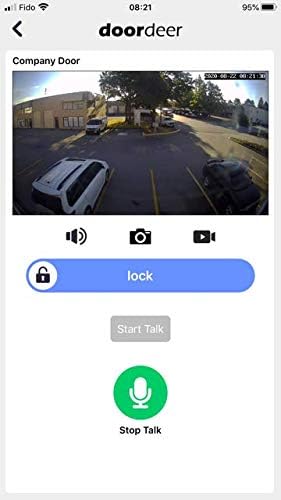
Figure 5.2: Mobile app interface for remote access.
5.2. Smart Keypad Functions
The integrated smart keypad allows for secure access control.
- Personal PIN Management: Through the mobile app, you can remotely change your personal keypad PIN.
- Temporary/Permanent PIN Codes: Generate temporary or permanent PIN codes to grant access to guests, delivery personnel, or service providers. These codes can be time-limited or permanent as needed.
- Timed Unlock: Configure your gate or door to open automatically during specified time periods and days of the week, all managed through the app.

Figure 5.3: Illuminated smart keypad for access.

Figure 5.4: App interface for managing temporary access codes.
5.3. Detekce pohybu
The advanced motion detection feature can be programmed from the app.
- Define Area of Interest: Specify particular zones within the camera's view kde by měla být aktivní detekce pohybu.
- Nastavení citlivosti: Upravte úroveň citlivosti, abyste minimalizovali falešné poplachy.
- Aktivní čas: Set specific times of day or days of the week when motion detection should be active.

Figure 5.5: App interface for motion detection settings.
5.4. Door/Gate Control
The system includes two integrated SPDT relays to trigger different remote door locks or gates.
- Aktivace: Relays can be activated directly from your mobile device or the Indoor Monitor (Lock 1 only with the monitor).
- Push-to-Exit Button: An optional push-to-exit button can also be integrated for convenient egress.

Figure 5.6: App interface for door/gate control.
5.5. Protokol událostí
The system maintains an event log that can be retrieved through the app.
- Accessing Logs: View a timeline and video clips of all events occurring at the outdoor station, including ring-ins, app unlocks, keypad unlocks, and motion detection events.
- Uchovávání protokolu: The event log typically retains data for one week.
6. Údržba
Regular maintenance ensures the longevity and optimal performance of your GBF intercom system.
- Čištění: Periodically wipe down the outdoor station and indoor monitors with a soft, damp hadříkem. Nepoužívejte abrazivní čisticí prostředky ani rozpouštědla, která by mohla poškodit povrch.
- Aktualizace softwaru: Ensure your mobile app and device firmware are kept up-to-date. Check the app store regularly for updates, which often include performance improvements and new features.
- Kontrola připojení: Periodically verify that all power and network connections are secure and free from damage.
7. Řešení problémů
This section addresses common issues you might encounter with your GBF intercom system.
| Problém | Možná příčina | Řešení |
|---|---|---|
| No video feed or communication | Power issue, network disconnection, app not connected. | Check power supply to outdoor station and monitors. Verify Wi-Fi or Ethernet connection. Ensure the app is connected to the device. Restart devices if necessary. |
| Špatná kvalita videa | Weak Wi-Fi signal, network congestion, camera lens obstruction. | Improve Wi-Fi signal strength near the outdoor station. Reduce network traffic. Clean the camera lens. |
| Klávesnice nereaguje | Power issue, keypad malfunction. | Ensure the outdoor station has power. If the issue persists, contact support. |
| Detekce pohybu nefunguje | Settings misconfigured, area not defined, sensitivity too low. | Review motion detection settings in the app. Ensure it's enabled, areas are defined, and sensitivity is appropriate. |
| Cannot unlock door/gate remotely | Relay wiring issue, app permission, lock mechanism problem. | Verify wiring to the lock/gate. Check app permissions for unlocking. Ensure the lock mechanism is functional. |
8. Záruka a podpora
8.1. Záruka výrobce
The GBF Wireless Video Door Phone & Doorbell WiFi Intercom System Kit comes with a 1letá záruka výrobceTato záruka se vztahuje na vady materiálu a zpracování při běžném používání. Uschovejte si prosím doklad o koupi pro případ uplatnění záruky.
8.2. Subscription Fees
Basic features of the system do not require subscription fees. However, certain optional features, such as extended Event Log retention, Temporary Visitor Codes, and Timed Unlock functionalities, may require subscription fees. Please refer to the mobile application or GBF's official website for details on subscription plans and pricing.
8.3. Zákaznická podpora
For technical assistance, troubleshooting beyond this manual, or warranty inquiries, please contact GBF customer support. Refer to the product packaging or the GBF official webstránky s nejaktuálnějšími kontaktními informacemi.
When contacting support, please have your product model number (GBF-PL963PM) and a detailed description of the issue ready to facilitate a quicker resolution.