1. Úvod
The Renkforce USB 3.2 Gen 1 4 Port Hard Drive Copy Station is a versatile device designed for efficient data management. It allows users to connect up to four 2.5-inch or 3.5-inch SATA SSDs or HDDs simultaneously for data transfer to a computer or for offline cloning of one source drive to up to three target drives.
This manual provides detailed instructions for setting up, operating, and maintaining your device, along with troubleshooting tips and technical specifications.
2. Vlastnosti produktu
- Four independent hard drive slots for 2.5-inch / 3.5-inch SSD or HDD hard drives.
- Supports USB 3.2 Gen 1 (USB 3.0) with data transfer rates up to 5Gbps.
- Offline clone function for direct drive-to-drive copying without a computer.
- Maximum hard drive capacity support of 40TB (4 x 10TB).
- LED status display for power, activity, and cloning progress.
- Audible sound signal upon completion of cloning process.
- Tool-free installation for quick and easy drive insertion and removal.
3. Obsah balení
Please check the package contents upon unpacking to ensure all items are present and undamaged:
- Renkforce USB 3.2 Gen 1 4 Port Hard Drive Copy Station
- Napájecí adaptér
- USB 3.0 Type-B to Type-A Cable
- Uživatelská příručka (tento dokument)

Image: Renkforce Hard Drive Copy Station with its power adapter and USB 3.0 cable.
4. Bezpečnostní pokyny
Please read the following safety instructions carefully before using the device to prevent injury or damage:
- Do not expose the device to moisture, rain, or extreme temperatures.
- Use only the provided power adapter. Using an incompatible adapter may damage the device.
- Neotevírejte zařízení casing. Veškerý servis svěřte kvalifikovanému personálu.
- Udržujte zařízení mimo dosah silných magnetických polí.
- Během provozu zajistěte dostatečné větrání v okolí zařízení.
- Handle hard drives with care to avoid damage.
5. Konec produktuview
Přední View

Obrázek: Přední strana view of the Renkforce Hard Drive Copy Station.
- Drive Bays (1-4): Slots for inserting 2.5-inch or 3.5-inch SATA hard drives. Bay 1 is designated as the 'Source' drive for cloning. Bays 2, 3, and 4 are 'Target' drives.
- Vypínač: Zapíná nebo vypíná zařízení.
- LED indikátory: Indicate power status, drive activity, and cloning progress for each bay.
Zadní View

Obrázek: Zadní view of the Renkforce Hard Drive Copy Station.
- Port USB 3.0: Connects the docking station to your computer.
- Clone/PC Switch: Selects between offline cloning mode and PC connection mode.
- Tlačítko Start: Initiates the cloning process when in Clone mode.
- Tlačítko reset: Resets the device or cancels the cloning process.
- Port DC IN: Připojuje napájecí adaptér.
6. Nastavení
Follow these steps to set up your Renkforce Hard Drive Copy Station:
- Připojte napájení: Plug the provided power adapter into the DC IN port on the back of the docking station, then plug the adapter into a power outlet.
- Připojení k počítači (volitelné): If you intend to use the device as an external hard drive dock, connect the USB 3.0 cable from the docking station's USB 3.0 port to an available USB port on your computer.
- Insert Hard Drives: Gently slide your 2.5-inch or 3.5-inch SATA SSDs or HDDs into the drive bays until they are securely seated. Ensure the SATA connectors align correctly.
- Zapnutí: Press the Power button on the front of the docking station. The power LED will illuminate.
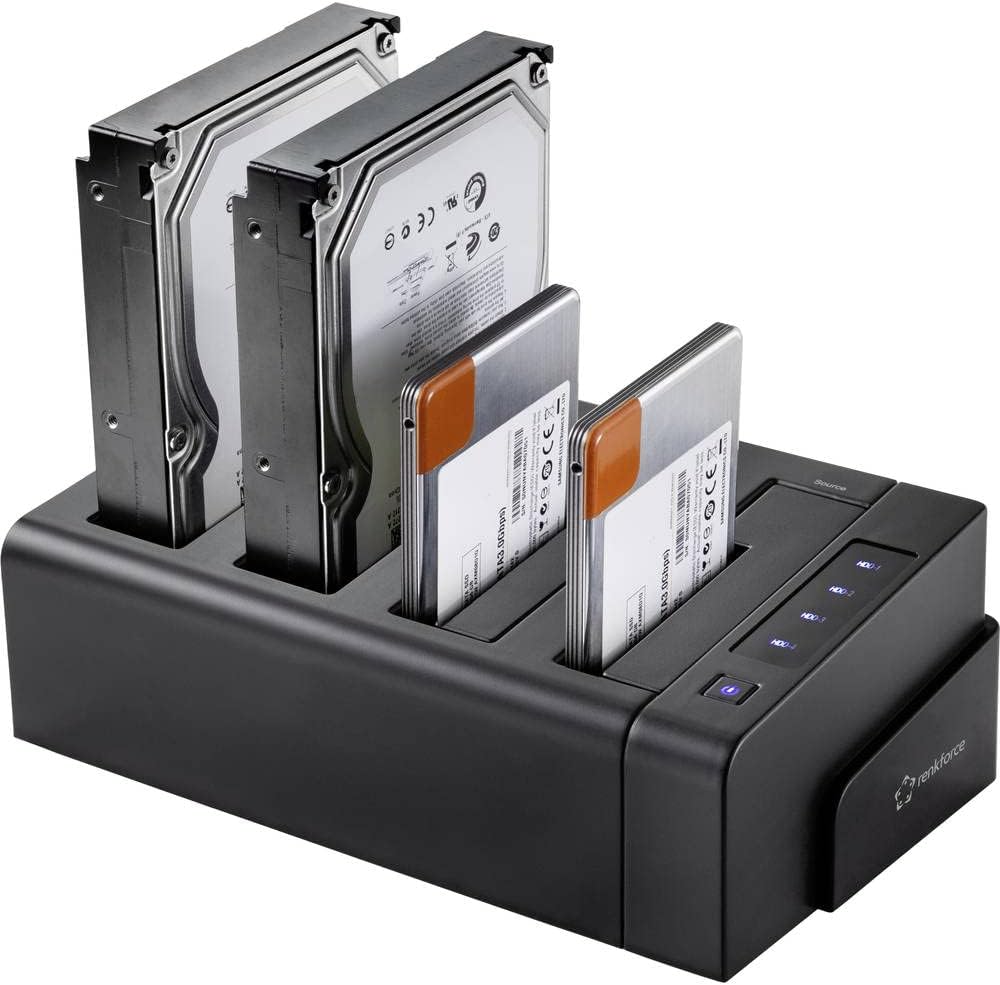
Image: Hard drives inserted into the docking station bays.
7. Návod k obsluze
7.1. Data Transfer Mode (PC Mode)
In this mode, the docking station functions as an external multi-bay enclosure for your computer.
- Zajistěte Clone/PC switch on the rear is set to PC.
- Connect the USB 3.0 cable from the docking station to your computer.
- Insert the desired hard drives into any of the four bays.
- Zapněte dokovací stanici.
- Your computer will detect the drives as external storage devices. You can now access, transfer, and manage files as you would with any external drive.
7.2. Offline Clone Function
The offline clone function allows you to duplicate a source hard drive to up to three target hard drives without needing a computer connection.
Důležité úvahy:
- Ensure the target drive(s) have a capacity equal to or greater than the source drive.
- All data on the target drive(s) will be erased during the cloning process. Back up any important data before proceeding.
- Do not disconnect drives or power during the cloning process.
Steps for Offline Cloning:
- Ensure the docking station is powered off and disconnected from any computer.
- Vložte Zdroj hard drive into Bay 1 (Source).
- Insert one, two, or three Cíl hard drives into Bays 2, 3, and/or 4 (Target).
- Zajistěte Clone/PC switch on the rear is set to Klonovat.
- Zapněte dokovací stanici.
- Stiskněte a podržte START button for approximately 3-5 seconds until the cloning progress LEDs begin to flash.
- The cloning process will begin. The progress LEDs (25%, 50%, 75%, 100%) will illuminate sequentially to indicate completion percentage.
- Once the cloning is complete, all progress LEDs will be solid, and the device will emit three short beeps.
- Power off the docking station before removing the drives.
8. Údržba
Správná údržba zajišťuje dlouhou životnost a optimální výkon vašeho zařízení:
- Čištění: K čištění vnější strany zařízení používejte měkký, suchý hadřík. Nepoužívejte tekuté čisticí prostředky ani aerosoly.
- Skladování: Pokud zařízení nepoužíváte, uložte jej na chladném a suchém místě mimo přímé sluneční světlo a extrémní teploty.
- Větrání: Ensure the ventilation slots are not blocked during operation to prevent overheating.
- Zacházení: Zabraňte pádu zařízení nebo jeho vystavení silným nárazům.
9. Řešení problémů
If you encounter issues with your Renkforce Hard Drive Copy Station, refer to the table below for common problems and solutions:
| Problém | Možná příčina | Řešení |
|---|---|---|
| Zařízení se nezapíná. | Napájecí adaptér není připojen nebo je vadný; problém se zásuvkou. | Check power adapter connection; try a different power outlet; ensure power button is pressed. |
| Drives not recognized by computer. | USB cable not connected properly; Clone/PC switch in wrong position; drive not initialized/formatted. | Ensure USB cable is securely connected; set switch to PC mode; check Disk Management (Windows) or Disk Utility (macOS) to initialize/format new drives. |
| Cloning fails or does not start. | Target drive capacity is smaller than source; drives not seated correctly; switch not in Clone mode. | Ensure target drive(s) are equal or larger than source; re-insert drives firmly; set switch to Clone mode; press START button firmly. |
| Pomalé rychlosti přenosu dat. | Connected to a USB 2.0 port; faulty USB cable. | Connect to a USB 3.0 (blue port) or higher port on your computer; try a different USB 3.0 cable. |
| Cloning process stops unexpectedly. | Power interruption; faulty drive; overheating. | Ensure stable power supply; check drives for errors; ensure adequate ventilation. |
10. Technické specifikace
| Funkce | Specifikace |
|---|---|
| Číslo modelu | RF-4528332 |
| Kompatibilní disky | 2.5" / 3.5" SATA I/II/III SSD & HDD |
| Počet zálivů | 4 (1 Source, 3 Target) |
| Max Capacity per Drive | Up to 10TB (40TB total) |
| Rozhraní | USB 3.2 Gen 1 (USB 3.0) |
| Rychlost přenosu dat | Až 5 Gbps |
| Klon offline | Yes (1-to-1, 1-to-2, 1-to-3) |
| Kompatibilní operační systémy | Windows, macOS, Linux |
| Napájení | Externí napájecí adaptér |
| Rozměry (D x Š x V) | Cca. 9.13 x 6.1 x 5.67 palce |
| Hmotnost | Approx. 2.17 pounds (983 grams) |
11. Záruka a podpora
Renkforce products are designed and manufactured to the highest quality standards. This product is covered by a limited warranty against defects in materials and workmanship. For specific warranty terms and conditions, please refer to the warranty card included with your purchase or visit the official Renkforce webmísto.
For technical support, troubleshooting assistance, or to inquire about replacement parts, please contact Renkforce customer service through the contact information provided on the official Renkforce website or your retailer's support channels. Please have your model number (RF-4528332) and purchase details ready when contacting support.


