1. Úvod
This manual provides detailed instructions for the assembly, operation, and maintenance of your FLEXISPOT 48x24 Inch Electric Height Adjustable Standing Desk. Please read this guide thoroughly before beginning assembly or operation to ensure proper use and longevity of your product. Keep this manual for future reference.
2. Bezpečnostní informace
- Always follow the assembly instructions carefully to ensure that the desk is stable and can support the recommended weight limit of 132 pounds.
- Use the desk in a residential setting with caution, taking care to avoid any potential hazards.
- Ujistěte se, že všechny kabely jsou správně vedeny a zajištěny, aby se zabránilo zamotání nebo poškození během nastavování výšky.
- Během práce držte děti a domácí zvířata v dostatečné vzdálenosti od stolu, abyste předešli zranění.
- Do not place hot items directly on the desktop surface without adequate protection.
3. Seznam dílů
Before assembly, verify that all components are present and undamaged. Refer to the included packaging for a complete list of parts. Key components include:
- Desktop (Maple Top)
- Desk Legs (White Frame)
- Nohy stolu
- Nosník
- Podpěrné desky
- Control Panel (2-button controller)
- Motor and Transmission Rod
- Napájecí kabel a adaptér
- Assembly Hardware (screws, Allen wrenches)
4. Nastavení a montáž
Assembly typically requires two people. While the desk includes necessary Allen wrenches, a Phillips screwdriver or drill is recommended for easier installation. Follow the numbered steps provided in the included instruction manual for detailed guidance.
Konec shromážděníview Video
Video: Overview of the Flexispot Standing Desk assembly process, demonstrating key steps for setting up the desk frame and attaching the desktop.
Klíčové kroky montáže:
- Instalace nohou stolu: Attach the desk feet to the bottom of the desk columns using the provided screws and Allen wrench.
- Install Transmission Rod: Connect the transmission rod between the motor and the opposite leg mechanism. Ensure it is securely tightened.
- Install Crossbeam: Secure the crossbeam between the two desk columns.
- Install Support Plates: Attach the support plates to the top of the desk columns.
- Connect Desktop: Carefully place the desktop onto the assembled frame. Secure it using the appropriate screws. Note: The desktop may not have pre-drilled holes for all components, requiring manual screwing.
- Install Adapter Holder, Desktop, and Keypad: Mount the adapter holder, secure the desktop, and install the keypad (control panel) underneath the desktop.
- Install Baffles and Adapter: Attach any baffles or cable management components as per instructions.
- Install and Sort out Power Cord: Connect the power cord to the control box and plug it into a power outlet. Organize cables using the provided cable management solutions.
Image: Illustration of installing the desk feet onto the leg columns.

Image: Illustration of installing the transmission rod between the motor and the desk leg.

Image: Illustration of attaching the crossbeam to the desk frame.

Image: Illustration of installing the support plates onto the desk frame.
5. Návod k obsluze
Your FLEXISPOT standing desk features an intuitive 2-button controller for height adjustment and memory presets.
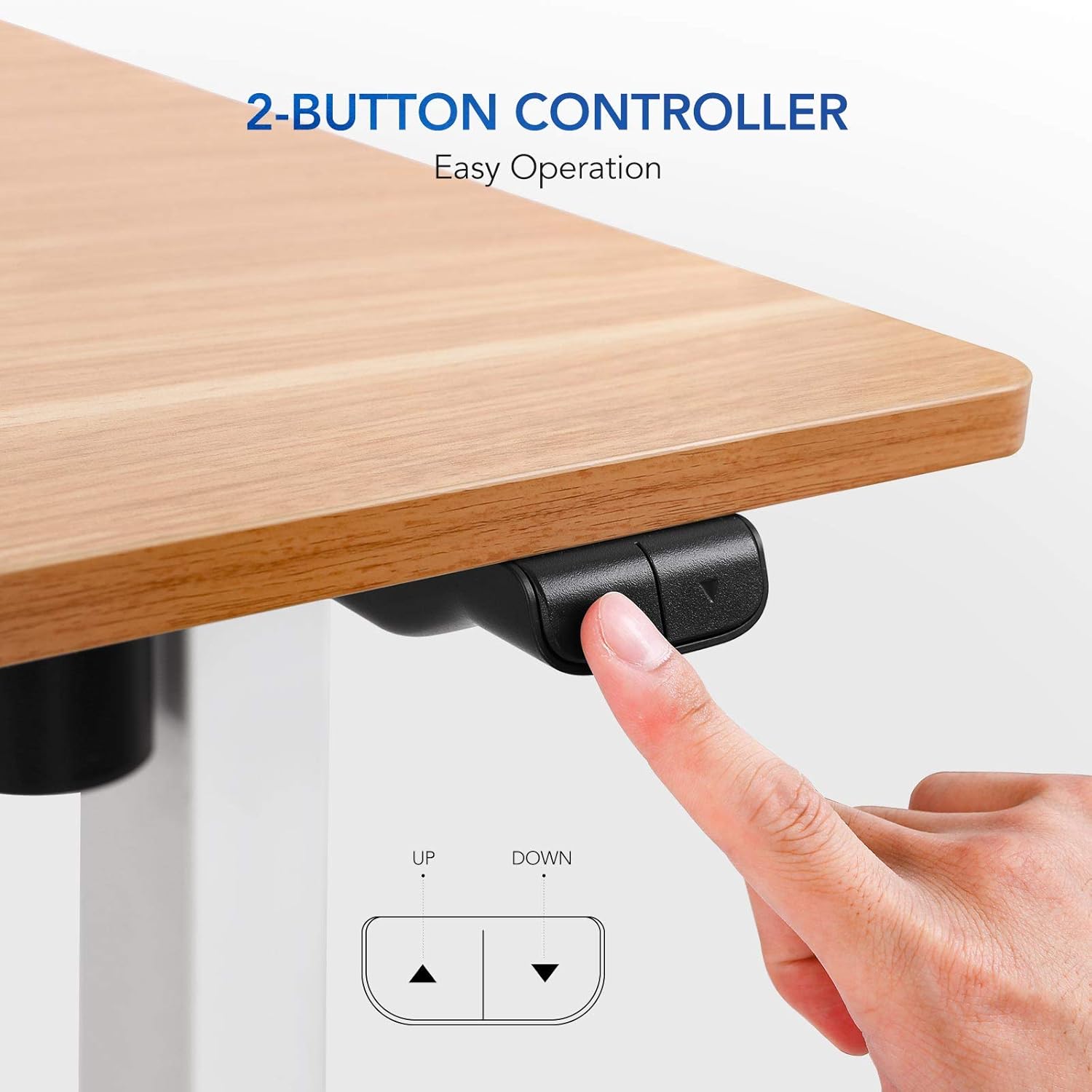
Image: Close-up of the 2-button controller with 'UP' and 'DOWN' arrows, and memory preset buttons (1, 2, 3, M, T).
Nastavení výšky:
- Ke zvýšení: Press and hold the 'UP' arrow button. The desk will smoothly ascend to your desired height.
- Snížit: Press and hold the 'DOWN' arrow button. The desk will smoothly descend to your desired height.
- The current height is displayed on the digital screen on the control panel.
Předvolby paměti:
Ovládací panel umožňuje uložit až tři preferovaná nastavení výšky pro rychlé úpravy.
- Uložení předvolby: Adjust the desk to your desired height using the UP/DOWN buttons. Press the 'M' button, then press one of the numbered preset buttons (1, 2, or 3) within 3 seconds. The height is now saved to that preset.
- To Use a Preset: Simply press the corresponding numbered preset button (1, 2, or 3). The desk will automatically move to the saved height.
6. Údržba
- Čištění: Otřete povrch pracovní plochy měkkým,amp hadříkem. Nepoužívejte agresivní chemikálie ani abrazivní čisticí prostředky, které by mohly poškodit povrchovou úpravu.
- Správa kabelů: Regularly check and adjust cable routing to ensure they do not snag or become damaged during height changes.
- Spojovací materiál: Pravidelně kontrolujte všechny šrouby a upevňovací prvky, zda jsou pevně utažené. V případě potřeby je dotáhněte.
- Hmotnostní limit: Nepřekračujte doporučenou maximální hmotnost 132 liber, abyste předešli poškození motoru a rámu.
7. Řešení problémů
If you encounter issues with your standing desk, refer to the following common solutions:
- Stůl se nehýbe:
- Zkontrolujte, zda je napájecí kabel bezpečně zapojený do stolu i do zásuvky.
- Unplug the desk for 10-15 seconds, then plug it back in to perform a soft reset.
- Nerovnoměrný pohyb/vibrování:
- Ensure the desk is on a level surface. Use the adjustable feet on the legs to stabilize if needed.
- Verify all assembly screws, especially those connecting the legs and crossbeam, are securely tightened.
- Hlučnost motoru: A slight motor hum is normal during operation. If the noise is excessive or unusual, ensure the desk is not overloaded and all components are properly assembled.
8. Specifikace
| Funkce | Detail |
|---|---|
| Značka | FLEXISPOT |
| Název modelu | Flexispot Standing Desk |
| Rozměry produktu | 24"H x 48"Š x 28.6"V |
| Barva | White Frame, Maple Top |
| Základní materiál | Steel, Reclaimed Wood |
| Typ horního materiálu | Umělé dřevo |
| Speciální funkce | Adjustable Height, Electric |
| Doporučená maximální hmotnost | 132 libry |
| Minimální výška | 28.6 palce |
| Maximální výška | 48.2 palce |
| Zvedací mechanismus | Standard Two Button Controller |
| Požadovaná montáž | Ano |
9. Quality and Environmental Testing
FLEXISPOT desks undergo rigorous testing to ensure stability, durability, and environmental safety.
Stability, Noise, and Durability Testing
Video: Demonstrates stability, noise levels, and durability testing of the Flexispot standing desk, highlighting its robust design and quiet operation.
Environmental Safety Testing
The desktop materials are tested for formaldehyde content and other hazardous substances. FLEXISPOT desks meet stringent environmental standards, with formaldehyde content significantly below international standards (e.g., 0.04 ppm vs. ASTM standard of ≤ 0.09 ppm).

Image: Graphic highlighting the environmental certifications and protective edge of the desktop.
10. Záruka a podpora
Záruka:
This product comes with a 3-year limited warranty. Please refer to the warranty card included with your product for specific terms and conditions.
Zákaznická podpora:
For any questions, troubleshooting assistance, or warranty claims, please contact FLEXISPOT customer support. Visit the official FLEXISPOT webstránky s kontaktními informacemi a dalšími zdroji.


