1. Úvod
The ProForm Carbon T7 Smart Treadmill is designed to provide an effective and engaging cardiovascular workout experience in your home. Featuring a 7-inch HD touchscreen and integration with iFIT, this treadmill offers a variety of interactive training options. This manual provides essential information for the safe assembly, operation, maintenance, and troubleshooting of your Carbon T7 treadmill.

This image shows the ProForm Carbon T7 Smart Treadmill from a front-side angle, highlighting its console with a 7-inch HD touchscreen, the running deck, and the sturdy frame.
2. Důležité bezpečnostní informace
Before operating the ProForm Carbon T7 Smart Treadmill, please read all instructions carefully. Keep this manual for future reference. Failure to follow these instructions could result in injury or damage to the product.
- Před zahájením jakéhokoli cvičebního programu se vždy poraďte s lékařem.
- Běžecký pás umístěte na rovný povrch s alespoň 2 metry (6.5 stop) volného prostoru za ním a 0.5 metru (1.6 stopy) po každé straně.
- Během provozu udržujte děti a domácí zvířata mimo běžecký pás.
- Nepoužívejte běžecký pás, pokud má poškozený napájecí kabel nebo zástrčku, nebo pokud nefunguje správně.
- Noste vhodné sportovní oblečení a sportovní obuv. Vyhněte se volnému oblečení, které by se mohlo zachytit o pohyblivé části.
- Always use the safety key. Attach the clip to your clothing before starting the treadmill.
- Nestupujte na běžecký pás ani z něj nesstupujte, pokud se pás pohybuje.
- Nepokoušejte se běžecký pás seřizovat ani opravovat sami. Kontaktujte kvalifikovaný servisní personál.
3. Montáž
The ProForm Carbon T7 Treadmill requires assembly. For detailed, step-by-step 3D instructions, download the free Bilt app on your smartphone or tablet. Ensure all parts are present before beginning assembly. It is recommended to have two people for assembly due to the weight and size of the components.
- Unpack all components and place them on a clear, flat surface.
- Follow the instructions provided in the Bilt app or the included assembly guide.
- Ensure all bolts, nuts, and screws are securely tightened before use.

The ProForm Carbon T7 Smart Treadmill is shown in its upright, folded configuration, illustrating its SpaceSaver design for compact storage when not in use.
4. Provoz
4.1 Začínáme
- Připojení napájení: Zapojte napájecí kabel do uzemněné zásuvky.
- Bezpečnostní klíč: Attach the safety key clip to your clothing and insert the safety key into the console. The treadmill will not operate without the safety key in place.
- Standing on the Treadmill: Stand on the foot rails, not the running belt, before starting your workout.
- Zahájení cvičení: Press the 'Start' button on the console. The belt will begin to move at a low speed.
4.2 Using the Console and 7" HD Touchscreen
The Carbon T7 features a 7-inch HD interactive touchscreen display that allows you to stream iFIT workouts directly. The console also includes physical buttons for quick adjustments.
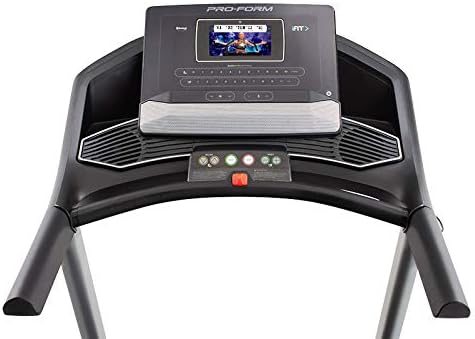
Detailní view of the treadmill's console, featuring the 7-inch HD touchscreen display, control buttons for speed and incline, and integrated speakers.
- Navigace na dotykové obrazovce: Use the touchscreen to browse iFIT workouts, adjust settings, and view workout metrics.
- QuickSpeed Controls: Use the 'Speed' buttons or quick-select buttons on the console to adjust the running belt speed from 0 to 10 MPH.
- Quick Incline Controls: Use the 'Incline' buttons or quick-select buttons to adjust the incline from 0% to 10%.
- Zastavení tréninku: Press the 'Stop' button to pause or end your workout. Remove the safety key to fully power off the treadmill.
4.3 Integrace iFITu
Your ProForm Carbon T7 Treadmill includes a 30-Day iFIT Family Membership. iFIT provides access to live workouts, studio classes, and global workouts led by expert personal trainers. With iFIT, your trainer can auto-adjust your treadmill's speed and incline for an optimized and immersive exercise experience.
- Activating iFIT: Follow the on-screen prompts on the 7-inch HD touchscreen to activate your iFIT membership.
- Výběr cvičení: Browse the iFIT library for a wide range of workouts, including running, walking, and cross-training.
- Trainer Control: During iFIT workouts, the treadmill's speed and incline may automatically adjust according to the trainer's program. You can override these adjustments manually if needed.

A woman is shown actively running on the ProForm Carbon T7 Smart Treadmill, demonstrating its use in a typical home environment. The treadmill's running deck and console are visible.
5. Údržba
Regular maintenance ensures the longevity and optimal performance of your ProForm Carbon T7 Treadmill.
- Čištění: Regularly wipe down the treadmill surfaces with a damp tkanina. Vyhněte se použití abrazivních čisticích prostředků nebo rozpouštědel.
- Čištění pásu: Periodically clean the running belt and the area beneath it to prevent debris buildup.
- Pásové mazání: The running belt is pre-lubricated. Refer to the full product manual for specific lubrication instructions and frequency, typically required after a certain number of hours of use.
- Seřízení a napnutí řemene: Check the running belt for proper alignment and tension. Adjust as needed according to the detailed instructions in the full product manual.
- Kontrola napájecího kabelu: Inspect the power cord for any damage. If damaged, discontinue use and contact customer support.
6. Řešení problémů
If you encounter issues with your ProForm Carbon T7 Treadmill, refer to the table below for common problems and solutions.
| Problém | Možná příčina | Řešení |
|---|---|---|
| Běžecký pás se nezapne. | Napájecí kabel není zapojen; jistič se vypnul; bezpečnostní klíč není zasunutý. | Ensure power cord is securely plugged in. Check household circuit breaker. Insert safety key fully into the console. |
| Běžecký pás se nepohybuje. | Safety key not inserted; 'Start' button not pressed; motor overload. | Insert safety key. Press 'Start'. If motor overload, reduce load and try again. |
| Řemen prokluzuje nebo váhá. | Napnutí řemene je příliš volné; řemen vyžaduje mazání. | Upravte napnutí řemene dle kompletního návodu k obsluze. V případě potřeby řemen namažte. |
| Displej konzole je prázdný nebo nereaguje. | Problém s napájením; softwarová závada. | Ensure power is connected. Try unplugging the treadmill for 60 seconds and plugging it back in. If issue persists, contact customer support. |
7. Specifikace
Key technical specifications for the ProForm Carbon T7 Smart Treadmill:
| Funkce | Detail |
|---|---|
| Číslo modelu | PFTL87720 |
| Rozměry produktu (D x Š x V) | 186.69 cm x 89.41 cm x 146.05 cm (73.5" x 35.2" x 57.5") |
| Hmotnost položky | 97.98 kg (216 lb) |
| Výkon motoru | 2.6 CHP (Continuous Horsepower) |
| Rozsah rychlosti | 0-10 MPH (0-16 KPH) |
| Sklon rozsahu | 0-10% Digital Quick Incline |
| Tread Belt Size | 20" x 55" (51 cm x 140 cm) |
| Zobrazit | 7" HD Interactive Touchscreen |
| Hmotnostní kapacita | 300 lb (136 kg) |
| Materiál rámu | Legovaná ocel |
| Zdroj napájení | Elektrický kabel |
| Speciální funkce | SpaceSaver Design, ISO Flex Deck Cushioning |
8. Záruka a zákaznická podpora
Your ProForm Carbon T7 Smart Treadmill is backed by a comprehensive warranty to ensure your peace of mind.
- Záruka na rám: 10 roky
- Záruka na díly a práci: 1 rok
For warranty claims, technical assistance, or to order replacement parts, please contact ProForm customer support. Refer to the contact information provided in your product packaging or on the official ProForm webmísto.