1. Úvod
The Zoom F2-BT Digital Multitrack Recorder is a compact and powerful field recorder designed for capturing high-quality audio. It features 32-bit float recording technology, eliminating the need for gain adjustments and preventing clipping. This model includes Bluetooth control for remote operation via a dedicated app, and comes with a lavalier microphone. It is ideal for content creators, videographers, and anyone needing reliable, high-fidelity audio recording in a portable package.
Key features include 32-bit/44.1kHz 48kHz Field Recording with LMF-2 Lavalier Microphone, Automatic Gain Adjustment, Bluetooth Control, Included Software, and Accessories.
2. Nastavení
2.1. Powering the Device (Batteries)
The F2-BT recorder operates on two AAA batteries. To install or replace batteries, locate the battery door on the device. Apply slight pressure to slide the door open, insert the batteries according to the polarity indicators, and then close the door securely.

Figure 1: Zoom F2-BT with battery compartment open.
2.2. Connecting the Lavalier Microphone
The included LMF-2 lavalier microphone connects to the input jack on the recorder. Ensure the connection is secure. The F2-BT features a locking connector for the input jack to prevent accidental disconnections during recording.

Figure 2: Zoom F2-BT with connected lavalier microphone.
2.3. Vložení karty MicroSD
The F2-BT records directly to a microSD card. Locate the microSD card slot, typically found on the side or back of the device, often behind the belt clip. Insert the card until it clicks into place. The device supports up to 512 GB of memory storage.

Obrázek 3: Zpět view of Zoom F2-BT showing microSD card slot.
3. Operating the F2-BT
3.1. Zapnutí/vypnutí
To power on the device, turn the power knob to the 'ON' position. To power off, turn the knob to the 'OFF' position. The 'HOLD' position prevents accidental button presses during recording.
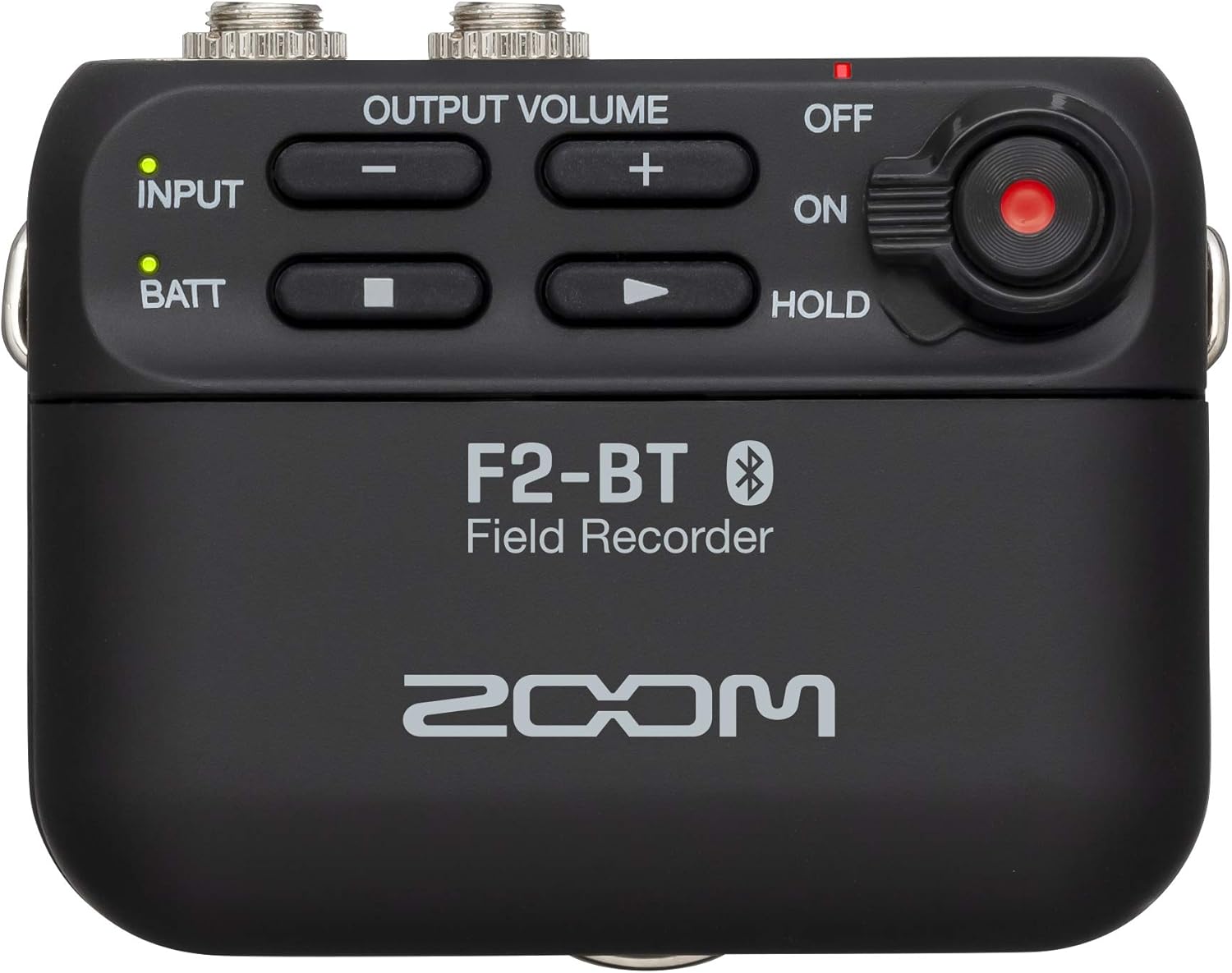
Figure 4: Zoom F2-BT top controls.
3.2. Nahrávání
The F2-BT features 32-bit float recording, which means you do not need to adjust input gain levels. Simply press the record button to begin capturing audio. The device automatically handles optimal levels, preventing clipping and ensuring high-quality sound even in dynamic environments.
3.3. Bluetooth Control via App
The F2-BT can be controlled remotely using a dedicated Bluetooth app on your smartphone or laptop. To connect, turn the F2-BT to the 'ON' position, which will automatically put it into pairing mode. Open the app on your device, select the F2-BT when it appears, and it will connect. Through the app, you can start and stop recordings, monitor input and output volumes, view recording format (48kHz/32bit Float), enable/disable the low-cut filter, and format the SD card.

Figure 5: Zoom F2-BT controlled via smartphone app.
4. Údržba
To ensure the longevity and optimal performance of your Zoom F2-BT, follow these maintenance guidelines:
- Čištění: K čištění vnější strany zařízení používejte měkký, suchý hadřík. Nepoužívejte tekuté čisticí prostředky ani rozpouštědla, protože by mohly poškodit povrchovou úpravu nebo vnitřní součásti.
- Skladování: Store the recorder in a cool, dry place away from direct sunlight, extreme temperatures, and high humidity. Remove batteries if the device will not be used for an extended period to prevent leakage.
- Zacházení: While the device is built with durable plastic, avoid dropping it or subjecting it to strong impacts. Handle all ports and connectors with care to prevent bending or damage.
5. Řešení problémů
If you encounter issues with your Zoom F2-BT, consider the following common troubleshooting steps:
- Zařízení se nezapíná: Ensure batteries are correctly inserted and have sufficient charge. Try replacing with new AAA batteries.
- Problémy s nahráváním: Verify that a microSD card is properly inserted and has available storage space. Check the microphone connection.
- Problémy s připojením Bluetooth: Ensure Bluetooth is enabled on your controlling device (smartphone/laptop). Restart both the F2-BT and your controlling device. Make sure the F2-BT is in pairing mode.
- Obavy o kvalitu zvuku: While 32-bit float minimizes clipping, ensure the lavalier microphone is positioned correctly and not obstructed.
- Chyby SD karty: Try formatting the SD card via the Bluetooth app or on a computer. If errors persist, the card may be faulty and require replacement.
For more detailed troubleshooting or persistent issues, refer to the full user manual or contact Zoom customer support.
6. Specifikace
- Hmotnost položky:
- 8 unce (0.5 libry)
- Rozměry produktu:
- 0.72 x 2.26 x 0.72 palce
- Číslo modelu položky:
- F2-BT
- Baterie:
- Jsou vyžadovány 2 baterie AAA.
- První dostupné datum:
- 10. listopadu 2020
- Kompatibilní zařízení:
- Chytrý telefon, notebook
- Hardwarové rozhraní:
- Bluetooth
- Typ baterie:
- Alkalický
- Formát média:
- WAV
- Velikost stálého displeje:
- 2.4 palce
- Tvarový faktor mikrofonu:
- Vestavěný
- Jack pro sluchátka:
- No headphones jack
- Úložná kapacita paměti:
- 512 GB
7. Záruka a podpora
For detailed warranty information, please refer to the official documentation included with your product. Extended protection plans are available for purchase, including 3-Year and 4-Year options, as well as a monthly Complete Protect plan.
For comprehensive user instructions and further assistance, please consult the official Uživatelská příručka (PDF). Můžete také navštívit Zoom Store on Amazon pro informace o produktech a zdroje podpory.


