1. Úvod
This manual provides detailed instructions for the installation, operation, and maintenance of the SINOTIMER TM919A-2 LCD Digital Programmable Timer Switch. This device is designed for automatic control of electrical appliances based on programmed time schedules, offering daily and weekly programming options.
2. Vlastnosti produktu
- Weekly 7-day programmable digital time switch.
- Více svtage options (5V, 12V, 24V, 110V, 220V, 85-265V). This specific model is 220V.
- Detachable battery design for backup power.
- 35mm DIN rail mounting for easy installation.
- LCD display for clear time and program viewIng.
- 16 ON/OFF programs per day or week.
- Funkce ručního přepínání.
- High capacity 16A switching contact.
3. Bezpečnostní informace
VAROVÁNÍ: Nebezpečí úrazu elektrickým proudem. Instalaci by měl provádět pouze kvalifikovaný elektrikář nebo kompetentní osoba.
- Před instalací nebo údržbou se ujistěte, že je odpojeno napájení.
- Do not exceed the maximum load capacity of 16A.
- Ověřte správný objemtage supply for the specific model (220V for TM919A-2).
- Chraňte zařízení před vlhkostí a extrémními teplotami.
4. Konec produktuview a Komponenty
The SINOTIMER TM919A-2 features an LCD display, control buttons, and wiring terminals for power input and load control.

Obrázek 4.1: Přední view of the SINOTIMER TM919A-2 Digital Timer Switch, showing the LCD display, control buttons (P, D+, H+, M+, RESET, MANUAL), and wiring terminals.

Obrázek 4.2: The timer switch with its transparent protective cover opened, revealing the control buttons for programming and manual operation.
Ovládací tlačítka:
- P (Program): Vstupuje do režimu nastavení programu.
- D+ (Day): Adjusts day of the week or program day.
- H+ (Hour): Adjusts hour or program hour.
- M+ (Minute): Adjusts minute or program minute.
- RESETOVÁNÍ: Obnoví všechna nastavení na výchozí tovární hodnoty.
- MANUÁL: Toggles output ON/AUTO/OFF.
5. Nastavení a instalace
5.1 Schéma zapojení
Refer to the wiring diagram on the side of the device and the illustration below for correct connection. Ensure all connections are secure.

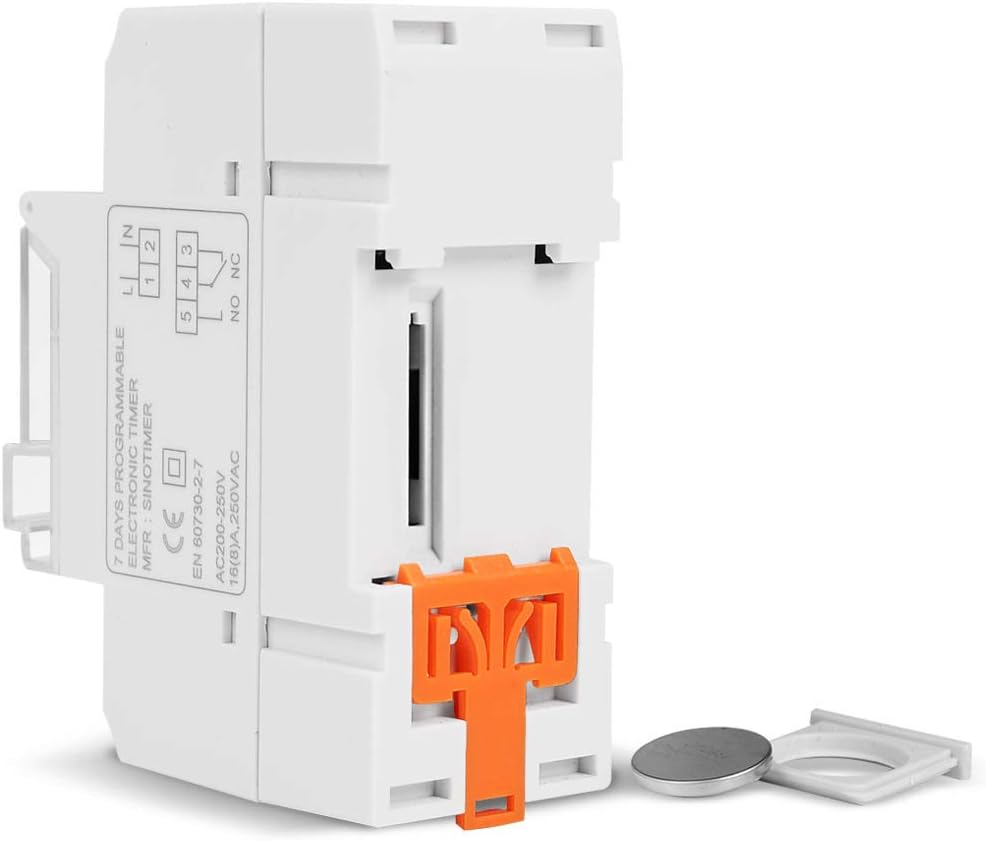
Obrázek 5.1: Strana view of the timer switch displaying the wiring diagram. Terminals 1 and 2 are for power input (L and N). Terminals 3, 4, and 5 are for the relay output (Common, Normally Open, Normally Closed).
- Terminály 1 a 2 (L, N): Connect to the main power supply (220V AC for this model).
- Terminal 3 (NO - Normally Open): Connects to the load when the timer is ON.
- Terminal 4 (COM - Common): Connects to one side of the load and the power supply.
- Terminal 5 (NC - Normally Closed): Connects to the load when the timer is OFF (less common for typical applications).
5.2 Initial Power-up and Reset
Upon first power-up or after a long period without power, the LCD display may be blank. The internal battery provides backup for settings. If the display is unresponsive or shows garbled characters, press the RESETOVAT button using a pointed object (e.g., a pen tip). This will clear all settings and restore the timer to its default state.
5.3 Nastavení aktuálního času a dne
- Stiskněte tlačítko P button once. The display will show the current time setting.
- Stiskněte D+ pro nastavení aktuálního dne v týdnu.
- Stiskněte H+ pro nastavení aktuální hodiny.
- Stiskněte M+ pro nastavení aktuální minuty.
- Stiskněte tlačítko P button again to exit time setting mode and return to normal operation.
6. Návod k obsluze
6.1 Programování cyklů ZAP/VYP
Časovač podporuje až 16 programů ZAP/VYP. Každý program se skládá z času ZAP a času VYP.
- Stiskněte tlačítko P button repeatedly until "1 ON" appears on the display. This is the first ON program.
- Stiskněte D+ vyberte den(y) pro tento program. Možnosti zahrnují jednotlivé dny, dny v týdnu, víkendy nebo všech 7 dní.
- Stiskněte H+ to set the desired hour for the "ON" event.
- Stiskněte M+ to set the desired minute for the "ON" event.
- Stiskněte P again. "1 OFF" will appear. This is the first OFF program.
- Repeat steps 2-4 to set the day(s), hour, and minute for the "OFF" event.
- Pokračujte v stisknutí P to cycle through "2 ON", "2 OFF", up to "16 ON", "16 OFF". If you do not need all 16 programs, simply press P until the display returns to the current time.
- To save and exit programming mode, press the P button until the current time is displayed.
6.2 Ruční ovládání
The MANUÁL button allows you to override the programmed settings temporarily or permanently.
- Stiskněte MANUÁL once: Toggles between ON/AUTO/OFF modes.
- NA: Výstup je trvale zapnutý a ignoruje programy.
- OFF: Výstup je trvale VYPNUTÝ a ignoruje programy.
- AUTO: The timer operates according to the programmed ON/OFF cycles. This is the standard operating mode.
7. Údržba
7.1 Výměna baterie
The timer includes a detachable CR2032 lithium battery to maintain time and program settings during power outages. If the display becomes dim or resets frequently, the battery may need replacement.

Obrázek 7.1: The timer switch shown with its battery compartment open and a CR2032 lithium battery, indicating the detachable battery design.
- Disconnect power to the timer before attempting battery replacement.
- Locate the battery compartment, typically on the side or back of the unit.
- Opatrně vyjměte starou baterii CR2032.
- Vložte novou baterii CR2032 a dbejte na správnou polaritu (+ stranou nahoru).
- Zavřete přihrádku na baterie.
- Reconnect power and reset the current time and day if necessary.
8. Řešení problémů
- Displej je prázdný:
- Check power supply connections (Terminals 1 & 2).
- Ensure the internal battery is charged or replaced if old.
- Stiskněte tlačítko RESETOVAT tlačítko.
- Programy neběží:
- Ujistěte se, že je časovač zapnutý AUTO mode (check the display for "AUTO"). Press MANUÁL do cyklických režimů.
- Verify that the current time and day are set correctly.
- Check that the ON/OFF programs are correctly entered and enabled for the desired days.
- Confirm wiring to the load (Terminals 3, 4, 5) is correct.
- Časovač se neočekávaně resetuje:
- The internal battery may be low or depleted. Replace the CR2032 battery.
- Ensure stable power supply to the unit.
9. Specifikace
| Funkce | Specifikace |
|---|---|
| Model | TM919A-2 |
| Napájení | 220V AC (as per model) |
| Spotřeba energie | 4.5 VA (MAX) |
| Teplotní rozsah | -20°C až +50°C |
| Zobrazit | LCD |
| Switching Contact | 1 přepínač |
| Programy | 16 ON/OFF per day or week |
| Hystereze | 2 sec/day (at 25°C) |
| Kapacita | 16A |
| Rozsah časovače | 1 minuta až 168 hodin |
| Minimální interval | 1 minuta |
| Black-out Memory | 60 days (with internal battery) |
| Hmotnost položky | 0.15 kg (5.3 unce) |
| Montáž | 35 mm DIN lišta |
| Velikost obrazovky | 1.2 palce |
Obrázek 9.1: Dimensional drawing of the SINOTIMER TM919A-2, showing measurements in centimeters for height, width, and depth.
10. Záruka a podpora
Specific warranty information for the SINOTIMER TM919A-2 is not provided in the product details. For warranty claims or technical support, please contact your retailer or the manufacturer directly. Keep your purchase receipt as proof of purchase.


