Zavedení
This manual provides detailed instructions for the safe and efficient operation of your Phomemo D30 Bluetooth Thermal Label Maker. Please read this manual thoroughly before use and retain it for future reference.

Image: The Phomemo D30 Label Maker in white, accompanied by three rolls of adhesive labels and its product packaging.
Nastavení
1. Vybalení a počáteční nabití
Carefully remove all components from the packaging. The package includes: 1 Phomemo D30 Label Maker, 1 USB Charging Cable, 1 User Guide, and 3 Rolls of Label Paper.
Before first use, fully charge the device using the provided USB cable. The indicator light will show charging status.
2. Instalace role s etiketami
- Open the label compartment by gently pressing the side release button or lifting the top cover, depending on the model design.
- Insert the label roll with the printing surface facing upwards, ensuring it is properly seated in the designated slot.
- Pull a small portion of the label tape out, extending it past the cutting edge.
- Pevně zavřete přihrádku na štítky.

Obrázek: Detailní záběr view of the Phomemo D30 Label Maker with its top cover open, illustrating the correct placement of a label roll for thermal printing.
Návod k obsluze
1. Instalace a připojení aplikace
Download the "Print Master" app from your device's app store (compatible with iOS and Android smartphones and tablets).
Turn on the Phomemo D30 Label Maker by pressing the power button. The indicator light will illuminate.
Open the "Print Master" app on your mobile device. Ensure Bluetooth is enabled on your device. The app will automatically detect and connect to the label maker.
2. Vytváření a tisk štítků
Within the "Print Master" app, you can choose from various modes and templates:
- Zjednodušený režim: For simple and quick label design.
- Režim vytváření: Offers extensive functions and materials for customized labels.
- One-Click Print: Pre-designed common words and phrases for instant printing.
To create a custom label:
- Select "Creation Mode" or "New Label" in the app.
- Choose your desired label size and type (e.g., white, continuous, cut label). The app supports label widths of 12-15mm.
- Utilize the app's features to add text, icons (over 1000 available), borders (over 60 available), images, barcodes, QR codes, and more. You can also import data from Excel or use OCR functionality.
- Adjust font styles, sizes, alignment, and character pitch as needed.
- Předview návrh vaší etikety.
- Tap "Print Label" or "Print Now" to send the design to the label maker.
- Once printed, gently tear off the label along the cutting edge.
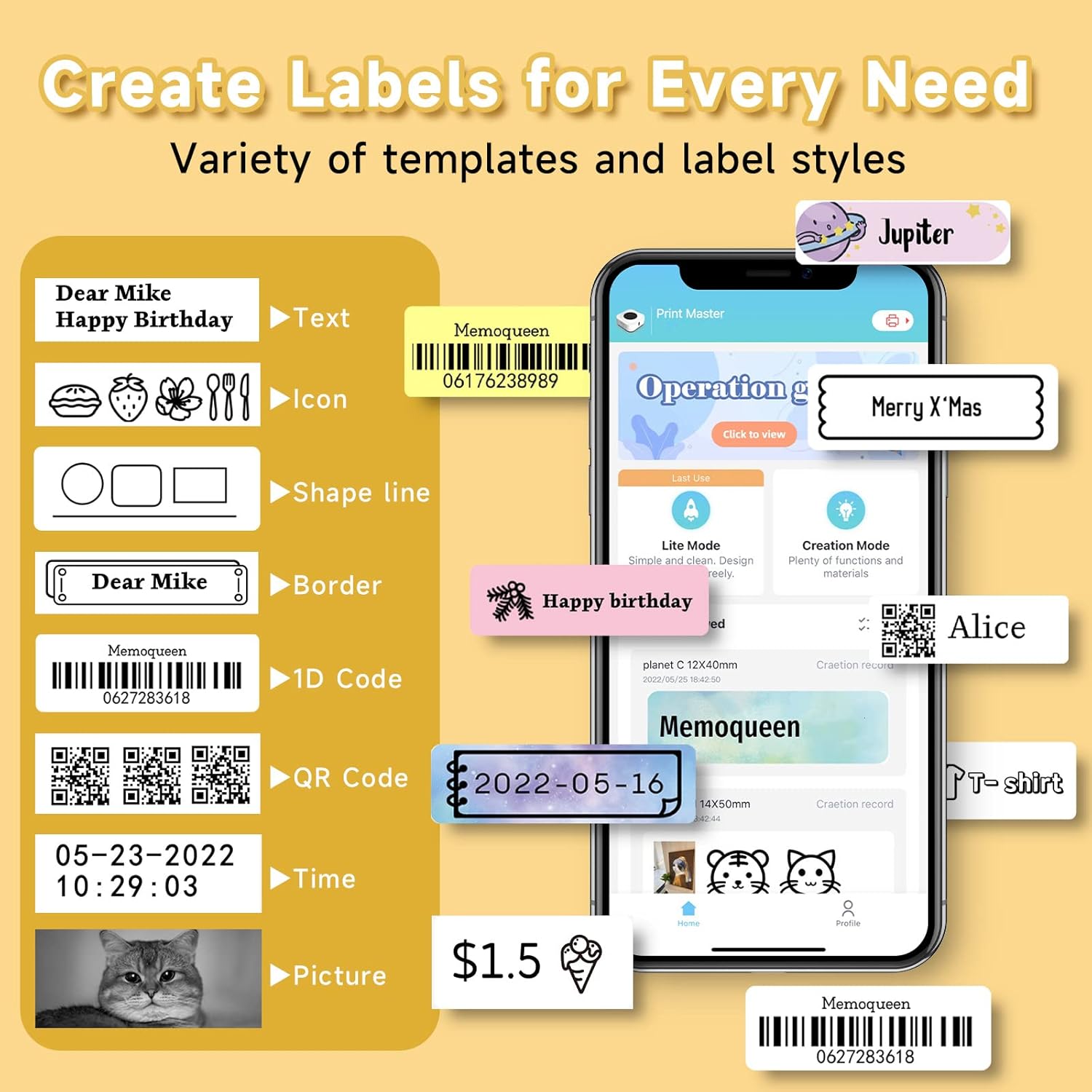
Image: Screenshot of the "Print Master" app, displaying diverse label creation tools and templates for text, icons, barcodes, and QR codes.

Image: The Phomemo D30 Label Maker shown alongside a smartphone running the "Print Master" app, highlighting Bluetooth connectivity and customization options like fonts and templates.
Video ukázky
Video: A quick look at the Phomemo D30 Label Maker, demonstrating its compact size and ease of use with the companion app.
Video: A thorough review demonstrating the Phomemo D30 app's features and the quality of the printed labels.
Údržba
To ensure optimal performance and longevity of your Phomemo D30 Label Maker, follow these maintenance guidelines:
- Čištění: Regularly clean the print head with a soft, lint-free cloth. Do not use harsh chemicals or abrasive materials.
- Skladování: Štítkovač skladujte na chladném a suchém místě mimo dosah přímého slunečního záření a extrémních teplot.
- Péče o baterie: Zařízení pravidelně nabíjejte, i když jej nepoužíváte často, abyste zachovali jeho stav. Nevystavujte baterii úplnému vybíjení po delší dobu.
- Role štítků: Use only genuine Phomemo D30 thermal label rolls to prevent damage to the print head and ensure print quality.

Image: A visual comparison emphasizing the compact and portable design of the Phomemo D30 Label Maker.
Odstraňování problémů
| Problém | Možná příčina | Řešení |
|---|---|---|
| Zařízení se nezapíná | Slabá baterie; Tlačítko napájení nebylo správně stisknuto | Charge the device fully; Press and hold the power button for a few seconds. |
| Nelze se připojit přes Bluetooth | Bluetooth off on device; App not detecting printer; Printer too far from device | Ensure Bluetooth is enabled; Restart app and printer; Move devices closer (within 10m). |
| Poor print quality / Faint print | Print head dirty; Incorrect label roll insertion; Low battery | Clean the print head; Re-insert label roll correctly; Charge the device. |
| Štítky se nepodávají správně | Label roll jammed or improperly installed | Open compartment, clear any jams, and re-install label roll. |
Specifikace
| Funkce | Detail |
|---|---|
| Název modelu | D30 |
| Technologie tisku | Termální (bezinkoustový) |
| Konektivita | Bluetooth |
| Rozlišení tisku | 203 x 203 DPI |
| Maximální rychlost tisku (černobíle) | 1 ppm (60 mm/s) |
| Kompatibilní šířka štítku | 12–15 mm (0.47–0.59 palců) |
| Kompatibilní zařízení | Chytré telefony, tablety (iOS a Android) |
| Kapacita baterie | 1000 XNUMX mAh |
| Rozměry produktu | 1.14"H x 2.95"Š x 5.17"V (cca 2.9 x 7.5 x 13.1 cm) |
| Hmotnost položky | 5.5 unce (cca 156 gramů) |
| Zahrnuté komponenty | Label Maker, USB Cable, User Guide, 3 Roll Paper |
Záruka a podpora
The Phomemo D30 Label Maker comes with a limited warranty. For specific warranty terms and conditions, please refer to the warranty card included in your product packaging or visit the official Phomemo webmísto.
For technical support, troubleshooting assistance, or to purchase additional label rolls, please contact Phomemo customer service through their official channels.


