1. Úvod
Děkuji za nákupasing the ELEPHAS Mini Portable Projector. This compact and versatile projector is designed to provide an immersive viewing experience for movies, videos, and games, whether at home or on the go. Its small size and multiple connectivity options make it an ideal entertainment solution for various environments. Please read this manual thoroughly before using the projector to ensure proper operation and to maximize its lifespan.
Co je v krabici:
- ELEPHAS Mini Portable Projector
- HDMI kabel
- AV kabel
- Dálkové ovládání
- Napájecí kabel
- Uživatelská příručka (tento dokument)
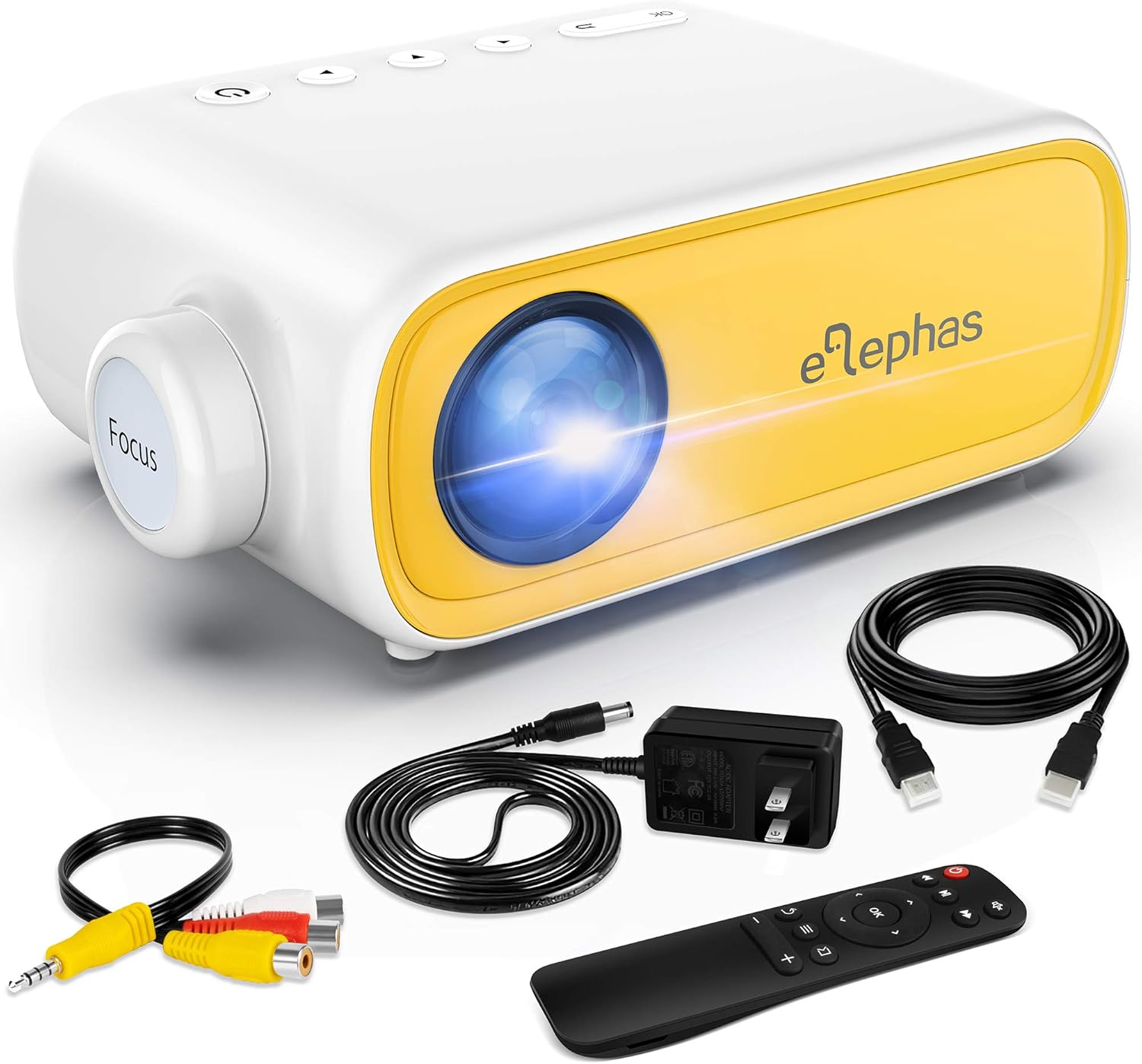
Figure 1.1: ELEPHAS Mini Portable Projector with its accessories including HDMI cable, AV cable, remote control, and power cord.
2. Bezpečnostní informace
To ensure safe and optimal operation of your projector, please observe the following safety precautions:
- Napájení: Use only the original power adapter and cord provided with the projector. Ensure the power outlet matches the voltage požadavky.
- Větrání: Do not block the ventilation openings on the projector. Ensure adequate airflow around the device to prevent overheating.
- Umístění: Place the projector on a stable, flat surface. Avoid placing it in direct sunlight, near heat sources, or in environments with high humidity or dust.
- Bezpečnost očí: Nedívejte se přímo do objektivu projektoru, když je zapnutýamp is on. The bright light can cause eye strain or damage.
- Čištění: Před čištěním odpojte napájení. K čištění vnějšího povrchu použijte měkký, suchý hadřík. Na objektiv použijte speciální hadřík na čištění objektivů.
- Děti: Keep the projector and its accessories out of reach of small children. Adult supervision is recommended when children are using the device.
- Demontáž: Nepokoušejte se projektor rozebírat ani opravovat sami. Veškerý servis svěřte kvalifikovanému personálu.
3. Konec produktuview a Komponenty
Familiarize yourself with the various parts and interfaces of your ELEPHAS Mini Portable Projector.

Obrázek 3.1: Zadní a boční strana view of the projector highlighting its input/output ports.
Klíčové komponenty:
- Čočka: Promítá obraz na plátno.
- Zaostřovací kroužek: Upravuje jasnost promítaného obrazu.
- Port DC-IN: Pro připojení napájecího adaptéru.
- AV port: For connecting devices using the included AV cable.
- Port HDMI: For connecting devices with HDMI output (e.g., laptops, game consoles, TV boxes).
- USB port: Pro připojení USB disků pro přehrávání médií files.
- Audio výstup (3.5mm): Pro připojení externích reproduktorů nebo sluchátek.
- Slot pro kartu Micro SD/TF: Pro přehrávání médií filepřímo z karty Micro SD.
- Vestavěný reproduktor: Poskytuje zvukový výstup.
- Ovládací tlačítka: Power, navigation, and input selection buttons on top of the projector.
- Senzor dálkového ovládání: Přijímá signály z dálkového ovladače.
4. Nastavení
4.1 Připojení napájení:
- Připojte napájecí kabel k napájecímu adaptéru.
- Plug the power adapter into the DC-IN port on the projector.
- Zapojte druhý konec napájecího kabelu do elektrické zásuvky.
4.2 Placement and Projection Distance:
Place the projector on a stable surface. The optimal projection distance ranges from 0.8 to 2 meters (approximately 31 to 79 inches) for a screen size of 24 to 60 inches. Adjust the distance to achieve your desired screen size.

Figure 4.1: Recommended projection distances and screen sizes.
4.3 Focus Adjustment:
After powering on the projector, rotate the focus ring on the front of the projector until the image appears clear and sharp on the projection surface.
5. Návod k obsluze
5.1 Zapnutí/vypnutí:
- Zapnutí: Stiskněte tlačítko napájení na projektoru nebo na dálkovém ovladači. Kontrolka se rozsvítí.
- Vypnutí: Znovu stiskněte tlačítko napájení. Projektor se vypne.
5.2 Input Source Selection:
After connecting your device, press the "Source" button on the projector or remote control to select the correct input source (e.g., HDMI, AV, USB, Micro SD).
5.3 Ovládání hlasitosti:
Use the volume buttons on the remote control to adjust the audio output level. You can also connect external speakers or headphones to the 3.5mm audio out port for enhanced sound.
6. Konektivita
6.1 Connecting to Laptops/PCs/Game Consoles (HDMI):
- Connect one end of the HDMI cable to the HDMI port on your device.
- Připojte druhý konec kabelu HDMI k portu HDMI na projektoru.
- Select "HDMI" as the input source on the projector.
6.2 Connecting to USB Drives/Micro SD Cards:
- Insert your USB drive into the USB port or your Micro SD card into the TF card slot.
- Select "USB" or "Micro SD" as the input source.
- Procházejte média files using the remote control and select the desired content to play.
6.3 Connecting to Smartphones/Tablets:
To connect your smartphone or tablet, you will need an appropriate adapter (not included):
- For iOS devices (iPhone/iPad): A Lightning to HDMI adapter is required.
- For Android devices: A Micro USB to HDMI or Type-C to HDMI adapter is required.
- For wireless connection: A Wi-Fi network adapter (dongle) is needed.
Once connected via the adapter, select "HDMI" as the input source.

Figure 6.1: Smartphone connectivity options using HDMI adapters (adapters not included).
6.4 Streaming Services Note:
Due to HDCP copyright restrictions, this mini projector does not directly support streaming from apps like Netflix, Amazon Prime Video, or Hulu when connected via smartphone mirroring. To watch content from these services, you can use an external streaming device such as an Amazon Fire Stick or Roku Stick, connected to the projector's HDMI port.
7. Údržba
- Čištění objektivu: Gently wipe the projector lens with a soft, lint-free cloth specifically designed for optical lenses. Do not use abrasive cleaners or harsh chemicals.
- Čištění exteriéru: K čištění vnější strany projektoru použijte měkký, suchý hadřík. V případě odolných skvrn použijte lehceamp Lze použít hadřík a poté otřít do sucha.
- Větrání: Regularly check that the ventilation openings are free from dust and debris to ensure proper heat dissipation.
- Skladování: Pokud projektor delší dobu nepoužíváte, skladujte jej na chladném a suchém místě mimo dosah přímého slunečního záření a extrémních teplot. Doporučuje se skladovat v originálním obalu.
8. Řešení problémů
| Problém | Možná příčina | Řešení |
|---|---|---|
| Žádná síla | Napájecí kabel není připojen; problém se zásuvkou. | Ujistěte se, že je napájecí kabel bezpečně připojen. Zkuste jinou zásuvku. |
| Žádný obrázek | Incorrect input source selected; device not connected properly. | Select the correct input source (HDMI, AV, USB). Check all cable connections. |
| Rozmazaný obrázek | Focus not adjusted; projection distance incorrect. | Rotate the focus ring until the image is clear. Adjust the projector's distance from the screen. |
| Žádný zvuk | Volume too low; external speakers not connected; audio format not supported. | Increase volume. Ensure external speakers are connected correctly or disconnect them to use built-in speaker. Check audio format compatibility. |
| Dálkové ovládání nefunguje | Batteries low/dead; sensor blocked. | Replace batteries. Ensure no obstructions between remote and projector sensor. |
9. Specifikace
| Funkce | Detail |
|---|---|
| Číslo modelu | JingHuier |
| Značka | ELEPHAS |
| Rozměry produktu | 5 x 3.6 x 2.16 palce |
| Hmotnost položky | 10.4 unce |
| Rozlišení displeje | 1920 x 1080 (podporováno) |
| Technologie připojení | HDMI, USB, AV, 3.5mm Audio, Micro SD/TF |
| Speciální funkce | Vestavěný reproduktor, přenosný |
| Výrobce | ELEPHAS |
| První dostupný termín | 28. října 2020 |

Figure 9.1: The compact dimensions of the projector, emphasizing its portability.
10. Záruka a podpora
ELEPHAS products are manufactured to the highest quality standards. For information regarding warranty coverage, please refer to the warranty card included with your product or visit the official ELEPHAS webmísto.
If you encounter any issues or have questions about your ELEPHAS Mini Portable Projector, please contact our customer support team. Provide your model number (JingHuier) and a detailed description of the issue for prompt assistance.
Pro další pomoc můžete navštívit ELEPHAS Store on Amazon.


