Zavedení
This manual provides comprehensive instructions for the setup, operation, and maintenance of your Keychron K4 RGB Hot Swappable Mechanical Keyboard. Designed for productivity and a tactile typing experience, the K4 features a 96% layout with 100 keys, offering both Bluetooth wireless and USB wired connectivity. It is compatible with both Mac and Windows operating systems.
Obsah balení
- Keychron K4 Mechanical Keyboard
- Kabel USB typu C
- Stahovač klíčů
- Stahovák spínačů
- Extra Keycaps for Windows and Mac operating systems
- Uživatelská příručka (tento dokument)
Nastavení
1. Počáteční nabíjení
Before first use, connect the keyboard to a USB power source using the provided USB Type-C cable. The keyboard features a 4000 mAh battery, providing up to 240 hours of usage with the backlight disabled.
2. Režimy připojení
The Keychron K4 supports both Bluetooth wireless and USB wired connections.

Image: The Keychron K4 keyboard is designed for broad compatibility, supporting both Mac and Windows operating systems, and connecting seamlessly with various devices including desktops, laptops, and smartphones/tablets.
2.1. Připojení Bluetooth
- Ensure the keyboard's mode switch (located on the side) is set to "BT" (Bluetooth).
- Stiskněte a podržte Fn + 1 (nebo Fn + 2 or Fn + 3) key combination for 4 seconds until the '1' (or '2' or '3') key flashes rapidly. This indicates the keyboard is in pairing mode.
- On your device (computer, smartphone, tablet), enable Bluetooth and search for "Keychron K4".
- Select "Keychron K4" from the list of available devices to complete the pairing process. The corresponding number key will stop flashing and remain solid when connected.
- The keyboard can connect with up to 3 devices and switch between them easily using Fn + 1, Fn + 2nebo Fn + 3.
2.2. Kabelové připojení USB
- Ensure the keyboard's mode switch is set to "Cable".
- Connect the USB Type-C cable from the keyboard to your computer's USB port.
- Klávesnice bude automaticky rozpoznána a připravena k použití.
3. Přepínač operačního systému
The Keychron K4 has a dedicated switch for Mac and Windows layouts. Locate the OS switch on the side of the keyboard and set it to your desired operating system for optimal key mapping.

Image: The Keychron K4 keyboard seamlessly integrates with Apple devices, as shown here next to an iMac and Magic Mouse, highlighting its Mac compatibility.
Návod k obsluze
1. Klíčové funkce a rozvržení
The K4 features a 96% layout with 100 keys, including a number pad. It provides all necessary Mac function keys and is fully compatible with Windows. Extra keycaps for both operating systems are included for customization.

Obrázek: Komplexní view of the Keychron K4 keyboard, highlighting its compact 96% layout which includes a full numeric keypad, and its vibrant RGB backlighting.
2. Ovládání podsvícení
The K4 features enchanting RGB backlighting with over 15 types of flashing light modes. All backlight controls are managed directly from the keyboard without the need for software.
- Fn + Light Bulb Key (F5): Cycle through different RGB lighting effects.
- Fn + šipka doleva: Snížení jasu podsvícení.
- Fn + šipka vpravo: Zvýšení jasu podsvícení.
- Fn + šipka nahoru: Increase backlight speed/effect.
- Fn + šipka dolů: Decrease backlight speed/effect.

Image: A detailed shot of the Keychron K4's RGB backlighting, showcasing the vibrant and customizable illumination beneath the keycaps.
3. N-Key Rollover (NKRO)
The K4 supports N-key rollover (NKRO) in wired mode, allowing all keys to be registered simultaneously. In wireless mode, it supports 6-key rollover (6KRO).
Údržba
1. Čištění klávesnice
To clean your keyboard, first disconnect it from all power sources. Use a soft, lint-free cloth slightly dampened with water or a mild cleaning solution. Avoid spraying liquids directly onto the keyboard. For cleaning between keycaps, use compressed air or a small brush.
2. Přepínače vyměnitelné za provozu
The K4 hot-swappable version allows you to personalize your typing experience by changing switches without soldering. This feature enables easy replacement of switches if they become faulty or if you wish to try different switch types (e.g., Gateron G Pro Brown, Red, Blue).
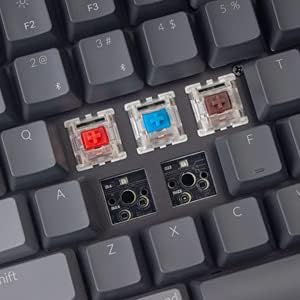
Image: This image demonstrates the hot-swappable capability of the Keychron K4, showing various Gateron switches detached from the keyboard's PCB, allowing for easy customization or replacement.
2.1. Replacing Switches
- Pomocí dodaného stahováku na klávesy jemně vyjměte požadovanou klávesu.
- Use the provided switch puller to carefully grip the switch from its top and bottom clips. Pull straight up to remove the switch from the PCB.
- Zarovnejte piny nového spínače s otvory na desce plošných spojů. Ujistěte se, že piny jsou rovné.
- Gently push the new switch into place until it clicks securely. Do not force it.
- Vyměňte krytku kláves.
3. Keycap Replacement
Keycaps can be removed and replaced using the keycap puller. This is useful for cleaning or for installing custom keycap sets. Ensure proper alignment when replacing keycaps.
Odstraňování problémů
- Klávesnice se nepřipojuje přes Bluetooth:
- Ensure the keyboard's mode switch is set to "BT".
- Verify the keyboard is in pairing mode (Fn + 1/2/3 key flashing).
- Check your device's Bluetooth settings and ensure Bluetooth is enabled.
- Try forgetting the device on your computer/phone and re-pairing.
- Ujistěte se, že je klávesnice dostatečně nabitá.
- Bluetooth connection lag or disconnection:
- Přesuňte klávesnici blíže k zařízení, abyste snížili rušení.
- Ujistěte se, že žádné jiné silné bezdrátové signály neruší.
- Zkontrolujte stav baterie; slabá baterie může ovlivnit výkon bezdrátového připojení.
- Consider using the wired USB connection for critical tasks or gaming if wireless performance is inconsistent.
- Podsvícení nefunguje nebo se zaseklo:
- Ensure the backlight is not turned off (Fn + Light Bulb key).
- Adjust brightness using Fn + Left/Right Arrow keys.
- A full charge might resolve minor power-related issues.
- Klávesy nereagují:
- If using wireless, check battery and connection.
- If using wired, ensure the USB cable is securely connected.
- For specific keys, consider the hot-swappable feature: remove the keycap and switch, inspect the switch pins for bending, straighten if necessary, and reinsert. If the switch is faulty, replace it.
- Keyboard not recognized by computer:
- Zkuste jiný port USB nebo kabel.
- Ensure the OS switch on the keyboard matches your computer's operating system.
- Restartujte počítač.
Specifikace
| Funkce | Detail |
|---|---|
| Značka | Keychron |
| Číslo modelu | Keychron K4J3 |
| Rozložení | 96 % (100 kláves) |
| Konektivita | Bluetooth 5.1 (up to 3 devices) & USB Type-C Wired |
| Spínače | Gateron G Pro Brown (Hot-Swappable) |
| Podsvícení | RGB (15+ types of flashing light mode) |
| Kapacita baterie | 4000 XNUMX mAh |
| Životnost baterie | Up to 240 hours (backlight disabled) |
| N-Key Rollover (NKRO) | Wired Mode: NKRO; Wireless Mode: 6KRO |
| Kompatibilita operačního systému | macOS, Windows |
| Rozměry (DxŠxV) | 14.8 x 5.08 x 1.5 palce |
| Hmotnost položky | 2.05 libry |
Záruka a podpora
Keychron products are designed for durability and performance. For specific warranty terms and conditions, please refer to the warranty information provided with your purchase or visit the official Keychron website. For technical support, troubleshooting assistance, or inquiries regarding your Keychron K4 keyboard, please contact Keychron customer service directly.
Oficiální Keychron Webmísto: www.keychron.com


