1. Konec produktuview
The KW-Trio Model 3971 is a heavy-duty guillotine manual paper cutter designed for precise and efficient cutting of various paper types. It features an 18.7-inch wide cutting capacity and an integrated LED cutting guide for enhanced accuracy. This manual provides essential information for the safe and effective operation, maintenance, and troubleshooting of your paper cutter.
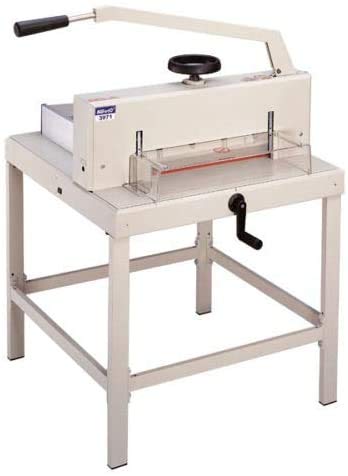
Image 1.1: The KW-Trio Guillotine Manual Paper Cutter Model 3971. This image displays the overall design of the paper cutter, including the cutting arm, base, and paper clamp mechanismus.
2. Bezpečnostní pokyny
WARNING: Improper use can result in serious injury. Always follow these safety guidelines.
- Keep hands and fingers clear of the blade at all times, especially during cutting operations.
- Ensure the cutter is placed on a stable, level surface before use.
- Do not attempt to cut materials thicker or harder than recommended specifications.
- Keep children and unauthorized personnel away from the cutter.
- Always engage the blade lock (if present) when the cutter is not in use.
- Wear appropriate safety glasses to protect against flying debris.
- Unplug the LED cutting guide power supply when not in use or during maintenance.
3. Obsah balení
Ověřte, zda jsou v balení přítomny všechny položky:
- KW-Trio Guillotine Manual Paper Cutter (Model 3971)
- Blade Guard (pre-installed)
- Papír Clamp Zacházet s
- LED Cutting Guide Power Adapter
- Uživatelská příručka (tento dokument)
4. Nastavení
- Rozbalení: Opatrně vyjměte všechny součásti z obalu. Uschovejte si obal pro budoucí skladování nebo přepravu.
- Umístění: Position the paper cutter on a sturdy, flat, and non-slip surface. Ensure adequate space around the cutter for safe operation and material handling.
- Attach Paper Clamp Zacházet s: Screw the paper clamp handle clockwise into the designated threaded hole on the paper clamp mechanism until secure.
- Connect LED Cutting Guide: Locate the power input port for the LED cutting guide, typically on the side or rear of the base. Connect the provided power adapter to the port and then plug the adapter into a standard electrical outlet.
- Počáteční kontrola: Before first use, inspect the blade for any damage and ensure all moving parts operate smoothly. Confirm the blade guard is properly installed.
5. Návod k obsluze
5.1 Příprava na řezání
- Unlock Blade: If the blade is locked, disengage the safety lock mechanism.
- Activate LED Guide: Press the power button for the LED cutting guide. A red laser line will appear, indicating the precise cutting path.
- Position Paper: Lift the cutting arm. Place the paper stack (up to the maximum capacity) onto the cutting bed, aligning the desired cut line with the LED guide. Use the measurement grid on the base for accurate positioning.
- Secure Paper: Lower the paper clamp handle firmly to hold the paper stack securely in place. This prevents shifting during the cut.
5.2 Performing a Cut
- Držte rukojeť: Grasp the cutting arm handle firmly with one hand.
- Execute Cut: With the other hand ensuring the paper clamp is secure and fingers are clear, pull the cutting arm down swiftly and smoothly in a single motion. Apply consistent pressure throughout the cut.
- Return Arm: Once the cut is complete, slowly raise the cutting arm back to its upright position.
- Odebrat papír: Uvolněte papír třamp and carefully remove the cut paper.
5.3 Maximum Cutting Capacity
The KW-Trio 3971 is designed to cut a maximum stack height of approximately 400 sheets of 70gsm paper or 40mm thickness. Do not exceed these limits to prevent damage to the blade or cutter mechanism.
6. Údržba
6.1 Čištění
- Regularly wipe the cutting bed and blade with a soft, dry cloth to remove paper dust and debris.
- For stubborn residue, use a slightly damp utřete jemným mýdlem a poté důkladně osušte.
- Do not use abrasive cleaners or solvents, as they can damage the surface and markings.
6.2 Péče o čepel a její výměna
CAUTION: The blade is extremely sharp. Handle with extreme care.
- A dull blade can lead to ragged cuts and require excessive force. Replace the blade when it becomes dull.
- Blade replacement should only be performed by trained personnel or by following the specific instructions provided with a replacement blade kit.
- Always ensure the cutter is unplugged and the blade is locked before attempting any blade maintenance.
6.3 Mazání
Periodically apply a small amount of light machine oil to the pivot points of the cutting arm to ensure smooth operation. Wipe off any excess oil.
7. Řešení problémů
| Problém | Možná příčina | Řešení |
|---|---|---|
| Ragged or uneven cuts | Dull blade; paper not clamped securely; cutting too much paper at once. | Replace blade; ensure paper clamp is tight; reduce paper stack height. |
| Blade sticks or is difficult to move | Accumulated debris; lack of lubrication; bent cutting arm. | Clean blade and pivot points; lubricate pivot points; inspect for damage (contact support if bent). |
| LED cutting guide not working | Power adapter not connected; power outlet issue; LED unit malfunction. | Check power adapter connection; try a different outlet; contact support if unit is faulty. |
| Paper slips during cut | Papír třamp not tight enough; too much paper. | Ensure paper clamp is fully engaged; reduce paper stack. |
8. Specifikace
- Model: KW-Trio 3971
- Typ: Guillotine Manual Paper Cutter
- Šířka řezu: 18.7 palců (přibližně 47.5 cm)
- Kapacita řezání: Approximately 400 sheets of 70gsm paper or 40mm thickness
- Průvodce řezáním: LED Laser Line
- Výrobce: KW-Trio
- ASIN: B08LR2SC2W
Poznámka: Specifikace se mohou změnit bez předchozího upozornění z důvodu vylepšení produktu.
9. Informace o záruce
This KW-Trio product is covered by a limited manufacturer's warranty against defects in materials and workmanship for a period of one year from the original date of purchase. This warranty does not cover damage resulting from misuse, abuse, accident, unauthorized service, or normal wear and tear. Please retain your proof of purchase for warranty claims.
For specific warranty terms and conditions, please refer to the warranty card included with your product or visit the official KW-Trio webmísto.
10. Zákaznická podpora
If you encounter any issues or have questions regarding your KW-Trio Guillotine Manual Paper Cutter 3971 that are not addressed in this manual, please contact our customer support team.
- Refer to the official KW-Trio webstránky pro kontaktní informace.
Než budete kontaktovat podporu, mějte prosím připravené číslo modelu (3971) a informace o nákupu.
11. Oficiální produktová videa
No official seller-created product videos were found in the provided data. If available, relevant videos demonstrating setup, operation, or maintenance would be embedded here with a maximum width of 420px and a detailed text description.


