1. Úvod
This manual provides detailed instructions for the installation, operation, maintenance, and troubleshooting of the Cudy PE25 2.5Gbps PCI Express Network Adapter. Please read this manual thoroughly before installation and use to ensure proper functionality and to avoid any potential issues.

Image 1.1: Cudy PE25 2.5Gbps PCI Express Network Adapter. This image shows the network adapter card with its standard bracket, featuring the RJ45 port and PCIe connector.
2. Obsah balení
Ověřte, zda jsou v balení přítomny všechny položky:
- Cudy PE25 2.5Gbps PCI Express Network Adapter
- Standardní Profile Bracket (pre-installed)
- Low-Profile Konzola
- Driver CD (or link to online drivers)
- Průvodce rychlou instalací

Image 2.1: Cudy PE25 Product Box. The retail packaging for the Cudy PE25 network adapter, indicating its 2.5Gbps speed and PCI Express interface.
3. Systémové požadavky
- Available PCI Express x1, x4, x8, or x16 slot
- Operating System: Windows 11/10/8.1/8/7, Windows Server 2003/2008/2012, Linux
- Minimálně 1 GB RAM
- Compatible network cable (Cat5e or higher recommended for 2.5Gbps speeds)

Image 3.1: PCIe Slot Compatibility. This diagram illustrates the various PCI Express slot types (x1, x4, x8, x16) that are compatible with the Cudy PE25 adapter.

Image 3.2: Operating System Compatibility. A computer monitor displaying various operating system logos, including Windows, Windows Server, Synology DSM, and Linux, indicating broad compatibility for the network adapter.
4. Nastavení a instalace
4.1 Instalace hardwaru
- Vypněte počítač: Completely shut down your computer and disconnect the power cord.
- Otevřete skříň počítače: Sejměte boční panel skříně počítače.
- Locate an Available PCIe Slot: Find an empty PCI Express x1, x4, x8, or x16 slot on your motherboard.
- Odstraňte kryt slotu: Remove the metal slot cover corresponding to the chosen PCIe slot.
- Install the Network Adapter: Carefully insert the Cudy PE25 adapter into the PCIe slot, pressing firmly until it is securely seated. Ensure the gold contacts are fully engaged.
- Zajištění adaptéru: Fasten the adapter's bracket to the computer case with a screw.
- Zavřete počítačovou skříň: Replace the side panel and reconnect the power cord.
4.2 Bracket Replacement (Optional)
If your computer case requires a low-profile držáku, postupujte takto:
- Unscrew the two screws holding the standard bracket to the adapter.
- Carefully remove the standard bracket.
- Zarovnejte low-profile bracket with the screw holes on the adapter.
- Zajistěte low-profile bracket with the two screws.

Image 4.1: Standard and Low-Profile Brackets. This image displays the Cudy PE25 network adapter alongside both its standard and low-profile brackets, offering flexibility for different computer chassis sizes.
4.3 Instalace ovladače
After hardware installation, power on your computer. The operating system may automatically detect and install the necessary drivers. If not, follow these steps:
- Pro Windows:
- Insert the provided Driver CD into your CD-ROM drive and follow the on-screen instructions.
- Alternatively, download the latest drivers from the official Cudy website or Realtek website (for RTL8125 chipset).
- After installation, verify the adapter is recognized in Device Manager under "Network adapters."
- Pro Linux:
- Most modern Linux distributions include native support for the Realtek RTL8125 chipset. The adapter should be recognized automatically.
- If not, consult your distribution's documentation for installing Realtek RTL8125 drivers or download them from the Realtek webmísto.
5. Návod k obsluze
5.1 Připojení k síti
- Connect one end of an Ethernet cable (Cat5e or higher recommended) to the RJ45 port on the Cudy PE25 adapter.
- Connect the other end of the Ethernet cable to your router, switch, or modem.
- Once connected, the Link/Speed/Act LED indicators on the adapter's RJ45 port will illuminate, indicating network activity and connection speed.
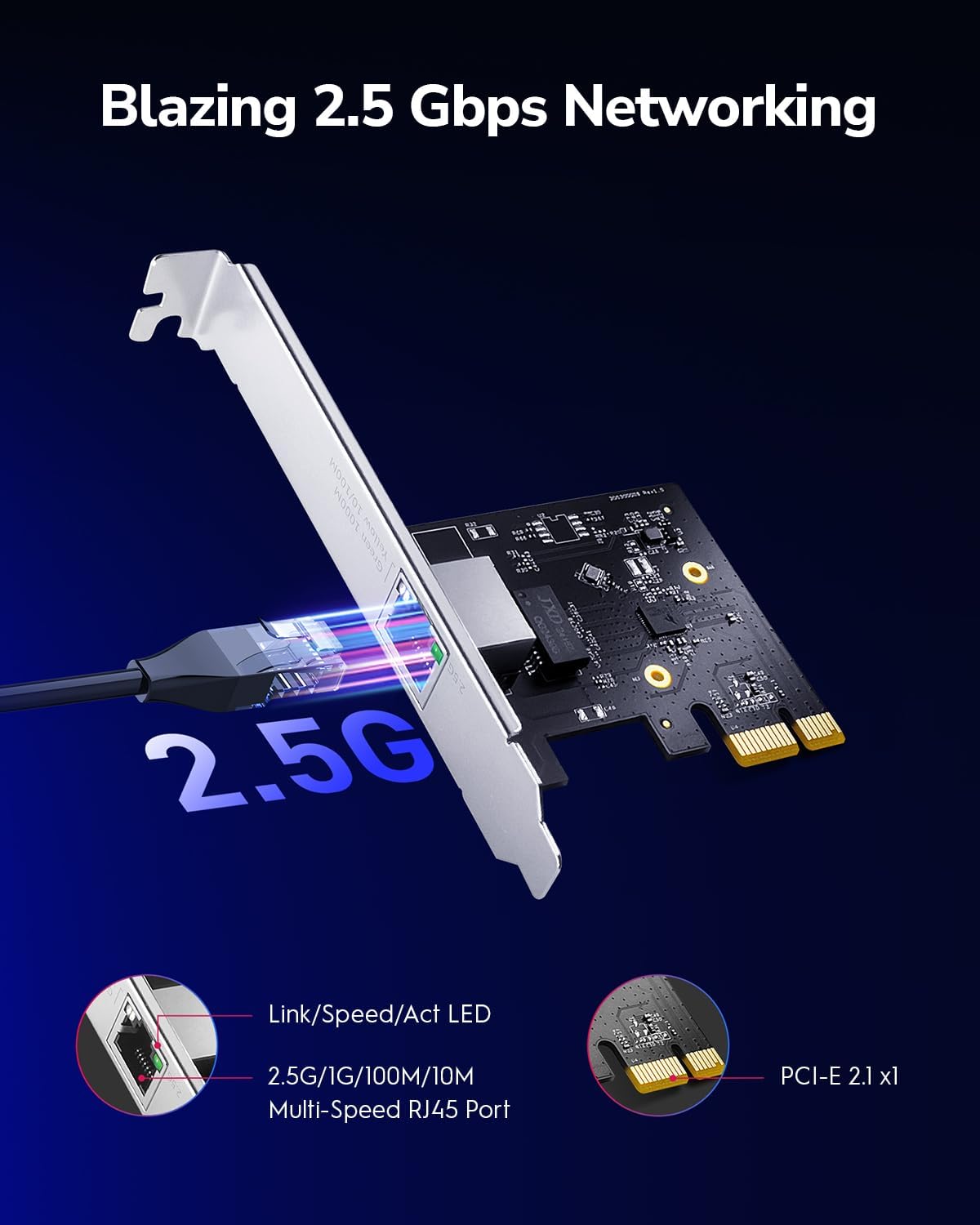
Image 5.1: 2.5Gbps Networking with Cudy PE25. This image highlights the Cudy PE25 network adapter connected via an Ethernet cable, emphasizing its 2.5Gbps capability and showing the Link/Speed/Act LED indicators on the RJ45 port.
5.2 Klíčové vlastnosti
- 2.5Gbps Speed: The PE25 supports data transfer rates up to 2.5 Gigabits per second, offering significantly faster performance than standard Gigabit Ethernet.
- Všestranná kompatibilita: It is backwards compatible with Fast Ethernet (100Mbps) and Gigabit Ethernet (1Gbps) networks, automatically negotiating the highest possible speed.
- Wake-on-LAN (WOL): This feature allows you to remotely power on your computer over the network, useful for centralized management or accessing your PC from another location.
- Řízení toku: Helps manage data traffic to prevent packet loss during periods of high network congestion.
- Energy Efficient Ethernet (EEE): Reduces power consumption during periods of low network activity.

Image 5.2: Network Diagram with Cudy PE25. This diagram illustrates a network setup where Cudy PE25 adapters are used to connect various devices like servers and gaming PCs to a multi-gigabit router, showcasing enhanced data transfer speeds.
6. Údržba
To ensure optimal performance and longevity of your Cudy PE25 network adapter, consider the following maintenance tips:
- Aktualizace ovladačů: Regularly check the official Cudy or Realtek website for the latest drivers. Keeping drivers updated can improve stability, performance, and compatibility.
- Fyzická kontrola: Periodically inspect the adapter for dust accumulation, especially around the PCIe contacts and the RJ45 port. Use compressed air to gently clean if necessary.
- Bezpečné sezení: Ensure the adapter remains securely seated in its PCIe slot. Loose connections can lead to intermittent network issues.
- Integrita kabelu: Use high-quality Ethernet cables (Cat5e or higher) and ensure they are not damaged or kinked.
7. Řešení problémů
If you encounter issues with your Cudy PE25 network adapter, refer to the following troubleshooting steps:
- Žádné síťové připojení:
- Verify the Ethernet cable is securely connected to both the adapter and your network device (router/switch).
- Check the Link/Speed/Act LEDs on the adapter. If they are off, there might be a cable issue or the adapter is not receiving power/signal.
- Ensure the adapter is properly seated in the PCIe slot.
- Check Device Manager (Windows) or network configuration (Linux) to confirm the adapter is recognized and enabled. Reinstall drivers if necessary.
- Slow Network Speeds:
- Ensure your router/switch supports 2.5Gbps speeds.
- Use a Cat5e or higher rated Ethernet cable. Older cables (e.g., Cat5) may limit speeds.
- Update the network adapter drivers to the latest version from the Realtek webmísto.
- Check network settings in your operating system to ensure the adapter is configured for full duplex and the correct speed (if not set to auto-negotiate).
- Consider other network components (e.g., other network cards, router firmware) that might be bottlenecking performance.
- Občasné výpadky připojení:
- Update drivers. Some chipsets (like the RTL8125) benefit significantly from the latest driver versions for stability.
- Ensure the adapter is not overheating. Good airflow within the computer case is important.
- Check for conflicts with other PCIe devices. Try moving the adapter to a different PCIe slot if available.
- Disable power-saving features for the network adapter in Device Manager (Windows) if experiencing drops during idle periods.
8. Specifikace
| Funkce | Specifikace |
|---|---|
| Číslo modelu | PE25 |
| Značka | Cudy |
| Hardwarové rozhraní | PCIe x1 (compatible with x4, x8, x16 slots) |
| Rychlost přenosu dat | 2.5 Gigabits Per Second (2.5G/1G/100M/10M auto-negotiation) |
| Data Link Protocol | Fast Ethernet, Gigabit Ethernet, 2.5GBase-T |
| Čipová sada | Realtek RTL8125 |
| Kompatibilní zařízení | Stolní počítače |
| Podporované operační systémy | Windows 11/10/8.1/8/7, Windows Server 2003/2008/2012, Linux |
| Vlastnosti | Wake-on-LAN (WOL), Flow Control, Energy Efficient Ethernet (EEE) |
| Rozměry (D x Š x V) | 19.69 x 19.69 x 11.02 palců (přibližně 50 x 50 x 28 cm) |
| Hmotnost položky | 5.3 uncí (cca 0.15 kg) |

Image 8.1: Cudy PE25 Product Dimensions. This image provides a visual representation of the network adapter's physical size, including key measurements.
9. Záruka a podpora
Informace o záruce naleznete v dokumentaci dodané s vaším nákupem nebo navštivte oficiální webové stránky Cudy. website. Cudy provides technical support and driver downloads through their official channels.
- Oficiální Cudy Webmísto: www.cudy.com
- Stažení ovladačů: Check the support section of the Cudy webstránky nebo Realtek website for the latest RTL8125 drivers.


