1. Úvod
Thank you for choosing the ORIA Touchscreen Indoor/Outdoor Temperature and Humidity Monitor. This device provides accurate, real-time temperature and humidity readings for both indoor and outdoor environments. With its large LCD display and multiple wireless sensors, you can easily monitor conditions in various locations within your home, office, greenhouse, or warehouse.
This manual will guide you through the setup, operation, and maintenance of your new monitor to ensure optimal performance.

Image: The ORIA monitor displayed in an office, bedroom, greenhouse, and warehouse, illustrating its versatile applications.
2. Obsah balení
Zkontrolujte prosím obsah balení, abyste se ujistili, že jsou přítomny všechny položky:
- 1 x Main Display Unit (Touchscreen Monitor)
- 3 x bezdrátové dálkové senzory
- Mounting Screws and Anchors (for sensors)
- 1 x Uživatelská příručka

Image: The main display unit, three wireless sensors, mounting hardware, and the user manual as they appear in the product packaging.
3. Vlastnosti produktu
- Hlavní zobrazovací jednotka:
- 4-inch Large Color LCD Touchscreen with Backlight
- Zobrazuje vnitřní teplotu a vlhkost
- Displays outdoor temperature and humidity from up to 3 remote sensors
- Temperature units: Celsius (°C) or Fahrenheit (°F) switchable
- Min/Max record for temperature and humidity (all time or 24 hours)
- Indikátory trendu teploty a vlhkosti
- Indikátor slabé baterie
- Multiple mounting options: Tabletop stand, magnetic back
- Bezdrátové dálkové senzory:
- Vodotěsné provedení pro venkovní použití
- Maximum transmission distance: 197ft / 60m (in open air)
- Podporuje až kanály 3
- Multiple mounting options: Hang, upright, wall mount

Image: A visual representation of the main display unit and a remote sensor, highlighting their dimensions and key features such as °C/°F switcher, trend indicator, MAX/MIN record, backlight, and low battery indicator.
4. Nastavení
4.1 Instalace baterie
The main display unit and each remote sensor require 2x AAA batteries (not included). Ensure correct polarity when inserting batteries.
- Pro dálkové senzory: Open the battery compartment cover on the back of each sensor. Insert 2x AAA batteries. Close the cover securely.
- Pro hlavní zobrazovací jednotku: Open the battery compartment cover on the back of the main unit. Insert 2x AAA batteries. Close the cover securely.

Obrázek: Podrobný view of the battery compartments for both the main display unit and a remote sensor, indicating where to insert 2x AAA batteries.
4.2 Channel Selection and Synchronization
Each remote sensor has a channel switch (1, 2, or 3) inside its battery compartment. Before closing the battery cover, select a unique channel for each sensor. The main display unit will automatically cycle through or allow manual selection of these channels.
- Set each remote sensor to a different channel (CH1, CH2, CH3) using the switch inside the battery compartment.
- After installing batteries in both the main unit and sensors, the main unit should automatically begin receiving data. If not, press the "CH SYNC" button on the main unit to initiate synchronization.
- Ensure the main unit and sensors are within the effective transmission range (up to 197ft/60m in open air).

Image: A diagram showing the main display unit and three remote sensors, with arrows indicating how to match the channel switch on each sensor (CH1, CH2, CH3) with the corresponding channel displayed on the main unit via the "CH SYNC" button.
4.3 Umístění a montáž
Consider the following for optimal placement:
- Hlavní zobrazovací jednotka: Place indoors in a central location, away from direct sunlight, heat sources, or drafts that could affect readings. Use the integrated tabletop stand or the magnetic back for mounting on metallic surfaces.
- Dálkové senzory:
- For outdoor use, place the sensor in a shaded area, protected from direct rain and sunlight, to ensure accurate readings and prolong battery life. Although waterproof, extreme conditions can impact performance.
- Mount using the integrated hanging hole, the upright stand, or the provided screws for wall mounting.
- Ensure sensors are within range of the main unit. Walls and obstacles can reduce transmission distance.

Image: A collage demonstrating different mounting options for the main display unit (tabletop stand, magnet) and remote sensors (hang, upright, wall mount).
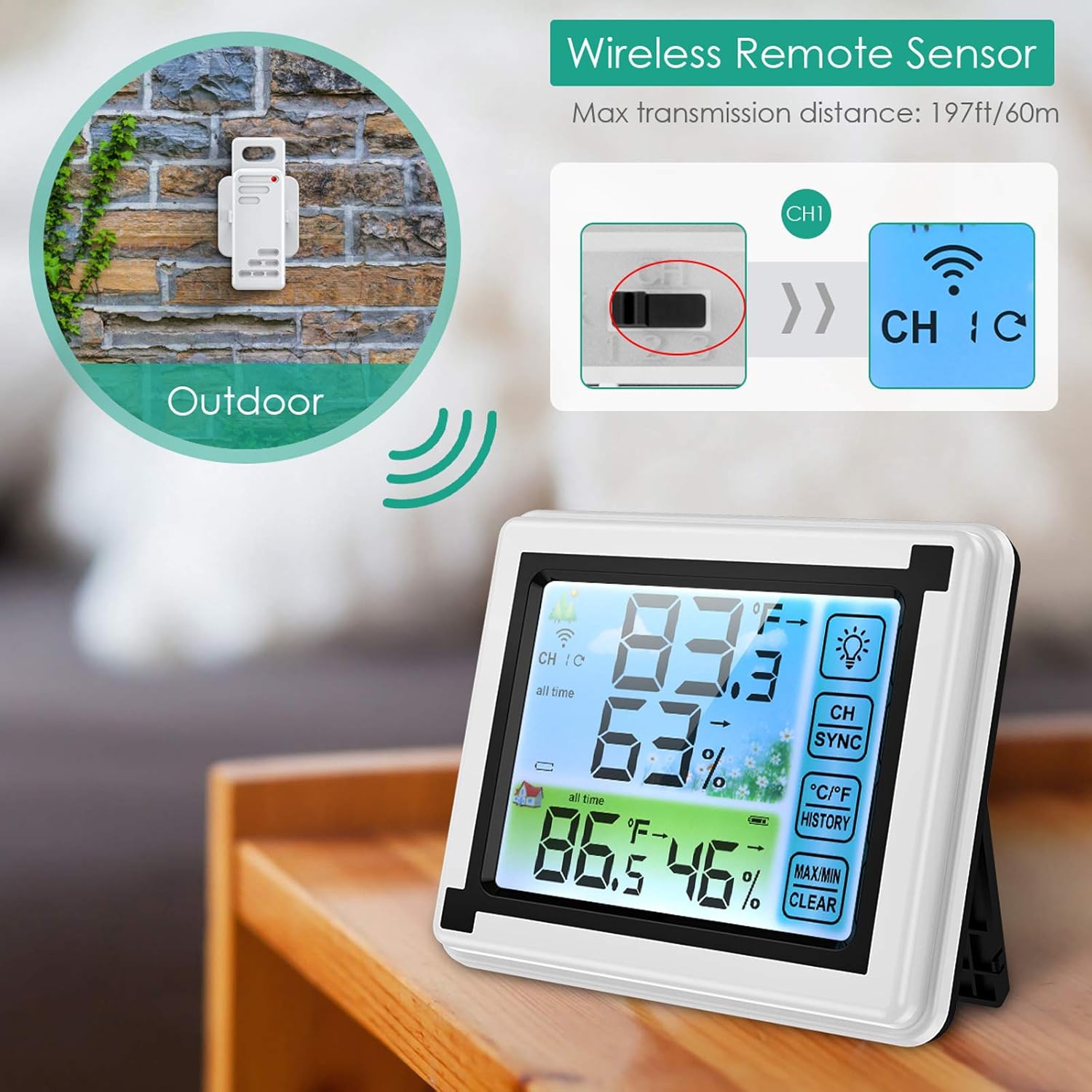
Image: A remote sensor mounted outdoors on a wall, illustrating its wireless capability and placement for external temperature and humidity monitoring.
5. Návod k obsluze
5.1 Zobrazení nadview
The main display unit shows indoor readings at the top and cycles through the remote sensor readings at the bottom. Key indicators include:
- CH 1/2/3: Indicates which remote sensor's data is currently displayed.
- Teplota (°C/°F): Aktuální teplota.
- Vlhkost (%): Current relative humidity.
- Trendové šipky: Indicates if temperature/humidity is rising, falling, or stable.
- Ikona baterie: Shows battery status for the main unit and active sensor.

Image: The main display unit showing indoor and outdoor temperature/humidity readings, along with three remote sensors. The display clearly shows channel indicators, temperature, humidity, and function buttons.
5.2 Funkce dotykové obrazovky
The main unit features several touch-sensitive buttons on the right side of the display:
- Ikona žárovky: Activates the backlight for approximately 10 seconds.
- SYNCHRONIZACE KANŮ: Press to manually cycle through remote sensor channels (CH1, CH2, CH3) or to re-sync sensors.
- °C/°F: Přepíná zobrazení teploty mezi stupni Celsia a Fahrenheita.
- DĚJINY: Displays the maximum and minimum recorded temperature and humidity values.
- VYMAZAT MAX/MIN: Když viewing HISTORY, press and hold this button to clear the recorded maximum and minimum values.

Image: The ORIA monitor's display with its backlight activated, demonstrating improved readability in low-light conditions. The touch-sensitive buttons are visible on the right side.
5.3 Viewzáznamy o min./max.
Na view the highest and lowest temperature and humidity recorded:
- Stiskněte tlačítko DĚJINY button once to display the maximum values.
- Stiskněte tlačítko DĚJINY button again to display the minimum values.
- Stiskněte potřetí pro návrat k aktuálním údajům.
- To clear the recorded Min/Max values, press and hold the MAX/MIN CLEAR tlačítko, zatímco viewv historii.
6. Údržba
- Čištění: Otřete hlavní jednotku a senzory měkkým hadříkemamp tkanina. Nepoužívejte abrazivní čisticí prostředky nebo rozpouštědla.
- Výměna baterie: Replace batteries in both the main unit and sensors when the low battery indicator appears on the display. Ensure to use fresh AAA batteries.
- Umístění senzoru: Periodically check the outdoor sensor's placement to ensure it remains protected from direct weather elements for accurate readings and longevity.
7. Řešení problémů
| Problém | Možná příčina | Řešení |
|---|---|---|
| No outdoor readings or "---" displayed. |
|
|
| Nepřesné údaje. |
|
|
| Displej je tmavý nebo prázdný. |
|
|
8. Specifikace
| Model | WA58 |
| Typ zobrazení | LCD Touchscreen with Backlight |
| Zdroj napájení (hlavní jednotka) | 2 x AAA baterie (nejsou součástí balení) |
| Zdroj energie (senzory) | 2 x AAA Batteries per sensor (not included) |
| Bezdrátové Dosah | Až 60 m (v otevřeném prostoru) |
| Počet podporovaných senzorů | 3 |
| Doba odezvy | 3 sekund |
| Speciální funkce | Waterproof (sensors) |
| Rozměry produktu (hlavní jednotka) | Přibližně 4.5 palce (šířka) x 3.7 palce (výška) |
| Rozměry produktu (senzor) | Přibližně 1.4 palce (šířka) x 3.9 palce (výška) |
9. Záruka a podpora
For warranty information or technical support, please refer to the contact details provided with your purchase or visit the official ORIA webwebu. Uschovejte si účtenku jako doklad o koupi.
Výrobce: ORIA
Místo podnikání: Shenzhen, Guangdong 518000, CN


