1. Úvod
Thank you for choosing the FREESTYLE FH0955 LED Bluetooth Headphones. This manual provides essential information for the proper setup, operation, and maintenance of your new headphones. Please read it carefully before use to ensure optimal performance and longevity of the product.
2. Konec produktuview
The FREESTYLE FH0955 headphones offer a wireless audio experience with integrated features designed for convenience and style. Key features include Bluetooth 5.0 + EDR connectivity, a built-in microSD card slot for direct music playback, a foldable headband for portability, and subtle LED backlighting on the earcups.

Obrázek 2.1: Přední strana view of the FREESTYLE FH0955 LED Bluetooth Headphones, showcasing the over-ear design and LED lighting.

Obrázek 2.2: Boční profesionálfile of the FREESTYLE FH0955 LED Bluetooth Headphones, highlighting the earcup and headband design.

Image 2.3: A person wearing the FREESTYLE FH0955 LED Bluetooth Headphones, demonstrating typical usage.
3. Nastavení
3.1. Nabíjení sluchátek
Before first use, fully charge the headphones. The FH0955LB model is equipped with a 400 mAh Lithium-ion battery.
- Connect the supplied MicroUSB charging cable to the charging port on the headphones.
- Connect the other end of the cable to a USB power source (e.g., computer USB port, USB wall adapter, or power bank).
- LED indikátor se během nabíjení rozsvítí a po úplném nabití zhasne nebo změní barvu.
- A full charge typically takes approximately 2 hours and provides up to 10 hours of continuous music playback.
3.2. Párování Bluetooth
Chcete-li bezdrátově připojit sluchátka k zařízení:
- Ujistěte se, že jsou sluchátka nabitá a vypnutá.
- Stiskněte a podržte tlačítko napájení na sluchátkách, dokud nezačne blikat LED indikátor, což signalizuje režim párování.
- Na svém zařízení (chytrý telefon, tablet, počítač) povolte Bluetooth a vyhledejte dostupná zařízení.
- Select "FH0955" or a similar name from the list of found devices.
- Po připojení přestane LED indikátor blikat a zůstane svítit trvale nebo zhasne, v závislosti na modelu.
- The Bluetooth 5.0 + EDR technology allows for a stable connection up to 10 meters.
3.3. MicroSD Card Playback
The headphones feature an integrated microSD card slot for direct music playback without a connected device.
- Insert a microSD card (pre-loaded with audio files) into the designated slot on the headphones.
- The headphones should automatically switch to microSD playback mode. If not, use the Mode button (if available) to switch.
- Use the playback controls on the headphones to manage your music.
3.4. Drátové připojení (3.5mm audio konektor)
For devices without Bluetooth or when the battery is depleted, you can use the included 3.5mm audio cable.
- Připojte jeden konec 3.5mm audio kabelu k audio konektoru na sluchátkách.
- Druhý konec připojte k 3.5mm audio výstupu vašeho zařízení.
- Sluchátka budou fungovat v pasivním režimu a funkce Bluetooth bude deaktivována.
4. Návod k obsluze
4.1. Zapnutí/vypnutí
- Zapnutí: Stiskněte a podržte tlačítko napájení přibližně 3 sekundy, dokud se nerozsvítí LED indikátor.
- Vypnout: Stiskněte a podržte tlačítko napájení přibližně 3–5 sekund, dokud nezhasne LED indikátor.
4.2. Přehrávání hudby
- Přehrát/pozastavit: Stiskněte jednou tlačítko Přehrát/Pozastavit.
- Další skladba: Press the "Next" button (often Volume Up, long press).
- Předchozí skladba: Press the "Previous" button (often Volume Down, long press).
- Zvýšit hlasitost: Krátce stiskněte tlačítko pro zvýšení hlasitosti.
- Snížit hlasitost: Krátce stiskněte tlačítko pro snížení hlasitosti.
4.3. Správa hovorů
With the built-in microphone, you can manage phone calls when connected via Bluetooth.
- Přijmout/ukončit hovor: Press the Play/Pause button once during an incoming call.
- Odmítnout hovor: Press and hold the Play/Pause button for approximately 2 seconds during an incoming call.
- Znovu vytočit poslední číslo: Dvakrát stiskněte tlačítko Přehrát/Pozastavit.
4.4. LED Backlighting
The headphones feature subtle LED backlighting. Refer to the specific controls on your device for toggling or changing LED modes, if available. This feature is primarily aesthetic.
5. Údržba
5.1. Čištění
- K čištění povrchu sluchátek použijte měkký, suchý hadřík.
- Do not use abrasive cleaners, alcohol, or chemical solvents, as these may damage the finish.
- Keep the charging port and audio jack free from dust and debris.
5.2. Skladování
- Sluchátka skladujte na chladném a suchém místě mimo dosah přímého slunečního záření a extrémních teplot.
- Pokud baterii delší dobu nepoužíváte, nabíjejte ji alespoň jednou za tři měsíce, aby byla zachována její životnost.
- Utilize the foldable headband feature for compact storage and transport.
6. Řešení problémů
| Problém | Možná příčina | Řešení |
|---|---|---|
| Sluchátka se nezapínají. | Slabá baterie. | Plně nabijte sluchátka. |
| Nelze spárovat přes Bluetooth. | Sluchátka nejsou v režimu párování; Bluetooth zařízení je vypnuté; zařízení je příliš daleko od zařízení. | Ensure headphones are in pairing mode. Turn device Bluetooth off/on. Move closer to device (within 10m). |
| Žádný zvuk. | Příliš nízká hlasitost; nesprávný zdroj zvuku; sluchátka nejsou připojena. | Increase volume on headphones and device. Check Bluetooth connection or 3.5mm cable. Ensure correct mode (Bluetooth/MicroSD). |
| MicroSD card not playing. | Karta nebyla vložena správně; není podporována file formát; karta poškozená. | Reinsert card. Ensure audio files are in a supported format (e.g., MP3). Try a different microSD card. |
7. Specifikace
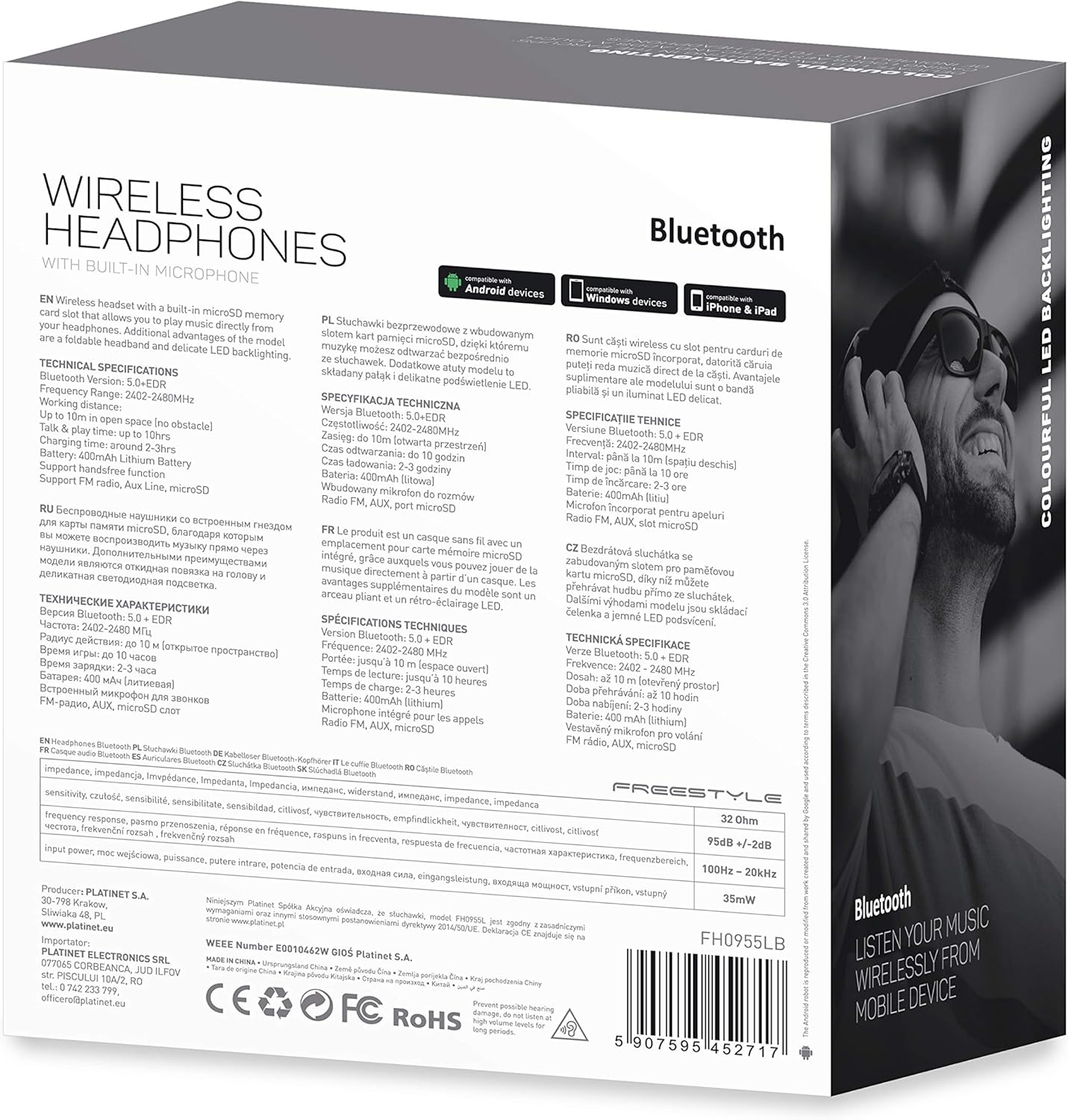
Obrázek 7.1: Detailní view of the product packaging, showing technical specifications and compliance information.
| Funkce | Specifikace |
|---|---|
| Číslo modelu | FH0955LB |
| Značka | Volný styl |
| Technologie připojení | Wireless (Bluetooth 5.0 + EDR) |
| Bezdrátové Dosah | Až 10 metrů |
| Audio Jack | 3.5 mm |
| Form Factor | Přesušní (cirkum-aurikulární) |
| Speciální funkce | Noise Cancellation, LED Backlighting, MicroSD Card Slot |
| Typ baterie | Integrated Lithium-ion (400 mAh) |
| Doba přehrávání | Až 10 hodin |
| Doba nabíjení | Přibližně 2 hodiny |
| Nabíjecí port | MicroUSB |
| Barva | Černý |
| Materiál | Leather (earpads/headband) |
| Úroveň odolnosti proti vodě | Voděodolný |
| Zahrnuté komponenty | 1 pár sluchátek |
| Výrobce | Platinet |
8. Záruka a podpora
Konkrétní podrobnosti o záruce jsou obvykle uvedeny v dokumentaci k nákupu nebo na oficiálních stránkách výrobce. webstránky. Uschovejte si prosím doklad o koupi pro případné reklamace.
For technical support or inquiries, please refer to the contact information provided by your retailer or the manufacturer, Platinet.
9. Bezpečnostní informace
- Nevystavujte sluchátka extrémním teplotám, vlhkosti ani kapalinám.
- Vyhněte se dlouhodobému poslechu při vysoké hlasitosti, abyste předešli poškození sluchu.
- Do not attempt to disassemble or modify the headphones, as this may void the warranty and cause damage.
- Uchovávejte mimo dosah dětí.
- Dispose of the product responsibly according to local electronic waste regulations.


