1. Úvod
This manual provides detailed instructions for the installation, operation, and maintenance of your Codnida 2K PTZ Outdoor Security Camera. Designed for comprehensive surveillance, this camera offers 360° pan and tilt capabilities, 2K (3MP) video resolution, motion detection with smart siren, two-way audio, and color night vision, ensuring robust security for your property.
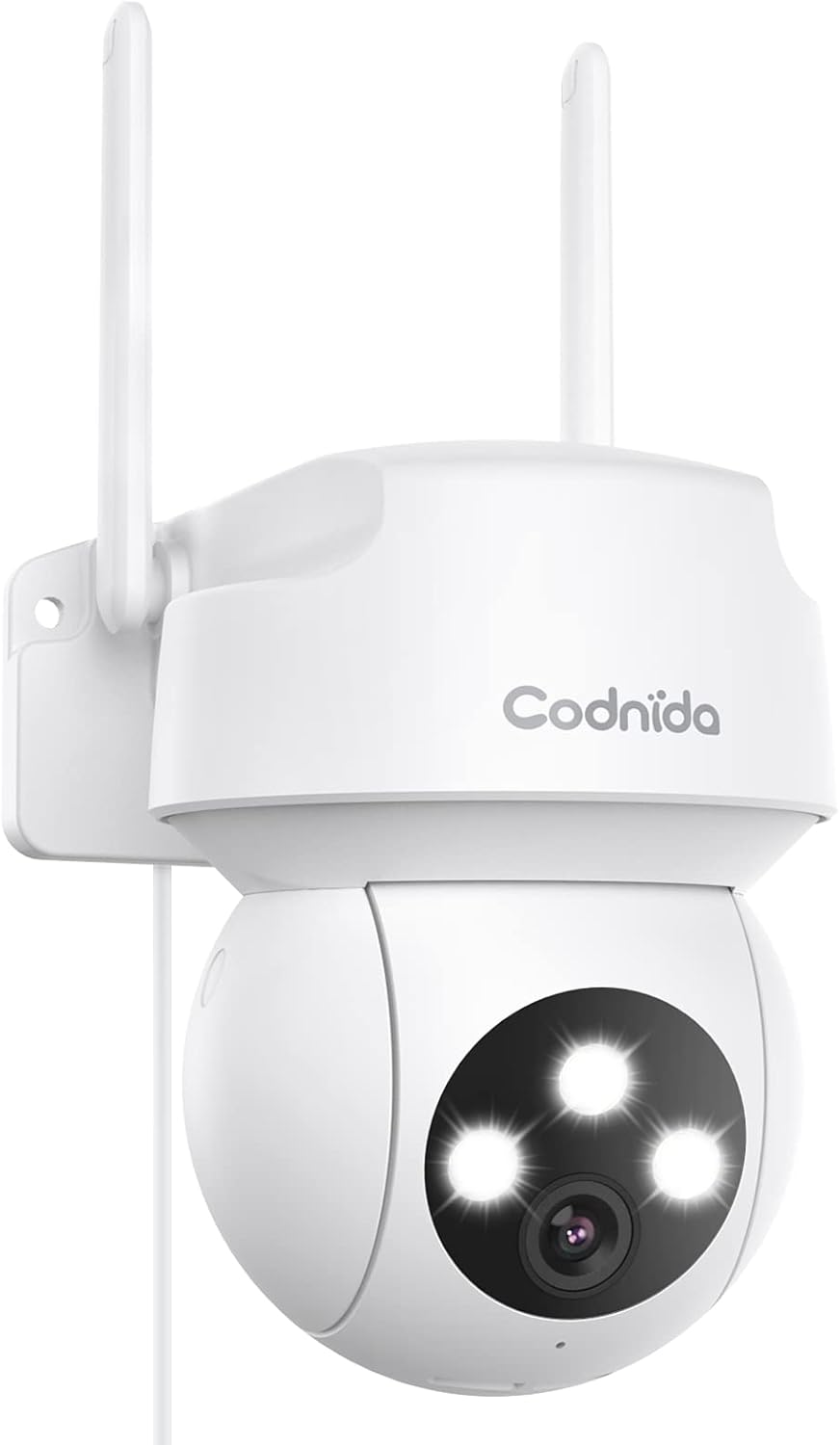
Figure 1.1: Codnida 2K PTZ Outdoor Security Camera, showcasing its sleek white design with dual antennas and three prominent LED lights on the camera head.
2. Obsah balení
Ověřte, zda jsou v balení obsaženy všechny níže uvedené položky:
- 1 x Security Camera with cable (approx. 10ft)
- 1 x napájecí adaptér
- 1 x poziční nálepka
- 1 x Šroubovací sada
- 1 x Uživatelská příručka

Figure 2.1: Diagram illustrating the camera's components including antennas, indicator light, LED lights, camera lens, microphone, power cable, reset button, and TF card slot.
3. Klíčové vlastnosti
- 360° View PTZ: Pan 340° and tilt 110° for comprehensive coverage without blind spots.
- 2K (3MP) Video & Image: Captures 2304x1296 resolution for clear, sharp visuals.
- Smart Siren Alarm: Automatic activation of floodlight and siren upon motion detection at night.
- Detekce pohybu a automatické sledování: Real-time alarm pushes to your phone and automatic tracking of human activity.
- Jasné noční vidění: Features infrared and full-color night vision modes.
- Vzdálený přístup: View live video and control the camera via the "CloudEdge" app (iOS & Android).
- Obousměrný zvuk: Vestavěný mikrofon a reproduktor pro komunikaci v reálném čase.
- IP66 Odolnost proti povětrnostním vlivům: Designed to withstand harsh weather conditions (-4℉ to +140℉).
- Podpora pro ukládání dat: Supports SD card (up to 128GB, not included) and cloud service for recording storage.
4. Průvodce nastavením
4.1 Zapnutí
Connect the camera to the provided power adapter and plug it into a standard electrical outlet. The camera will perform a self-test, indicated by LED lights and a voice prompt.
4.2 Stažení aplikace a vytvoření účtu
Download the "CloudEdge" app from your device's app store (available for iOS and Android). Follow the in-app instructions to create a new account or log in if you already have one.
4.3 Wi-Fi připojení
The Codnida camera connects only to 2.4GHz Wi-Fi networks. Ensure your router is broadcasting a 2.4GHz signal. If you have a dual-band router, you may need to separate the 2.4GHz and 5GHz networks or ensure your device is connected to the 2.4GHz band during setup.
Within the CloudEdge app, select 'Add Device' and follow the prompts to connect your camera to your Wi-Fi network. This typically involves scanning a QR code displayed on your phone with the camera lens.
Video 4.1: Instructions on how to change your Xfinity router settings to enable a 2.4GHz Wi-Fi network, which is required for the camera's connection.
4.4 Montáž fotoaparátu
Choose a suitable outdoor location for mounting, ensuring a clear view and proximity to a power source. Use the included position sticker to mark drill holes, then secure the camera using the provided screws. The camera's IP66 weatherproof rating ensures durability against rain and snow.

Obrázek 4.1: Example of the camera mounted outdoors on a wall, demonstrating its placement for optimal surveillance.

Figure 4.2: Visual representation of the camera's IP66 weatherproof capability, showing it enduring rain, snow, and sunshine.
5. Provoz
5.1 Živě View a ovládání PTZ
Open the CloudEdge app and select your camera to access the live view. Use the on-screen joystick or swipe gestures to control the camera's pan (340°) and tilt (110°) movements, allowing you to adjust the viewúhel na dálku.

Figure 5.1: A smartphone screen displaying the live camera feed with an overlay of PTZ control arrows, indicating the ability to remotely adjust the camera's pan and tilt.

Figure 5.2: An outdoor scene with a house and garage, showing the camera mounted on the wall with arrows indicating its 340° pan and 110° tilt capabilities for a 360° view.
5.2 Detekce pohybu a upozornění
Enable motion detection in the app settings. When motion is detected, the camera will automatically push real-time alarm information to your phone. The auto-tracking feature allows the camera to follow detected human activity, ensuring important moments are recorded.

Figure 5.3: An illustration depicting the camera's human motion tracking feature, showing a person walking and the camera's field of view adjusting to follow them.

Figure 5.4: A night scene showing the camera's spotlight illuminating an intruder and a siren icon, with a phone displaying an alarm message, demonstrating the smart siren and spotlight function.
5.3 Obousměrný zvuk
Pro obousměrnou komunikaci použijte vestavěný mikrofon a reproduktor. V živém přenosu klepněte na ikonu mikrofonu. view mluvit skrz kameru a poslouchat zvuk z okolí kamery.

Figure 5.5: A person interacting with the camera via a smartphone app, showing a microphone icon for speaking and text bubbles indicating a two-way conversation, such as with a delivery person.
5.4 Režimy nočního vidění
The camera offers two night vision modes: infrared night vision for clear black-and-white images in low light, and full-color night vision which uses the integrated floodlight to provide color images at night.

Figure 5.6: Comparison of color night vision (top) showing a brightly lit house and infrared night vision (bottom) showing a black and white view, both captured by the camera at night.
5.5 Nahrávání a přehrávání
The camera supports 24/7 recording. Recordings can be stored on a local SD card (not included, up to 128GB) or via cloud service (subscription may be required). Access recorded footage and playback through the CloudEdge app.

Figure 5.7: A visual comparison demonstrating the superior clarity of 2K (3MP) video resolution compared to 1080p, highlighting the enhanced detail captured by the camera.
6. Údržba
6.1 Čištění fotoaparátu
Pravidelně čistěte objektiv a kryt fotoaparátu měkkým hadříkemamp hadříkem odstraňte prach a nečistoty. Nepoužívejte agresivní chemikálie ani abrazivní čisticí prostředky.
6.2 aktualizací firmwaru
Check the CloudEdge app regularly for available firmware updates. Keeping your camera's firmware up-to-date ensures optimal performance, security, and access to new features.
6.3 Kontrola připojení
Ensure the power cable and any network cables (if used) are securely connected and free from damage. Verify Wi-Fi signal strength in the app to maintain a stable connection.
7. Specifikace
| Funkce | Detail |
|---|---|
| Značka | Codnida |
| Číslo modelu | COD-CD320 |
| Technologie připojení | Bezdrátové (Wi-Fi) |
| Frekvence Wi-Fi | 2.4 GHz (Does not support 5G Wi-Fi) |
| Rozlišení záznamu videa | 2K (3MP, 2304x1296p) |
| Rozsah Pan | 340° |
| Rozsah náklonu | 110° |
| Rozsah nočního vidění | 33 stop |
| Režimy nočního vidění | Infrared, Full Color |
| Zvuk | 2-Way Audio (Built-in microphone and speaker) |
| Odolnost vůči povětrnostním vlivům | IP66 Vodotěsný |
| Provozní teplota | -4℉ až +140℉ (-20℃ až +60℃) |
| Možnosti úložiště | SD Card (up to 128GB), Cloud Service |
| Zdroj napájení | Elektrický s kabelem (5 voltů, 12 wattů) |
| Rozměry (D x Š x V) | 1 x 1 x 1 palce |
| Hmotnost položky | 1.08 libry |
| Zahrnuté komponenty | Camera, Power Adapter, Position Sticker, Screw Package, User Manual |
8. Řešení problémů
8.1 Kamera se nepřipojuje k Wi-Fi
- Ujistěte se, že vaše Wi-Fi síť je 2.4 GHz. Kamera nepodporuje Wi-Fi 5 GHz.
- Zkontrolujte správnost hesla k Wi-Fi.
- Pro zlepšení síly signálu přesuňte kameru blíže k Wi-Fi routeru.
- If using a dual-band router, temporarily disable the 5GHz band during setup or ensure your phone is connected to the 2.4GHz band.
- Reset the camera by holding the reset button (located near the TF card slot) for 6-10 seconds until you hear a prompt. Then, attempt to reconnect.
8.2 Blurry or Pixelated Images
- Ujistěte se, že objektiv fotoaparátu je čistý a bez šmouh nebo nečistot.
- Check your internet connection speed. A slow connection can result in lower quality streaming.
- Verify the camera's resolution setting in the CloudEdge app is set to 2K (3MP) or FHD.
8.3 Motion Detection Not Working or Too Sensitive
- Adjust the motion detection sensitivity settings within the CloudEdge app.
- Define specific detection zones to reduce false alarms from irrelevant areas.
- Ujistěte se, že v záběru kamery nejsou žádné překážky. view v detekční oblasti.
9. Záruka a podpora
For any issues with your order or product, please contact customer support. You can typically find support by logging into your account, choosing 'your order', finding the order ID, and clicking 'contact seller'.
For the most up-to-date warranty information, please refer to the product listing or contact Codnida customer service directly.


