Zavedení
The Microsoft Designer Compact Keyboard is engineered for exceptional comfort and a streamlined workspace. Its sleek, low-profile design complements any setup, offering optimized key travel for fast, fluid typing. This wireless Bluetooth keyboard is compatible with Bluetooth-enabled PCs and Macs, providing a versatile and efficient input solution.
Key features include a built-in expressive input (emoji) key and a dedicated Screen snipping key for quick capture, copy, paste, and sharing. It is designed to connect with up to three devices, allowing seamless switching between them.
Co je v krabici
- Microsoft Designer Compact Keyboard
- 4 x DL2032 Lithium Metal Batteries (pre-installed)
- Stručná úvodní příručka a informace o záruce
Nastavení
1. Instalace baterie
Your Microsoft Designer Compact Keyboard comes with four DL2032 Lithium Metal Batteries pre-installed. Before first use, you may need to remove a protective pull tab from the battery compartment to activate the batteries. If the keyboard does not power on, ensure the batteries are correctly oriented according to the polarity indicators (+/-) inside the compartment.
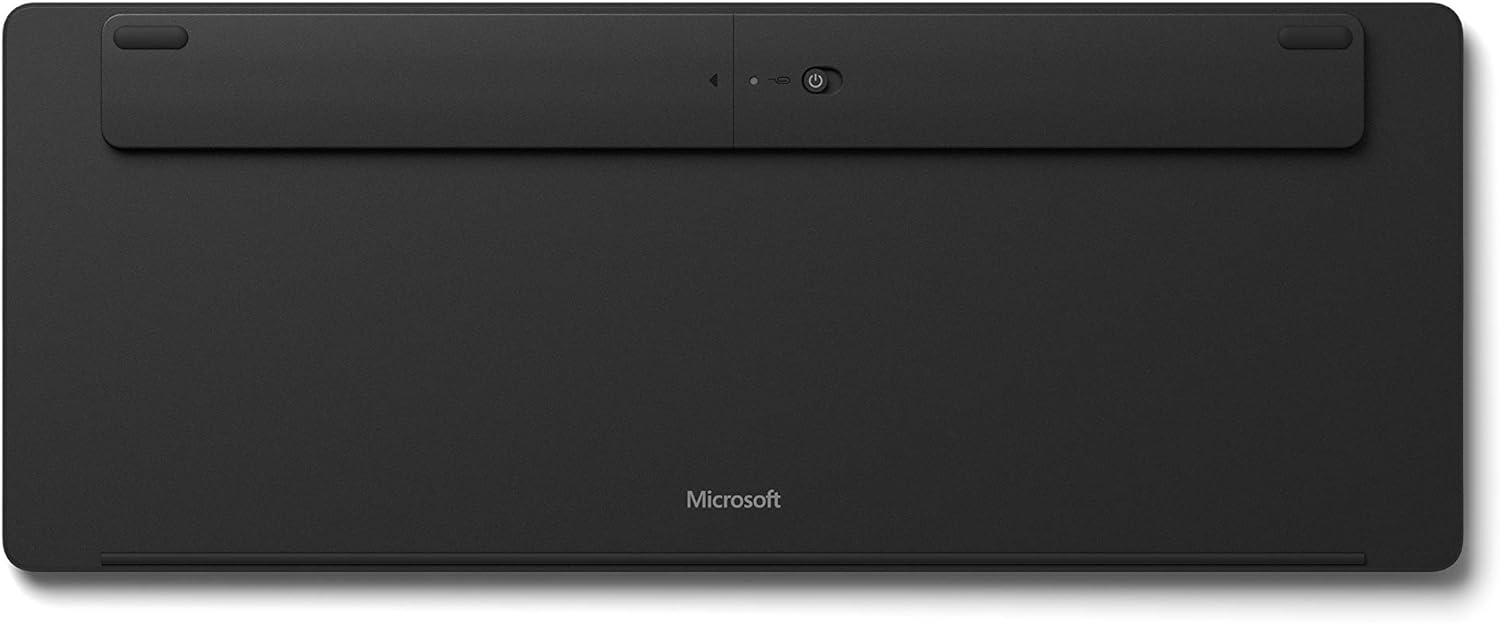
Obrázek 1: Spodní část view of the keyboard, highlighting the battery compartment and power switch.
To access the battery compartment, locate the small hole near the power switch on the underside of the keyboard. Insert a paperclip into this hole and gently press to release the battery tray. Replace batteries as needed, ensuring correct polarity, then slide the tray back into place until it clicks securely.
2. Zapnutí
Locate the power switch on the underside of the keyboard. Slide the switch to the 'On' position. A small LED indicator on the Caps Lock key may briefly illuminate to confirm power.
3. Párování Bluetooth
The Microsoft Designer Compact Keyboard can be paired with up to three different Bluetooth-enabled devices. Follow these steps to pair your keyboard:
- Ujistěte se, že je v počítači nebo zařízení povoleno rozhraní Bluetooth.
- On the keyboard, press and hold one of the Bluetooth keys (F1, F2, or F3) for approximately 3-5 seconds until the LED above the key begins to flash. This indicates the keyboard is in pairing mode.
- On your device, navigate to Bluetooth settings and select "Microsoft Designer Compact Keyboard" from the list of available devices.
- Postupujte podle pokynů na obrazovce a dokončete proces párování. Můžete být požádáni o zadání kódu zobrazeného na obrazovce pomocí klávesnice.
- Once successfully paired, the LED will stop flashing and remain solid for a few seconds before turning off.
To switch between paired devices, simply press the corresponding Bluetooth key (F1, F2, or F3) for the desired device. The keyboard will automatically connect to that device.
Ovládání klávesnice
The Microsoft Designer Compact Keyboard offers a range of features designed to enhance your productivity and comfort.
Klíčové vlastnosti:
- Kompaktní design: Saves desktop space and allows for a comfortable mouse position.
- Optimized Key Travel: Poskytuje citlivé a pohodlné psaní.
- Expressive Input Key: Quickly access emojis, symbols, and more (located near the right Alt key).
- Screen Snipping Key: Instantly capture, copy, paste, and share screenshots.
- Připojení více zařízení: Connect and seamlessly switch between up to 3 devices using dedicated Bluetooth keys (F1, F2, F3).
- Media Playback Keys: Dedicated keys for controlling media (play/pause, volume up/down, mute).
- Search Key: Quick access to search functions on your operating system.
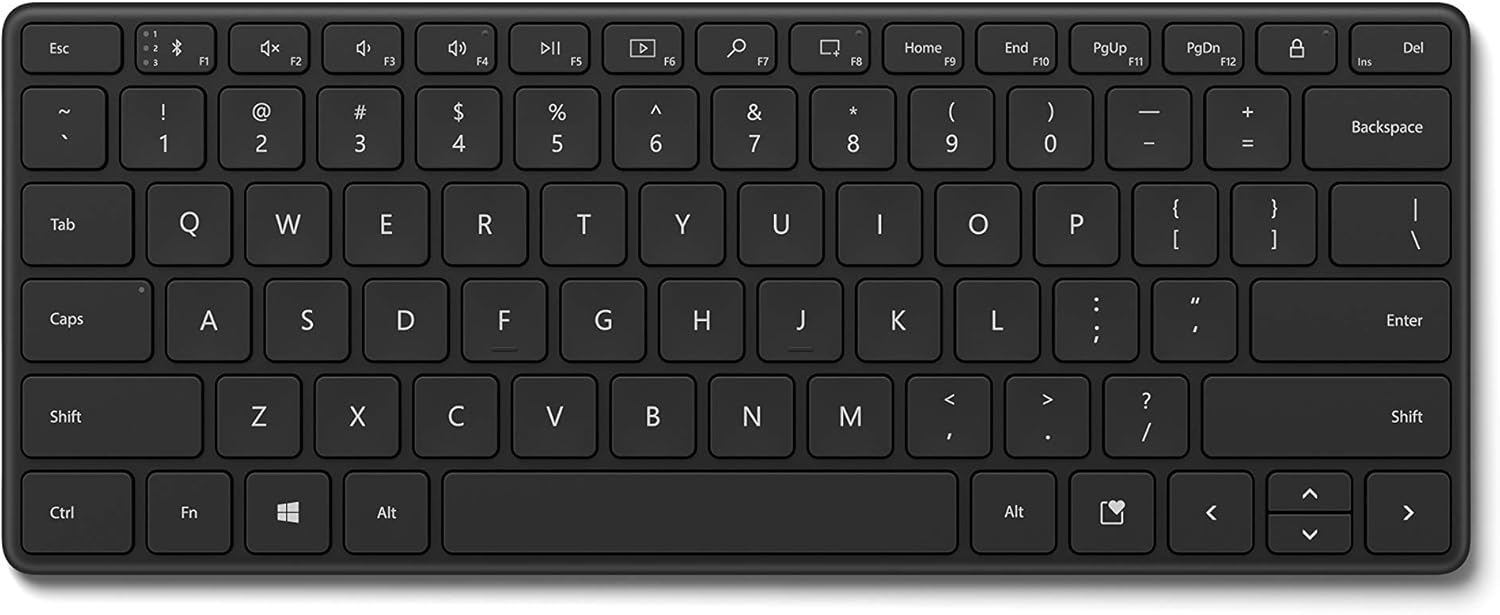
Obrázek 2: Shora dolů view of the keyboard, illustrating the key layout and special function keys.

Obrázek 3: Úhlové view klávesnice, ukázkaasing its compact size and low profile.
Údržba
To ensure the longevity and optimal performance of your Microsoft Designer Compact Keyboard, follow these maintenance guidelines:
- Čištění: Použijte měkký hadřík, který nepouští vlákna dampened with water or a mild cleaning solution to wipe down the keys and surface. Avoid abrasive cleaners or solvents.
- Odstranění prachu: K odstranění prachu a nečistot z prostoru mezi klávesami použijte stlačený vzduch.
- Vyvarujte se rozlití: Chraňte klávesnici před tekutinami, abyste zabránili poškození vnitřních součástí. V případě polití klávesnici okamžitě vypněte a nechte ji před dalším použitím zcela vyschnout.
- Skladování: When not in use for extended periods, turn off the keyboard to conserve battery life. Store it in a cool, dry place away from direct sunlight.
Odstraňování problémů
If you encounter issues with your Microsoft Designer Compact Keyboard, refer to the following common solutions:
- Klávesnice se nepřipojuje nebo se často odpojuje:
- Ensure the keyboard is powered on and within range of your device (typically up to 33 feet or 10 meters).
- Check the battery level. Replace batteries if they are low.
- Try re-pairing the keyboard with your device. Go to your device's Bluetooth settings, remove the keyboard, and then re-add it.
- Ujistěte se, že ovladače Bluetooth vašeho zařízení jsou aktuální.
- If the keyboard enters standby and takes a moment to wake up, this is normal behavior designed to conserve battery life.
- Klávesy nereagují nebo se píší nesprávně:
- Vyčistěte klávesnici a odstraňte veškeré nečistoty, které by mohly blokovat klávesy.
- Verify that the batteries are installed correctly and have sufficient charge.
- Test the keyboard with another device to determine if the issue is with the keyboard or the original device.
- Accidental F1 key presses (Bluetooth pairing button):
- Be mindful of the F1 key's function as a Bluetooth pairing button. Avoid resting fingers or objects on it during normal use.
- If accidentally pressed, the keyboard may enter pairing mode. Wait for the pairing function to time out, or re-select your desired paired device using F1, F2, or F3.
- Bez podsvícení:
- The Microsoft Designer Compact Keyboard does not feature a backlight. This is by design to maximize battery life.
Specifikace
| Funkce | Detail |
|---|---|
| Značka | Microsoft |
| Číslo modelu | 21Y-00001 |
| Technologie připojení | Bezdrátové (Bluetooth) |
| Kompatibilní zařízení | PC (Windows 10 with latest updates), Mac (Bluetooth Enabled) |
| Barva | Matná černá |
| Hmotnost položky | 15.2 unce |
| Rozměry produktu (DxŠxV) | 11.18 x 4.36 x 0.38 palce |
| Zdroj napájení | Napájení z baterie |
| Jsou vyžadovány baterie | 4 Lithium Metal (DL2032) |
| Životnost baterie | Up to 36 months (approximate, varies with usage) |
| Počet klíčů | 78 |
| Speciální funkce | Portable, Multi-device support |
Záruka a podpora
This product is covered by Microsoft's standard limited warranty. For detailed warranty information, please refer to the warranty card included in your product packaging or visit the official Microsoft support webmísto.
For technical support, troubleshooting assistance, or to register your product, please visit the official Microsoft Support page:
You can also find additional resources and FAQs on the Microsoft webmísto.


