Zavedení
The UMAX Air Mouse M1 is a versatile wireless controller designed to enhance your interaction with various devices. Featuring a built-in gyroscope for precise air mouse functionality, a full QWERTY keyboard for easy text input, and voice control capabilities, it offers a comprehensive solution for navigation and command. Its ergonomic design ensures comfortable handling, and the integrated Li-Ion battery provides extended usage time. This manual will guide you through the setup, operation, and maintenance of your Air Mouse M1.

Obrázek 1: Přední strana view of the UMAX Air Mouse M1, showing the directional pad, OK button, volume controls, and voice button.
Obsah balení
Ujistěte se prosím, že balení obsahuje všechny položky:
- UMAX Air Mouse M1
- USB přijímač
- Nabíjecí kabel
- Uživatelská příručka (tento dokument)
Nastavení
1. Nabíjení zařízení
The UMAX Air Mouse M1 comes with a built-in Li-Ion battery. Before first use, it is recommended to fully charge the device. Connect the charging cable to the charging port on the Air Mouse and the other end to a standard USB power source (e.g., computer USB port, USB wall adapter).
2. Připojení USB přijímače
The Air Mouse M1 connects wirelessly via a USB receiver. Locate the USB receiver, typically stored within the battery compartment or a dedicated slot on the device itself. Insert the USB receiver into an available USB port on your target device (e.g., Smart TV, PC, Android TV Box).
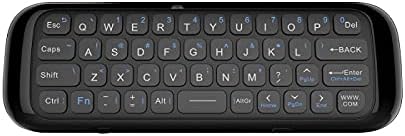
Obrázek 2: Zpět view of the UMAX Air Mouse M1, showing the full QWERTY keyboard.
3. Initial Pairing (Automatic)
Once the USB receiver is plugged in, the Air Mouse M1 should automatically pair with your device. No manual pairing steps are typically required. The device should be ready for use within a few seconds.
Návod k obsluze
1. Air Mouse Function
The Air Mouse M1 utilizes a gyroscope for cursor control. Hold the remote in your hand and move your wrist to control the on-screen cursor. The cursor will follow your hand movements. Press the OK button to click.
2. Vstup z klávesnice
Flip the Air Mouse M1 over to access the full QWERTY keyboard. Use the keys to type text as you would on a standard keyboard.
3. Hlasové ovládání
Stiskněte a podržte příslušné tlačítko Hlas button (often indicated by a microphone icon) to activate voice input. Speak clearly into the microphone located on the device. Release the button when you have finished speaking. This feature requires compatible software or operating system support on your connected device.
4. Funkce tlačítek
- Vypínač: Turns the device on/off or puts it into sleep mode.
- Tlačítko OK: Confirms selection, acts as left-click.
- Směrová podložka: Navigace v nabídkách a výběrech.
- Volume Buttons (V+/V-): Upravuje hlasitost zvuku.
- Tlačítko Domů: Returns to the home screen of the connected device.
- Tlačítko Zpět: Navigace zpět v nabídkách nebo aplikacích.
- Tlačítko nabídky: Opens context-sensitive menus.
Údržba
1. Péče o baterie
The UMAX Air Mouse M1 is equipped with a rechargeable Li-Ion battery. To prolong battery life:
- Vyhněte se častému úplnému vybíjení baterie.
- Charge the device when the low battery indicator appears.
- Pokud zařízení nebudete delší dobu používat, skladujte jej na chladném a suchém místě.
2. Čištění
K čištění zařízení použijte měkký, suchý hadřík. V případě odolných nečistot použijte lehceamp cloth can be used, but ensure no moisture enters the device's ports or openings. Do not use harsh chemicals or abrasive cleaners.
Odstraňování problémů
| Problém | Možná příčina | Řešení |
|---|---|---|
| Zařízení nereaguje | Low battery; USB receiver not connected; Device not paired. | Charge the device; Ensure USB receiver is securely plugged in; Re-insert USB receiver to re-establish connection. |
| Kurzor je nepravidelný nebo se nepohybuje plynule | Interference; Low battery. | Move closer to the USB receiver; Ensure no strong electromagnetic interference; Charge the device. |
| Klávesnice nepíše | Device in air mouse mode; Low battery. | Ensure the device is flipped to the keyboard side; Charge the device. |
| Hlasové ovládání nefunguje | Microphone blocked; No internet connection on host device; Host device does not support voice input. | Ensure microphone is clear; Check host device's internet connection; Verify host device's compatibility with voice input. |
Specifikace
- Model: UMAX Air Mouse M1 (laishutin)
- Technologie detekce pohybu: Gyroskopická stabilizace
- Konektivita: Bezdrátový (USB přijímač)
- Baterie: 1 lithium-iontová baterie (součástí balení)
- Barva: Pomerančový (Note: Product images show a black device, but specifications list 'Orange'.)
- Hmotnost položky: 7 unce (0.2 kilogramů)
- Rozměry balení: 7.09 x 3.94 x 0.79 palce
- Kompatibilní operační systémy: Android, Windows, Linux
Podpora a záruka
For technical support or inquiries regarding your UMAX Air Mouse M1, please refer to the official UMAX website or contact their customer service. Specific warranty details may vary by region and retailer. Please retain your proof of purchase for warranty claims.
Pro více informací navštivte: UMAX Official Webmísto


