Zavedení
Děkuji za nákupasing the Salange Mini Projector. This portable projector is designed to provide a versatile and immersive viewing experience for various applications, from home entertainment to outdoor movie nights. Featuring Full HD support, high brightness, and multiple connectivity options, it offers a convenient solution for projecting content from smartphones, gaming consoles, and other media devices. This manual provides detailed instructions for setup, operation, maintenance, and troubleshooting to ensure optimal performance and longevity of your device.
Bezpečnostní informace
Před použitím projektoru si pečlivě přečtěte všechny bezpečnostní pokyny. Uschovejte si tento návod k obsluze pro budoucí použití.
- Neblokujte větrací otvory. Zajistěte dostatečné proudění vzduchu kolem projektoru, abyste zabránili jeho přehřátí.
- Nedívejte se přímo do objektivu projektoru, když je zapnutýamp svítí. Jasné světlo může způsobit poškození očí.
- Používejte pouze napájecí adaptér dodaný s projektorem. Použití neschváleného adaptéru může způsobit poškození nebo požár.
- Nevystavujte projektor dešti, vlhkosti ani extrémním teplotám.
- Neumisťujte projektor na nestabilní povrchy.
- Během bouřek nebo pokud přístroj delší dobu nepoužíváte, odpojte napájecí kabel.
- Nepokoušejte se projektor opravovat sami. Veškerý servis svěřte kvalifikovanému personálu.
Co je v krabici
Po vybalení zkontrolujte, zda jsou všechny položky přítomny:
- 1 x Salange Mini Projector (Model P62H / HY300US)
- 1 x Dálkové ovládání
- 1 x HDMI kabel
- Signální kabel 1 x AV
- 1 x napájecí kabel
- 1 x Uživatelská příručka (Tento dokument)

Figure 1: Salange Mini Projector with remote control.
Konec produktuview
Familiarize yourself with the main components and ports of your Salange Mini Projector.

Obrázek 2: Shora dolů view of the Salange Mini Projector, highlighting its compact design.
Přední panel
- Projekční čočka: Promítá obraz na plátno nebo zeď.
- Zaostřovací kroužek: Upravuje jasnost promítaného obrazu.
- Korekce lichoběžníkového zkreslení: Opravuje lichoběžníkové zkreslení obrazu.
Rear Panel (Connectivity)

Obrázek 3: Zadní view of the projector, illustrating its multiple connection ports.
- Port HDMI: Connects to devices like laptops, gaming consoles (PS5), Fire TV Stick, Roku, etc.
- USB Ports (USB-1, USB-T): Connects USB drives for media playback.
- AV port: Připojuje se ke starším zařízením pomocí AV kabelu.
- VGA port: Připojuje se k počítačům s VGA výstupem.
- Audio výstup (3.5 mm): Připojuje se k externím reproduktorům nebo sluchátkům.
- Příkon: Připojuje napájecí adaptér.
Nastavení
1. Umístění
Place the projector on a stable, flat surface. Ensure there are no obstructions to the projection path or the ventilation openings. The ideal projection distance ranges from 2.6 ft to 18.0 ft, yielding screen sizes from 30 inches to 176 inches. For optimal viewing, a darker environment is recommended.

Figure 4: Recommended projection distances and screen sizes for the projector.
3. Připojení napájení
Connect the power cable to the projector's power input port, then plug the other end into a power outlet.
3. Zaostření a korekce lichoběžníkového zkreslení
After powering on, adjust the focus ring on the top of the projector until the image is clear. If the image appears trapezoidal, use the keystone correction dial to square the image.
4. Připojení zařízení
Projektor podporuje různé vstupní zdroje:
- HDMI: Connect your laptop, gaming console, or streaming device (e.g., Fire TV Stick) using an HDMI cable.
- USB: Insert a USB flash drive into one of the USB ports for direct media playback.
- AV: Use the provided AV cable to connect to devices with AV output.
- VGA: Connect to a computer using a VGA cable.
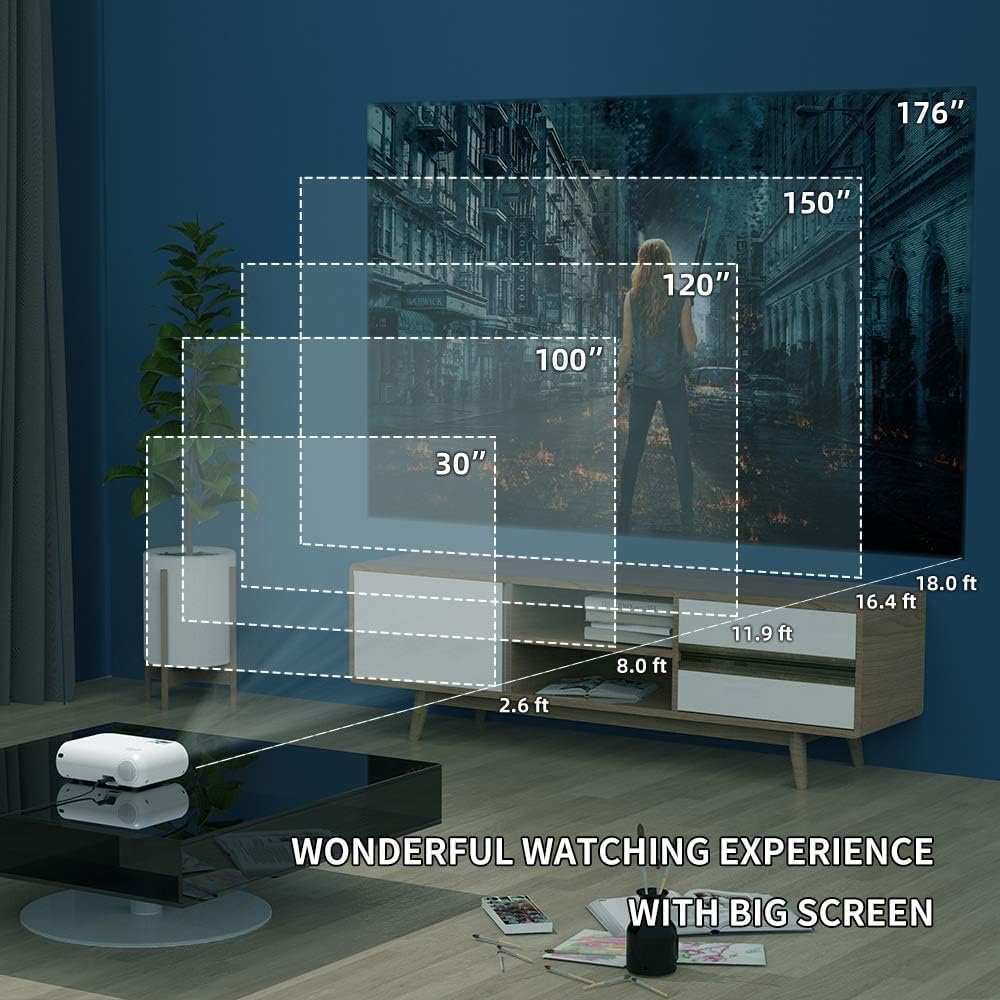
Figure 5: The projector's compatibility with multiple devices, including laptops, smartphones, and gaming consoles.
Návod k obsluze
1. Zapnutí/vypnutí
Stisknutím tlačítka napájení na projektoru nebo na dálkovém ovladači zapnete nebo vypnete zařízení.
2. Výběr zdroje vstupu
Use the "Source" button on the remote or projector to cycle through available input sources (HDMI, USB, AV, VGA, WiFi).
3. Bezdrátové zrcadlení obrazovky (WiFi)
The Salange Mini Projector supports wireless screen mirroring for both iOS and Android devices via WiFi connection.

Figure 6: Wireless screen mirroring in action, showing a smartphone's display projected.
Pro zařízení se systémem iOS:
- Select "Screen Mirroring for iOS System" on the projector's input menu.
- Connect your iOS device to the projector's WiFi network (e.g., "RKcast-xxxxxx"). The password is usually displayed on the projector screen.
- On your iOS device, open Control Center and tap "Screen Mirroring" (or "AirPlay Mirroring").
- Select the projector's name (e.g., "RKcast-xxxxxx") from the list to begin mirroring.
Pro zařízení Android:
- Select "Screen Mirroring for Android System" on the projector's input menu.
- On your Android device, enable "Wireless Display," "Multi-screen," "Smart View," or similar function (names vary by device).
- Select the projector's name from the detected devices to connect.
Note: Due to copyright restrictions, direct screen mirroring of certain streaming services like Netflix, Amazon Prime Video, and Hulu is not supported. For these services, it is recommended to use an external streaming device like an Amazon Fire TV Stick connected via HDMI.
Video 1: Official demonstration of the Salange Mini Projector's wireless screen mirroring capabilities and general usage.
4. Zvukový výstup
The projector has built-in Hi-Fi dual stereo speakers. For enhanced audio, connect external speakers or headphones to the 3.5mm audio out port.
Údržba
1. Čištění čočky
Používejte měkký hadřík bez žmolků, speciálně určený pro optické čočky. Nepoužívejte abrazivní čisticí prostředky ani hadříky, které by mohly čočku poškrábat.
2. Čištění těla projektoru
Otřete vnější povrch měkkým, suchým hadříkem. V případě odolných skvrn použijte lehceamp Lze použít hadřík a poté otřít do sucha.
3. Skladování
When not in use, store the projector in a cool, dry place, away from direct sunlight and excessive dust. It is recommended to use the original packaging for storage.
Odstraňování problémů
| Problém | Možná příčina | Řešení |
|---|---|---|
| Žádný promítaný obraz | Napájení není připojeno; Nesprávný vstupní zdroj; Nasazená krytka objektivu. | Zkontrolujte připojení napájení; vyberte správný vstupní zdroj; sejměte krytku objektivu. |
| Obraz je rozmazaný | Mimo zaostření; Nesprávná projekční vzdálenost. | Nastavení zaostřovacího kroužku; Nastavení projekční vzdálenosti. |
| Obrázek je lichoběžníkový | Projektor není kolmý k promítací ploše. | Upravte kolečko pro korekci lichoběžníkového zkreslení. |
| Žádný zvuk | Volume too low; Muted; External audio device not connected or configured. | Zvýšit hlasitost; Zapnout zvuk; Zkontrolovat připojení a nastavení externího zvuku. |
| Wireless mirroring not working | Incorrect WiFi connection; Device compatibility; App restrictions. | Ensure correct WiFi network and password; Verify device compatibility; Use HDMI for restricted content. |
Specifikace
| Funkce | Detail |
|---|---|
| Značka | Salange |
| Číslo modelu | HY300US |
| Podporované rozlišení | 1920x1080P |
| Jas | 9600 l |
| Kontrastní poměr | 10000:1 |
| Technologie připojení | WIFI, HDMI, USB, AV, VGA |
| Typ reproduktoru | Built-In Hi-Fi Dual Stereo Speakers |
| Lamp Život | Až 60,000 hodin |
| Rozměry produktu | 6.69 x 3.74 x 3.74 palce |
| Hmotnost položky | 3.08 libry |

Figure 7: Visual representation of the projector's upgraded brightness (9600 Lux) and color contrast.
Záruka a podpora
Salange provides lifetime professional technical support for this product. For any questions, issues, or warranty claims, please contact Salange customer service through the retailer's platform or the official Salange website. Please have your model number (HY300US) and purchase details ready when contacting support.
Pro více informací navštivte Salange Store on Amazon.


