1. Úvod
This manual provides instructions for the safe and efficient operation, maintenance, and troubleshooting of your MISTRAL Mimica MHV901R High Velocity Table Fan. Please read this manual thoroughly before using the appliance and retain it for future reference.
2. Bezpečnostní pokyny
- Always ensure the fan is unplugged from the power outlet before cleaning, maintenance, or when not in use.
- Nevkládejte prsty ani žádné předměty do mřížky, když je ventilátor v provozu.
- Keep the fan away from water or other liquids. Do not operate in wet or damp prostředí.
- Ujistěte se, že napájecí kabel není poškozený, přiskřípnutý nebo umístěn pod těžké předměty.
- Tento spotřebič není určen k tomu, aby ho používaly osoby (včetně dětí) se sníženými fyzickými, smyslovými nebo duševními schopnostmi nebo nedostatkem zkušeností a znalostí, pokud na ně nebude dohlíženo nebo na ně nebude dohlížet osoba odpovědná za jejich bezpečnost nebo je poučit o používání spotřebiče. .
- Nepoužívejte ventilátor v blízkosti záclon, rostlin nebo jiných předmětů, které by mohly bránit proudění vzduchu nebo být nasávány ventilátorem.
- Umístěte ventilátor na stabilní, rovný povrch, aby se zabránilo jeho převrácení.
3. Konec produktuview
The MISTRAL Mimica MHV901R is a 9-inch high velocity table fan designed for efficient air circulation. It features sensor touch controls, an LED display, and a remote control for convenient operation.

Obrázek 1: Přední strana view of the MISTRAL Mimica MHV901R High Velocity Table Fan.

Figure 2: Close-up of the control panel on the fan base, showing touch buttons for various functions.
Klíčové vlastnosti:
- Dotykové senzorové ovládání
- Zobrazení pokojové teploty
- LED displej
- 3 speed selections
- 8 hodinový časovač
- Automatic up and down oscillation of 70°
- Automatic left and right oscillation of 70°
- Natural and Eco modes
- Včetně dálkového ovládání
- Back handle for easy portability
4. Nastavení
4.1 Vybalení
- Opatrně vyjměte ventilátor a veškerý balicí materiál z krabice.
- Verify that all components are present: the fan unit and the remote control.
- Retain packaging for storage or in case of return.
4.2 Umístění
Place the fan on a firm, level surface. Ensure there is adequate space around the fan for optimal airflow and oscillation. Avoid placing the fan directly against walls or furniture that could obstruct its movement.
4.3 Připojení napájení
- Ensure the fan is in the OFF position before plugging it in.
- Plug the power cord into a standard electrical outlet. The fan operates on corded electric power.

Obrázek 3: Zpět view of the fan with the power cord and handle.
5. Návod k obsluze
The fan can be operated using the sensor touch controls on the base or the included remote control.
5.1 Zapnutí/vypnutí
- Stiskněte tlačítko Moc tlačítko (
 ) on the control panel or remote to turn the fan ON or OFF.
5.2 Volba rychlosti
- Stiskněte tlačítko Rychlost tlačítko () repeatedly to cycle through the 3 available fan speeds. The LED display will indicate the current speed setting.
5.3 Oscilace
- Stiskněte tlačítko Horizontální oscilace tlačítko () to activate or deactivate the automatic 70° left and right oscillation.
- Stiskněte tlačítko Vertikální oscilace tlačítko () to activate or deactivate the automatic 70° up and down oscillation.
5.4 Modes (Natural & Eco)
- Stiskněte tlačítko Režim tlačítko () to switch between Normal, Natural, and Eco modes.
- Přirozený režim: Simuluje přirozený vánek změnou rychlosti ventilátoru.
- Eko režim: Adjusts fan speed based on room temperature for energy efficiency.
5.5 Funkce časovače
- Stiskněte tlačítko Časovač tlačítko (
 ) repeatedly to set the desired operating time up to 8 hours. The fan will automatically turn off after the set time.
5.6 Zobrazení pokojové teploty
The LED display on the fan base shows the current room temperature, providing ambient information at a glance.
6. Údržba
6.1 Čištění
- Před čištěním vždy odpojte ventilátor.
- Použijte měkký, damp hadříkem otírejte vnější povrchy ventilátoru. Nepoužívejte abrazivní čisticí prostředky ani rozpouštědla.
- For cleaning the fan blades, use a vacuum cleaner with a brush attachment or compressed air to remove dust from the grilles.
- Před opětovným zapojením a spuštěním ventilátoru se ujistěte, že je zcela suchý.
6.2 Skladování
When not in use for extended periods, store the fan in its original packaging in a cool, dry place, away from direct sunlight and moisture.
7. Řešení problémů
- Ventilátor se nezapne:
- Zkontrolujte, zda je napájecí kabel bezpečně zapojený do funkční elektrické zásuvky.
- Ujistěte se, že bylo stisknuto tlačítko napájení.
- Fan is not oscillating:
- Verify that the oscillation button for the desired direction (horizontal or vertical) has been activated.
- Slabé proudění vzduchu:
- Check if the fan speed is set to a higher setting.
- Ensure the grilles are not blocked by dust or debris. Clean as per maintenance instructions.
Pokud problémy přetrvávají, kontaktujte prosím zákaznickou podporu.
8. Specifikace
| Funkce | Detail |
|---|---|
| Značka | MISTRAL |
| Model | MHV901R |
| Design elektrického ventilátoru | Stolní ventilátor |
| Velikost | 9 palců |
| Barva | Bílý |
| Zdroj napájení | Elektrický kabel |
| Wattage | 45.0 wattů |
| Rozměry produktu | 24 D x 33.2 W x 23 V centimetrů |
| Hmotnost položky | 2.1 kg |
| Počet kusů | 1 |
| Typ ovladače | Dálkové ovládání |
| Speciální funkce | Remote Controlled, Timer, Sensor Touch, Room Temperature Display, LED Display, Natural & Eco Modes, Automatic Oscillation (70° Up/Down, 70° Left/Right) |
| Typ montáže | Stolní držák |
| Typ pokoje | Home Office |
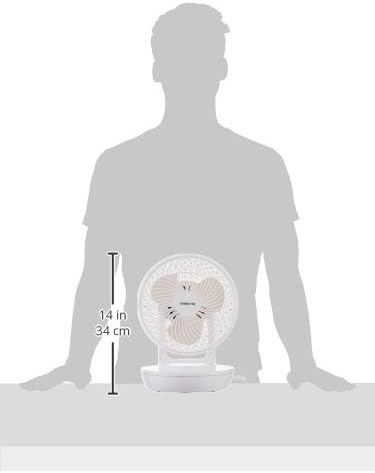
Figure 4: Product dimensions for the MISTRAL Mimica MHV901R fan.
9. Záruka a podpora
9.1 Informace o záruce
This MISTRAL Mimica MHV901R fan comes with a 1-Year Standard Brand Warranty od data nákupu. Uschovejte si prosím doklad o koupi pro případné reklamace.
9.2 Zásady vrácení zboží
For information regarding returns or replacements, please refer to the retailer's specific return policy. For purchases made on Amazon, a 15-day refund/replacement policy typically applies.
9.3 Zákaznická podpora
For technical assistance, warranty claims, or further inquiries, please contact MISTRAL customer support through their official webwebu nebo kontaktních údajů uvedených v nákupní dokumentaci.


