Zavedení
Thank you for choosing the AGFA PHOTO Realiview APF700 Digital Photo Frame. This device allows you to display your favorite photos with a clear 1024 x 600 LED screen. It also includes convenient features such as a clock, calendar, and programmable on/off times for energy saving. This manual provides essential information for setting up, operating, and maintaining your digital photo frame.
Konec produktuview
Klíčové vlastnosti
- 7-inch (17.8 cm) HD LED Screen (1024 x 600 resolution)
- Photo Display Functionality
- Integrated Clock and Calendar Modes
- Programmable Auto On/Off for Energy Saving
- Supports SD, SDHC, MMC cards (up to 32GB) and USB 2.0
- Compatible with JPEG, JPG, and BMP image formats
Přední View
The front of the digital photo frame features the 7-inch LED display, designed to showcase your photos with clarity.

Obrázek: Přední strana view of the AGFA PHOTO Realiview APF700, highlighting its photo display, clock, and calendar features.
Zadní View a porty
The back of the frame houses all necessary ports and control buttons for operation.

Obrázek: Zadní view of the digital photo frame, illustrating the SD, SDHC, MMC card slots, and USB port for memory input.
- SD/SDHC/MMC Card Slot: Insert your memory card here.
- USB port: Připojte USB flash disk.
- DC IN: Připojení napájecího adaptéru.
- Ovládací tlačítka: Pro navigaci v menu a úpravu nastavení.
- Vypínač: Pro zapnutí nebo vypnutí zařízení.
Nastavení
- Rozbalení: Carefully remove the digital photo frame and all accessories from the packaging. Ensure all components are present: the photo frame, power adapter, and quick start guide.
- Připojení napájení: Connect the power adapter to the DC IN port on the back of the frame. Plug the other end of the adapter into a standard electrical outlet (100-240V).
- Insert Memory Card/USB Drive:
- Insert an SD, SDHC, or MMC memory card (up to 32GB) into the designated card slot until it clicks into place.
- Alternatively, insert a USB flash drive into the USB port.
- Ensure your photos are in JPEG, JPG, or BMP format.
- Zapnutí: Press the Power button on the back of the frame to turn it on. The device will typically start displaying photos automatically from the inserted memory source.
- Počáteční nastavení: Upon first use, you may need to set the language, time, and date using the control buttons and on-screen menu.
Návod k obsluze
Základní navigace
Use the buttons on the back of the frame to navigate through menus and adjust settings. Typically, there are directional buttons (Up, Down, Left, Right) and an OK/Enter button. A Menu button allows access to main settings.
Photo Display and Slideshow
Once a memory card or USB drive with photos is inserted, the frame will usually begin a slideshow automatically. You can customize slideshow settings:
- Rychlost prezentace: Adjust the duration each photo is displayed (e.g., 3s, 5s, 10s, 1min).
- Přechodové efekty: Select different visual effects between photos.
- Mód opakování: Choose to repeat a single file, a directory, or all files.
Clock and Calendar Functions
The Realiview APF700 includes a built-in clock and calendar. These can be accessed via the main menu. You can set the time and date, and choose to display them alongside your photos or as a standalone screen.
Programmable Auto On/Off (Energy Saving)
To conserve energy and for convenience, you can program specific times for the frame to automatically turn on and off.

Image: The digital photo frame illustrating its energy-saving programmable auto on/off feature.
- Access the 'Settings' or 'System' menu.
- Locate the 'Timer' or 'Auto On/Off' option.
- Set your desired 'Power On Time' and 'Power Off Time'.
- Save your settings. The frame will now power on and off according to your schedule.
Údržba
- Čištění obrazovky: K jemnému otření obrazovky použijte měkký hadřík, který nepouští vlákna. V případě odolných šmouh lehceampOmyjte hadřík vodou nebo roztokem na čištění obrazovky. Nepoužívejte agresivní chemikálie ani abrazivní materiály.
- Čištění rámu: Tělo rámu otřete suchým, měkkým hadříkem.
- Skladování: When not in use for extended periods, disconnect the power adapter and store the frame in a cool, dry place, away from direct sunlight and extreme temperatures.
- Vyhněte se tekutinám: Nevystavujte zařízení vodě nebo jiným kapalinám.
Odstraňování problémů
| Problém | Možná příčina | Řešení |
|---|---|---|
| Rám se nezapne. | Napájecí adaptér není připojen nebo je vadný; problém se zásuvkou. | Ujistěte se, že je napájecí adaptér bezpečně připojen k rámu a k funkční elektrické zásuvce. Zkuste jinou zásuvku. |
| No photos displayed. | No memory card/USB inserted; unsupported file format; card/USB faulty or empty. | Insert a memory card or USB drive with photos. Ensure photos are JPEG, JPG, or BMP. Check if the card/USB contains actual photo files. Try a different memory source. |
| Photos appear cropped or distorted. | Image aspect ratio does not match frame's 16:10 ratio. | The frame displays images at a 16:10 aspect ratio. Images with different ratios may be cropped to fit. Adjust image aspect ratio on your computer if necessary. |
| Tlačítka nereagují. | Dočasná softwarová závada. | Turn off the frame, disconnect the power, wait a few seconds, then reconnect and power on again. |
Specifikace
Detailed technical specifications for the AGFA PHOTO Realiview APF700 Digital Photo Frame.
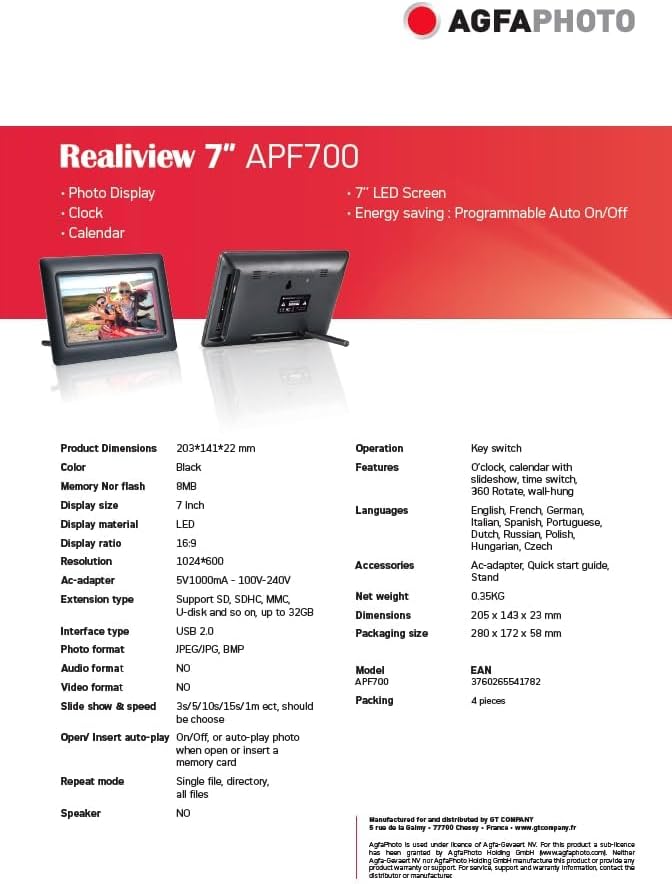
Image: Official specification sheet for the Realiview 7" APF700.
| Funkce | Detail |
|---|---|
| Značka | AgfaPhoto |
| Model | APF700 |
| Velikost obrazovky | 7 palců (17.8 cm) |
| Typ zobrazení | LED |
| Rezoluce | 1024 x 600 pixelů |
| Poměr zobrazení | 16:9 |
| Podporované formáty fotografií | JPEG, JPG, BMP |
| Typ rozhraní | USB 2.0 |
| Extension Type (Memory) | Supports SD, SDHC, MMC (up to 32GB) |
| Vstup AC adaptéru | 100-240V |
| Výstup AC adaptéru | 5V/1000mA |
| Rozměry produktu (D x Š x V) | 20.5 x 14.2 x 2.5 cm |
| Hmotnost položky | 350 gramů |
| Materiál rámu | Plast |
| Vstup lidského rozhraní | Tlačítka |
Záruka a podpora
Information regarding specific warranty details and availability of spare parts for the AGFA PHOTO Realiview APF700 is not available in the provided product data. For support inquiries, please refer to the contact information provided with your purchase or visit the official AgfaPhoto webmísto.
Software update information is also not available.


