1. Konec produktuview
The XIAOMI Smartmi Standing Floor Fan 3 is a portable, rechargeable DC pedestal fan designed to provide natural wind simulation and efficient air circulation. It features intelligent controls, a quiet operation, and a built-in battery for wireless use.
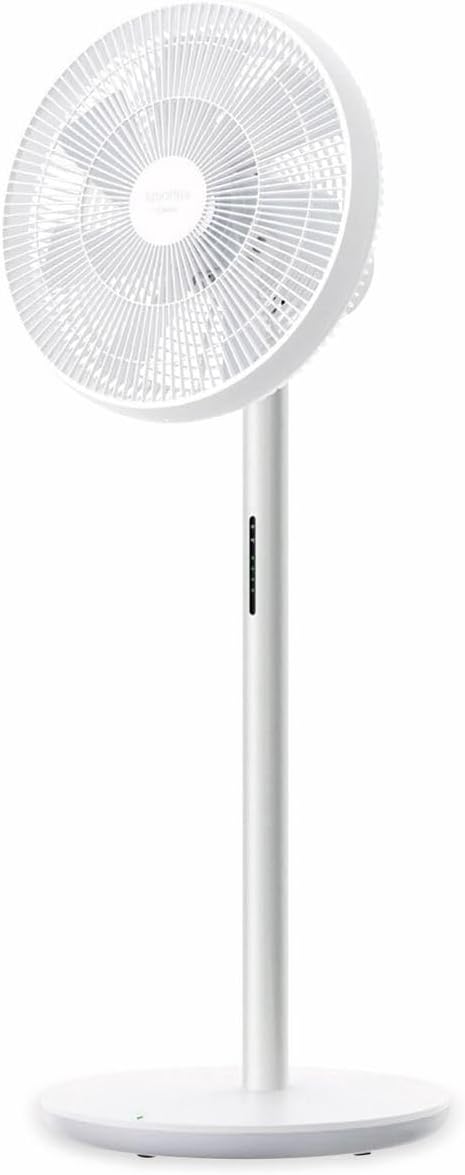
Obrázek 1.1: Přední view of the Smartmi Standing Floor Fan 3, showcasing its minimalist white design and fan head.

Obrázek 1.2: Boční profíkfile of the Smartmi Standing Floor Fan 3, highlighting its slim pedestal and stable base.
2. Nastavení a montáž
The Smartmi Standing Floor Fan 3 is designed for easy assembly. Follow these steps to set up your fan:
- Rozbalte komponenty: Carefully remove all components from the packaging. Ensure all parts are present: fan head, pedestal, base, power adapter, and remote control.
- Attach Pedestal to Base: Align the bottom of the pedestal with the opening in the base. Secure it firmly, typically with a screw provided, using the included tool or a standard screwdriver.
- Attach Fan Head to Pedestal: Connect the fan head to the top of the pedestal. Ensure it clicks into place or is secured according to the visual guides.
- Počáteční nabíjení: Before first use, connect the power adapter to the fan and a suitable power outlet. Allow the fan to charge for approximately 4 hours until fully charged. The power indicator on the pedestal will provide charging status.
- Připojení aplikace (volitelné): Download the Xiaomi Home app from your device's app store. Follow the in-app instructions to connect your fan via Wi-Fi (IEEE 802.11b/g/n 2.4GHz). This enables advanced control features.
3. Návod k obsluze
The fan can be operated using the physical buttons on the pedestal, the included Bluetooth remote control, or the Xiaomi Home app.
3.1 Zapnutí/vypnutí
- Fyzické tlačítko: Press the power button on the pedestal once to turn on, and again to turn off.
- Dálkové ovládání: Stiskněte tlačítko napájení na dálkovém ovladači.
- Xiaomi Home App: Use the power toggle within the app interface.
3.2 Nastavení rychlosti ventilátoru
- Dálkové ovládání: Use the speed adjustment buttons on the remote to cycle through available speeds.
- Xiaomi Home App: The app allows for precise adjustment across 100 different speed settings.
3.3 Wind Type Selection
The fan offers a 'Natural Wind' mode, which simulates irregular wind patterns for a more comfortable experience.
- Dálkové ovládání: Press the mode button to switch between standard and natural wind modes.
- Xiaomi Home App: Select the desired wind mode from the app interface.
3.4 Oscillation (Head Shaking)
The fan head can oscillate to distribute air across a wider area. The oscillation angle is adjustable via the app.

Obrázek 3.1: Illustration of the fan's adjustable oscillation angles (30°, 60°, 90°, 120°).
- Dálkové ovládání: Press the oscillation button to start or stop head shaking.
- Xiaomi Home App: Adjust the oscillation angle (30°, 60°, 90°, 120°) and control the oscillation function.
3.5 Funkce časovače
Set a timer for the fan to automatically turn off after a specified duration (up to 7.5 hours or more).
- Dálkové ovládání: Use the timer button to cycle through preset timer options.
- Xiaomi Home App: Set a precise timer duration.
3.6 Additional App Features
When connected to the Xiaomi Home app, you can access:
- Negative ion function activation.
- Screen brightness adjustment on the pedestal.
- Child safety lock activation.
4. Údržba
Pravidelné čištění zajišťuje optimální výkon a dlouhou životnost vašeho ventilátoru.
- Vypnout: Před čištěním vždy odpojte ventilátor od zdroje napájení.
- Čištění exteriéru: Wipe the exterior surfaces of the fan, pedestal, and base with a soft, damp hadříkem. Nepoužívejte abrazivní čisticí prostředky ani rozpouštědla.
- Čištění lopatek ventilátoru: For thorough cleaning, the front grille can typically be removed to access the fan blades. Use a soft brush or cloth to gently clean the blades. Ensure all parts are dry before reassembling.
- Skladování: If storing the fan for an extended period, ensure it is clean and dry. Store it in a cool, dry place, preferably in its original packaging.
5. Řešení problémů
- Ventilátor se nezapne:
- Ensure the fan is properly plugged into a working power outlet or that the internal battery is charged.
- Check if the power adapter is securely connected to the fan.
- Dálkové ovládání nereaguje:
- Vyměňte baterie v dálkovém ovladači.
- Ujistěte se, že mezi dálkovým ovladačem a ventilátorem nejsou žádné překážky.
- Problémy s připojením aplikace:
- Verify your Wi-Fi network is active and operating on the 2.4GHz band.
- If the fan is running on battery and has been off for a period, it may enter a deep sleep mode. In this state, it might not respond to app commands until the physical power button on the fan is pressed to wake it up.
- Ensure the Xiaomi Home app is updated to the latest version.
- Battery Charge Status Indication:
- The fan's battery indicator typically shows status changes for a limited duration (e.g., 20 seconds) rather than a continuous display. Observe the indicator during charging or immediately after powering on.
6. Specifikace
| Funkce | Specifikace |
|---|---|
| Značka | XIAOMI (Smartmi) |
| Číslo modelu | ZLBPLDS05ZM (6970403201486) |
| Jmenovitý výkon | 25W |
| Jmenovitý objemtage | 220V |
| Jmenovitá frekvence | 50 Hz |
| Kapacita baterie | 33.6 Wh / 288 mAh |
| Doba používání bezdrátové sítě | Až 4 hodin |
| Rozměry produktu | 340 × 330 × 960 mm (34 × 33 × 96 cm) |
| Čistá hmotnost | 3.5 kg |
| Úroveň hluku | 29 decibelů (minimálně) |
| Množství rotačních lopatek | 7 |
| Bezdrátové připojení | Wi-Fi IEEE 802.11b / g / n 2.4GHz |
| Režimy ovládání | Remote Controlled, App Controlled |
7. Záruka a podpora
For warranty information, please refer to the warranty card included with your product or contact your retailer. For technical support, please visit the official XIAOMI or Smartmi webwebu nebo se obraťte na jejich oddělení zákaznických služeb.
Uschovejte si doklad o koupi pro případné reklamace.