1. Úvod
The Korg SoundLink MW-1608 is a 16-channel hybrid mixer designed for a wide range of audio applications, including studio recording and live sound reinforcement. This mixer integrates both analog and digital processing to provide comprehensive control over audio signals. It features high-quality components such as HiVolt microphone preamps, Velvet Sound AD/DA converters, and ALPS faders.
Key functionalities include per-channel 3-band equalizers, 1-knob compressors, mute groups, a dedicated monitor section, feedback suppression, all-XLR speaker outputs, a built-in spectrum analyzer, and a suite of Korg digital effects. This manual provides essential information for the proper setup, operation, maintenance, and troubleshooting of your MW-1608 mixer.
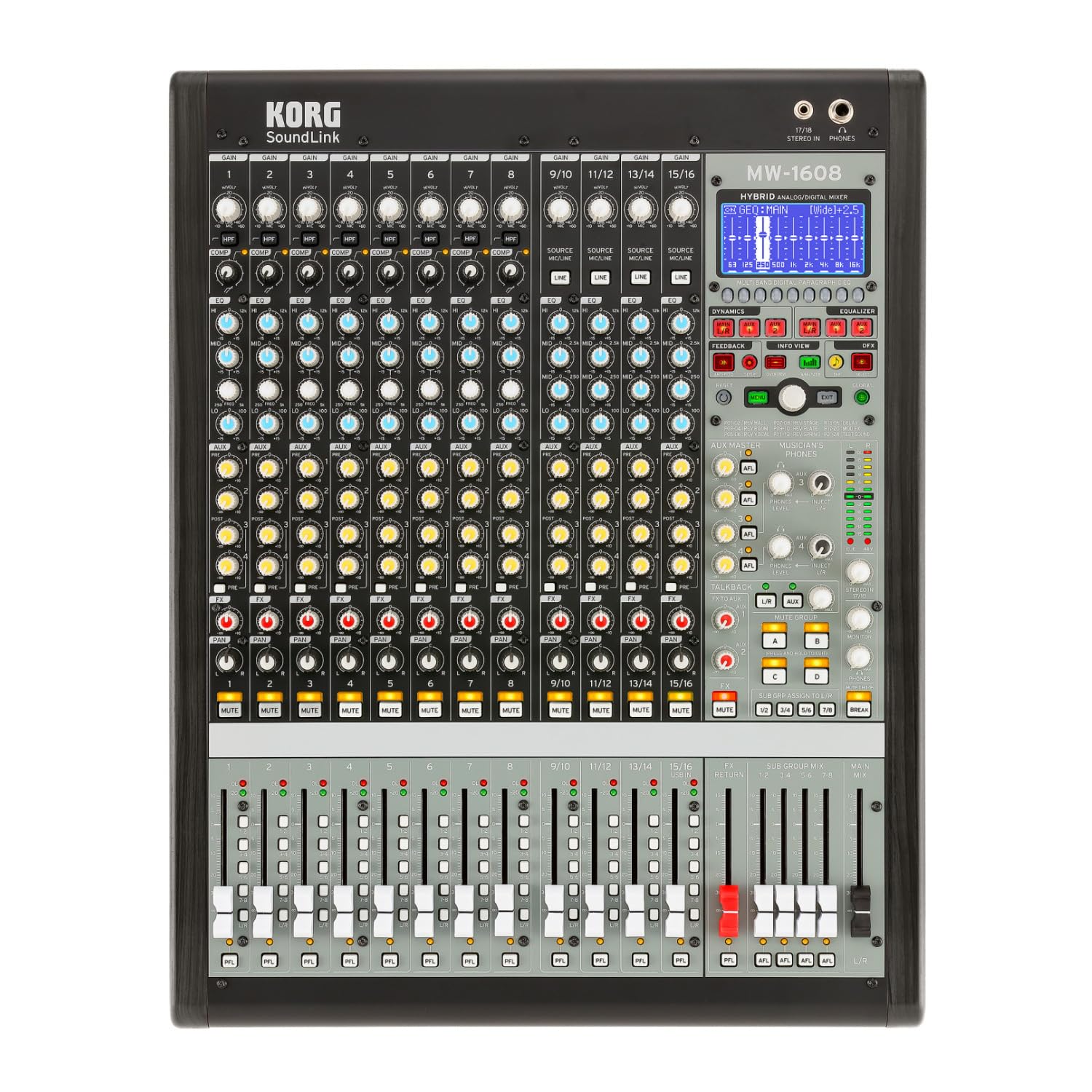
Obrázek 1: Přední strana view of the Korg SoundLink MW-1608 mixer, showing the control surface with faders, knobs, and display.
2. Nastavení
Before operating the Korg SoundLink MW-1608, ensure all connections are made correctly and securely. This section outlines the basic steps for setting up your mixer.
2.1 Vybalení a umístění
- Carefully remove the mixer from its packaging. Retain all packaging materials for future transport or storage.
- Place the mixer on a stable, flat surface with adequate ventilation. Avoid placing it near heat sources or in direct sunlight.
- Ensure sufficient space around the unit for cable connections and heat dissipation.
2.2 Připojení napájení
- The MW-1608 operates on a "Corded Electric" power source.
- Connect the supplied AC power cord to the mixer's power input on the rear panel.
- Plug the other end of the power cord into a suitable electrical outlet. Ensure the power switch is in the OFF position before connecting.
2.3 Audio připojení
The MW-1608 offers various input and output options. Refer to the rear panel diagram below for connection points.

Obrázek 2: Zadní view of the Korg SoundLink MW-1608 mixer, showing various input and output connectors.
- Vstupy mikrofonu: Connect microphones to the XLR inputs (channels 1-12, 15/16, 13/14, 11/12, 9/10, 7, 6, 5, 4, 3, 2, 1) using balanced XLR cables.
- Řádkové vstupy: Connect line-level devices (e.g., keyboards, media players) to the 1/4-inch TRS or RCA line inputs.
- Hlavní výstupy: Připojte hlavní reproduktory nebo napájecí amplifier to the MAIN OUT (XLR L/R) connectors. The mixer features "XLR" output connector type.
- Pomocné výstupy: Use the AUX OUT (XLR) connectors for monitor mixes or external effects processors.
- Výstupy skupiny: Utilize the GROUP OUT (XLR) for sub-mixes.
- USB připojení: The USB port allows for connection to a computer for recording or playback.
3. Návod k obsluze
Tato sekce poskytuje přesview of the Korg SoundLink MW-1608's operational features and controls.
3.1 Ovládání kanálů
- Vstupní zisk: Adjust the input sensitivity for each channel to achieve optimal signal levels.
- 3pásmový EQ: Each channel features a 3-band equalizer for tone shaping. Adjust the HIGH, MID, and LOW frequency bands as needed.
- 1-Knob Compressor: Engage and adjust the built-in compressor on individual channels to control dynamics and add punch.
- Aux sendy: Route channel signals to auxiliary outputs for monitor mixes or external effects.
- Ovládání posunu: Position the channel's signal within the stereo field.
- Tlačítko ztlumení: Silences the channel's output.
- Fader kanálu: Controls the volume level of the individual channel in the main mix.
3.2 Hlavní sekce
- Hlavní fadery mixu: Ovládá celkovou výstupní úroveň stereo hlavního mixu.
- Group Faders: Adjust the output levels of the 8-bus groups.
- Monitor Section: Provides control over headphone and control room outputs. The "Musician's Phone Feature" allows for dedicated monitoring.
- Digitální efekty: Access and apply Korg's studio-quality digital effects to your mix.
- Potlačení zpětné vazby: Utilize the integrated feedback suppression system to prevent unwanted audio feedback.
- Spektrální analyzátor: The built-in spectrum analyzer provides visual feedback on the frequency content of your audio.
4. Údržba
Proper maintenance ensures the longevity and optimal performance of your Korg SoundLink MW-1608 mixer.
- Čištění: Use a soft, dry cloth to wipe down the exterior of the mixer. For stubborn dirt, a slightly damp Lze použít hadřík s jemným mýdlem a poté suchý hadřík. Nepoužívejte abrazivní čisticí prostředky ani rozpouštědla.
- Ochrana proti prachu: When not in use, cover the mixer with a dust cover to prevent dust and debris from accumulating on controls and inside the unit.
- Podmínky prostředí: Operate and store the mixer in a clean, dry environment. Avoid extreme temperatures, high humidity, and direct exposure to liquids.
- Správa kabelů: Ujistěte se, že kabely jsou úhledně uspořádané a nejsou napjaté, aby nedošlo k poškození konektorů a portů.
5. Řešení problémů
This section addresses common issues you might encounter with your MW-1608 mixer. If the problem persists after attempting these solutions, contact Korg customer support.
- Bez napájení:
- Ensure the power cord is securely connected to both the mixer and a working electrical outlet.
- Zkontrolujte vypínač na zadním panelu.
- Ověřte funkčnost elektrické zásuvky zapojením jiného zařízení.
- Žádný zvukový výstup:
- Zkontrolujte všechna připojení vstupních a výstupních kabelů.
- Ensure channel faders, group faders, and main mix faders are raised.
- Ověřte, zda kanály nejsou ztlumené.
- Check the gain settings for each input channel.
- Confirm that connected speakers or ampZáchranné přístroje jsou zapnuté a funkční.
- Zkreslený zvuk:
- Reduce input gain levels if the signal is clipping (indicated by peak LEDs).
- Check for damaged cables or faulty connectors.
- Ensure output levels are not overdriving connected devices.
- Channel or Group Functionality Issues:
- Verify routing assignments for channels to groups or main mix.
- Ensure mute buttons are disengaged for relevant channels/groups.
- Check if any effects or processing are inadvertently applied.
6. Specifikace
| Funkce | Detail |
|---|---|
| Číslo modelu | MW-1608 |
| Značka | KORG |
| Počet kanálů | 16 |
| Technologie připojení | Pomocný |
| Typ výstupního konektoru | XLR |
| Zdroj napájení | Elektrický kabel |
| Hmotnost položky | 3.41 libry |
| Rozměry produktu (D x Š x V) | 18.9 x 7.36 x 20.91 palce |
| ASIN | B08FSYXMW9 |
7. Záruka a podpora
For detailed warranty information, please refer to the warranty card included with your product or visit the official Korg webZáruční podmínky se mohou lišit v závislosti na regionu.
For technical support, service, or additional product information, please visit the official Korg support website or contact their customer service department. Keep your product's model number (MW-1608) and serial number (if applicable) ready when seeking support.
Oficiální Korg Webmísto: www.korg.com


