1. Úvod
This manual provides detailed instructions for the Smartab Tab 7 Android Tablet, Model ST7160. Please read this manual thoroughly before using your device to ensure proper operation and to maximize its lifespan. Keep this manual for future reference.
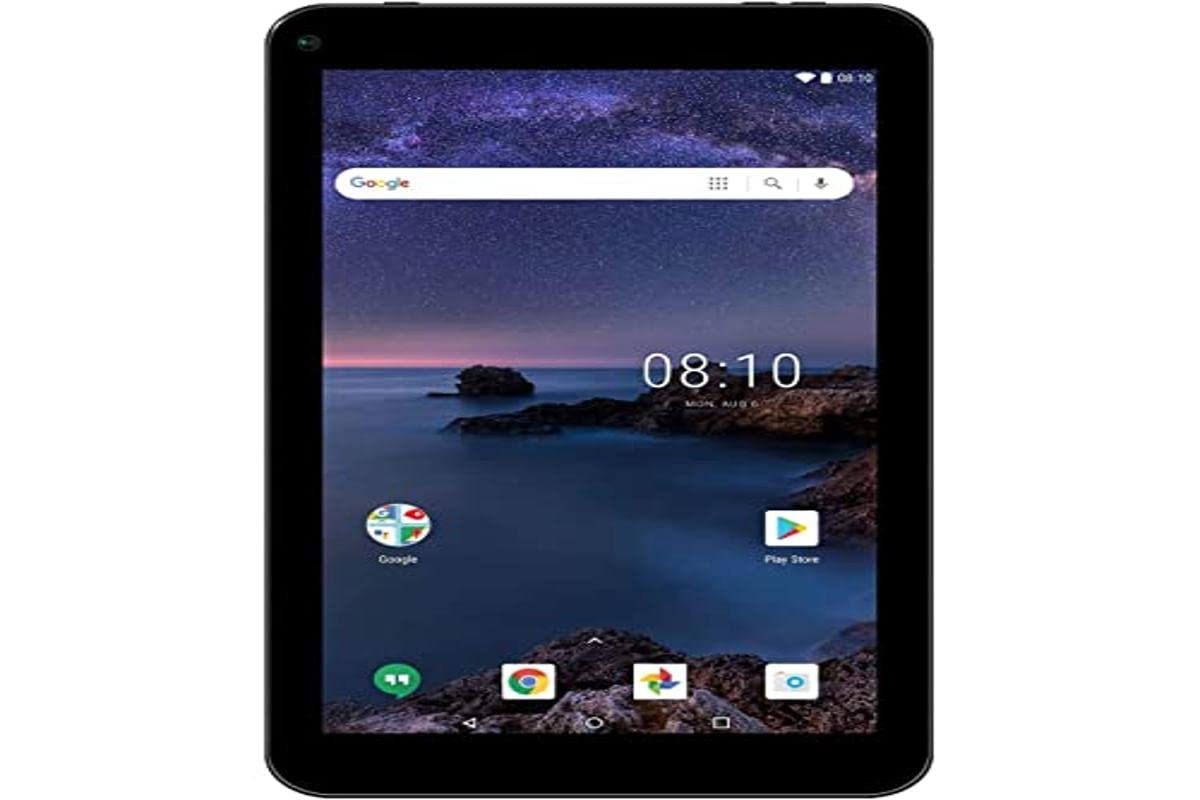
Obrázek: Přední strana view of the Smartab Tab 7 Android Tablet, displaying its 7-inch screen with a nature-themed wallpaper and app icons.
2. Počáteční nastavení
2.1. Nabíjení tabletu
Before first use, fully charge the tablet. Connect the included USB cable to the tablet's USB port and the other end to a compatible USB power adapter (not always included) or a computer's USB port. The charging indicator will show the charging status.
2.2. Zapnutí/vypnutí
- To power on: Press and hold the Power button until the screen lights up.
- To power off: Press and hold the Power button until a power-off menu appears. Select "Power off" and confirm.
2.3. Počáteční konfigurace
Upon first power-on, follow the on-screen prompts to select your language, connect to a Wi-Fi network, and set up your Google account. A Google account is required to download apps from the Google Play Store.
3. Klíčové vlastnosti
3.1. Displej
- Velikost obrazovky: 7-inch LED touch display.
- Rezoluce: 1024 x 600 pixels, providing clear visuals for media consumption and browsing.
3.2. Fotoaparát
- Přední kamera: 2 MP, suitable for video calls and selfies.
- Duální fotoaparáty: The tablet is equipped with dual cameras for versatile photography.
3.3. Výkon a úložiště
- Operační systém: Android 9 Pie - Go Edition, optimized for entry-level devices.
- BERAN: 1 GB RAM for essential multitasking.
- Interní úložiště: 16 GB flash storage for apps and files.
- Rozšiřitelné úložiště: Micro SD card slot supports up to 32 GB for additional storage.
- GPU: Mali-400 MP graphics coprocessor for basic graphics tasks.
3.4. Connectivity & Audio
- Bezdrátové připojení k internetu: Wi-Fi 802.11b/g/n for internet access.
- Bluetooth: Pro připojení bezdrátového příslušenství, jako jsou sluchátka nebo reproduktory.
- USB port: Available for data transfer and charging.
- Zvuk: Vestavěný reproduktor pro přehrávání zvuku.
4. Návod k obsluze
4.1. Základní navigace
The tablet uses a touch interface. Swipe to navigate between screens, tap to open apps, and pinch to zoom. Use the navigation bar at the bottom of the screen for Home, Back, and Recent Apps functions.
4.2. Připojení k Wi-Fi
- Přejít na Nastavení > Síť a internet > Wi-Fi.
- Přepnout Wi-Fi On.
- Vyberte požadovanou síť ze seznamu.
- Zadejte heslo, pokud se zobrazí výzva, a klepněte na Připojit.
4.3. Using Google Play Store
The Google Play Store is pre-installed. Tap the Play Store icon to browse and download apps, games, movies, and books. You must be signed in with a Google account to use this feature.
4.4. Párování Bluetooth
- Ujistěte se, že zařízení Bluetooth, které chcete spárovat, je v režimu párování.
- Na tabletu přejděte na Nastavení > Připojená zařízení > Bluetooth.
- Přepnout Bluetooth On.
- Klepněte Spárovat nové zařízení a vyberte ze seznamu své zařízení.
- Dokončete párování podle pokynů na obrazovce.
5. Údržba
5.1. Čištění tabletu
Use a soft, lint-free cloth to clean the screen and body of the tablet. Avoid using harsh chemicals or abrasive materials, which can damage the screen or finish.
5.2. Aktualizace softwaru
Pravidelně kontrolujte aktualizace softwaru, abyste zajistili optimální výkon a zabezpečení. Přejděte na Nastavení > Systém > Aktualizace systému zkontrolovat a nainstalovat dostupné aktualizace.
5.3. Péče o baterie
To prolong battery life, avoid extreme temperatures. Do not leave the tablet fully charged or fully discharged for extended periods. For long-term storage, charge the battery to about 50%.
6. Řešení problémů
- Tablet se nezapne: Ujistěte se, že je baterie nabitá. Připojte nabíječku a zkuste to znovu. Pokud zařízení nereaguje, stiskněte a podržte tlačítko napájení po dobu 10–15 sekund, abyste vynutili restart.
- Obrazovka nereaguje: Restartujte tablet. Pokud problém přetrvává, ujistěte se, že je obrazovka čistá a bez nečistot.
- Nelze se připojit k Wi-Fi: Check if Wi-Fi is enabled in settings. Ensure you have the correct password. Restart your Wi-Fi router and the tablet.
- Apps are crashing or slow: Close unused apps. Clear app cache (Settings > Apps > [App Name] > Storage > Clear cache). Consider uninstalling rarely used apps to free up storage.
- Baterie se rychle vybíjí: Reduce screen brightness. Close background apps. Disable Wi-Fi, Bluetooth, and GPS when not in use.
7. Specifikace
| Funkce | Detail |
|---|---|
| Značka | Smartab |
| Číslo modelu | ST7160 |
| Operační systém | Android 9 Pie - Go Edition |
| Velikost obrazovky | 7 palců |
| Rozlišení obrazovky | 1024 x 600 |
| BERAN | 1 GB |
| Interní úložiště | 16 GB |
| Rozšiřitelné úložiště | Slot pro kartu Micro SD (až 32 GB) |
| Grafický koprocesor | Mali-400 MP |
| Přední kamera | 2 MP |
| Konektivita | Wi-Fi 802.11b/g/n, Bluetooth, USB Port |
| Baterie | Lithium-ion, 2500 mAh capacity |
| Rozměry | 24.13 x 12.7 x 3.81 cm |
| Hmotnost | 440 g |
8. Co je v krabici
The Smartab Tab 7 Android Tablet package includes:
- Smartab Tab 7 Android Tablet (Model ST7160)
- USB nabíjecí kabel
- Uživatelská příručka (tento dokument)
Video: Overview of the Smartab Tab 7 Android Tablet, highlighting its 7-inch LED display, 2MP front camera, dual cameras, 2500 mAh battery, 1GB RAM, 16GB storage with Micro SD slot, built-in speaker, USB, Bluetooth, Wi-Fi connectivity, Android 9 Pie OS, and pre-installed Google Play Store. This video is provided by the seller.
9. Záruka a podpora
This product includes a standard manufacturer's warranty. For detailed warranty information, please refer to the warranty card included in your product packaging or visit the official Smartab website. For technical support or service inquiries, please contact Smartab customer service.
Pro více informací o produktu prosím navštivte product details page on Amazon.com.mx.


