1. Úvod
This manual provides detailed instructions for the installation, configuration, and operation of your SMONET Wireless Security Camera System. This system features 5-megapixel high-resolution cameras, a 12-inch IPS monitor, two-way audio, AI human detection, IP67 weatherproofing, and a pre-installed 1TB hard disk drive for reliable surveillance.
2. Bezpečnostní informace
Please read and understand all safety warnings and instructions before installing and operating this product. Failure to follow these instructions may result in electric shock, fire, or serious injury.
- Ujistěte se, že všechna napájecí připojení jsou bezpečná a správně dimenzovaná pro dané zařízení.
- Do not expose the monitor to extreme temperatures or direct sunlight.
- Cameras are IP67 rated for outdoor use, but ensure all cable connections are properly sealed to prevent water ingress.
- Avoid placing the camera in locations where it may be subject to strong vibrations or impact.
- Udržujte výrobek mimo dosah dětí.
- Installation and home maintenance are not covered under warranty.
3. Obsah balení
Ověřte, zda jsou všechny níže uvedené položky součástí balení. Pokud některé položky chybí nebo jsou poškozené, kontaktujte zákaznickou podporu.
- 1 x 12-inch IPS Monitor (with 8-channel NVR and 1TB HDD integrated)
- 2 x 5MP Wireless Cameras
- 1 x Monitor Power Adapter
- 2 x napájecí adaptéry pro fotoaparáty
- 1 x myš USB
- 1 x HDMI kabel
- 1 x LAN kabel
- 2 x Camera Antennas
- Mounting Screws and Wall Plugs for Cameras
- 1 x User Manual (Japanese)
- 2 x výstražné samolepky

4. Konec produktuview
4.1. 5MP Wireless Camera Features
- 5megapixelové vysoké rozlišení: Captures clear and detailed images.
- IP67 Odolnost proti povětrnostním vlivům: Určeno pro venkovní použití, odolné vůči prachu a vodě.
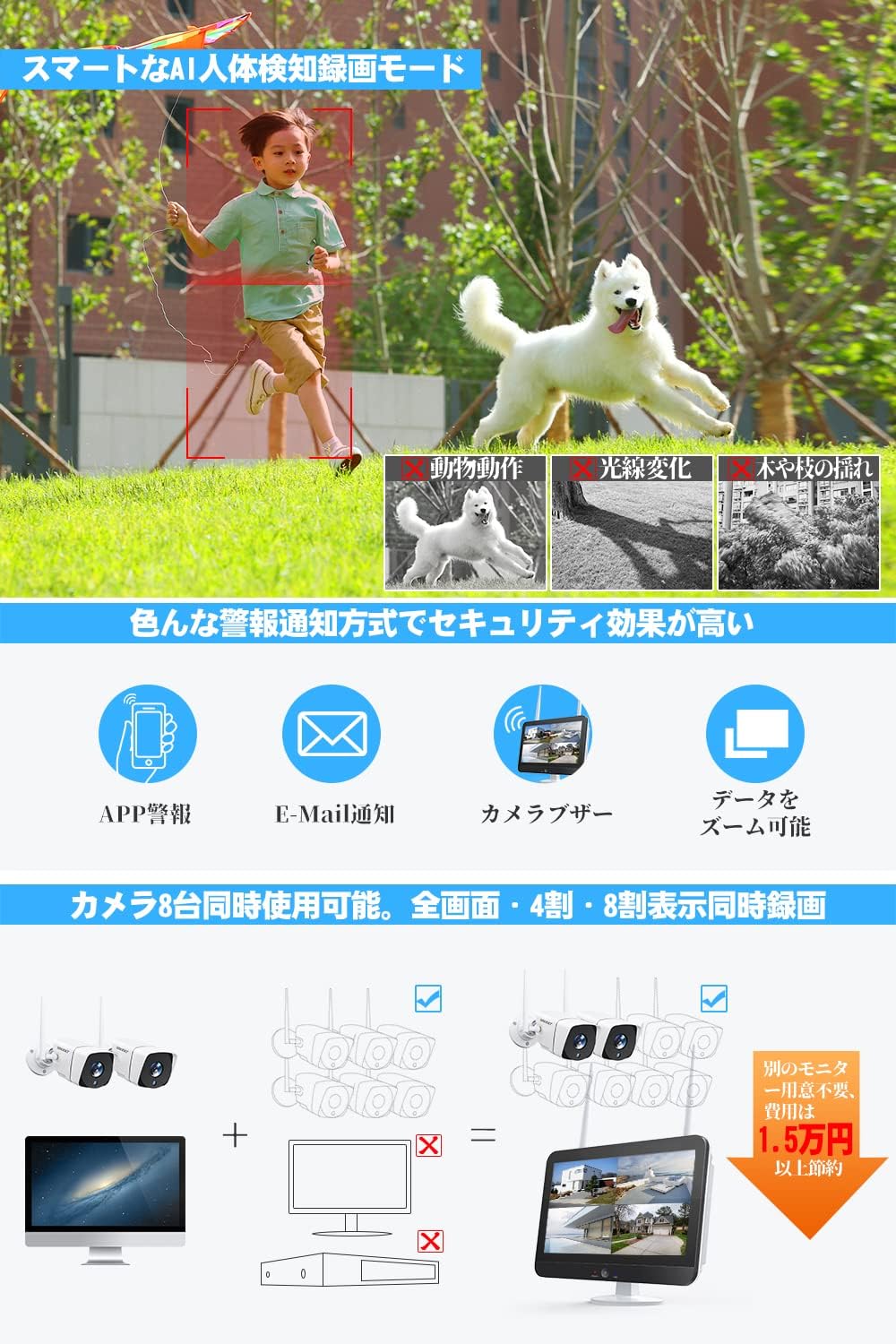
- AI lidská detekce: Reduces false alarms by distinguishing human shapes from other moving objects.
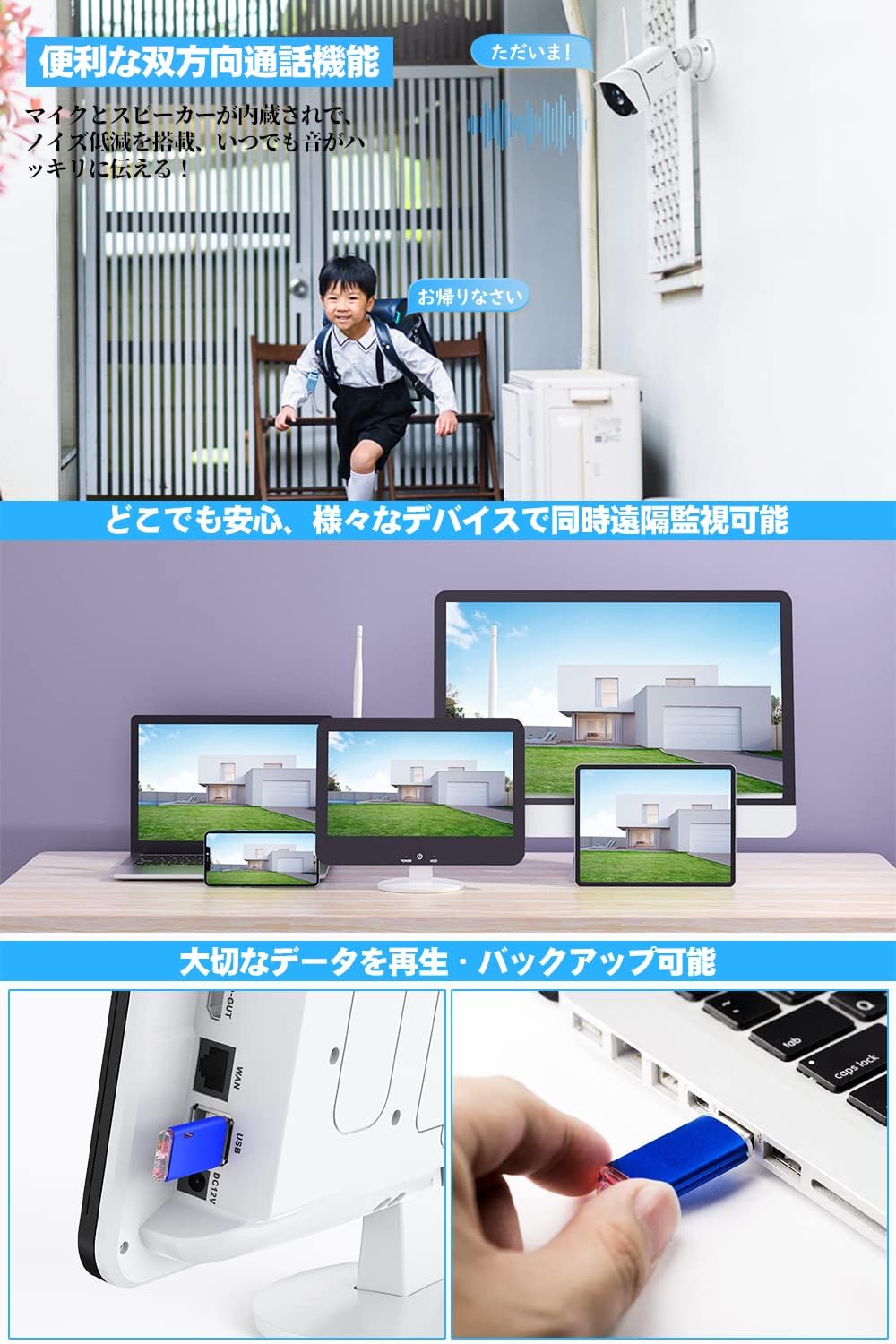
- Obousměrný zvuk: Vestavěný mikrofon a reproduktor pro komunikaci.
- Infračervené noční vidění: Automatic day/night mode for clear surveillance in low light.
- 360-degree Adjustable Mount: Ball-type metal mount allows flexible positioning.
- Režim opakovače: Extends Wi-Fi signal range for stable connection over larger areas.

4.2. 12-inch IPS Monitor (NVR) Features
- 12palcový IPS displej: Poskytuje široký viewing angle and vibrant colors, reducing eye strain.
- Integrated 8-Channel NVR: Supports up to 8 cameras simultaneously.
- 1TB HDD Pre-installed: Ampúložiště pro nepřetržitý záznam.
- Komprese H.265+: Efficiently stores video, extending recording time and improving wireless stability.
- Více režimů nahrávání: Schedule recording, continuous recording, and motion-activated recording.
- Vzdálený Viewing: Compatible with Android, iOS, Mac, and Windows devices for live view a přehrávání.
- Konektivita: Features HDMI, USB, LAN ports, and Wi-Fi.
5. Pokyny k nastavení
5.1. Initial Power-up and Connection
- Install Camera Antennas: Carefully screw the antennas onto the designated ports on each camera.
- Connect Camera Power: Plug each camera's power adapter into a power outlet and connect it to the camera. The camera's lights will illuminate upon successful power-up.
- Connect Monitor Power: Plug the monitor's power adapter into a power outlet and connect it to the monitor. The monitor will power on automatically.
- Připojení USB myši: Plug the USB mouse into one of the USB ports on the monitor.
- Automatické párování: The cameras and monitor are pre-paired at the factory. They should automatically connect and display video feeds within a few minutes.

Průvodce videem: For a visual guide on unboxing and initial setup, please refer to the video below.
5.2. Konfigurace sítě
The system can operate wirelessly without an internet connection for local viewing. For remote monitoring via smartphone or PC, an internet connection is required.
- Kabelové připojení: Connect the provided LAN cable from the monitor's LAN port to your router.
- Bezdrátové připojení:
- Right-click on the monitor screen with the mouse.
- Navigate to "Network Settings" or a similar option.
- Select "Wireless Network" and choose your Wi-Fi network.
- Enter your Wi-Fi password to connect.
Průvodce videem: For a visual guide on connecting the monitor to your network, please refer to the video below.
5.3. Nastavení aplikace pro chytré telefony
Chcete-li povolit dálkové ovládání viewing and receive alerts, download the companion app to your smartphone.
- Stáhnout aplikaci: On the monitor, right-click and navigate to the "Wizard" or "App Download" section. Scan the QR code displayed on the screen with your smartphone to download the "EseeCloud" app (or similar, as indicated by the QR code).
- Vytvořit účet: Open the app and create a new user account if you don't have one.
- Přidat zařízení: In the app, click the "+" button to add a new device. Select "Kit" or "NVR" and scan the device ID QR code displayed on the monitor. Enter the NVR's password (default is usually blank or 'admin' if not set).
- Žít View: Po přidání můžete view live feeds from your cameras and access other features remotely.
5.4. Instalace kamery
The cameras can be mounted indoors or outdoors. Ensure the mounting surface is stable and provides a clear view požadované oblasti sledování.
- Vyberte umístění: Select a suitable location for each camera, considering power access and Wi-Fi signal strength.
- Označte vrtné body: Use the camera's base as a template to mark the drilling points on the wall or ceiling.
- Vrtací otvory: Drill pilot holes and insert the provided wall plugs if necessary.
- Montáž kamery: Připevněte základnu kamery k povrchu pomocí dodaných šroubů.
- Upravit úhel: Adjust the camera's angle using the 360-degree ball-type mount to cover the desired area.
Průvodce videem: For a visual guide on camera installation, please refer to the video below.
6. Návod k obsluze
6.1. Živě View and Multi-Screen Display
The 12-inch IPS monitor can display live feeds from all connected cameras simultaneously. You can switch between single-camera view, 4-split screen, or 8-split screen modes (if more cameras are added) using the NVR interface.

6.2. Obousměrný zvuk
Each camera is equipped with a microphone and speaker, allowing for two-way communication. You can speak through the camera using the smartphone app or the monitor interface.

6.3. Režimy nahrávání
The NVR supports various recording options:
- Nepřetržité nahrávání: Records 24/7, utilizing the 1TB HDD.
- Plán nahrávání: Nastavte si konkrétní časy pro nahrávání.
- Záznam detekce pohybu: Nahrává pouze při detekci pohybu, čímž šetří úložný prostor.
- AI Human Detection Recording: Advanced motion detection that only triggers recording for human shapes.
6.4. Remote Monitoring and Alerts
With the smartphone app, you can monitor your property from anywhere. The system also provides various alert notifications:
- Push notifikace aplikací: Receive instant alerts on your smartphone when motion or human detection is triggered.
- E-mailová upozornění: Get email notifications with snapshots of events.
- Alarm bzučákem: The NVR can sound an audible alarm.
- Přizpůsobitelné oblasti detekce: Define specific areas for motion detection to avoid unnecessary alerts (e.g., excluding public roads).
6.5. Přehrávání
Můžete snadno znovuview zaznamenané footage on the monitor or via the smartphone app.
- Chytré přehrávání: Quickly find specific events using the timeline.
- Date/Time Selection: Select specific dates and times to review nahrávek.
- Záloha: Important data can be backed up via USB.
6.6. Noční vidění
The cameras automatically switch to night vision mode in low-light conditions, providing clear black-and-white images. The 5MP sensor and large infrared LED lights ensure detailed capture even in darkness.

7. Údržba
- Čištění: Use a soft, dry cloth to clean the camera lens and monitor screen. Avoid abrasive cleaners.
- Aktualizace firmwaru: Pravidelně kontrolujte informace od výrobce webweb nebo aplikaci pro aktualizace firmwaru, aby byl zajištěn optimální výkon a zabezpečení.
- Správa pevných disků: 1TB HDD automaticky přepíše nejstarší soubory.tage when full. Back up important recordings regularly.
- Power Off Monitor: Use the power OFF button on the monitor to extend its lifespan when not in active use.
8. Řešení problémů
| Problém | Možná příčina | Řešení |
|---|---|---|
| No video displayed on monitor. | Power issue, camera not paired, weak signal. | Check power connections for both monitor and cameras. Ensure cameras are within range and properly paired. Restart the system. |
| Nelze se připojit k Wi-Fi. | Incorrect password, router issues, weak signal. | Verify Wi-Fi password. Ensure router is functioning correctly. Move monitor closer to the router or use repeater mode. |
| Upozornění z aplikací nebyla přijata. | App notifications disabled, network issue, incorrect settings. | Check app notification settings on your phone. Ensure the NVR is connected to the internet. Verify motion detection settings. |
| Špatná kvalita nočního vidění. | Obstruction, dirty lens, insufficient IR light. | Clear any obstructions in front of the camera. Clean the camera lens. Ensure IR LEDs are not blocked. |
9. Specifikace
| Funkce | Detail |
|---|---|
| Značka | SMONET |
| Číslo modelu | SMJP-W823M1TM-002 |
| Rozlišení fotoaparátu | 5 megapixelů |
| Velikost monitoru | 12-inch IPS Panel |
| Kanály NVR | 8 kanály |
| Pevný disk | 1TB (Pre-installed) |
| Komprese videa | H.265 + |
| Hodnocení voděodolnosti | IP67 |
| Konektivita | Wi-Fi, LAN |
| Porty | HDMI, USB, LAN |
| Zdroj napájení | DC |
| Materiál | Metal (camera case) |
| Provozní teplota | -10°C to 50°C (implied from A+ content) |
10. Záruka a podpora
SMONET provides a jednoletá záruka for this product. In case of any defects or issues during the warranty period, please contact our customer support for exchange or refund. We also offer doživotní technickou podporu.
A detailed Japanese instruction manual is included in the package. For further assistance, please contact our dedicated after-sales service team via phone, email, Line, or Skype.
Poznámka: Installation and home maintenance services are not covered under warranty.


