1. Konec produktuview
The Philips SRP5016/10 is a modern and elegant 6-in-1 universal remote control designed to simplify your home entertainment experience. It allows you to control up to six different devices, such as televisions, DTVs, DVRs, home theater systems, soundbars, and streaming devices. This remote features a learning function, enabling it to receive and store infrared codes from your original remote controls, providing comprehensive control over various brands and models.
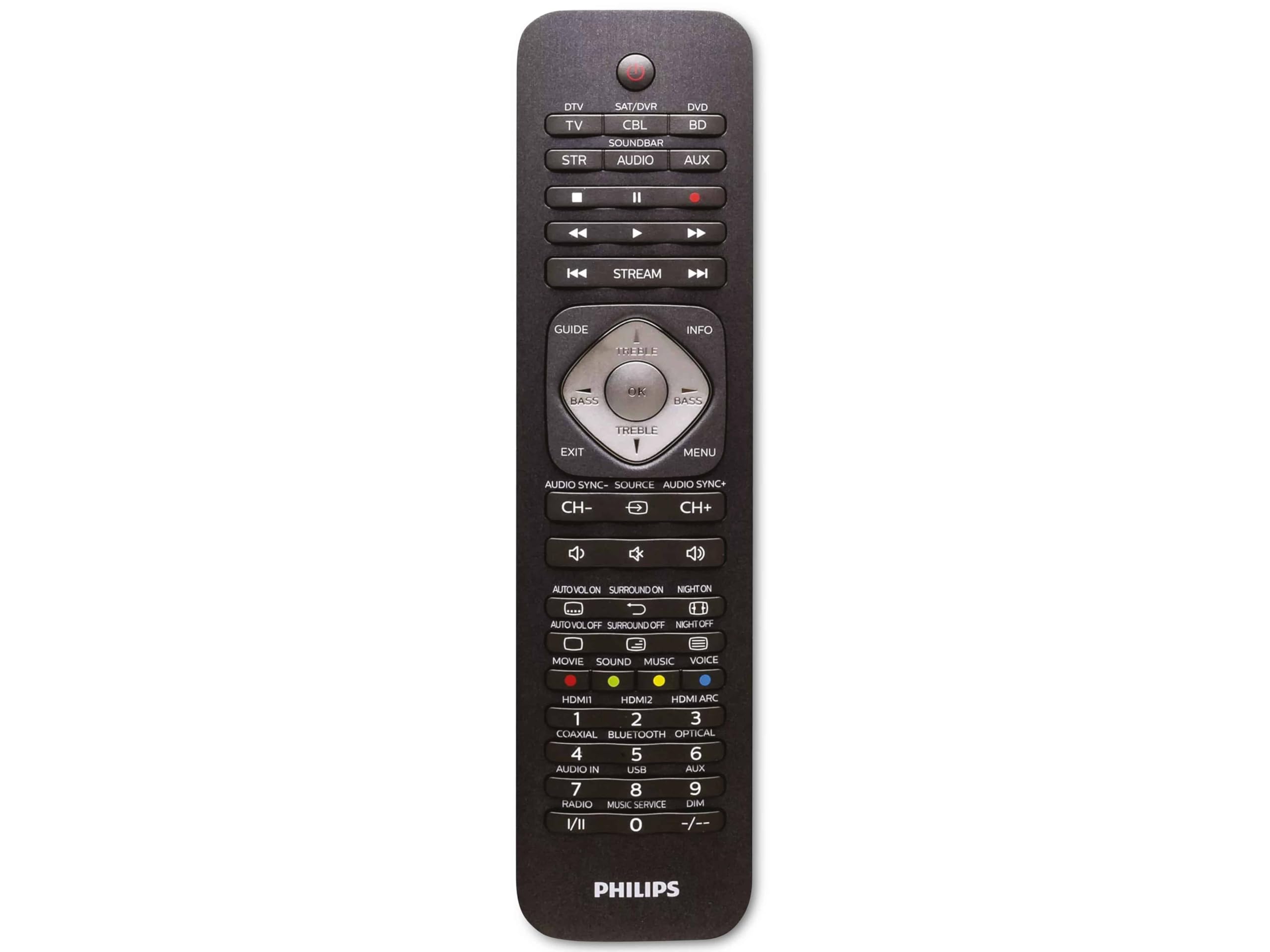
Image 1.1: Philips SRP5016/10 6-in-1 Universal Remote Control. This image displays the front view of the black universal remote control, highlighting its ergonomic design and button layout.
2. Nastavení
2.1. Instalace baterie
- Otevřete kryt přihrádky na baterie, který se nachází na zadní straně dálkového ovladače.
- Vložte dvě baterie typu AAA a dbejte na správnou polaritu (+ a -) vyznačenou uvnitř přihrádky.
- Bezpečně zavřete kryt bateriového prostoru.
Poznámka: Baterie nejsou součástí dodávky a je nutné je zakoupit samostatně.
2.2. Programming Devices
The Philips SRP5016/10 can be programmed using either direct code entry or the learning function.
2.2.1. Direct Code Entry (Recommended for common brands)
- Zapněte zařízení, které chcete ovládat (např. televizor, DVD přehrávač).
- Press and hold the desired device button on the universal remote (e.g., TV, DVD) for approximately 3 seconds until the device button lights up.
- Enter the 4-digit code for your device's brand (refer to the code list provided with your remote, if available, or search online for Philips universal remote codes).
- If the device turns off or responds, the code is correct. Press the device button again to save the code. If not, try the next code for your brand.
2.2.2. Learning Function (For devices not in the code list or advanced functions)
- Place the universal remote and your original remote control head-to-head, approximately 1-3 cm apart.
- Press and hold the desired device button on the universal remote (e.g., TV) for approximately 3 seconds until the device button lights up.
- Stiskněte a podržte UČIT SE button on the universal remote until the device button starts blinking.
- On your original remote, press the button you wish to teach (e.g., MOC). The device button on the universal remote will blink rapidly and then stay solid, indicating successful learning.
- Repeat step 4 for all other buttons you wish to learn.
- Stiskněte tlačítko UČIT SE button again to exit learning mode.
3. Návod k obsluze
3.1. Selecting a Device
To control a specific device, press the corresponding device button (e.g., TV, DVD, SAT, AUX, SOUNDBAR, PROUD) once. The selected device button will light up briefly to confirm your selection. You can then use the remote's buttons to control that device.
3.2. Základní funkce
- MOC: Zapne nebo vypne vybrané zařízení.
- VOLUME +/-: Upravuje hlasitost vybraného zvukového zařízení.
- KANÁL +/-: Changes channels on the selected TV or DTV device.
- ZTLUMIT: Ztlumí zvuk.
- POČET TLAČÍTEK (0-9): Pro přímé zadávání kanálů nebo jiné číselné vstupy.
- NAVIGATION (Arrow buttons, OK): Pro navigaci v menu a výběr.
4. Údržba
4.1. Výměna baterie
When the remote control's range decreases or buttons become unresponsive, it is time to replace the batteries. Follow the battery installation steps in Section 2.1. Always replace both AAA batteries simultaneously with new ones.
4.2. Čištění
K čištění dálkového ovladače použijte měkký, suchý hadřík. V případě odolných nečistot lehceampen the cloth with water or a mild cleaning solution. Avoid using abrasive cleaners, solvents, or alcohol, as these can damage the remote's surface or internal components.
5. Řešení problémů
- Dálkové ovládání nefunguje:
- Zkontrolujte, zda jsou baterie správně vloženy a nejsou vybité. V případě potřeby je vyměňte.
- Ujistěte se, že mezi dálkovým ovladačem a zařízením nejsou žádné překážky.
- Verify that the correct device button (e.g., TV, DVD) is selected.
- Zařízení nereaguje na příkazy:
- The device code may be incorrect. Try reprogramming the device using a different code from the code list or use the learning function.
- Ensure the remote's infrared emitter is pointed directly at the device's infrared receiver.
- Funkce učení nefunguje:
- Ujistěte se, že jsou baterie v původním dálkovém ovladači nové a že funguje správně.
- Make sure the remotes are positioned correctly (head-to-head, 1-3 cm apart) during the learning process.
- Try learning the button again. Some original remotes have weaker IR signals that require multiple attempts.
6. Specifikace
| Funkce | Specifikace |
|---|---|
| Značka | Philips |
| Název modelu | 6 v 1 |
| Číslo modelu | SRP5016/10 |
| Kompatibilní zařízení | Home Theater, DVD/Blu-ray Player, SoundBar, Television, Streaming Device |
| Speciální funkce | Univerzální, učící se funkce |
| Technologie připojení | Infračervený |
| Maximální počet podporovaných zařízení | 6 |
| Typ ovladače | Ovládání tlačítkem |
| Počet tlačítek | Not specified (typical universal remote layout) |
| Maximální dosah | 10 metrů |
| Zdroj napájení | 2 x AAA baterie (nejsou součástí balení) |
| Typ materiálu | Plast |
| Rozměry produktu | 21.4 x 5.3 x 2.2 cm |
| Hmotnost produktu | 130 g |
7. Záruka a podpora
For warranty information, please refer to the documentation provided at the time of purchase or contact your retailer. Philips offers customer support for their products. If you encounter issues that cannot be resolved using this manual, please visit the official Philips support webnebo se obraťte na jejich zákaznický servis a požádejte o pomoc.
Uschovejte si prosím doklad o koupi pro uplatnění záruky.


