Zavedení
The Keychron C1 is a tenkeyless (87-key) hot-swappable wired mechanical keyboard designed for both Mac and Windows operating systems. It features Gateron G Pro Red switches, double-shot ABS keycaps, and a white LED backlight. This manual provides instructions for setup, operation, maintenance, and troubleshooting to help you maximize your productivity and enjoyment with the C1 keyboard.

Image: Keychron C1 Tenkeyless Wired Mechanical Keyboard.
Obsah balení
Ověřte, zda jsou v balení přítomny všechny položky:
- Keychron C1 Wired Mechanical Keyboard
- Kabel USB typu C na USB-A
- Stahovač klíčů
- Stahovák spínačů
- Extra klávesy pro operační systém Windows
- Uživatelská příručka (tento dokument)

Obrázek: Overview of Keychron C1 features and included accessories.
Nastavení
1. Připojení klávesnice
The Keychron C1 uses a USB Type-C wired connection. Connect the provided USB Type-C cable to the port on the back of the keyboard and the other end to an available USB-A port on your computer. The keyboard is plug-and-play and should be recognized automatically by your operating system.
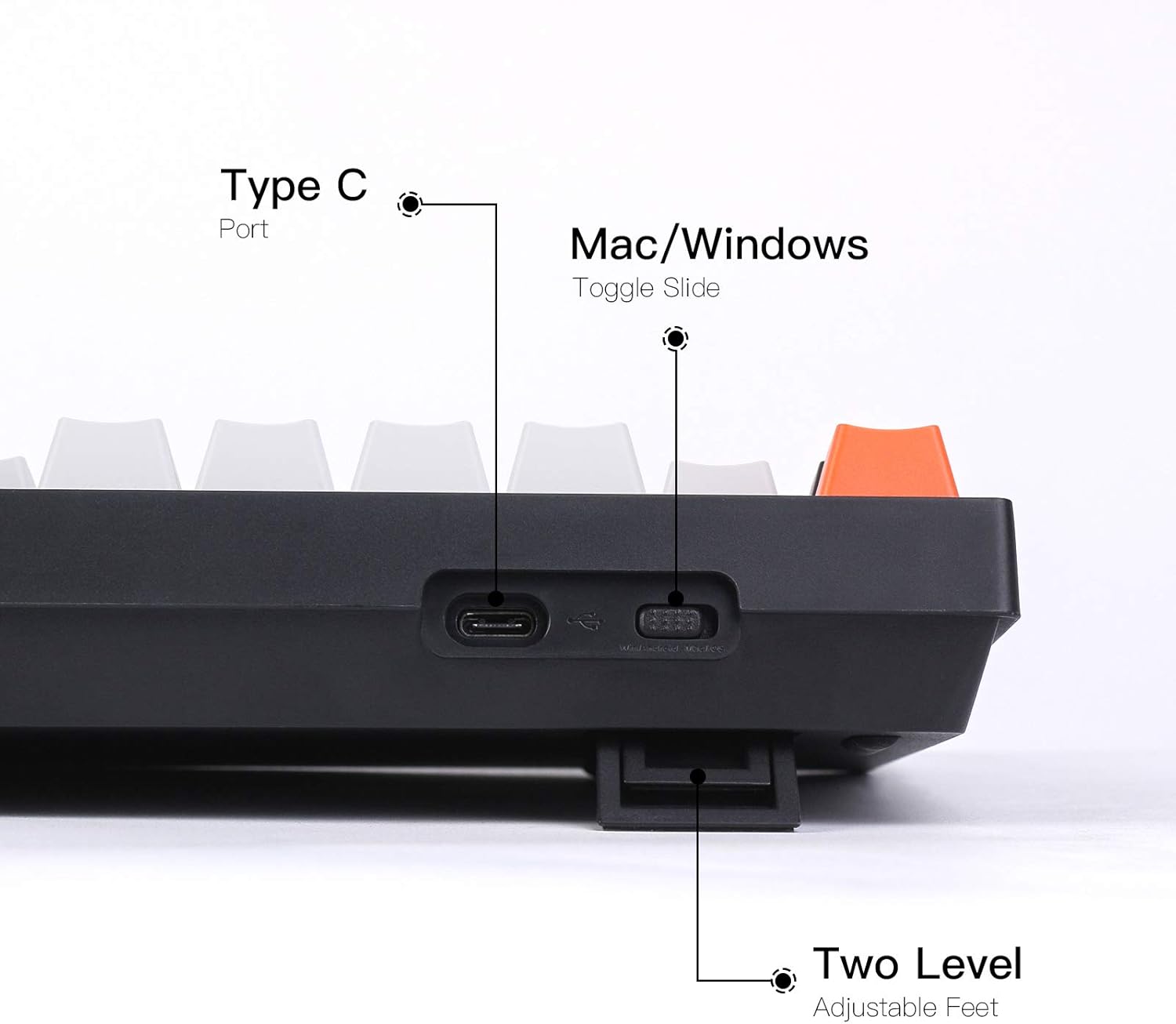
Image: Keyboard side view highlighting the Type-C port, OS toggle, and adjustable feet.
2. Přepínač operačního systému
The keyboard features a physical toggle switch on the back to select between Mac and Windows/Android operating system layouts. Ensure the switch is set to the correct position for your computer to ensure proper function of multimedia and function keys.

Image: Keyboard compatibility with Mac and Windows systems.
For Windows users, extra keycaps are included to replace the Mac-specific keys (e.g., Option, Command) with their Windows equivalents (e.g., Alt, Win). Use the provided keycap puller to swap these keycaps as needed.

Image: Detail of OS layout switch and Caps Lock indicator.
3. Nastavitelné nohy
The keyboard features two-level adjustable feet, allowing you to set the typing angle to your preference for ergonomic comfort. The keyboard also has an inclined bottom frame providing a default 9-degree angle for a natural typing posture.

Image: Keyboard side view illustrating the 9-degree inclined bottom frame.
Ovládání klávesnice
1. Základní funkce
The Keychron C1 is a standard 87-key tenkeyless layout. All standard alphanumeric, function (F1-F12), and navigation keys operate as expected based on your selected operating system. Multimedia keys are accessible via the Fn key combination (e.g., Fn + F7 for play/pause).
2. Ovládání podsvícení
The keyboard features a white LED backlight. Use the dedicated backlight control keys (typically Fn + F keys or a dedicated light key) to cycle through different lighting effects (flashing, breathing, static) and adjust brightness levels. Refer to the keyboard's keycap legends for specific backlight control functions.

Image: White LED Backlight in operation.
3. Přepínače vyměnitelné za provozu
The C1 hot-swappable version allows you to change mechanical switches without soldering. This feature enables customization of the typing experience. The keyboard is compatible with most MX style 3-pin and 5-pin mechanical switches (e.g., Gateron, Cherry, Kailh). The pre-installed switches are Gateron G Pro Red, known for their linear responsiveness.

Image: Hot-swappable feature showing removable switches.
4. Double-Shot ABS Keycaps
The keyboard is equipped with double-shot ABS keycaps. This manufacturing process ensures that the legends (characters) on the keycaps will not fade over time, and allows the backlight to shine through clearly, providing durable and aesthetically pleasing klávesy.

Image: Detail of Double-shot ABS Keycaps.
Údržba
1. Čištění
To clean the keyboard, first disconnect it from your computer. Use a can of compressed air to remove dust and debris from between the keycaps. For surface cleaning, gently wipe the keycaps and frame with a soft, damp cloth. Avoid using harsh chemicals or abrasive materials that could damage the finish or legends.
2. Výměna kláves a spínačů
Use the provided keycap puller to carefully remove keycaps by hooking it onto the keycap and pulling straight up. To remove switches, use the switch puller. Align the switch puller with the clips on the top and bottom of the switch and gently pull upwards until the switch detaches from the socket. When installing new switches, ensure the pins are straight and align correctly with the hot-swappable sockets before pressing down firmly until it clicks into place. Similarly, press new keycaps firmly onto the switch stem.
Odstraňování problémů
Klávesnice nereaguje
- Ujistěte se, že je kabel USB typu C bezpečně připojen ke klávesnici i k počítači.
- Zkuste připojit klávesnici k jinému USB portu na počítači.
- Verify that the Mac/Windows toggle switch on the back of the keyboard is set to the correct operating system.
- Restart your computer to refresh USB connections.
Podsvícení nefunguje
- Check if the backlight is turned off or set to the lowest brightness level using the backlight control keys (refer to your keyboard's keycap legends).
- Ensure the keyboard is receiving sufficient power from the USB port. Try a different USB port if available.
Konkrétní klávesy nefungují
- If you have replaced switches, ensure the new switch is fully seated and its pins are not bent. Remove and reinsert the switch carefully.
- Carefully remove the keycap and switch for the non-functioning key and inspect the hot-swappable socket for any obstructions or damage.
Specifikace
| Funkce | Detail |
|---|---|
| Číslo modelu | C1G1 |
| Rozložení | Tenkeyless (87 Keys) |
| Konektivita | Kabelové USB typu C |
| Spínače | Gateron G Pro Red (Hot-swappable) |
| Klíčenky | Double-Shot ABS |
| Podsvícení | Bílá LED |
| Kompatibilita | Mac, Windows, PC |
| Hmotnost položky | 2.27 libry (1.03 kg) |
| Rozměry balení | 15.28 x 7.09 x 2.05 palce (38.8 x 18.0 x 5.2 cm) |
Záruka a podpora
Informace o záruce
Produkty Keychron se obvykle dodávají s omezenou zárukou kryjící výrobní vady. Viz oficiální záruka Keychron. website or the warranty card included with your purchase for specific terms and conditions regarding warranty coverage and duration. Keep your proof of purchase for warranty claims.
Zákaznická podpora
For technical assistance, troubleshooting beyond this manual, or warranty claims, please visit the official Keychron support page or contact their customer service. You can find up-to-date contact information and FAQs on the Keychron official webmísto.


