1. Úvod
This manual provides detailed instructions for the setup, operation, maintenance, and troubleshooting of your MYPIN Infrared Remote Control. This remote is specifically designed to work with MYPIN 4K Media Players, including models B07WPY8VKL and B07PGFCPTV.
Please read this manual thoroughly before using the remote control to ensure proper functionality and to maximize your user experience.
2. Obsah balení
- 1 x MYPIN Infrared Remote Control
Poznámka: Baterie AAA nejsou součástí balení a je nutné je zakoupit samostatně.
3. Nastavení
3.1 Instalace baterie
- Najděte přihrádku na baterie na zadní straně dálkového ovladače.
- Posuňte kryt přihrádky na baterie dolů a otevřete jej.
- Vložte dvě (2) baterie typu AAA a ujistěte se, že kladný (+) a záporný (-) pól správně odpovídají označením uvnitř přihrádky.
- Zasuňte kryt přihrádky na baterie zpět na místo, dokud bezpečně nezacvakne.
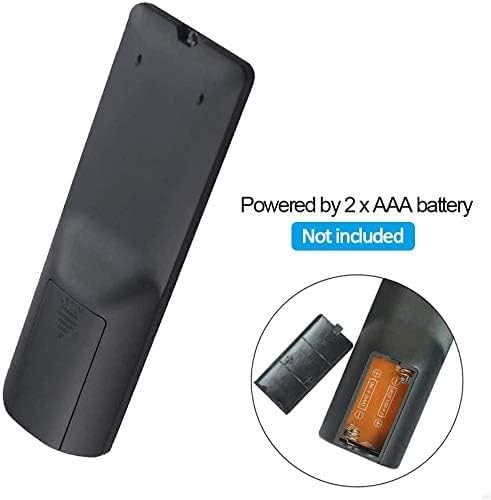
Obrázek 3.1: Battery installation for the MYPIN Infrared Remote Control. Ensure correct polarity when inserting two AAA batteries.
3.2 Kompatibilita
This remote control is designed exclusively for MYPIN 4K Media Players. It is compatible with models such as B07WPY8VKL and B07PGFCPTV. It may not function correctly with other brands or models of media players.
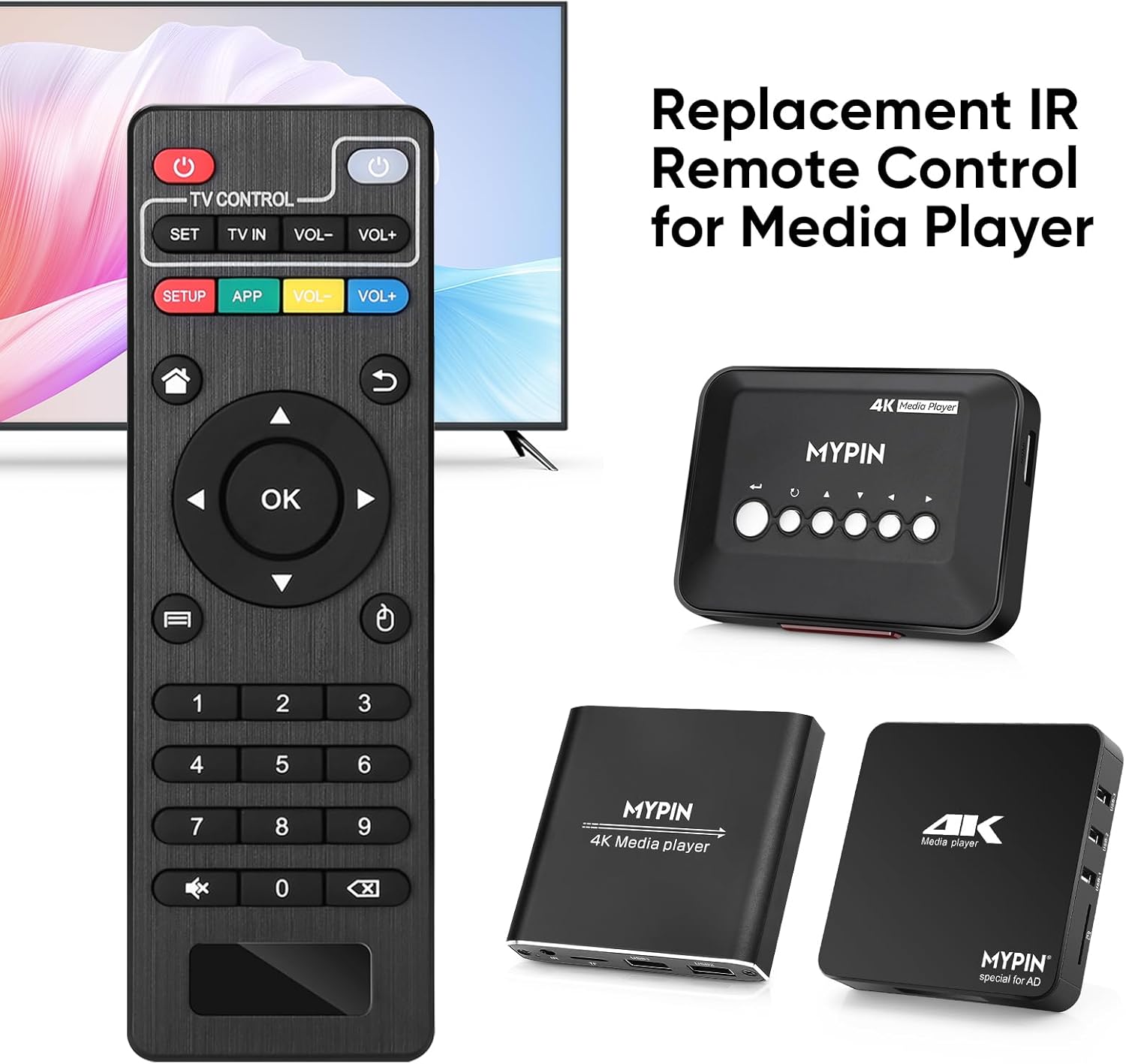
Obrázek 3.2: The MYPIN remote control shown with compatible MYPIN 4K Media Players.
3.3 Počáteční připojení
The MYPIN Infrared Remote Control operates via infrared (IR) signals. No pairing process is required. Simply point the remote control directly at the IR receiver of your MYPIN 4K Media Player. Ensure there are no obstructions between the remote and the media player.

Obrázek 3.3: Using the MYPIN remote control with an optional IR cable for discreet placement of the media player.
4. Návod k obsluze
The MYPIN Infrared Remote Control features a standard layout for intuitive control of your media player. Below is a guide to its primary functions:

Obrázek 4.1: Key functional areas of the MYPIN Remote Control.
4.1 Funkce tlačítek
- Tlačítko napájení (červené, vlevo nahoře): Turns the media player on or off.
- TV Control Section (Top Row):
- TV Learning Button (1): Used to program basic TV functions (e.g., TV Power, Volume). Refer to your TV's manual for learning remote functions.
- SOUBOR: Used for TV learning mode.
- TV IN: Přepíná vstupní zdroj televizoru.
- HLASITOST- / HLASITOST+: Upravuje hlasitost TV.
- SETUP / APP / VOL- / VOL+ (Colored Buttons): These buttons provide quick access to specific media player functions or applications. Their exact function may vary depending on the media player's software.
- Tlačítko Domů (ikona domu): Returns to the main menu or home screen of the media player.
- Return/Back Button (Arrow Icon): Přejde zpět na předchozí obrazovku nebo do předchozí nabídky.
- Direction Keys (2 - Up, Down, Left, Right): Navigates through menus and content. When playing videos or music, Up/Down typically selects previous/next track, and Left/Right performs fast backward/forward.
- Tlačítko OK (střed): Confirms selections or plays content.
- Menu Key (3 - Three Horizontal Lines Icon): Accesses context-sensitive menus or playback options.
- Numerická klávesnice (0-9): Used for direct input of numbers, such as channel selection or specific menu options.
- Mute Button (Crossed Speaker Icon): Mutes or unmutes the media player's audio.
- Context Menu Button (Box with Arrow Icon): Opens additional options or settings.

Obrázek 4.2: Accessing playback options using the Menu key on the MYPIN remote control.
5. Údržba
5.1 Výměna baterie
When the remote control's performance degrades (e.g., reduced range, unresponsive buttons), it is likely time to replace the batteries. Follow the battery installation steps in Section 3.1 to replace the two AAA batteries.
5.2 Čištění
Pro čištění dálkového ovladače jemně otřete jeho povrch měkkým, suchým hadříkem. V případě odolných nečistot lehceampOtřete hadřík vodou nebo jemným neabrazivním čisticím prostředkem. Nepoužívejte agresivní chemikálie ani nadměrnou vlhkost, protože by mohly poškodit elektroniku dálkového ovladače.
5.3 Skladování
Store the remote control in a cool, dry place away from direct sunlight and extreme temperatures. If the remote will not be used for an extended period, it is recommended to remove the batteries to prevent leakage and potential damage.
6. Řešení problémů
- Dálkový ovladač nereaguje:
- Ujistěte se, že jsou správně vloženy nové baterie AAA.
- Point the remote directly at the media player's IR receiver.
- Remove any obstructions between the remote and the media player.
- Check the operating distance; the remote has an infrared range of approximately 7 meters.
- If the remote initially seems unresponsive after battery installation, allow a short period for it to initialize, as some users have reported spontaneous functionality after a delay.
- Buttons not performing expected functions:
- Verify that the remote is compatible with your specific MYPIN media player model.
- Some buttons (e.g., SETUP, APP) may have functions determined by the media player's software and may not be universally assigned.
- TV Control buttons not working:
- Ensure you have successfully programmed the TV Learning Button functions according to your TV's instructions.
7. Specifikace
| Funkce | Detail |
|---|---|
| Technologie připojení | Infračervený (IR) |
| Kompatibilní zařízení | MYPIN media players (e.g., B07WPY8VKL, B07PGFCPTV) |
| Maximální počet podporovaných zařízení | 1 (for media player control) |
| Speciální funkce | Ergonomický design |
| Zdroj napájení | 2 x AAA baterie (nejsou součástí balení) |
| Infračervená vzdálenost | Až 7 metrů |
| Infračervený úhel | 30 stupňů |
| Hmotnost položky | 1.13 unce |
| Rozměry balení | 5.43 x 1.81 x 0.71 palce |
| Číslo modelu | B08CDNZMJG |
8. Informace o záruce
MYPIN products are manufactured to high-quality standards. For specific warranty details regarding your remote control, please refer to the documentation included with your MYPIN 4K Media Player or visit the official MYPIN webUschovejte si účtenku jako doklad o koupi pro případné reklamace.
9. Podpora
If you encounter any issues not covered in this manual or require further assistance, please contact MYPIN customer support through the retailer where you purchased the product or visit the official MYPIN support webstránky pro kontaktní informace.


