1. Úvod
Vimar 19593 Arké Connected IoT Actuator je elektronické řídicí zařízení určené pro chytré domácnosti. Je vybaveno reléovým výstupem NO 16 A a podporuje duální technologii IoT: Bluetooth 5.0 pro Vimar. VIEW Bezdrátový mesh systém a Zigbee 3.0 pro širší kompatibilitu. Tento aktuátor umožňuje jak lokální ovládání pomocí fyzického tlačítka, tak i dálkové ovládání prostřednictvím specializovaných aplikací. Zahrnuje také okamžité měření výkonu a monitorování spotřeby energie spolu s RGB LED pro indikaci stavu a nastavitelnou intenzitu.
Tato příručka obsahuje základní informace pro bezpečnou instalaci, provoz a údržbu vašeho připojeného IoT aktuátoru Vimar 19593 Arké.
2. Bezpečnostní informace
- Elektrická instalace: Instalaci musí provést kvalifikovaný personál v souladu s místními elektrotechnickými předpisy a předpisy.
- Napájení: Před instalací se ujistěte, že napájení (100–240 V ~ 50/60 Hz) odpovídá specifikacím zařízení.
- Odpojit napájení: Před zahájením jakékoli instalace, zapojení nebo údržby vždy odpojte napájení hlavním jističem.
- Pouze pro vnitřní použití: Toto zařízení je určeno pro použití v suchých vnitřních prostorách. Nevystavujte ho vlhkosti ani extrémním teplotám.
- Vyvarujte se přetížení: Nepřekračujte maximální zatížitelnost reléového výstupu 16 A.
- Děti a domácí mazlíčci: Uchovávejte zařízení a jeho součásti mimo dosah dětí a domácích zvířat.
3. Konec produktuview
Akční člen Vimar 19593 Arké Connected IoT je kompaktní modul určený pro integraci do standardních elektrických systémů. Je vybaven fyzickým tlačítkem pro lokální ovládání a párování a RGB LED indikátorem pro zpětnou vazbu stavu.

Obrázek 1: Přední view akčního členu Vimar 19593 Arké Connected IoT. Jedná se o tmavě šedý obdélníkový modul s malou kontrolkou a kruhovým tlačítkem ve spodní části.

Obrázek 2: Detailní záběr aktuátoru zobrazující symbol bezdrátového připojení a ovládací tlačítko.
Klíčové komponenty:
- Ovládací tlačítko: Používá se pro lokální ovládání ZAP/VYP a zahájení procesu párování.
- RGB LED indikátor: Poskytuje vizuální zpětnou vazbu o stavu zařízení, režimu párování a lze upravit intenzitu.
- Reléový výstup: Připojuje se k zátěži (např. světelům, spotřebičům) pro zapínání/vypínání.
- Bezdrátové moduly: Integrované Bluetooth 5.0 a Zigbee 3.0 pro připojení k chytré domácnosti.
4. Nastavení
4.1 Fyzická instalace
- Odpojit napájení: Před zahájením práce se ujistěte, že je hlavní přívod proudu do prostoru instalace vypnut jističem.
- Zapojení: Připojte pohon podle dodaného schématu zapojení (obvykle se nachází na samotném zařízení nebo v obalu). Zajistěte správné připojení fázového, nulového a zátěžového vodiče k příslušným svorkám. Toto zařízení je určeno pro modulární, zapuštěnou nebo nástěnnou instalaci.
- Zabezpečené zařízení: Namontujte pohon bezpečně do elektrické krabice nebo pouzdra.
- Obnovit napájení: Jakmile je instalace dokončena a všechna připojení jsou bezpečná, obnovte napájení jističem.
4.2 Instalace a párování aplikace
Vimar 19593 podporuje dvě primární bezdrátové technologie pro integraci chytré domácnosti: Bluetooth 5.0 (prostřednictvím Vimar VIEW Bezdrátová aplikace) a Zigbee 3.0 (prostřednictvím kompatibilních rozbočovačů a aplikací Zigbee).

Obrázek 3: Vimar VIEW Ikona aplikace, používaná pro správu akčního členu.
- Stáhnout aplikaci: Stáhněte si Vimar VIEW Bezdrátový aplikaci z obchodu s aplikacemi vašeho zařízení (pro ovládání přes Bluetooth) nebo kompatibilní aplikaci Zigbee Hub (např. aplikaci Amazon Alexa pro Zigbee).
- Vytvořit účet: Otevřete aplikaci a vytvořte si účet, pokud jej ještě nemáte.
- Spuštění režimu párování: Stiskněte a podržte fyzické ovládací tlačítko na ovladači přibližně 5 sekund. RGB LED začne modře blikat, což znamená, že je v režimu párování.
- Přidat zařízení do aplikace: Postupujte podle pokynů na obrazovce ve vámi zvolené aplikaci a přidejte nové zařízení. Aplikace by měla detekovat aktuátor Vimar 19593.
- Vyberte technologii: Uvnitř Vimaru VIEW Bezdrátová aplikace umožňuje v případě potřeby přepínat mezi režimy Bluetooth a Zigbee. V případě Zigbee se ujistěte, že je váš Zigbee hub také v režimu párování.
- Kompletní nastavení: Přiřaďte svému zařízení název a nakonfigurujte počáteční nastavení podle pokynů aplikace.
5. Návod k obsluze
5.1 Místní ovládání
- ON/OFF: Krátkým stisknutím fyzického ovládacího tlačítka na pohonu zapnete nebo vypnete připojenou zátěž.
5.2 Dálkové ovládání přes aplikaci
Po spárování můžete pohon ovládat na dálku pomocí Vimaru. VIEW Bezdrátová aplikace (pro Bluetooth) nebo kompatibilní aplikace Zigbee.
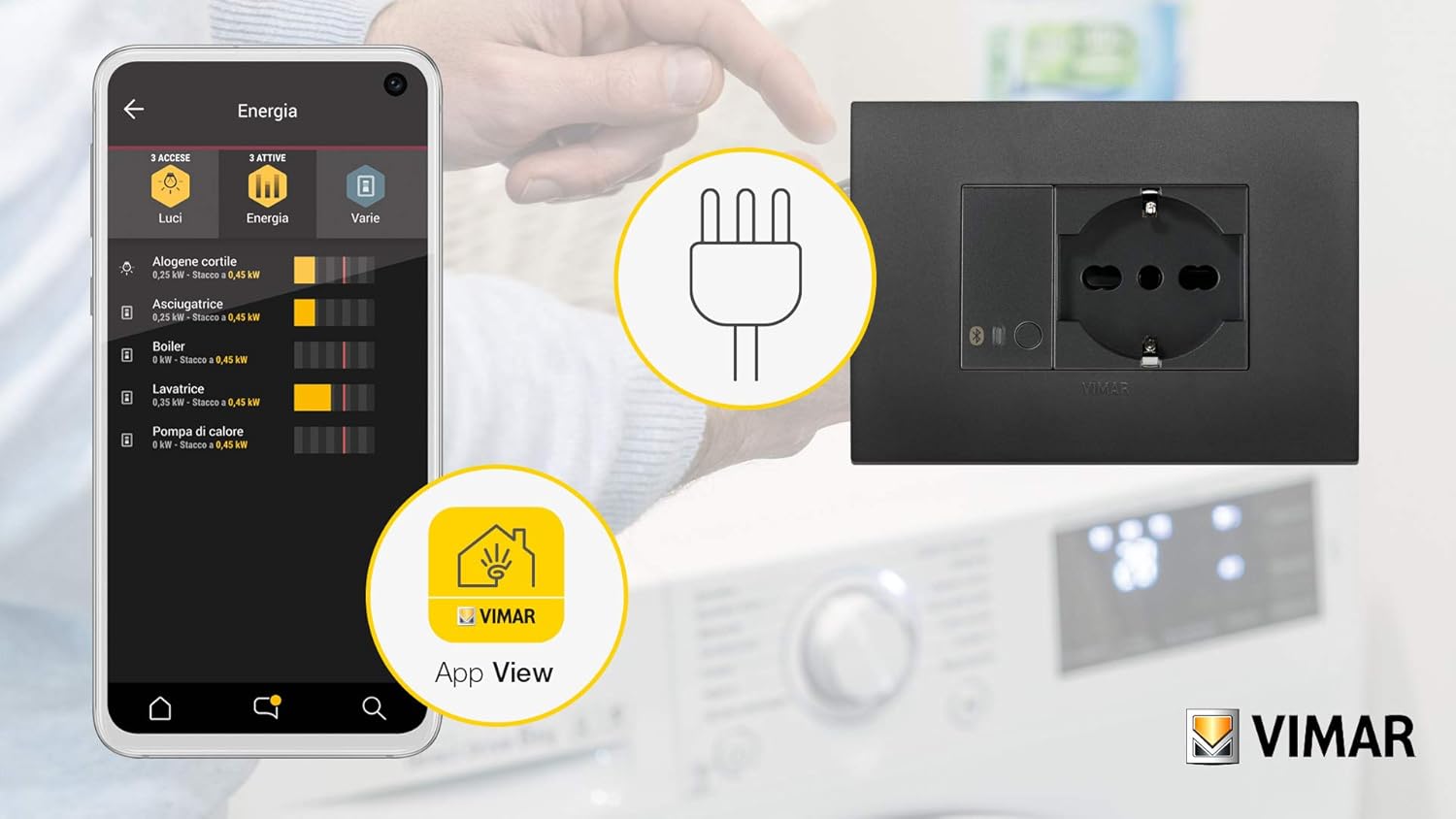
Obrázek 4: ExampLevá část rozhraní aplikace Vimar zobrazující monitorování spotřeby energie pro připojená zařízení.
- Přepnout načítání: Otevřete aplikaci, vyberte svůj pohon Vimar 19593 a pomocí virtuálního tlačítka zapněte nebo vypněte připojenou zátěž.
- Sledování energie: Aplikace poskytuje okamžité měření spotřeby energie v reálném čase a sleduje spotřebovanou energii. Tato funkce vám umožňuje sledovat spotřebu energie připojeného spotřebiče.
- Nastavení RGB LED: Intenzitu a případně i barvu (pokud to aplikace podporuje) RGB LED indikátoru upravte v nastavení aplikace.
5.3 Integrace hlasového ovládání
Pohon lze integrovat s hlasovými asistenty prostřednictvím kompatibilních rozbočovačů chytré domácnosti (např. Amazon Alexa pro Zigbee). Postup integrace naleznete v návodu k nastavení vašeho hlasového asistenta.

Obrázek 5: Ilustrace chytré zástrčky (podobné funkci aktuátoru) ovládané hlasovými příkazy a aplikací pro chytré telefony.
6. Údržba
- Čištění: Před čištěním odpojte napájení. K otření zařízení použijte měkký, suchý hadřík. Nepoužívejte tekuté čisticí prostředky ani abrazivní materiály.
- Aktualizace firmwaru: Pravidelně kontrolujte Vimar VIEW Bezdrátová aplikace pro dostupné aktualizace firmwaru zajišťující optimální výkon a zabezpečení. Pro postup aktualizace postupujte podle pokynů aplikace.
- Pravidelné kontroly: Občas zkontrolujte zařízení, zda nevykazuje známky poškození nebo uvolněných spojů. Pokud zjistíte jakékoli problémy, odpojte napájení a obraťte se na kvalifikovaného elektrikáře.
7. Řešení problémů
- Zařízení nereaguje:
- Zkontrolujte, zda je aktivní napájení.
- Ujistěte se, že je zařízení správně zapojeno.
- Pokud používáte bránu Vimar, ověřte, že má aktivní připojení k internetu (cloud), protože ztráta připojení může znemožnit její provoz.
- Problémy s párováním:
- Ujistěte se, že LED dioda aktuátoru bliká modře, což signalizuje režim párování.
- Ověřte, zda je váš chytrý telefon nebo Zigbee hub v dosahu.
- Pokud provádíte opětovné přidružení, může být nutné přepnout zařízení do režimu Bluetooth pomocí aplikace Vimar Arké a poté zpět do režimu Zigbee. Pokud se to nepodaří, dočasně odpojte napájení aktuátoru a znovu jej zapněte, abyste se pokusili o resetování před opětovným párováním.
- LED dioda nefunguje podle očekávání (Zigbee Hub):
- Při spojení s generickým Zigbee rozbočovačem může být přímé ovládání funkce a barvy LED diody omezené. LED dioda obvykle odráží stav ZAPNUTO (modrá) nebo VYPNUTO (nesvítí) akčního členu.
- Chybí údaje o spotřebě energie (Zigbee Hub):
- Některé integrace Zigbee (např. ZHA) nemusí plně podporovat čtení dat o spotřebě energie z tohoto zařízení. Ověřte kompatibilitu s vaším konkrétním koordinátorem a integrací Zigbee.
- Obnovení továrního nastavení: Chcete-li provést obnovení továrního nastavení, odpojte zařízení na několik sekund od napájení a poté jej obnovte. Tím se mohou vymazat všechny informace o párování.
8. Specifikace
| Výrobce | Vimar |
| Číslo modelu | 19593 |
| Rozměry produktu | 4.9 x 2.22 x 5.01 cm |
| Hmotnost | 40 gramů |
| Barva | Šedá |
| svtage | 100-240 V AC |
| Frekvence | 50/60 Hz |
| Reléový výstup | Č. 16 A |
| Bezdrátová technologie | Bluetooth 5.0, Zigbee 3.0 |
| Jsou vyžadovány baterie | Žádný |
| Země původu | Itálie |
9. Záruka
Informace o záruční době a podmínkách pro váš Vimar 19593 Arké Connected IoT Actuator naleznete na oficiálních stránkách společnosti Vimar. webwebu nebo v záruční dokumentaci dodané s vaším nákupem. Záruční podmínky se mohou lišit v závislosti na regionu a prodejci.
10. Podpora
Další pokyny, návody a technickou podporu naleznete na oficiálních stránkách podpory Vimar. webmísto:
S dotazy k produktům, řešením problémů nebo reklamacemi se můžete také obrátit přímo na zákaznický servis Vimar.


