Zavedení
This manual provides detailed instructions for the installation, operation, and maintenance of your PROZOR HDMI Audio Extractor. Please read this manual thoroughly before using the product to ensure proper function and to prevent damage.
The PROZOR HDMI Audio Extractor is designed to separate audio and video signals from an HDMI source. It allows you to output the video signal to an HD display while simultaneously extracting the audio to a separate audio system via SPDIF (optical) or a 3.5mm analog jack.
Vlastnosti produktu
- HDMI Audio Separation: Extracts audio from an HDMI signal, allowing video to be displayed on an HD screen and audio to be output through SPDIF (optical) or a 3.5mm audio jack.
- Ovládání hlasitosti: Features a dedicated volume adjustment knob for the 3.5mm audio output. Includes a 3.5mm to 2RCA cable for connecting to RCA-compatible speakers.
- HDMI 2.0 & HDCP 2.2 Support: Compatible with HDMI 2.0 and HDCP 2.2 standards. Supports input resolutions up to 4K@60Hz (YUV 4:4:4), and is backward compatible with 1080P and 720P resolutions.
Note: This product is not designed for use with HDR to DVI converters or displays equipped with DVI interfaces.
- Vysoce kvalitní vizuální a zvukové efekty: Supports HDR functionality for enhanced dynamic images and accurate color reproduction. Audio output supports both 2.0ch and 5.1ch.
Note: 5.1ch audio output is available only via the optical (SPDIF) port.
- Široká kompatibilita: Suitable for various HDMI source devices such as Fire TV Stick 4K, Roku, Chromecast, Xbox One X, PS4 Pro, 4K Blu-ray/DVD players, Apple TV 4K, and 4K laptops.
- Stabilní přenos signálu: For optimal performance and stable signal transmission, it is recommended to use a 5V1A power adapter with the product. For 4K@60Hz (YUV 4:4:4) and HDR effects, ensure all connected devices use HDMI 2.0 certified cables (HDMI 19+1, 26AWG).
Obsah balení
Po obdržení zkontrolujte prosím obsah balíku, abyste se ujistili, že jsou všechny položky přítomny a nepoškozené.
- PROZOR HDMI Audio Extractor (Model: PST155)
- Napájecí kabel USB
- 3.5mm až 2RCA audio kabel
- Uživatelská příručka
- HDMI Cable (may vary by package)

Image: The PROZOR HDMI Audio Extractor unit with various included cables, including HDMI, USB power, and 3.5mm to RCA audio cables.

Image: The PROZOR HDMI Audio Extractor unit shown alongside its user manual and included cables.
Schéma produktu

Image: A diagram illustrating the connection points of the PROZOR HDMI Audio Extractor. It shows HDMI IN, HDMI OUT, Power (Micro USB), Stereo (3.5mm), and Optical/Toslink ports. Connections are shown from a source device (e.g., PS4) to HDMI IN, HDMI OUT to an HD TV, Power to a USB cable, Stereo to 3.5mm headphones, and Optical/Toslink to a soundbar.
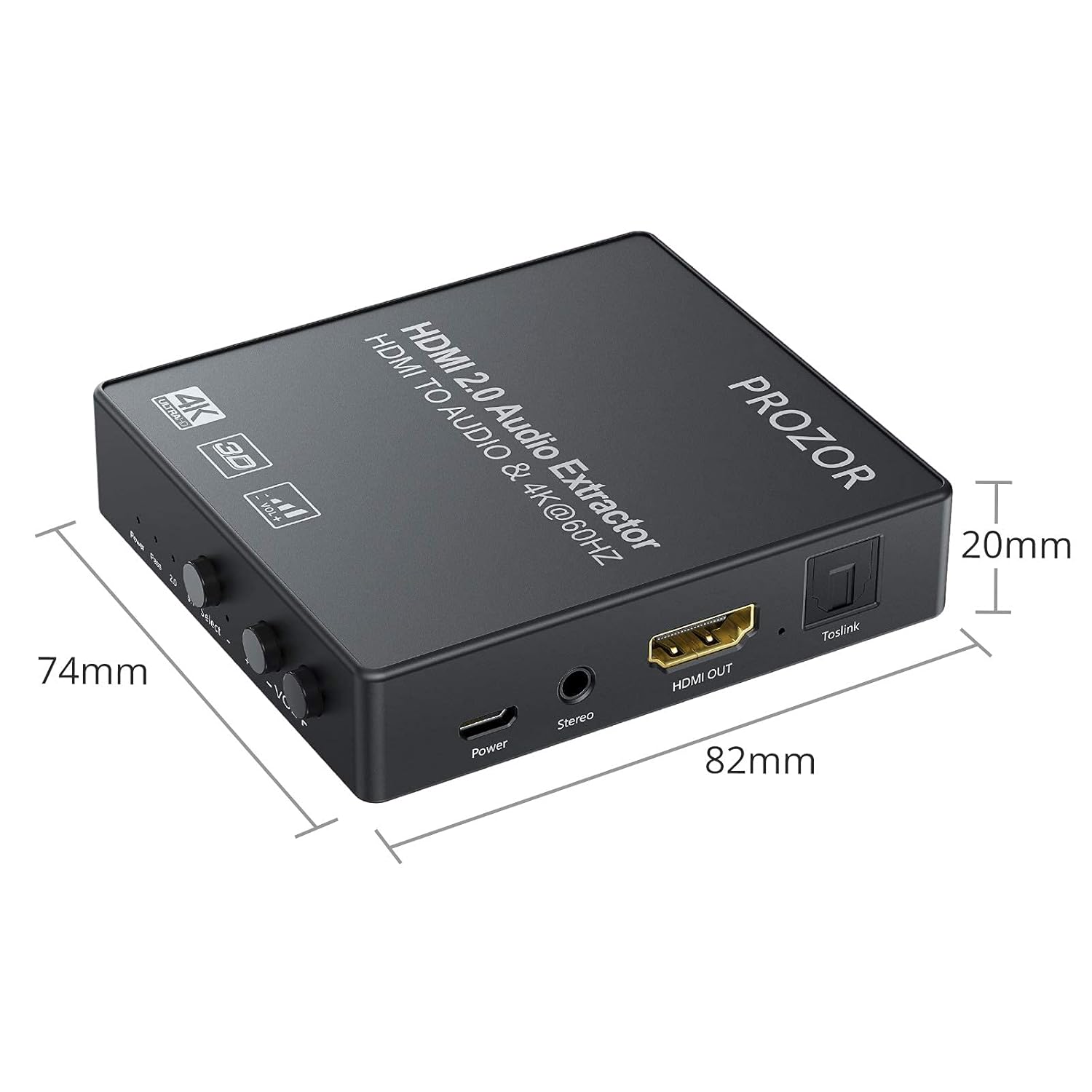
Image: A diagram showing the physical dimensions of the PROZOR HDMI Audio Extractor, measuring 82mm in length, 74mm in width, and 20mm in height.
Pokyny pro nastavení
- Připojení napájení: Connect the provided USB power cable to the "Power" port on the extractor and then to a 5V1A USB power adapter (not always included) or a USB port on your display/source device. Ensure the power indicator light illuminates.
- HDMI vstup: Connect an HDMI cable from your source device (e.g., Blu-ray player, game console, laptop) to the "HDMI IN" port on the extractor.
- HDMI výstup: Connect another HDMI cable from the "HDMI OUT" port on the extractor to the HDMI input of your display device (e.g., TV, monitor, projector).
- Audio Output (Analog): For analog audio, connect headphones or speakers to the "Stereo" (3.5mm) port. If using RCA speakers, utilize the included 3.5mm to 2RCA cable.
- Audio Output (Digital): For digital audio, connect an optical (Toslink) cable from the "Toslink" port on the extractor to your soundbar, AV receiver, or other optical audio input device.
- Vyberte režim zvuku: Use the "Select" button on the extractor to choose your desired audio output mode:
- PŘIHRÁVKA: HDMI audio passes through directly to the HDMI output.
- 2.0CH: Stereo audio output via 3.5mm and optical ports.
- 5.1CH: 5.1 channel audio output via the optical port only.
- Ověřte připojení: Ujistěte se, že jsou všechny kabely pevně připojeny.

Image: A visual representation of various input devices (Laptop, TV Box, DVD Player, PS3/PS4, Blu-ray DVD) connecting to the HDMI IN of the extractor, and output devices (HD TV, HD display, Projector) connecting from the HDMI OUT. This illustrates the signal flow.
Návod k obsluze
- Zapnutí: Once all connections are made and the USB power is supplied, the extractor will power on automatically. The "Power" indicator light will be red.
- Výběr zvukového režimu: Press the "Select" button to cycle through the audio modes: PASS, 2.0CH, and 5.1CH. The corresponding indicator light (2.0 or 5.1) will illuminate.
- Nastavení hlasitosti: For the 3.5mm stereo output, use the "VOL+" and "VOL-" knobs to adjust the audio volume. There are 10 levels of volume adjustment.

Obrázek: Detailní záběr view of the volume control knobs and the 3.5mm stereo output port on the PROZOR HDMI Audio Extractor. The text indicates 10 levels of volume adjustment for the 3.5mm headphone output.
- Kompatibilita rozlišení: The device automatically detects and supports resolutions up to 4K@60Hz (YUV 4:4:4) and 3D 1080P. Ensure your source and display devices also support these resolutions for optimal performance.

Image: A graphic demonstrating the resolution capabilities of the PROZOR HDMI Audio Extractor, supporting 4K@60Hz (YUV 4:4:4) and compatible with 3D 1080P.
Údržba
- Čištění: K čištění zařízení používejte měkký, suchý hadřík. Nepoužívejte tekuté ani aerosolové čisticí prostředky.
- Skladování: Přístroj skladujte na chladném a suchém místě mimo dosah přímého slunečního záření a extrémních teplot.
- Zacházení: Avoid dropping or subjecting the device to strong impacts. Do not attempt to disassemble or modify the unit, as this will void the warranty and may cause damage.
- Péče o kabely: Ensure HDMI and audio cables are not bent sharply or placed under heavy objects to prevent damage.
Odstraňování problémů
| Problém | Možná příčina | Řešení |
|---|---|---|
| Žádný video výstup. |
|
|
| Žádný audio výstup. |
|
|
| Přerušovaný signál nebo blikání. |
|
|
| No image with PS5 (as reported by some users). |
|
|
| Device stopped working after a short period. |
|
|
Specifikace
| Funkce | Detail |
|---|---|
| Číslo modelu | PST155 |
| Značka | PROZOR |
| Verze HDMI | HDMI 2.0 |
| Verze HDCP | HDCP 2.2 |
| Maximální vstupní rozlišení | 4K@60Hz (YUV 4:4:4) |
| Podporovaná rozlišení | 4K@60Hz, 4K@50Hz, 4K@30Hz, 1080P, 720P |
| 3D podpora | Ano (1080P) |
| Podpora HDR | Ano |
| Audio výstupní porty | 1 x SPDIF (Optical), 1 x 3.5mm Stereo Jack |
| Zvukové režimy | PASS, 2.0CH, 5.1CH (Optical only for 5.1CH) |
| Ovládání hlasitosti | 10 levels for 3.5mm output |
| Napájení | DC 5V/1A (přes Micro USB) |
| Hmotnost produktu | 210 g |
| Rozměry (D x Š x V) | 82 mm x 74 mm x 20 mm (přibližně) |
| Kompatibilní zařízení | Game consoles, Blu-ray/DVD players, streaming devices, laptops |
| Typ konektoru | AUX, HDMI, RCA (via adapter) |
Bezpečnostní informace
- Nevystavujte toto zařízení vodě, vlhkosti ani nadměrné vlhkosti.
- Neumisťujte zařízení do blízkosti zdrojů tepla nebo na přímé sluneční světlo.
- Use only the specified power adapter (5V1A) to avoid damage.
- Uchovávejte mimo dosah dětí.
- Odpojte napájení během bouřek s blesky nebo pokud jej delší dobu nepoužíváte.
Záruka a podpora
PROZOR products are designed for reliability and performance. For warranty information or technical support, please refer to the contact details provided with your purchase or visit the official PROZOR webmísto.
Uschovejte si prosím doklad o koupi pro uplatnění záruky.


