1. Úvod
The FeiTian A4B USB Security Key is a hardware authenticator designed to enhance the security of your online accounts. It provides robust protection against phishing and unauthorized access by requiring a physical key for login. This manual provides instructions for setting up, operating, and maintaining your security key.

Obrázek 1.1: Přední strana view of the FeiTian A4B USB Security Key. This image shows the USB-A connector and the circular touch button with a key icon.
2. Klíčové vlastnosti
- FIDO2 + FIDO U2F Certified: Ensures broad compatibility and strong security standards.
- Driverless Operation: Works in every browser without requiring additional driver installations.
- Univerzální kompatibilita: Supports desktops, laptops, tablets, and mobile devices via USB-A.
- Odolný design: Constructed for long-lasting everyday use.
- Voděodolnost (IP67): Provides protection against water ingress.
- Enhanced Account Protection: Helps safeguard your accounts from phishing and other cyber-attacks, preventing unauthorized device use.
- Wide Service Support: Compatible with numerous websites and applications including Windows Log-In, Twitter, Google Accounts, Microsoft Accounts, Facebook, Salesforce, Zoho, Dropbox, DUO Security, Microsoft Azure Entra ID, Microsoft Active Directory, Coinbase, Bank of America, Okta, Ping Identity, eBay, and many more.
Image 2.1: The FIDO Certified logo, indicating compliance with FIDO authentication standards.
3. Pokyny k nastavení
To begin using your FeiTian A4B USB Security Key, you will need to register it with your desired online services. The general process involves enabling two-factor authentication (2FA) or passkey support within the service's security settings and then following the on-screen prompts to register your physical key.
3.1 General Setup Steps:
- Přístup k nastavení zabezpečení: Navigate to the security or account settings section of the online service (e.g., Google, Microsoft, Facebook).
- Enable 2FA/Passkey: Look for options related to Two-Factor Authentication, Security Keys, or Passkeys and choose to add a new security key.
- Vložit klíč: When prompted, insert your FeiTian A4B USB Security Key into an available USB-A port on your computer or compatible device.
- Confirm Presence: The service will typically ask you to touch the key's button to confirm your presence. The key has an authentication indicator light that may flash during this process.
- Set PIN (if applicable): Some services or operating systems may require you to set a PIN for your security key. Follow the on-screen instructions to create a strong PIN.
- Name Key: You may be given the option to name your security key for easier identification.
- Kompletní registrace: Follow any remaining prompts to finalize the registration process.
3.2 Klíčové komponenty:
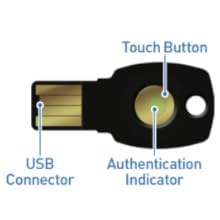
Image 3.1: Diagram illustrating the USB Connector, Touch Button, and Authentication Indicator on the FeiTian A4B USB Security Key.
3.3 Video Guide: Authenticate to a Web App using FIDO2
Video 3.1: This video demonstrates the process of authenticating to a web application using a FIDO2 security key, including PIN entry and touching the key.
3.4 Video Guide: Amazon Account Passkey Setup
Video 3.2: A step-by-step guide on how to set up a FIDO2 security key as a passkey for your Amazon account.
4. Návod k obsluze
Once your FeiTian A4B USB Security Key is registered with an online service, using it for login is straightforward:
- Initiate Login: Go to the login page of the service you wish to access. Enter your username or email address as usual.
- Vložit klíč: When prompted for your second factor, insert your FeiTian A4B USB Security Key into an available USB-A port.
- Dotykové tlačítko: The service will instruct you to touch the circular button on your security key. The authentication indicator light will typically flash or illuminate to confirm the action.
- Enter PIN (if required): If you set a PIN during registration, you may be prompted to enter it on your device.
- Přístup udělen: Upon successful verification, you will be logged into your account.
The security key acts as a physical token, ensuring that only someone with physical possession of the key and knowledge of any associated PIN can access your account.

Image 4.1: The FeiTian A4B USB Security Key attached to a keychain, demonstrating its portability and integration with everyday items.
5. Údržba
To ensure the longevity and proper functioning of your FeiTian A4B USB Security Key, follow these maintenance guidelines:
- Udržujte v čistotě: Regularly wipe the key with a soft, dry cloth to remove dust and debris. Avoid using harsh chemicals or abrasive materials.
- Chraňte před poškozením: While durable, avoid excessive force, bending, or dropping the key.
- Voděodolnost: The key is water-resistant (IP67), meaning it can withstand immersion in up to 1 meter of water for 30 minutes. However, it is not fully waterproof. Avoid prolonged submersion or exposure to high-pressure water jets. Ensure the USB connector is dry before inserting it into a device.
- Skladování: Store the key in a cool, dry place away from extreme temperatures and direct sunlight.
6. Řešení problémů
If you encounter issues with your FeiTian A4B USB Security Key, try the following solutions:
- Key Not Recognized:
- Ensure the key is fully inserted into a functional USB-A port.
- Try a different USB-A port on your device.
- Restartujte počítač nebo zařízení.
- Ensure your browser and operating system are up to date.
- Authentication Failure:
- Make sure you are touching the circular button on the key when prompted.
- Verify that the security key is correctly registered with the online service you are trying to access.
- If a PIN is required, ensure you are entering the correct PIN.
- Lost or Damaged Key:
- It is highly recommended to register multiple security keys (e.g., a primary and a backup key) with your accounts to prevent lockout in case one is lost or damaged.
- If you only have one key and it is lost, you will need to use the recovery options provided by the online service (e.g., backup codes, alternative 2FA methods).
7. Specifikace
| Atribut | Hodnota |
|---|---|
| Číslo modelu | A4B |
| Rozměry produktu | 3.94 x 1.18 x 3.94 palce |
| Hmotnost položky | 0.096 unce |
| Konektivita | USB-A |
| Osvědčení | FIDO2, FIDO U2F |
| Voděodolnost | IP67 |
| Výrobce | Feitian Technologies |
8. Záruka a podpora
For warranty information and technical support, please refer to the official FeiTian Technologies webnebo se obraťte přímo na jejich zákaznický servis. Uschovejte si účtenku jako doklad o koupi pro případ reklamace.
Výrobce: Feitian Technologies
Pro další pomoc navštivte: Feitian Technologies Official Webmísto