1. Úvod
This manual provides detailed instructions for the installation, operation, maintenance, and troubleshooting of your ASRock B460M PRO4 Motherboard. Designed to support 10th Generation Intel Core Processors (Socket 1200), this motherboard offers a robust platform for personal computing with features like DDR4 2933MHz memory support, multiple PCIe 3.0 slots, and M.2 connectivity.

Image 1.1: ASRock B460M PRO4 Motherboard and its retail packaging.
2. Obsah balení
Ověřte, zda jsou všechny níže uvedené položky součástí balení základní desky. Pokud některá položka chybí nebo je poškozena, obraťte se na prodejce.
- ASRock B460M PRO4 Motherboard
- Průvodce rychlou instalací
- Podpůrné CD (obsahující ovladače a nástroje)
- I / O štít
- Datové kabely 2 x SATA
- 3 x šrouby pro patice M.2
- 1 x distanční sloupek pro M.2 socket
3. Nastavení
3.1. Instalace procesoru
The ASRock B460M PRO4 motherboard features an LGA 1200 socket, compatible with 10th Generation Intel Core Processors. Carefully align the CPU with the socket, ensuring the gold triangle on the CPU matches the triangle on the socket. Gently lower the CPU into place without forcing it, then secure the retention arm.
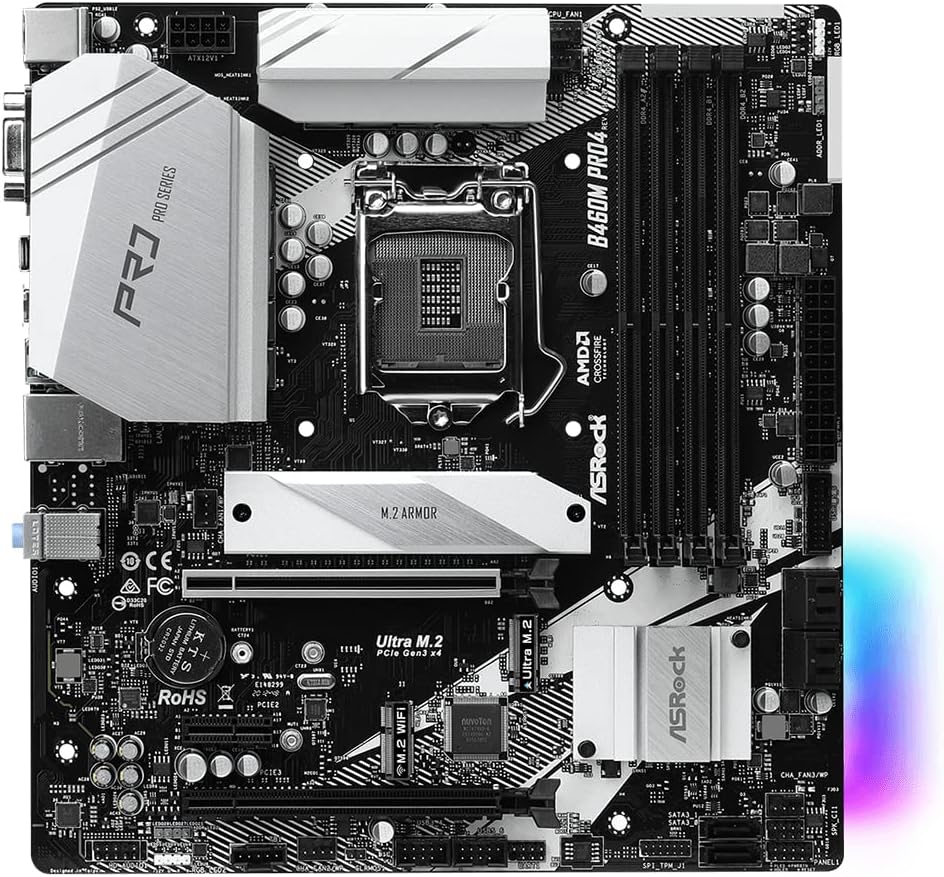
Obrázek 3.1: Shora dolů view of the ASRock B460M PRO4 Motherboard, highlighting the LGA 1200 CPU socket.
3.2. Instalace paměti (RAM)
This motherboard supports DDR4 memory modules up to 2933MHz. It features four DIMM slots. For optimal performance, install memory modules in matched pairs into the designated primary slots as indicated in the motherboard's detailed manual. Open the retention clips, align the memory module notch with the slot key, and press firmly until the clips snap into place.
3.3. Instalace úložného zařízení
The B460M PRO4 includes M.2 slots for high-speed NVMe SSDs and SATA ports for traditional hard drives or SSDs. Use the provided M.2 screws and standoffs for M.2 drive installation. Connect SATA data cables (included) from your storage devices to the SATA ports on the motherboard.

Obrázek 3.2: Úhlové view of the ASRock B460M PRO4 Motherboard, illustrating the M.2 slots and SATA ports for storage devices.
3.4. Instalace rozšiřující karty
The motherboard provides 2 PCIe 3.0 x16 slots for graphics cards and 1 PCIe 3.0 x1 slot for other expansion cards. Additionally, it includes 1 M.2 (Key E) slot specifically for a WiFi module. Ensure expansion cards are properly seated in their respective slots and secured with chassis screws.

Image 3.3: ASRock B460M PRO4 Motherboard, showcasing the various PCIe expansion slots.
3.5. Připojení napájení
Connect the 24-pin ATX power connector and the 8-pin CPU power connector from your power supply unit (PSU) to the corresponding ports on the motherboard. The 9 Power Phase Design ensures stable power delivery to critical components.
4. Provoz
4.1. Nastavení BIOSu/UEFI
Upon initial boot, press the designated key (usually DEL or F2) to enter the BIOS/UEFI setup utility. Here, you can configure system settings, boot order, and monitor hardware status. Refer to the ASRock website for a detailed BIOS/UEFI user manual specific to your model.
4.2. Instalace ovladače
After installing your operating system (Microsoft Windows 10 64-bit / 11 64-bit), install the necessary drivers from the included Support CD or download the latest versions from the official ASRock website. This ensures optimal performance and compatibility for all motherboard components.
4.3. Softwarové nástroje
ASRock provides various software utilities to enhance your system's functionality, including monitoring tools, fan control, and system tuning options. These can be found on the Support CD or ASRock's official webmísto.
5. Údržba
5.1. Čištění
Regularly clean your computer's interior to prevent dust buildup, which can lead to overheating and reduced performance. Use compressed air to remove dust from fans, heatsinks, and other components. Ensure the system is powered off and unplugged before cleaning.
5.2. Aktualizace BIOSu
Pravidelně kontrolujte ASRock website for BIOS/UEFI updates. Updates can improve system stability, add support for new hardware, or fix bugs. Follow the instructions provided by ASRock carefully when performing a BIOS update to avoid system damage.
6. Řešení problémů
If you encounter issues with your ASRock B460M PRO4 Motherboard, consider the following basic troubleshooting steps:
- Žádné napájení/žádné spuštění: Double-check all power connections (24-pin ATX, 8-pin CPU, GPU). Ensure the power supply is functioning correctly.
- Bez displeje: Verify that your monitor is connected to the correct graphics output (either integrated graphics or a dedicated graphics card). Reseat your graphics card and RAM modules.
- Nestabilita/pády systému: Check RAM seating and compatibility. Ensure all drivers are up-to-date. Monitor CPU and GPU temperatures to rule out overheating.
- Problémy s periferními zařízeními: Test peripherals in different USB ports. Ensure relevant drivers are installed.
For more advanced troubleshooting or persistent issues, consult the detailed troubleshooting section in the full user manual available on the ASRock support webwebu nebo kontaktujte technickou podporu společnosti ASRock.
7. Specifikace
Below are the key technical specifications for the ASRock B460M PRO4 Motherboard:
| Funkce | Specifikace |
|---|---|
| Značka | ASRock |
| Název modelu | B460M PRO4 |
| Zásuvka CPU | LGA 1200 |
| Kompatibilní procesory | Intel Core sedmé generace |
| Typ čipové sady | Intel B460 |
| Technologie paměti RAM | DDR4 SDRAM |
| Rychlost paměti | 2933 MHz |
| Počet portů USB 2.0 | 2 |
| Podpora operačního systému | Microsoft Windows 10 64bitový / 11 64bitový |
| Rozměry produktu (DxŠxV) | 10.9 x 10.3 x 2.5 palce |
| Hmotnost položky | 2.2 libry |

Image 7.1: Rear I/O panel of the ASRock B460M PRO4 Motherboard, showing various connectivity ports.
8. Podpora a záruka
For technical assistance, driver downloads, BIOS updates, and detailed product information, please visit the official ASRock support website. You can find comprehensive FAQs and contact information for customer service there.
For specific warranty terms and conditions applicable to your ASRock B460M PRO4 Motherboard, please refer to the warranty card included in your product packaging or visit the ASRock official website. Warranty policies may vary by region and retailer.
Poznámka: Konec produktuview video provided in the source data is for a different motherboard (MSI B760M-P) and is not relevant to the ASRock B460M PRO4. Therefore, no video content has been embedded in this manual.
9. Důležité bezpečnostní informace
Always observe the following safety precautions when handling or operating your motherboard:
- Disconnect the power cord from the wall outlet before touching any components inside the computer.
- Před manipulací se součástmi noste antistatický náramek nebo se často dotýkejte uzemněného kovového předmětu, abyste vybili statickou elektřinu.
- Chraňte základní desku před vlhkostí a extrémními teplotami.
- Nepokoušejte se o opravu základní desky sami. Obraťte se na kvalifikovaný servisní personál.


