1. Úvod
The ASUS ROG Strix B550-E Gaming motherboard is engineered to deliver next-level performance and connectivity for your gaming and computing needs. Designed for 3rd Gen AMD Ryzen CPUs, it features advanced technologies such as PCIe 4.0, WiFi 6, and 2.5Gb Ethernet, ensuring a robust and high-speed foundation for your system.
This manual provides detailed instructions for the installation, operation, and maintenance of your ROG Strix B550-E Gaming motherboard, helping you maximize its potential and ensure stable performance.

Figure 1.1: ASUS ROG Strix B550-E Gaming Motherboard and Box.
Klíčové vlastnosti:
- Patice AMD AM4 a PCIe 4.0: Optimized for Zen 3 Ryzen 5000 & 3rd Gen AMD Ryzen CPUs.
- Robustní konstrukce napájení: Vlastnosti 14+2 DrMOS napájecích tranzistorůtages with high-quality alloy chokes and durable capacitors for reliable power delivery.
- Optimalizované tepelné řešení: Fanless VRM and chipset heatsinks with ASUS Stack Cool 3+ design for enhanced passive cooling.
- Vysoce výkonné herní sítě: On-board WiFi 6 (802.11ax), Bluetooth V5.1, and 2.5 Gb LAN with ASUS LANGuard.
- Nejlepší herní konektivita: Supports HDMI 2.1 (4K@60HZ) and DisplayPort 1.2 output, dual M.2 slots (NVMe SSD) with PCIe 4.0 x4 connectivity, USB 3.2 Gen 2 Type-C ports, and Thunderbolt 3 header.
2. Obsah balení
Before you begin, please verify that all items listed below are present in your motherboard package. If any item is damaged or missing, contact your retailer.

Figure 2.1: Included accessories with the ASUS ROG Strix B550-E Gaming Motherboard.
- ASUS ROG Strix B550-E Gaming Motherboard
- ASUS 2x2 Dual Band Wi-Fi Antenna
- Uživatelská příručka
- Podpora DVD
- ROG Audio USB Type-C Cable
- Samolepky ROG
- Klíčenka ROG
- 1 x Cable Ties Pack
- 4x SATA kabely
- 1 x M.2 Gumové balení
- 1 x M.2 SSD Screw Package
- 1 x Addressable RGB Extension Cable
- 1 x RGB Extension Cable
3. Rozložení a komponenty základní desky
Familiarize yourself with the key components and connectors on your motherboard before installation.

Figure 3.1: Motherboard overview highlighting key areas for performance gaming.
- ProCool Power Connector: Zajišťuje stabilní napájení CPU.
- Patice AMD AM4: Supports 3rd Gen AMD Ryzen™ Processors.
- 14+2 Power Stages: Robust power delivery for high-performance CPUs.
- DDR4, 4 x DIMM: Supports dual-channel memory configuration with ASUS OptiMem II.
- Multi-GPU SLI®/CFX Support: Includes PCIe 4.0 x16 SafeSlots for graphics cards.
- 2 x M.2 Sockets: One supports PCIe 4.0 x4 & SATA modes, the other supports PCIe 3.0 x4 & SATA modes.

Figure 3.2: Motherboard overview highlighting comprehensive cooling features.
- VRM Heatsink: Dissipates heat from the voltage regulator modules.
- Dual M.2 Heatsinks: Udržuje M.2 SSD disky chladné pro trvalý výkon.
- Chladič čipsetu: Cools the B550 chipset.
- AIO Pump Header: Dedicated header for All-in-One liquid coolers.
- Multiple 4-pin PWM Fan Headers: For flexible fan control and optimal airflow.

Figure 3.3: Motherboard overview highlighting total gaming immersion features.
- I/O Zone Aura Lighting: Customizable RGB lighting on the I/O shroud.
- 2 x 3-pin Addressable Gen 2 RGB headers: For connecting addressable RGB strips and devices.
- 2 x RGB headers: For connecting standard RGB strips and devices.
- Chipset Zone Aura Lighting: Customizable RGB lighting on the chipset heatsink.
- SupremeFX S1220A CODEC: High-quality audio solution with impedance sense, high-quality output and input, SupremeFX shielding, and dual OP ampzáchranáři.
- Sonic Studio III + Sonic Studio Virtual Mixer: Advanced audio software suite.
- Sonic Radar III: Visualizes in-game sound for competitive advantage.
- DTS® Sound Unbound: Pohlcující zvukový zážitek.
4. Nastavení a instalace
4.1. Instalace procesoru
Carefully align your AMD AM4 processor with the socket on the motherboard. Ensure the golden triangle on the CPU matches the triangle on the socket. Gently lower the CPU into place and secure it by pushing down the retention lever.
4.2. Instalace paměti (RAM)
The motherboard supports DDR4 memory modules. For optimal performance, install memory modules in the recommended DIMM slots for dual-channel operation, typically A2 and B2 (refer to your motherboard manual for exact slot numbering). Open the DIMM slot clips, align the memory module's notch with the slot's key, and press firmly until the clips snap into place.
4.3. Instalace úložného zařízení
The motherboard features two M.2 slots for NVMe SSDs and six SATA 6Gb/s ports for traditional SATA drives.
- M.2 SSD: Remove the M.2 heatsink, insert the M.2 SSD into the slot, and secure it with the provided M.2 screw package. Reattach the heatsink.
- SATA disky: Connect your SATA SSDs or HDDs to the SATA 6Gb/s ports using the provided SATA cables.
4.4. Instalace grafické karty (GPU)
Insert your PCIe 4.0 graphics card into the primary PCIe 4.0 x16 SafeSlot. Ensure it is fully seated and secured by the slot's retention clip. Connect any necessary PCIe power cables from your power supply to the graphics card.
4.5. Připojení napájení
Connect the 24-pin ATX main power connector and the 8-pin (or 8+4-pin) ProCool CPU power connector from your power supply to the corresponding ports on the motherboard.
4.6. Přední panel a vstupně/výstupní připojení
Connect your case's front panel headers (power button, reset button, USB ports, audio jacks) to the corresponding headers on the motherboard. Refer to the motherboard's detailed manual for specific pin layouts.
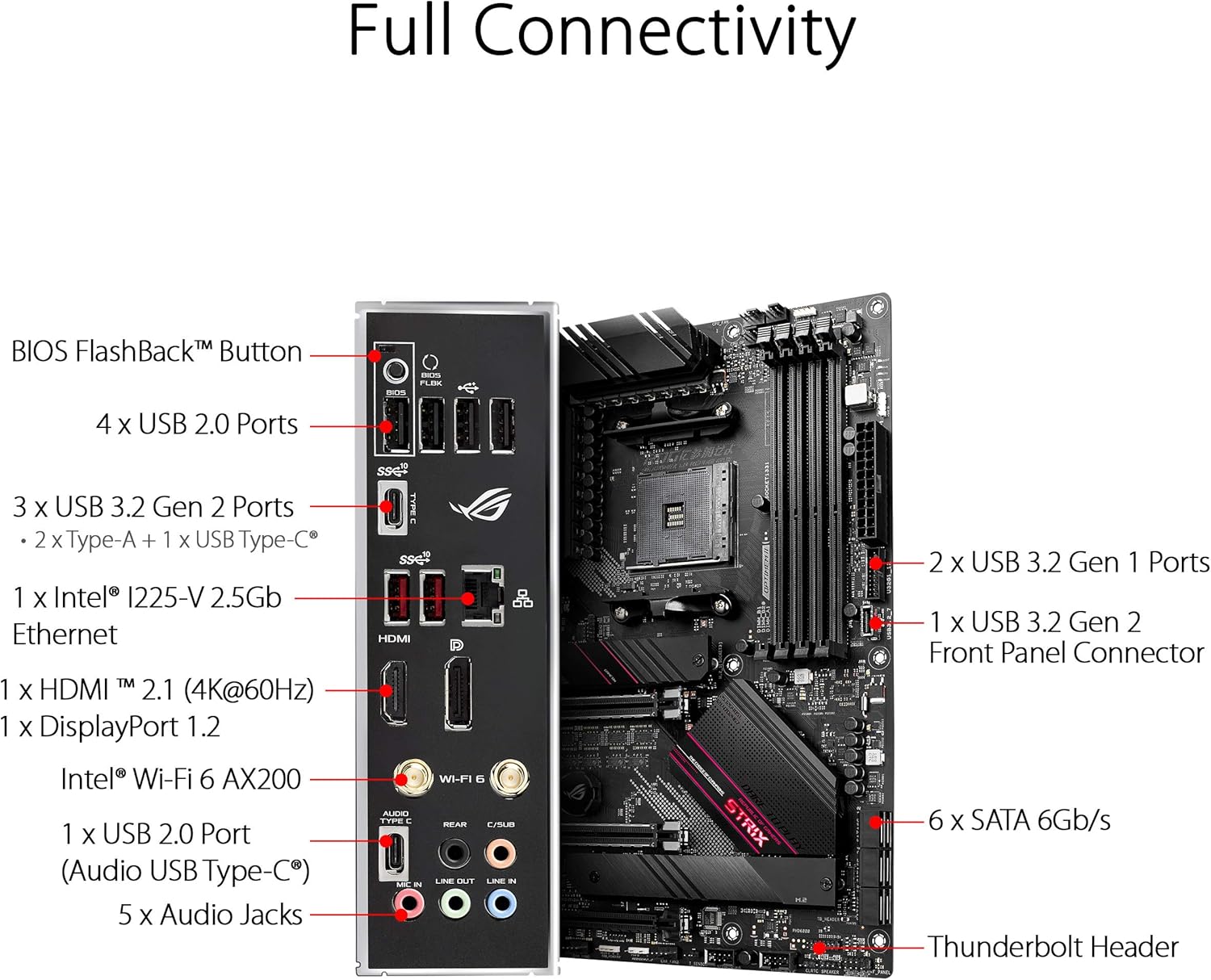
Figure 4.1: Full Connectivity: Rear I/O Panel.
Zadní I/O panel nabízí různé možnosti připojení:
- BIOS FlashBack™ Button
- 4 x USB 2.0 porty
- 3 x USB 3.2 Gen 2 Ports (2 x Type-A + 1 x USB Type-C®)
- 1 x Intel™ I225-V 2.5Gb Ethernet
- 1 x HDMI™ 2.1 (4K@60HZ)
- 1 x DisplayPort 1.2
- Intel® Wi-Fi 6 AX200
- 1 x USB 2.0 Port (Audio USB Type-C®)
- 5 x audio konektory
- Thunderbolt Header (internal)
5. Obsluha základní desky
5.1. Nastavení systému BIOS
The ASUS ROG Strix B550-E Gaming motherboard features an intuitive UEFI BIOS. To enter BIOS setup, press the DEL or F2 key during the Power-On Self-Test (POST). The BIOS allows you to configure system settings, boot order, and overclocking parameters.
5.2. Software a ovladače
Install the necessary drivers from the included Support DVD or download the latest versions from the ASUS official webweb (www.asus.com). Key software includes:
- Bedna zbrojnice: Centralized utility for managing drivers, utilities, RGB lighting (Aura Sync), and game profiles.
- AI Noise-Canceling Microphone Software: Enhances communication by filtering out background noise.
- Sonic Studio III: For advanced audio customization.
Video 5.1: Overview of the ASUS B550 AMD Ryzen WiFi 6 Gaming Motherboard Series, showcasinjeho vlastnosti a design.
6. Údržba
Pravidelná údržba pomáhá zajistit dlouhou životnost a optimální výkon vaší základní desky.
6.1. Údržba chladicího systému
The motherboard features fanless VRM and chipset heatsinks, reducing dust accumulation in these areas. However, ensure proper airflow within your PC case. Regularly clean dust from case fans, CPU cooler, and GPU fans using compressed air. Keep the heatsinks free from obstructions.
6.2. Generální úklid
Periodically clean the motherboard and other components inside your PC case. Disconnect power before cleaning. Use a soft brush or compressed air to remove dust. Avoid using liquid cleaners directly on components.
7. Řešení problémů
Tato část se zabývá běžnými problémy, se kterými se můžete setkat.
7.1. No Display / Boot Issues
- Zkontrolujte připojení napájení: Ujistěte se, že jsou všechny napájecí kabely (24pinový ATX, 8pinový CPU, napájení GPU PCIe) bezpečně připojeny.
- Znovu usaďte komponenty: Try reseating the CPU, RAM modules, and graphics card. Ensure RAM modules are installed in the correct slots for dual-channel operation.
- Zobrazení Q-kódu: The motherboard features a Q-Code display (Debug LED) that shows a two-digit code indicating the system status or an error. Refer to the detailed manual for a list of Q-Codes and their meanings to diagnose the issue.
- BIOS FlashBack™: If your system doesn't boot after a BIOS update or if you need to update BIOS for a new CPU without an older one, use the BIOS FlashBack™ feature. Refer to the detailed manual for instructions on how to use this feature.
7.2. Driver Issues
If you experience instability or device malfunction, ensure all drivers are up-to-date. Download the latest drivers from the ASUS support website. Avoid installing generic drivers if specific motherboard drivers are available.
7.3. Nestabilita systému / Pády
- Zkontrolujte teploty: Monitor CPU and GPU temperatures using monitoring software. Overheating can lead to instability.
- Kompatibilita pamětí: Ensure your RAM is compatible with the motherboard and CPU. Refer to the Qualified Vendor List (QVL) on the ASUS support webmísto.
- Napájení: Ověřte, zda má váš napájecí zdroj (PSU) dostatečný výkon.tage for all your components.
8. Technické specifikace
| Funkce | Specifikace |
|---|---|
| Značka | ASUS |
| Série | ROG STRIX B550-E GAMING |
| Číslo modelu | ROG STRIX B550-E GAMING |
| Zásuvka CPU | Zásuvka AM4 |
| Kompatibilní procesory | AMD 3rd Generation Ryzen (Zen 3 Ryzen 5000 ready) |
| Typ čipové sady | AMD B550 |
| Technologie paměti RAM | DDR4 |
| Rychlost paměti | Až 4400 MHz (přetaktování) |
| Podpora PCIe | PCIe 4.0 |
| Bezdrátový typ | WiFi 6 (802.11ax), Bluetooth V5.1 |
| LAN | 2.5 Gb Ethernet |
| USB porty | 4 x USB 2.0, 3 x USB 3.2 Gen 2 (Type-A + Type-C), USB Audio Type-C |
| Video výstup | HDMI 2.1 (4K@60HZ), DisplayPort 1.2 |
| Skladování | Dual M.2 slots, 6 x SATA 6Gb/s |
| Hmotnost položky | 2.36 libry |
| Rozměry produktu | 13.5 x 10.7 x 3.3 palce |
9. Záruka a podpora
Podrobné informace o záruce naleznete v záruční kartě dodané s vaším produktem nebo na oficiálních webových stránkách společnosti ASUS. website. ASUS provides comprehensive support for its products, including driver downloads, FAQs, and customer service.
You can find support resources and contact information on the ASUS official support page: www.asus.com/support/
When contacting support, please have your product model number (ROG STRIX B550-E GAMING) and serial number ready.


