Ipega PG-9069 Bluetooth Gamepad
Návod k použití
1. Úvod
Děkuji za nákupasing the Ipega PG-9069 Bluetooth Gamepad. This controller is designed to enhance your gaming experience across various platforms, including Android, iOS, and PC. It features a built-in touchpad, dual motor vibration, and a stretchable phone bracket for versatile use. Please read this manual carefully before using the product to ensure proper operation and to maximize its potential.

Figure 1: Ipega PG-9069 Bluetooth Gamepad
This image displays the Ipega PG-9069 Bluetooth Gamepad from an angled perspective, showcasing its ergonomic design, dual joysticks, D-pad, action buttons, and the central touchpad. The Ipega logo is visible on the left handle.
2. Obsah balení
Po vybalení zkontrolujte obsah balení:
- 1 x Ipega PG-9069 Bluetooth Gamepad
- 1 x Micro USB Charging Cable (90cm)
- 1 x Stretchable Phone Bracket
- 1 x Uživatelská příručka (tento dokument)
3. Vlastnosti produktu
- Široká kompatibilita: Supports Bluetooth-enabled Android tablets, phones, TV boxes, smart TVs, VR devices, iOS phones/tablets, Mac OSX PCs, and Windows 7/8/10/XP.
- Přesné ovládání: Built-in Hall sensors in L2 and R2 keys for more accurate and responsive control.
- Vibrační zpětná vazba: Dual motor vibration function provides immersive feedback (available when wired to PC in X-INPUT mode only).
- Enhanced Gameplay: Features Turbo and Macro modes for customized and exciting game experiences.
- Integrovaný touchpad: Mouse touch function for convenient navigation on Android and PC platforms.
- Ergonomický design: Designed for comfortable and extended gaming sessions.
- Mobile Gaming Ready: Includes a stretchable phone bracket for attaching smartphones.
4. Ovládací prvky a funkce
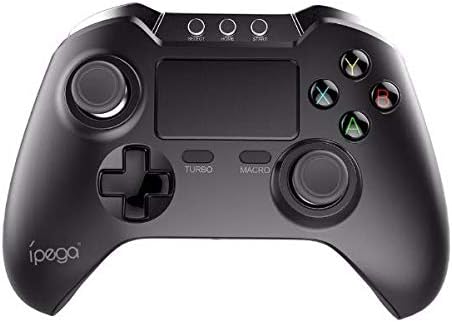
Obrázek 2: Nahoře view of the Ipega PG-9069 Gamepad
Tento obrázek poskytuje jasný pohled shora dolů view of the Ipega PG-9069 Gamepad, highlighting the layout of its buttons and controls. Visible elements include the dual analog sticks, D-pad, action buttons (A, B, X, Y), central touchpad, and the Turbo and Macro buttons.
- Levá analogová páčka: Používá se pro ovládání pohybu a kamery.
- Pravá analogová páčka: Used for camera control or aiming.
- D-Pad (směrový ovladač): Pro přesné směrové zadávání.
- Akční tlačítka (A, B, X, Y): Pro akce ve hře.
- Tlačítka L1/R1: Knoflíky na ramenou.
- Spouštěče L2/R2: Analog triggers with Hall sensors for precise input.
- Tlačítko Domů: Power on/off, mode switching.
- SELECT/BACK Button: Varies by game/platform.
- Tlačítko Start: Varies by game/platform.
- Tlačítko TURBO: Activates/deactivates turbo function for rapid firing.
- MACRO Button: Used to program and execute macro sequences.
- Touchpad: Functions as a mouse on compatible systems (Android/PC).
- Charging Port (Micro USB): Located on the front edge.
5. Nastavení a připojení
5.1. Nabíjení regulátoru
Before first use, fully charge the controller. Connect the supplied Micro USB cable to the controller's charging port and the other end to a USB power source (e.g., computer USB port, USB wall adapter). The charging indicator light will illuminate during charging and turn off when fully charged. Charging time is approximately 2 hours.
5.2. Párování Bluetooth
The PG-9069 supports various Bluetooth pairing modes:
- Standardní režim Android: Stiskněte a podržte X + DOMŮ buttons simultaneously until the indicator light flashes rapidly. Hledat "PG-9069" on your Android device's Bluetooth settings and connect.
- Režim iOS: Stiskněte a podržte Y + DOMŮ buttons simultaneously until the indicator light flashes rapidly. Hledat "PG-9069" on your iOS device's Bluetooth settings and connect.
- PC (Bluetooth Dongle Required): For PC, it is recommended to use a wired connection for optimal performance, especially for vibration. If using Bluetooth, ensure your PC has Bluetooth capability or use a Bluetooth dongle. Pair as per Android Standard Mode.
Once successfully paired, the indicator light will remain solid.
5.3. Wired Connection (PC Only)
For PC gaming, you can connect the controller directly via the Micro USB cable. This mode supports dual motor vibration. Simply connect the controller to your PC using the provided USB cable. The controller will be recognized as a standard gamepad (X-INPUT mode).
6. Návod k obsluze
6.1. Zapnutí/vypnutí
Pro zapnutí stiskněte DOMOV tlačítko. Pro vypnutí stiskněte a podržte DOMOV tlačítko po dobu 3 sekund, dokud kontrolka nezhasne.
6.2. Funkce Turbo
The Turbo function allows for rapid, continuous input of a button press. To activate: Press and hold the desired action button (e.g., A) and then press the TURBO button. To deactivate: Repeat the process.
6.3. Funkce makra
The Macro function allows you to record a sequence of button presses and execute them with a single button. Refer to the specific game or application for macro programming details, as implementation may vary.
6.4. Touchpad Function
The central touchpad functions as a mouse on Android and PC platforms. Use your finger to navigate the cursor. Tapping the touchpad acts as a left-click.
6.5. Using the Phone Bracket

Figure 3: Ipega PG-9069 Gamepad with phone mounted
This image shows the Ipega PG-9069 Gamepad with a smartphone securely mounted on its integrated stretchable bracket, demonstrating its use for mobile gaming. The phone displays a game, indicating readiness for play.
Attach the stretchable phone bracket to the designated slot on the controller. Gently extend the bracket to secure your smartphone. Ensure the phone is firmly seated before use.
7. Řešení problémů
- Ovladač se nepřipojuje: Ensure the controller is charged. Verify you are in the correct pairing mode (Android/iOS). Delete previous pairings on your device and try pairing again.
- Vstupní zpoždění nebo odpojení: Ensure there are no strong electromagnetic interferences nearby. Move closer to the device. Recharge the controller if the battery is low.
- Tlačítka nereagují: Try resetting the controller (if a reset button is available, usually a small pinhole on the back). Re-pair the controller.
- Vibrace nefungují: Ensure you are connected via wired mode to a PC and the game supports vibration feedback.
- Touchpad nefunguje: Ensure you are in a compatible mode (Android/PC) and the application supports mouse input.
8. Specifikace
| Parametr | Hodnota |
|---|---|
| Model | PG-9069 |
| Značka | Ipega |
| Typ připojení | Bluetooth V3.0, Wired (Micro USB) |
| Kompatibilita | Android, iOS, PC (Windows 7/8/10/XP, Mac OSX) |
| Typ baterie | Vestavěná Li-polymerová baterie |
| Kapacita baterie | 380 XNUMX mAh |
| Baterie Voltage | 3.7V |
| Doba nabíjení | Přibl. 2 hodin |
| Pracovní doba | Přibl. 12 hodin |
| Materiál | ABS |
| Rozměry produktu | 15.40 x 11.50 x 5.50 cm (6.06 x 4.53 x 2.17 palce) |
9. Údržba
- Clean the controller regularly with a soft, dry cloth. Do not use harsh chemicals or abrasive cleaners.
- Regulátor skladujte na chladném a suchém místě mimo dosah přímého slunečního záření a extrémních teplot.
- Zabraňte pádu ovladače nebo jeho vystavení silným nárazům.
- Nepokoušejte se rozebírat ani upravovat ovladač, mohlo by dojít ke ztrátě záruky a poškození.
10. Bezpečnostní informace
- Udržujte zařízení mimo dosah vody a jiných kapalin.
- Do not expose the device to open flames or extreme heat.
- Uchovávejte mimo dosah dětí.
- Dispose of the battery according to local regulations. Do not dispose of with household waste.
11. Záruka a podpora
This product comes with a standard manufacturer's warranty. Please refer to the warranty card included in your package or contact your retailer for specific warranty terms and conditions. For technical support or inquiries, please contact the Ipega customer service department through their official webnebo kontaktní informace poskytnuté při nákupu.


