Zavedení
Děkuji za nákupasing the Altec Lansing AL-5003 Multimedia DJ Trolly Speaker. This speaker is designed to deliver powerful audio for various applications, including parties and surround sound systems. Featuring wireless connectivity, a built-in trolley for portability, and multiple input options, the AL-5003 offers a versatile audio experience. Please read this manual carefully to ensure proper setup, operation, and maintenance of your speaker.
Důležité bezpečnostní pokyny
- Read these instructions thoroughly before operating the speaker.
- Uschovejte tento návod pro budoucí použití.
- Nevystavujte reproduktor dešti ani vlhkosti.
- Neblokujte žádné ventilační otvory.
- Neinstalujte v blízkosti zdrojů tepla, jako jsou radiátory, tepelné regulátory, kamna nebo jiná zařízení (včetně amplifikátory), které produkují teplo.
- Chraňte napájecí kabel před šlapáním nebo přiskřípnutím, zejména u zástrček, zásuvek a v místě, kde vychází z přístroje.
- Používejte pouze nástavce/příslušenství určené výrobcem.
- Odpojte toto zařízení během bouřky s blesky nebo když se delší dobu nepoužívá.
- Veškeré opravy svěřte kvalifikovanému servisnímu personálu.
Obsah balení
Zkontrolujte prosím balení, zda neobsahuje následující položky:
- Altec Lansing AL-5003 Multimedia DJ Trolly Speaker
- Napájecí kabel
- Dálkové ovládání
- Uživatelská příručka
- Auxiliary Cable (may vary by region)
Konec produktuview
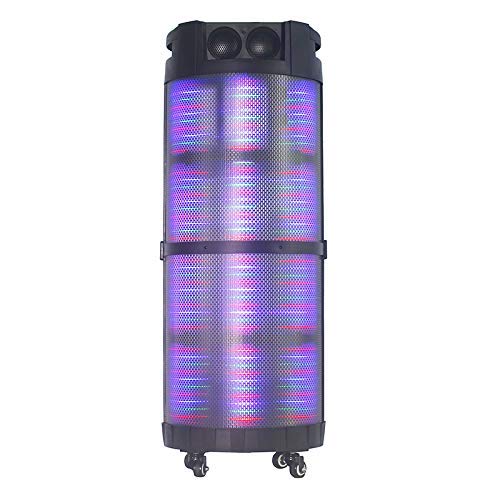
The AL-5003 speaker features a robust design with integrated wheels and a handle for easy transport. It includes a powerful 10-inch speaker and a 1-inch tweeter, providing clear and dynamic sound. The control panel is located on the top of the unit, offering easy access to various functions.
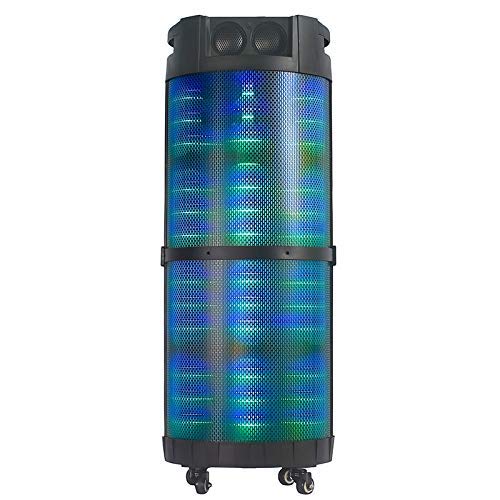
Obrázek 1: Přední view of the Altec Lansing AL-5003 speaker, showcasing its cylindrical design and illuminated grille. The speaker features a sturdy build with integrated wheels at the base for portability.
Ovládací panely a připojení
The top panel of the speaker houses the main controls and input/output ports.
Obrázek 2: Shora dolů view of the AL-5003 speaker, highlighting the control panel with various buttons and knobs, along with the top-mounted speakers. This view also shows the integrated handle for easy transport.
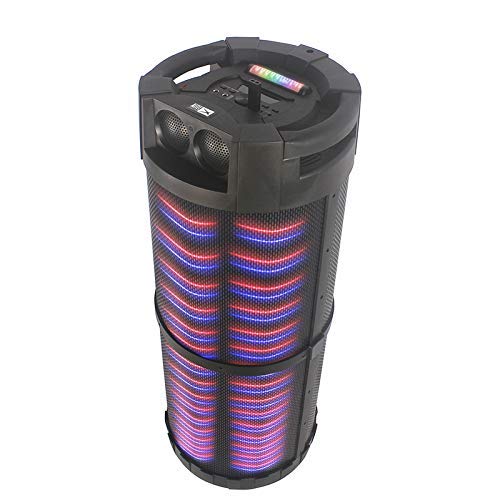
Obrázek 3: Úhlové view of the AL-5003 speaker, providing a perspective of its overall structure, including the side grille and the top control area. The dynamic lighting effects are visible through the mesh.
Common controls include Power, Volume, Mode selection, Play/Pause, Track Skip, and inputs for USB, Auxiliary, and potentially Microphone (if available on the model).
Pokyny pro nastavení
- Rozbalení: Opatrně vyjměte reproduktor a veškeré příslušenství z obalu. Obal si uschovejte pro budoucí přepravu nebo skladování.
- Umístění: Place the speaker on a stable, flat surface. Ensure there is adequate ventilation around the unit. For optimal sound, position the speaker in a central location within the listening area.
- Připojení napájení: Connect the provided power cord to the AC input on the speaker and then plug it into a standard wall outlet (AC 100-240V, 50/60Hz).
- Počáteční poplatek (pokud je k dispozici): If the speaker has an internal battery (Lead Acid battery mentioned in specs), it is recommended to fully charge it before first use. The charging indicator light will typically show charging status.
- Zapnutí: Press the Power button on the control panel or remote control to turn on the speaker.
Návod k obsluze
1. Režim Bluetooth
- Aktivujte Bluetooth: Turn on the speaker. Press the "Mode" button on the control panel or remote until "Bluetooth" or "BT" is displayed (or indicated by a blue LED). The speaker will enter pairing mode, indicated by a flashing light or audible prompt.
- Spárování se zařízením: On your mobile device (smartphone, tablet, laptop), go to Bluetooth settings and enable Bluetooth. Hledat available devices. You should see "AL-5003" or "Altec Lansing" in the list. Select it to pair.
- Potvrzení připojení: Once successfully paired, the speaker will emit a confirmation sound, and the Bluetooth indicator light will become solid.
- Přehrávání: Start playing audio on your connected device. Use the speaker's volume controls or your device's volume controls to adjust the sound level. Use the Play/Pause, Next, and Previous buttons on the speaker or remote to control playback.
2. Auxiliary (AUX) Mode
- Připojte AUX kabel: Insert one end of a 3.5mm auxiliary cable into the AUX input port on the speaker. Connect the other end to the headphone jack or audio output of your external audio device (e.g., MP3 player, laptop).
- Vyberte režim AUX: Press the "Mode" button on the speaker or remote until "AUX" is displayed or indicated.
- Přehrávání: Play audio from your connected device. Adjust volume using both the speaker's controls and your device's volume.
3. USB Playback Mode
- Vložte USB disk: Vložte USB flash disk s audio soubory ve formátu MP3 filedo USB portu na reproduktoru.
- Vyberte režim USB: The speaker may automatically switch to USB mode. If not, press the "Mode" button until "USB" is displayed or indicated.
- Přehrávání: Reproduktor automaticky začne přehrávat zvuk files from the USB drive. Use the Play/Pause, Next, and Previous buttons to control playback.
4. Karaoke Function (if applicable)
If your AL-5003 model includes a microphone input, you can use it for karaoke:
- Připojení mikrofonu: Plug a wired microphone into the designated microphone input jack.
- Upravit hlasitost: Use the dedicated Microphone Volume knob (if present) to adjust the microphone's volume.
- Ovládání ozvěny: Some models may have an Echo knob to add an echo effect to the microphone audio.
5. Dálkové ovládání
The included remote control provides convenient access to all major functions:
- Moc: Zapnutí/vypnutí reproduktoru.
- režim: Switch between Bluetooth, AUX, USB, and other available modes.
- Hlasitost +/-: Upravte hlavní hlasitost.
- Přehrát/pozastavit: Spuštění nebo pozastavení přehrávání.
- Předchozí další: Přechod na předchozí nebo další skladbu.
- EQ: Select different equalizer presets (if available).
- Ztlumit: Ztlumit nebo zapnout zvuk.
Údržba
- Čištění: K čištění vnější strany reproduktoru používejte měkký, suchý hadřík. Nepoužívejte tekuté čisticí prostředky ani abrazivní materiály.
- Skladování: Pokud reproduktor delší dobu nepoužíváte, skladujte jej na chladném a suchém místě, mimo dosah přímého slunečního záření a extrémních teplot.
- Péče o baterie: If the speaker has a built-in rechargeable battery, avoid fully discharging it frequently. For long-term storage, charge the battery to approximately 50-70% every few months to prolong its lifespan.
- Větrání: Ujistěte se, že ventilační otvory nejsou zablokovány, aby nedošlo k přehřátí.
Odstraňování problémů
| Problém | Možná příčina | Řešení |
|---|---|---|
| Žádná síla | Power cord not connected; Power outlet not working; Speaker is off; Battery drained. | Ensure power cord is securely connected. Try a different outlet. Press the Power button. Charge the battery. |
| Žádný zvuk | Volume too low; Incorrect mode selected; Device not connected properly; Mute function active. | Increase volume on speaker and source device. Select the correct input mode (Bluetooth, AUX, USB). Reconnect device. Check if mute is active on remote. |
| Chyba párování Bluetooth | Reproduktor není v režimu párování; Bluetooth zařízení vypnuto; Reproduktor je příliš daleko od zařízení; Rušení. | Ensure speaker is in Bluetooth pairing mode. Turn on Bluetooth on your device. Move device closer to speaker. Turn off other Bluetooth devices nearby. |
| Přehrávání z USB nefunguje | USB disk nebyl správně vložen; Nekompatibilní file formát; USB disk poškozen. | Znovu vložte USB disk. Ujistěte se, že files are in MP3 format. Try a different USB drive. |
| Dálkové ovládání nefunguje | Batteries drained; Obstruction between remote and speaker; Remote not pointed at sensor. | Replace remote control batteries. Remove any obstructions. Point remote directly at the speaker's IR sensor. |
Specifikace
| Funkce | Detail |
|---|---|
| Název modelu | Altec Lansing AL-5003 Multimedia DJ Trolly Speaker |
| Typ reproduktoru | Prostorový zvuk |
| Speciální funkce | Bezdrátový |
| Doporučená použití | For Surround Sound Systems, Party |
| Kompatibilní zařízení | Gaming Console, Karaoke Machine, Laptop, MP3 Player, Smartphone, Tablet |
| Konfigurace kanálů prostorového zvuku | 1.0 |
| Kontrolní metoda | Vzdálený |
| Technologie bezdrátové komunikace | Bluetooth |
| Velikost reproduktoru | 10 palce |
| Zdroj napájení | Elektrický kabel |
| Průměr výškového reproduktoru | 1 palce |
| Kompatibilní audio vstup | Pomocný, USB |
| Připojení reproduktorů | Wired (for power), Wireless (Bluetooth) |
| Audio Wattage | 100 wattů |
| Složení článků baterie | Olověná kyselina |
| Typ montáže | Stojící na podlaze |
Záruka a podpora
Altec Lansing products are manufactured to the highest quality standards. For information regarding warranty coverage, technical support, or service inquiries, please refer to the warranty card included with your product or visit the official Altec Lansing website. Please have your model number (AL-5003) and purchase details ready when contacting support.
Webmísto: www.alteclansing.com (This is a generic link, actual link might vary by region)


