Zavedení
This manual provides essential information for the safe and efficient use of your Grundig 24 GCH 5900B HD Ready TV. Please read these instructions carefully before operating the device and retain them for future reference. This television features HDR technology for enhanced contrast, Dolby Digital sound for clear audio, and a built-in satellite receiver for convenience.
Bezpečnostní informace
- Ensure the television is placed on a stable surface to prevent tipping.
- Do not expose the TV to rain or moisture to avoid electric shock.
- Udržujte větrací otvory volné, aby nedošlo k přehřátí.
- Během bouřek nebo pokud jej delší dobu nepoužíváte, odpojte televizor ze zásuvky.
- Veškeré opravy svěřte kvalifikovanému servisnímu personálu.
Nastavení
1. Vybalování
Carefully remove the TV and all accessories from the packaging. Check for any damage during transit. Keep packaging materials for future transport or storage.
2. Instalace stojanu
If you are not wall-mounting the TV, attach the stand according to the diagrams provided in the separate assembly guide. Ensure all screws are securely tightened.

Obrázek: Přední strana view of the Grundig 24 GCH 5900B HD Ready TV with its stand attached. The screen displays a vibrant image of cherries on a plate.
3. Propojovací kabely
- Napájecí kabel: Připojte napájecí kabel k napájecímu vstupu televizoru a poté do zásuvky ve zdi.
- Anténa/Satelit: Connect your antenna or satellite cable to the appropriate input on the TV. This model includes a built-in satellite receiver.
- Externí zařízení: Use HDMI or other available ports to connect devices like DVD players, game consoles, or sound systems.
4. Průvodce prvním nastavením
Upon first power-on, the TV will guide you through an initial setup process. This includes language selection, country, and channel scanning. Follow the on-screen prompts to complete the setup.
Provozní
1. Dálkové ovládání Overview
The remote control allows you to access all TV functions. Familiarize yourself with the button layout.
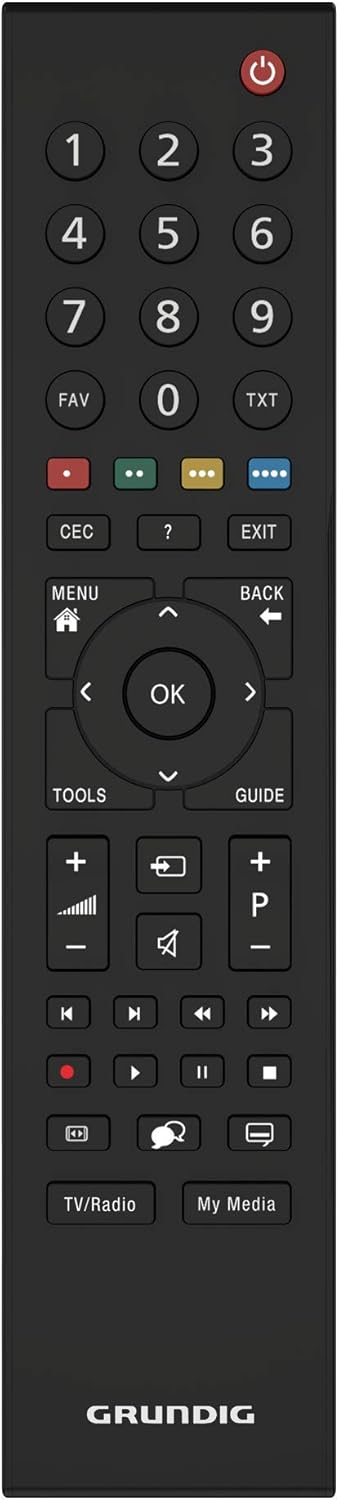
Obrázek: Pohled shora dolů view of the black Grundig TV remote control. Key buttons include Power, Number Pad, Volume Up/Down, Channel Up/Down, Menu, OK, and navigation arrows.
2. Základní funkce
- Moc: Stiskněte tlačítko červené tlačítko napájení zapnout nebo vypnout televizor.
- Objem: Použijte VOL +/- tlačítky pro nastavení úrovně zvuku.
- Kanál: Použijte CH +/- tlačítka pro změnu kanálů.
- Výběr vstupu: Stiskněte tlačítko ZDROJ button (if available, or similar icon) to select between different input sources (HDMI, AV, TV, Satellite).
3. Navigace v menu
Stiskněte tlačítko MENU button to access the main menu. Use the arrow buttons (Nahoru dolu vlevo vpravo) pro navigaci mezi možnostmi a OK tlačítko pro potvrzení výběru. ZADNÍ or EXIT button will return you to the previous screen or exit the menu.
4. Pokročilé funkce
- Technologie HDR: Your Grundig TV utilizes HDR (High Dynamic Range) technology to enhance contrast and deliver more realistic images. This technology increases the contrast between bright whites and deep blacks, providing a more immersive viewzkušenosti.
- Zvuk Dolby Digital: The integrated Dolby Digital sound technology ensures natural and clear audio, even at high volumes.
- Built-in Satellite Receiver: The TV includes a built-in satellite receiver, eliminating the need for an external set-top box and reducing cable clutter. This allows for easy and seamless viewing of satellite channels.
Údržba
1. Čištění obrazovky
Jemně otřete obrazovku měkkým, suchým hadříkem, který nepouští vlákna. V případě odolných skvrn lehceampOtřete hadřík vodou nebo specializovaným čističem obrazovek. Nestříkejte tekutinu přímo na obrazovku.
2. Čištění těla televizoru
Use a soft, dry cloth to wipe the exterior of the TV. Avoid using abrasive cleaners or solvents.
Odstraňování problémů
Pokud se s televizorem setkáte s problémy, podívejte se na následující běžné problémy a jejich řešení:
- Bez napájení: Ujistěte se, že je napájecí kabel bezpečně připojen k televizoru i k elektrické zásuvce. Zkontrolujte, zda zásuvka funguje, zapojením jiného zařízení.
- Žádný obraz, ale zvuk: Check the input source selection. Ensure the connected device (e.g., DVD player) is powered on and functioning correctly.
- Žádný zvuk, ale obraz: Zkontrolujte úroveň hlasitosti a ujistěte se, že televizor není ztlumený. Pokud používáte externí zvuk, ověřte připojení a nastavení.
- Dálkové ovládání nefunguje: Zkontrolujte baterie a v případě potřeby je vyměňte. Ujistěte se, že mezi dálkovým ovladačem a infračerveným senzorem televizoru nejsou žádné překážky.
- Špatná kvalita obrazu: Check antenna/cable connections. If using an external device, try a different HDMI cable or input port.
For persistent issues, please contact Grundig customer support.
Specifikace
| Značka | Grundig |
| Model | 24 GCH 5900B |
| Modelový rok | 2019 |
| Velikost obrazovky | 24 palce (59 cm) |
| Technologie displeje | LED |
| Rezoluce | 720p HD Ready (Max. Vertical Resolution: 768 Pixels) |
| Obnovovací frekvence | 60 Hz |
| Typ připojení | Kabel |
| Typ montáže | Držák na zeď |
| Rozměry produktu | 12.3 x 55.2 x 34.3 cm |
| Hmotnost produktu | 2.4 kg |
Záruka a podpora
Your Grundig 24 GCH 5900B HD Ready TV comes with a manufacturer's warranty. Please refer to the warranty card included in your product packaging for specific terms and conditions. For technical support, service, or warranty claims, please contact your local Grundig service center or authorized dealer. Keep your purchase receipt as proof of purchase.


