Zavedení
The TOSHIBA TF-43A810U21 43-inch 4K UHD TV with Fire TV Edition offers a seamless entertainment experience by integrating live over-the-air TV with streaming content directly on the home screen. This smart television provides breathtaking 4K Ultra HD picture quality with over 8 million pixels, delivering stunning clarity, deep contrast, and vivid colors. The built-in Fire TV experience includes a Voice Remote with Alexa, allowing for easy navigation, app launching, content search, input switching, and smart home device control using voice commands. The TV receives automatic over-the-air software updates, ensuring access to the latest Alexa skills and features.

Přední view of the TOSHIBA TF-43A810U21 43-inch 4K UHD Fire TV Edition Television.
Co je v krabici
Your TOSHIBA TF-43A810U21 package includes the following items:
- TOSHIBA 43-inch 4K UHD Fire TV Edition Television
- Voice Remote with Alexa (requires 2 AAA batteries, included)
- TV Stand (with necessary screws)
Průvodce nastavením
Follow these steps to set up your new TOSHIBA 4K UHD Fire TV Edition television:
- Rozbalení: Opatrně vyjměte televizor a veškeré příslušenství z obalu.
- Připevnění stojanu: Place the TV face down on a soft, clean surface. Attach the included stand to the bottom of the TV using the provided screws. Ensure the stand is securely fastened.
- Připojení napájení: Zapojte napájecí kabel do napájecího vstupu televizoru a poté do zásuvky ve zdi.
- Připojovací zařízení:
- Anténa/kabel: Connect an HD antenna (sold separately) to the ANT/CABLE IN port for live over-the-air TV.
- Zařízení HDMI: Connect external devices like Blu-ray players, game consoles, or soundbars to the HDMI IN ports. This model includes HDMI 1 (ARC) for audio return channel functionality.
- Zařízení USB: Use the USB port for media playback or connecting compatible accessories.
- Ethernet (LAN): Pro stabilní připojení k internetu připojte ethernetový kabel k portu LAN.
- Audio výstup: Use the Digital Audio Out (Optical) or Audio Out (3.5mm) for external audio systems.
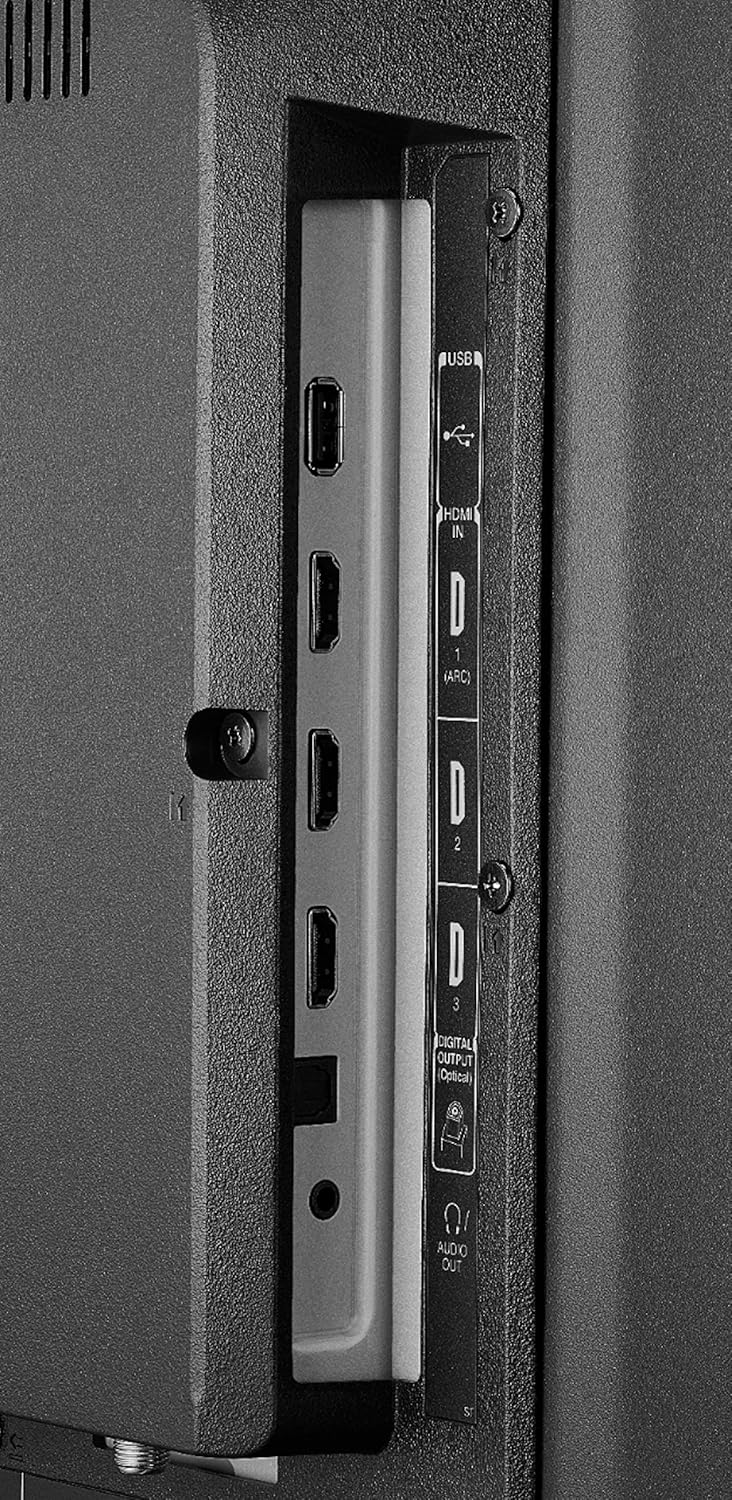
Strana view showing HDMI and USB ports.

Zadní view showing AV IN, LAN, and ANT/CABLE IN ports.
- Počáteční zapnutí: Zapněte televizor pomocí tlačítka napájení na dálkovém ovladači nebo samotného televizoru.
- Vzdálené párování: Insert the included AAA batteries into the Voice Remote. To pair the remote, press and hold the Alexa Voice button (microphone icon) for a few seconds until the TV screen prompts you.
- Internetové připojení: Follow the on-screen instructions to connect your TV to your Wi-Fi network or confirm the Ethernet connection.
- Fire TV Account Setup: Sign in with your Amazon account to access Fire TV features and content.
Video demonstrating the remote pairing process and initial Fire TV interface navigation.
Návod k obsluze
Your TOSHIBA Fire TV Edition TV is designed for intuitive operation. Here are key functions:
- Fire TV Home Screen: The home screen provides access to live TV, streaming apps, and your personalized content. Navigate using the directional pad on your remote.
- Hlasové dálkové ovládání Alexa:
- Stiskněte a podržte Alexa Voice button (microphone icon) to speak commands. You can launch apps, search for titles, switch inputs, and control smart home devices.
- Dedicated buttons for Prime Video and Netflix provide instant access to these services.

The Alexa Voice Remote for easy control and navigation.
- Živé televizní vysílání: If an antenna is connected, access live over-the-air channels directly from the Fire TV home screen.
- Streamovací aplikace: Download and access a wide variety of streaming applications from the Appstore.
- Přepínání vstupů: Use the input button on the remote or voice command to switch between HDMI inputs, AV, and TV tuner.
- Nastavení: Access TV settings for picture, sound, network, and device preferences through the Fire TV interface.
Údržba
Proper care ensures the longevity and optimal performance of your television:
- Čištění obrazovky: Jemně otřete obrazovku měkkým, suchým hadříkem z mikrovlákna. V případě odolných šmouh lehceamphadřík vodou nebo čisticím roztokem určeným pro obrazovky (nestříkejte přímo na obrazovku).
- Čištění skříně: K čištění televizní skříňky používejte měkký, suchý hadřík. Nepoužívejte abrazivní čisticí prostředky ani rozpouštědla.
- Aktualizace softwaru: Your TV receives automatic over-the-air software updates. Ensure your TV is connected to the internet to receive these updates, which improve performance and add new features.
- Větrání: Zajistěte dostatečné větrání kolem televizoru. Neblokujte větrací otvory.
Odstraňování problémů
If you encounter issues with your TOSHIBA TF-43A810U21 TV, refer to the following common solutions:
- Bez napájení:
- Zkontrolujte, zda je napájecí kabel bezpečně zapojený do televizoru i do zásuvky.
- Ověřte, zda zásuvka funguje, zapojením jiného zařízení.
- Žádný obraz/zvuk:
- Ujistěte se, že je vybrán správný vstupní zdroj (např. HDMI 1, TV).
- Check all cable connections (HDMI, antenna, AV) are secure.
- If using external devices, ensure they are powered on and functioning correctly.
- Dálkové ovládání nereaguje:
- Vyměňte baterie v dálkovém ovladači.
- Re-pair the remote with the TV by holding the Alexa Voice button for a few seconds.
- Problémy s připojením k síti:
- Restartujte Wi-Fi router a modem.
- Přejděte do síťového nastavení televizoru a zkuste se znovu připojit k síti Wi-Fi.
- If using an Ethernet connection, ensure the cable is securely connected.
- Problémy s kvalitou obrazu:
- Upravte nastavení obrazu (jas, kontrast, barvy) v nabídce televizoru.
- Ensure the content you are watching is of high quality (e.g., 4K content for 4K resolution).
For further assistance, please refer to the official TOSHIBA support webnebo kontaktujte zákaznický servis.
Specifikace
| Název značky | TOSHIBA |
| Číslo modelu | TF-43A810U21 |
| Velikost obrazovky | 42.5 palce |
| Technologie displeje | LED |
| Rezoluce | 4K Ultra HD |
| Poměr stran | 16:9 |
| Technologie připojení | Wi-Fi, Ethernet |
| Podporované internetové služby | Amazon Instant Video, Hulu, Netflix (and more via Fire TV) |
| Speciální funkce | Flat Screen, Fire TV Edition, Alexa Voice Remote |
| Rozměry produktu (D x Š x V) | 38.1 x 9.3 x 23.9 palce |
| Hmotnost položky | 18.7 libry |
| Barva | Černý |
| Jsou vyžadovány baterie | 2 baterie AAA (součástí balení pro dálkový ovladač) |
Záruka a podpora
For detailed warranty information, please refer to the warranty card included with your product or visit the official TOSHIBA support webwebu. Najdete tam také další zdroje podpory, nejčastější dotazy a kontaktní informace na zákaznický servis.
WebSlužby a obsah založené na vyžadují vysokorychlostní internetové připojení. Některé služby mohou vyžadovat předplatné.
Official TOSHIBA Store: Navštivte obchod TOSHIBA na Amazonu


