Zavedení
The Steelcase Leap V2 Desk Chair is engineered for exceptional comfort and support, adapting to your movements to promote a healthier sitting posture. This manual provides comprehensive instructions for setting up, operating, maintaining, and troubleshooting your chair, ensuring you maximize its ergonomic benefits.
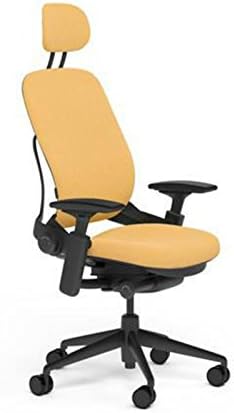
Image: The Steelcase Leap V2 Desk Chair, featuring Sunrise Buzz2 fabric, a headrest, and a black frame, designed for ergonomic support.
Nastavení
The Steelcase Leap V2 chair ships fully assembled. No complex assembly is required. Upon receipt, carefully remove all packaging materials. Place the chair on a level surface in your desired workspace. Ensure all casters are securely attached and functioning correctly for smooth movement.
Provozní úpravy
The Leap V2 chair offers a range of adjustments to customize your seating experience for optimal comfort and support. Familiarize yourself with these controls to personalize your chair settings.
1. Pneumatic Seat Height Adjustment
Locate the lever on the right side, beneath the seat. To raise the seat, lift the lever with no weight on the chair. To lower the seat, lift the lever while seated. Adjust the seat height so your feet are flat on the floor and your thighs are parallel to the floor.
2. Nastavení hloubky sedadla
Find the lever on the left side, beneath the seat. Lift the lever and slide the seat forward or backward to ensure a 2-3 inch gap between the front edge of the seat and the back of your knees. Release the lever to lock the seat in place.
3. Nastavení napětí sklopení
The round knob on the right side, below the seat, controls the recline tension. Turn the knob forward (clockwise) to increase tension, requiring more effort to recline. Turn it backward (counter-clockwise) to decrease tension, allowing for easier recline. Adjust to your preferred resistance.
4. Zámek sklopení (5 poloh)
The lever located on the left side, towards the back, allows you to lock the chair's recline in one of five positions. Recline to your desired angle and push the lever down to lock. To unlock, pull the lever up and lean back slightly.
5. Lumbar Support Height Adjustment
The lumbar support is integrated into the backrest. To adjust its height, grasp the sides of the backrest and slide the lumbar support up or down to align with the natural curve of your lower back.
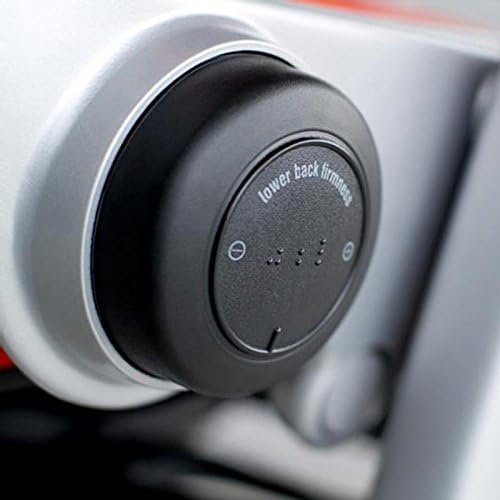
6. Lower Back Firmness Control

Image: Detail of the lower back firmness control knob, allowing users to adjust the level of support in the lumbar region.
A dial on the lower right side of the backrest allows you to control the firmness of the lower back support. Rotate the dial to increase or decrease the firmness to match your comfort preference.
7. 4-Way Highly Adjustable Arms
Obrázek: Detailní záběr view of the chair's armrest, highlighting its adjustability for personalized comfort.
The armrests can be adjusted in four ways: height, depth, pivot, and width. Use the buttons or levers located on the armrests to make these adjustments. Position the armrests so your arms are gently supported and your shoulders are relaxed.
8. Nastavení opěrky hlavy
The headrest can be adjusted vertically (up and down). Grasp the headrest and slide it to your desired height. Position it to comfortably support your head and neck, typically at the base of your skull when leaning back.
Údržba
To ensure the longevity and appearance of your Steelcase Leap V2 Desk Chair, follow these simple maintenance guidelines:
- Čištění: For general cleaning, wipe the fabric and plastic components with a clean, damp cloth. For deeper cleaning of Buzz2 fabric, refer to Steelcase's official fabric care instructions. Avoid harsh chemical cleaners.
- Kolečka: Periodically check the casters for any accumulated debris (hair, lint) and clean as necessary to ensure smooth movement.
- Inspekce: Regularly inspect all moving parts and fasteners to ensure they are secure. Do not attempt to lubricate internal mechanisms unless specifically instructed by Steelcase.
Odstraňování problémů
If you encounter any issues with your Steelcase Leap V2 Desk Chair, consider the following common solutions:
- Adjustment Not Working: Ensure that the adjustment levers or knobs are fully engaged or disengaged. Sometimes a slight jiggle or re-attempt can resolve the issue.
- Vrzavé zvuky: Check for loose fasteners. If the noise persists, it may indicate an internal mechanism issue. Avoid applying lubricants yourself.
- Caster Movement Issues: Clean any debris from the casters. Ensure the chair is on an appropriate surface for its caster type (standard carpet casters are designed for carpeted floors).
For persistent problems or issues not covered here, please contact Steelcase customer support.
Specifikace
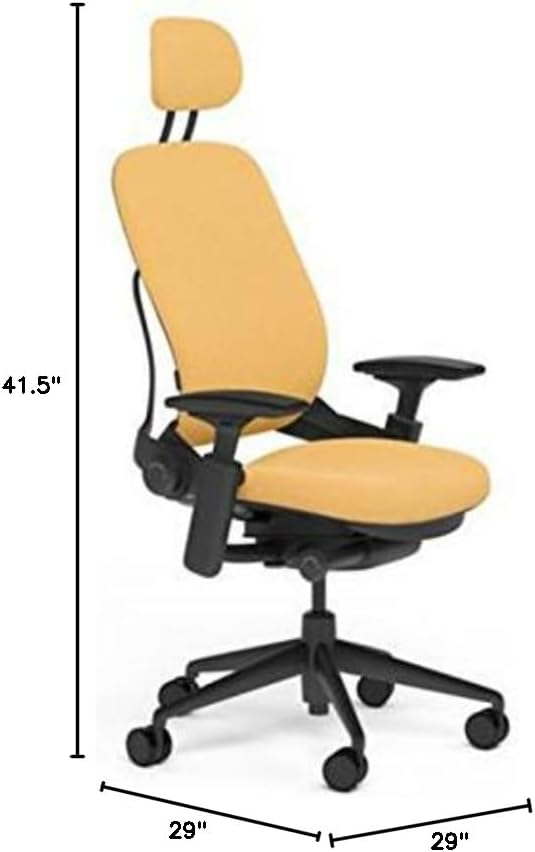
Image: Diagram illustrating the dimensions of the Steelcase Leap V2 Desk Chair, including height, width, and depth.
| Funkce | Detail |
|---|---|
| Značka | Steelcase |
| Název modelu | Skok |
| Rozměry produktu | 29"H x 29"Š x 41.5"V |
| Výška sedu | 20.5 palce |
| Hloubka sedu | 19 palců |
| Doporučená maximální hmotnost | 400 libry |
| Hmotnost položky | 65 libry |
| Typ kolečka | Standard Carpet Casters |
| Materiál tkaniny | Buzz2 (100% Polyester) |
| Materiál rámu | Plast |
| Speciální funkce | Adjustable Height, Adjustable Lumbar, Arm Rest, Ergonomic, Seat Lock |
Informace o záruce
The Steelcase Leap V2 Desk Chair is backed by a 12letá záruka výrobce. This warranty covers defects in materials and workmanship under normal use. For specific terms, conditions, and to make a warranty claim, please refer to the official Steelcase warranty documentation provided with your purchase or visit the Steelcase webmísto.
Zákaznická podpora
For additional assistance, product inquiries, or technical support regarding your Steelcase Leap V2 Desk Chair, please contact Steelcase customer service directly. You can find contact information and further resources on the official Steelcase webmísto:


