1. Úvod
This manual provides comprehensive instructions for the installation, operation, maintenance, and troubleshooting of your Intel SSD DC S3700 Series 200GB 2.5-inch MLC NAND SATA Solid State Drive (Model: SSDSC2BA200G3). Please read this manual thoroughly before using the product to ensure proper functionality and to prevent damage.
2. Bezpečnostní informace
- Always handle the SSD with care to avoid physical damage.
- Ensure your system is powered off and disconnected from the power source before installation or removal.
- Wear an anti-static wrist strap or discharge static electricity by touching a grounded metal object before handling the SSD.
- Do not attempt to open the SSD enclosure. Doing so will void the warranty.
- Keep the SSD away from liquids and extreme temperatures.
- Disclaimer: WARRANTY VOID IF ANY LABEL/SCREW IS REMOVED OR BROKEN.
3. Obsah balení
Ověřte, zda váš balíček obsahuje následující položky:
- Intel SSD DC S3700 Series 200GB Solid State Drive
- Documentation (e.g., Quick Start Guide, Warranty Information - if applicable)
Poznámka: Datové kabely SATA, napájecí kabely a montážní šrouby obvykle nejsou součástí dodávky a v případě potřeby je nutné je zakoupit samostatně.
4. Nastavení a instalace
This section outlines the general steps for installing the Intel SSD into a desktop or laptop computer. Specific steps may vary depending on your system's chassis design.
4.1 Fyzická instalace
- Připravte si systém: Power off your computer and disconnect all cables (power, peripherals). Open the computer case.
- Vyhledejte pozici pro diskovou jednotku: Najděte dostupnou 2.5palcovou pozici pro jednotku. Pokud má váš systém pouze 3.5palcové pozice, budete možná potřebovat adaptér z 2.5 palce na 3.5 palce (není součástí dodávky).
- Připojte SSD: Slide the SSD into the drive bay and secure it with screws. Ensure it is firmly seated.
- Připojit kabely:
- Připojte jeden konec datového kabelu SATA k portu SATA na disku SSD a druhý konec k volnému portu SATA na základní desce.
- Připojte napájecí kabel SATA ze zdroje napájení (PSU) ke konektoru napájení na disku SSD.
- Uzavření případu a opětovné připojení: Zavřete skříň počítače a znovu připojte všechny kabely.
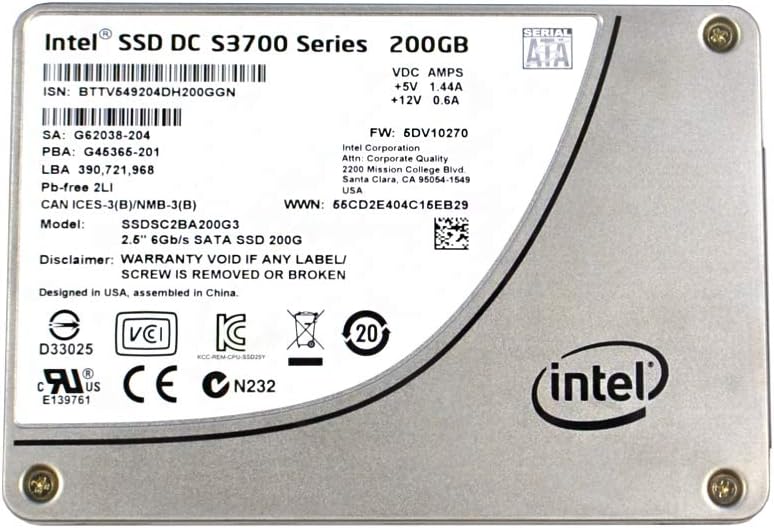
Obrázek 1: Nahoru view of the Intel SSD DC S3700 Series 200GB Solid State Drive. The label displays model number SSDSC2BA200G3, capacity 200GB, SATA interface, and various regulatory marks. The Intel logo is prominently featured on the bottom right.
4.2 Počáteční konfigurace systému
- Nastavení BIOSu/UEFI: Power on your computer and enter the BIOS/UEFI setup. Verify that the SSD is detected. Ensure the SATA controller mode is set to AHCI for optimal SSD performance.
- Instalace operačního systému: If this is a new installation, proceed with installing your operating system onto the SSD.
- Migrace dat (volitelné): If you are replacing an existing drive, use a data migration tool (often provided by Intel or third-party software) to transfer your operating system and data to the new SSD.
- Initialization and Formatting: For a secondary drive, after booting into your operating system, open Disk Management (Windows) or Disk Utility (macOS/Linux) to initialize and format the SSD before use.
5. Obsluha SSD disku
The Intel SSD DC S3700 Series operates as a standard storage device within your computer system. Once installed and configured, it functions like any other hard drive, providing fast data access and storage.
- Úložiště dat: Store your operating system, applications, and files on the SSD for improved system responsiveness and faster loading times.
- Výkon: The SSD leverages SATA 6Gb/s interface for high-speed data transfer. Performance will vary based on system configuration and workload.
- Příkaz TRIM: Ensure your operating system supports and enables the TRIM command. TRIM helps maintain the performance and longevity of the SSD by allowing the operating system to inform the SSD which data blocks are no longer in use and can be internally erased.
6. Údržba
Správná údržba zajistí dlouhou životnost a optimální výkon vašeho SSD disku.
- Aktualizace firmwaru: Pravidelně kontrolujte podporu Intelu webweb s aktualizacemi firmwaru pro váš model SSD. Aktualizace firmwaru mohou zlepšit výkon, stabilitu a řešit známé problémy. Při provádění aktualizací firmwaru pečlivě dodržujte pokyny společnosti Intel.
- Záloha dat: Regularly back up important data from your SSD to another storage device. While SSDs are reliable, data loss can occur due to various factors.
- Vyhněte se defragmentaci: Unlike traditional hard drives, SSDs do not benefit from defragmentation. Defragmenting an SSD can reduce its lifespan without improving performance. Ensure your operating system's defragmentation utility is set to skip SSDs.
- Sledovat zdraví: Use S.M.A.R.T. (Self-Monitoring, Analysis, and Reporting Technology) tools to monitor the health and lifespan of your SSD. Many operating systems and third-party utilities offer this functionality.
7. Řešení problémů
If you encounter issues with your Intel SSD, refer to the following common troubleshooting steps:
- SSD nezjištěno:
- Check all SATA data and power cable connections. Ensure they are securely seated.
- Verify that the SATA port on the motherboard is enabled in BIOS/UEFI.
- Try connecting the SSD to a different SATA port or with different cables.
- Ensure the SATA controller mode is set to AHCI in BIOS/UEFI.
- Pomalý výkon:
- Confirm that TRIM is enabled and functioning correctly in your operating system.
- Check for background processes or applications consuming excessive resources.
- Ensure your motherboard's SATA ports are operating at SATA 6Gb/s (SATA III) speeds.
- Update SSD firmware if available.
- Operating System Errors/Crashes:
- Run a diagnostic tool (e.g., Intel SSD Toolbox, if available) to check the SSD's health.
- Perform a clean installation of the operating system if data corruption is suspected.
If these steps do not resolve your issue, please contact Intel customer support.
8. Specifikace
| Číslo modelu | SSDSC2BA200G3 |
| Série | DC S3700 Series |
| Kapacita | 200 GB |
| Form Factor | 2.5 palce |
| Rozhraní | SATA 6 Gb/s (SATA III) |
| Typ NAND | MLC (Multi-Level Cell) |
| svtage / Ampvymazat | +5V 1.44A, +12V 0.6A |
| Verze firmwaru | 5DV10270 |
| WWN | 56CD2E404C15EB29 |
| ISN | BTTV549204DH200GGN |
| SA | G62038-204 |
| PBA | G45366-201 |
| LBA | 390,721,968 |
| Certifikace | D33025, VCI, KCC, CE, cURus E139761, CN232 |
| Navrženo v | USA |
| Sestaveno v | Čína |
9. Záruka a podpora
Intel provides a limited warranty for its SSD products. The specific terms and duration of the warranty may vary by region and product. Please refer to the official Intel warranty documentation included with your product or visit the Intel support webstránky pro podrobné informace.
Important Warranty Note: As stated on the product label, the warranty is void if any label or screw is removed or broken. This is crucial for maintaining warranty coverage.
For technical support, driver downloads, firmware updates, and additional resources, please visit the official Intel support webmísto:


