Konec produktuview
The NordicTrack RW500 Rower provides an efficient full-body workout. This machine is designed to offer a comprehensive exercise experience, focusing on core strength and cardiovascular fitness. It includes an integrated tablet holder for accessing iFit Coach workouts and tracking performance metrics such as strokes, time, watts, and calories burned. The rower features a SpaceSaver design for compact storage and Silent Magnetic Resistance for quiet operation.

Image: The NordicTrack RW500 Rower in active use, demonstrating the full machine and user during a rowing stroke.
Klíčové vlastnosti:
- Interactive Personal Training: Features an integrated tablet holder for accessing iFit Coach workouts and tracking stats.
- Silent Flywheel: Utilizes SMR Silent Magnetic Resistance for quiet and smooth exercise.
- Design šetřící prostor: Allows the rower to fold vertically for convenient storage.
- Navrženo pro pohodlí: Equipped with a soft ergonomic handle and pivoting pedals with adjustable foot straps.
Pokyny pro nastavení
- Rozbalení: Carefully remove all components from the packaging. Ensure all parts listed in the assembly guide are present.
- Sestava rámu: Follow the detailed instructions in the included assembly manual to connect the main frame components. This typically involves attaching the front and rear stabilizers to the main rail.
- Instalace sedačky: Slide the seat onto the rail, ensuring it moves smoothly.
- Console/Tablet Holder Attachment: Secure the console and tablet holder to the designated arm. Connect any necessary cables as per the assembly guide.
- Nastavení nožního pedálu: Adjust the foot pedals to fit your shoe size using the adjustable straps. Ensure your feet are securely fastened before use.
- Připojení napájení: Connect the power adapter to the rower and a suitable electrical outlet.

Obrázek: Detail view of the rower's foot pedals, highlighting the adjustable straps for secure foot placement.
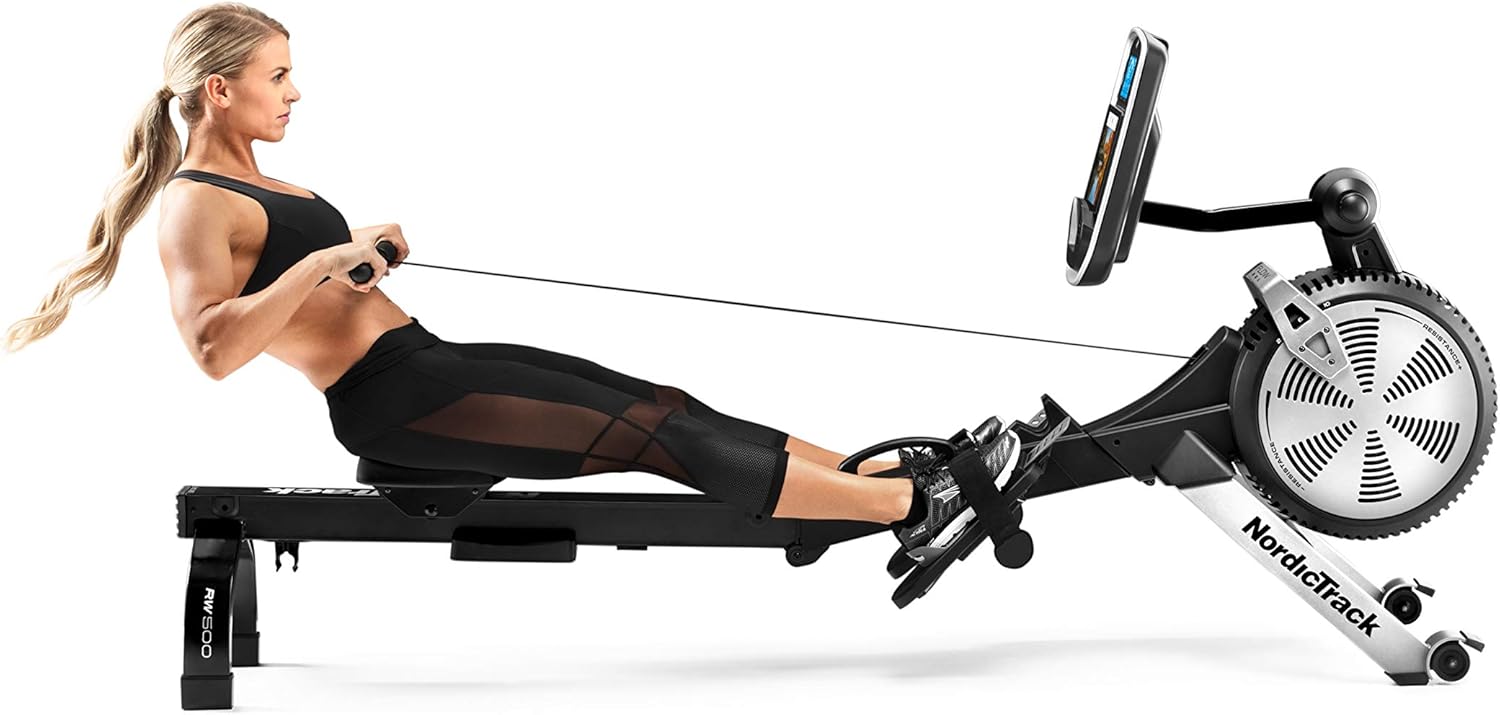
Image: The NordicTrack RW500 Rower folded into its SpaceSaver configuration for compact storage.
Návod k obsluze
- Zapnutí: Ensure the rower is plugged in. The console should power on automatically or by pressing a button.
- Umístění nohou: Sit on the seat and place your feet on the foot pedals. Secure them with the adjustable straps.
- Uchopte rukojeť: Grasp the ergonomic handle with both hands, palms down.
- Upravte odpor: The RW500 uses Silent Magnetic Resistance. Adjust the resistance level using the controls on the console or as guided by your iFit workout.
- Technika veslování:
- Chytit: Začněte s pokrčenými koleny, holeněmi ve svislé poloze a pažemi nataženými dopředu.
- Řídit: Push off with your legs, then lean back slightly, and finally pull the handle towards your abdomen.
- Dokončit: Legs extended, body leaned back, handle at abdomen.
- Zotavení: Natáhněte paže dopředu, poté se předkloňte a nakonec pokrčte kolena, abyste se vrátili do polohy záchytu.
- Using the Console/iFit:

Obrázek: Detail view of the NordicTrack RW500 Rower's console, displaying various workout metrics such as time, distance, pace, watts, and calories burned.
Place your tablet or smartphone in the integrated holder. Connect to the iFit app to access trainer-led workouts and track your progress. The console displays real-time metrics such as time, distance, pace, watts, and calories burned.
- Skládací pro uložení: To save space, the rower can be folded vertically. Consult the assembly manual for specific folding instructions.
Údržba
- Čištění: Regularly wipe down the rower with a damp Po každém použití setřete hadříkem, abyste odstranili pot a prach. Nepoužívejte abrazivní čisticí prostředky.
- Čištění kolejí: Udržujte kolejnici sedadla čistou a bez nečistot, aby byl zajištěn plynulý pohyb sedadla.
- Zkontrolujte připojení: Periodically inspect all bolts, nuts, and moving parts to ensure they are secure and functioning correctly. Tighten any loose fasteners.
- Mazání: Refer to the full user manual for specific lubrication requirements, if any, for moving parts.
Odstraňování problémů
- Konzole nezobrazuje data:
- Ensure the rower is properly plugged into a power source and that any internal connections to the console are secure. Check if batteries (if applicable) need replacement.
- Neobvyklé zvuky během provozu:
- Inspect the seat rollers and rail for debris. Check all bolts and connections for tightness. If the noise persists, consult the full user manual or contact customer support.
- iFit Connectivity Issues:
- Ensure your tablet or smartphone has a stable internet connection. Verify that the iFit app is updated to the latest version. Restart both the rower and your device. If problems persist, refer to iFit support resources.
Specifikace
| Název modelu | 500 RW |
| Číslo modelu položky | NTRW99147 |
| Značka | Nordictrack |
| Barva | Černý |
| Mechanismus odporu | Magnetický |
| Typ zobrazení | LCD |
| Materiál rámu | Kov |
| Hmotnost položky | 52.2 kg |
| Doporučená maximální hmotnost | 250 libry |
| Rozměry balíku | 116.84 x 63.5 x 55.88 cm |
| Zdroj napájení | Napájení z baterie |
| Speciální funkce | Adjustable, Compact |
Informace o záruce
For detailed warranty information regarding your NordicTrack RW500 Rower, please refer to the warranty card included with your product or visit the official NordicTrack website. Warranty terms and conditions may vary by region and purchase date. It is recommended to register your product upon purchase to activate your warranty.
Zákaznická podpora
Should you require assistance with assembly, operation, maintenance, or troubleshooting, please contact NordicTrack customer support. Have your model number (RW500) and serial number ready when contacting support for faster service.
For iFit-related inquiries, including account setup, workout access, or technical issues with the iFit platform, please refer to the iFit support resources or their dedicated customer service channels.
You can often find contact information and FAQs on the official NordicTrack webmísto: www.nordictrack.ca


