1. Úvod
The Saramonic SR-Q2M is a compact and lightweight handheld audio recorder designed for capturing high-quality sound. Its rugged metal construction ensures durability, making it suitable for various recording environments. Equipped with professional stereo condenser microphones in an X/Y configuration, the SR-Q2M delivers rich, broadcast-quality audio for video productions, music recording, podcasting, and journalism.
This device supports recording line-level signals or external microphones via its dedicated 3.5mm mic and line inputs. Two 3.5mm outputs allow for headphone monitoring and connection to cameras or other recording devices. The SR-Q2M records high-resolution audio files up to 96kHz and features a built-in USB-C port for easy file přenos do počítače.
2. Co je v krabici
Ověřte prosím, zda jsou ve vašem balení obsaženy všechny níže uvedené položky:
- 1 x SR-Q2M Portable Handheld Recorder
- 1 x RC-X Remote Control
- 1 x Lavalier Microphone with 6’ Cable, Alligator Mic Clip and Foam Windscreen
- 1 x 8 GB karta MicroSD
- 1 x Protective Travel Case
- 1 x High-Wind Furry Windscreen
- 1 x pěnové čelní sklo
- 1 x řemínek na ruku
- 1 x 4’ (1.2m) Gold-Plated USB-A to USB-C Cable
- 1 x Uživatelská příručka
- 1 x Záruční list
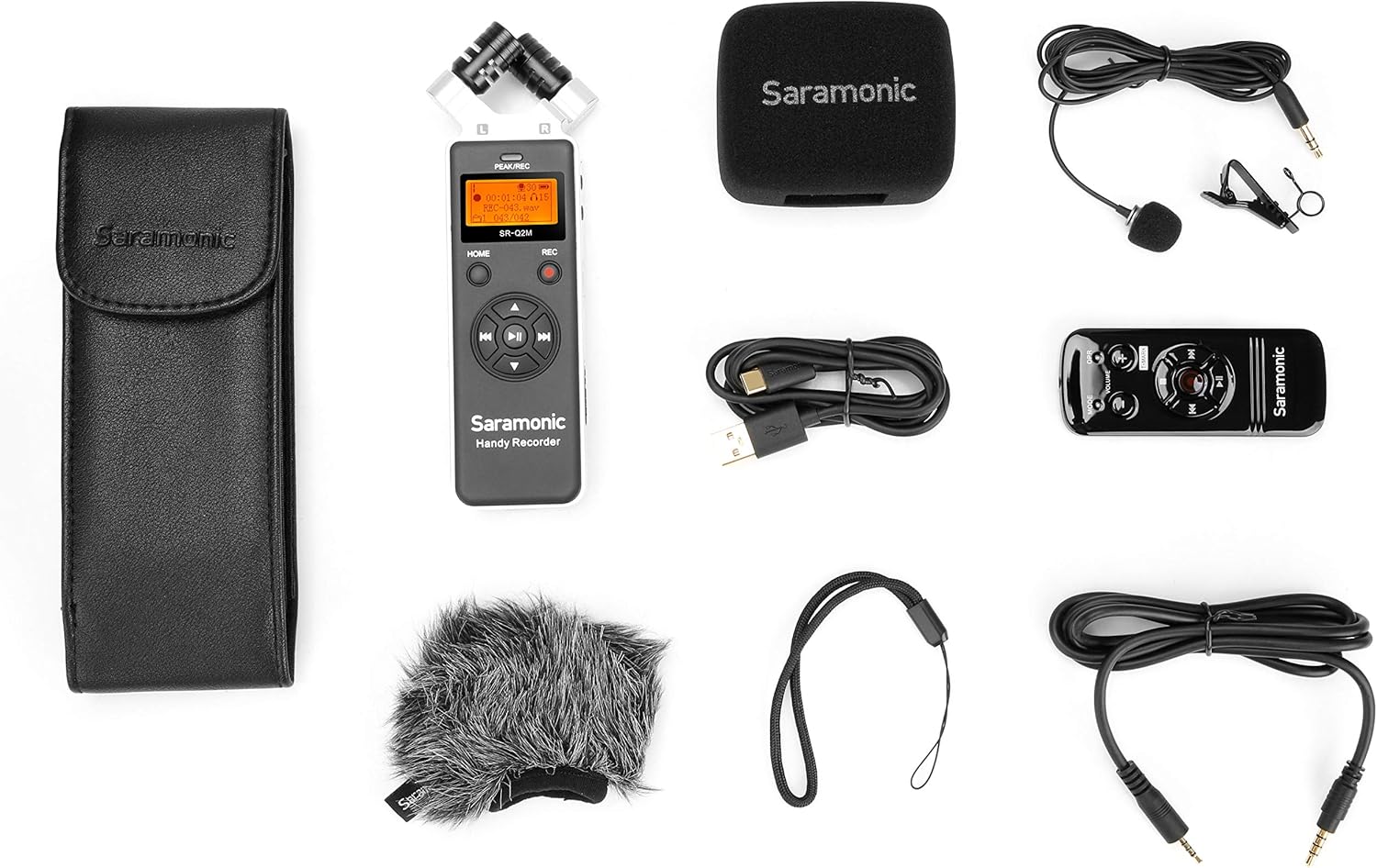
Image: All components included in the Saramonic SR-Q2M package, including the recorder, remote, lavalier mic, windscreens, case, and cables.
3. Konec produktuview
Familiarize yourself with the main components and controls of your SR-Q2M recorder.
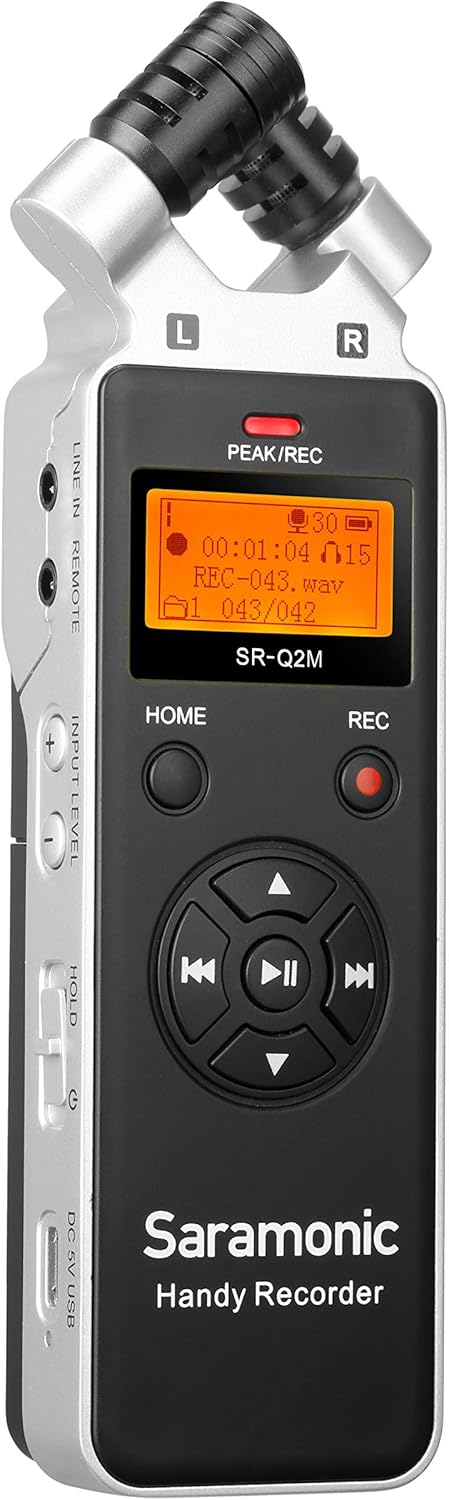
Obrázek: Přední strana view of the Saramonic SR-Q2M handheld recorder, showing the stereo microphones, display screen, and main control buttons.
3.1 Front Panel and Top Microphones
- Stereo Condenser Microphones: X/Y configured microphones for capturing wide, clear stereo sound.
- Displej: Zobrazuje stav nahrávání, úroveň nabití baterie, čas a možnosti nabídky.
- PEAK/REC Indicator: Lights up to indicate recording or input signal peaking.
- Tlačítko Domů: Navigates to the main menu.
- Tlačítko REC: Starts and stops recording.
- Ovládací prvky navigace/přehrávání: Directional buttons for menu navigation and playback (Play/Pause, Fast Forward, Rewind, Skip).

Obrázek: Levá strana view of the Saramonic SR-Q2M, highlighting the LINE IN/REMOTE port, INPUT LEVEL controls, HOLD switch, and USB-C port.
3.2 Levý boční panel
- LINE IN / REMOTE Port: 3.5mm input for external line-level audio sources or the RC-X remote control.
- INPUT LEVEL Buttons (+/-): Adjusts the recording input gain.
- Přepínač HOLD: Zablokuje všechna tlačítka, aby se zabránilo nechtěnému ovládání.
- DC 5V / USB-C Port: For external power supply or connecting to a computer for data transfer.

Obrázek: Pravá strana view of the Saramonic SR-Q2M, showing the LINE OUT port, VOLUME controls, and MicroSD card slot.
3.3 Pravý boční panel
- Port LINE OUT: 3.5mm output for connecting to cameras, mixers, or other audio devices.
- Jack pro sluchátka: 3.5mm output for monitoring audio with headphones.
- Tlačítka HLASITOST (+/-): Adjusts the playback volume for headphones/line out.
- Slot pro microSD kartu: Insert your MicroSD card here for storage.

Obrázek: Zpět view of the Saramonic SR-Q2M, showing the external MIC IN port and tripod mount thread.
3.4 Zadní panel
- Port MIC IN: 3.5mm input for connecting an external microphone.
- Držák na stativ: Standard 1/4-inch thread for mounting on tripods or stands.
4. Nastavení
4.1 Instalace baterie
- Vyhledejte kryt prostoru pro baterie na zadní straně rekordéru.
- Posunutím otevřete kryt.
- Vložte dvě baterie typu AA a dbejte na správnou polaritu (+/-).
- Bezpečně zavřete kryt bateriového prostoru.

Image: The Saramonic SR-Q2M with its battery compartment open, showing the slots for two AA batteries.
4.2 Instalace karty MicroSD
- Locate the MicroSD card slot on the right side of the recorder.
- Vložte kartu MicroSD zlatými kontakty směrem dolů, dokud nezacvakne.
- Chcete-li kartu vyjmout, jemně ji zatlačte dovnitř, dokud nevyskočí.
4.3 Zapnutí/vypnutí
- Zapnutí: Press and hold the HOME button for a few seconds until the display lights up.
- Vypnutí: Press and hold the HOME button again until the display turns off.
4.4 Připojení příslušenství
- Lavalier mikrofon: Connect the included lavalier microphone to the 3.5mm MIC IN port on the back of the recorder.
- RC-X Remote Control: Connect the remote control cable to the LINE IN / REMOTE port on the left side.
- Sluchátka: Plug your headphones into the 3.5mm Headphones Jack on the right side for monitoring.
- External Line-Level Device: Connect to the 3.5mm LINE IN / REMOTE port for line-level audio input.
- Camera/Mixer: Use the 3.5mm LINE OUT port to send audio to external recording devices.

Image: The Saramonic SR-Q2M handheld recorder connected to its RC-X remote control, demonstrating remote operation capability.
5. Návod k obsluze
5.1 Základní nahrávání
- Power on the SR-Q2M.
- Ujistěte se, že je vložena karta MicroSD.
- Adjust the input level using the INPUT LEVEL +/- buttons on the left side. Monitor the PEAK/REC indicator to avoid clipping (red light).
- Stiskněte tlačítko REC button once to start recording. The PEAK/REC indicator will glow red.
- Stiskněte tlačítko REC button again to stop recording. The file se automaticky uloží.
5.2 Přehrávání
- From the main screen, use the navigation buttons to select a recorded file.
- Press the Play/Pause button (center of navigation controls) to start playback.
- Use the VOLUME +/- buttons on the right side to adjust playback volume.
- Use the Fast Forward/Rewind buttons to navigate within the track or skip between files.
5.3 Připojení k počítači
- Power on the SR-Q2M.
- Connect the recorder to your computer using the included USB-C cable.
- The recorder will appear as a removable storage device on your computer.
- You can now transfer recorded audio files do vašeho počítače.
5.4 Using the RC-X Remote Control
Connect the RC-X remote control to the LINE IN / REMOTE port. The remote allows you to control recording, playback, and volume without directly touching the recorder, reducing handling noise.
- Tlačítko REC: Starts and stops recording.
- Tlačítko Přehrát/Pozastavit: Ovládá přehrávání.
- Tlačítka HLASITOST +/-: Upravuje hlasitost přehrávání.
- Tlačítko MODE: Přístup k možnostem nabídky.
6. Údržba
6.1 Čištění
- K čištění vnějšího povrchu rekordéru použijte měkký, suchý hadřík.
- Nepoužívejte tekuté čisticí prostředky ani rozpouštědla, protože by mohly poškodit povrchovou úpravu nebo vnitřní součásti.
- Udržujte mřížky mikrofonu bez prachu a nečistot.
6.2 Skladování
- Uchovávejte diktafon na chladném a suchém místě, mimo dosah přímého slunečního záření a extrémních teplot.
- Pokud skladujete po delší dobu, vyjměte baterie, abyste zabránili vytečení.
- Use the included protective travel case to prevent scratches and damage.
6.3 Péče o baterii
- Vždy používejte nové, vysoce kvalitní AA baterie.
- Vyměňte baterie, když se na displeji zobrazí indikátor slabé baterie.
- Použité baterie zlikvidujte zodpovědně v souladu s místními předpisy.
7. Řešení problémů
If you encounter issues with your SR-Q2M, refer to the following common problems and solutions:
| Problém | Možná příčina / řešení |
|---|---|
| Rekordér se nezapne. | Check battery installation and ensure batteries are fresh. Connect via USB-C for external power. |
| Nelze nahrávat zvuk. | Ensure a MicroSD card is inserted and has sufficient free space. Check input level settings. |
| Poor audio quality / Distortion. | Adjust INPUT LEVEL to prevent peaking (red PEAK/REC indicator). Ensure microphones are not obstructed. Consider disabling the limiter if audio artifacts are present. |
| Během přehrávání není slyšet žádný zvuk. | Check headphone connection and VOLUME settings. Ensure the correct file je vybráno pro přehrávání. |
| Dálkové ovládání nefunguje. | Ensure the remote is securely connected to the LINE IN / REMOTE port. |
| Recorder not recognized by computer. | Ensure the USB-C cable is properly connected. Try a different USB port or cable. Restart the computer and recorder. |
8. Specifikace
| Funkce | Specifikace |
|---|---|
| Rozměry produktu | 2.36 x 6.57 x 1.18 palce |
| Hmotnost položky | 5.3 unce (150 g) |
| Číslo modelu položky | SR-Q2M |
| Hardwarové rozhraní | MicroSD, USB-C |
| Tvarový faktor mikrofonu | Built-in Stereo (X/Y), Lavalier (external) |
| Formát záznamu | WAV (up to 96kHz high-resolution) |
| Jack pro sluchátka | 3.5 milimetru |
| Kapacita paměti | 8 GB MicroSD card included (supports up to 128GB) |
| Battery Life (Digital Recording) | Approximately 19 hours (with 2 AA batteries) |
| Zdroj napájení | 2 x AA Batteries or DC 5V via USB-C |
| Provozní režim mikrofonu | Stereo |
9. Záruka a podpora
The Saramonic SR-Q2M comes with a standard manufacturer's warranty. Please refer to the included Warranty Card for specific terms and conditions, including warranty duration and coverage details.
For technical support, troubleshooting assistance, or service inquiries, please visit the official Saramonic website or contact their customer support team. Keep your purchase receipt and warranty card handy for any claims.
Saramonic Official Webmísto: www.saramonic.com


