1. Úvod
Thank you for choosing the Arcam SA10 Class A/B Integrated Ampzáchranář. Tato příručka obsahuje základní informace pro nastavení, provoz a údržbu vašeho amplifier to ensure years of high-quality audio enjoyment. The SA10 is designed to deliver class-leading sound quality, bringing your music to life with its powerful 50W per channel output, high-performance ESS9016K2M Sabre DAC, and low noise floor. It offers a listening experience as close to the artist's original performance as possible.
2. Bezpečnostní informace
Před použitím jednotky si pečlivě přečtěte všechny bezpečnostní pokyny. Uschovejte si tento návod pro budoucí použití.
- Nevystavujte toto zařízení dešti nebo vlhkosti.
- Nezakrývejte žádné větrací otvory. Nainstalujte v souladu s pokyny výrobce.
- Neinstalujte v blízkosti zdrojů tepla, jako jsou radiátory, tepelné regulátory, kamna nebo jiná zařízení (včetně amplifikátory), které produkují teplo.
- Chraňte napájecí kabel před šlapáním nebo přiskřípnutím, zejména u zástrček, zásuvek a v místě, kde vychází z přístroje.
- Používejte pouze nástavce/příslušenství určené výrobcem.
- Odpojte toto zařízení během bouřky s blesky nebo když se delší dobu nepoužívá.
- Veškerý servis svěřte kvalifikovanému servisnímu personálu. Je -li zařízení jakýmkoli způsobem poškozeno, je nutná údržba.
- Tento produkt obsahuje chemikálie, o kterých je ve státě Kalifornie známo, že způsobují rakovinu a vrozené vady nebo jiná poškození reprodukce.
3. Obsah balení
Po otevření krabice se prosím ujistěte, že jsou v ní přítomny všechny následující položky:
- Arcam SA10 Integrated Ampdoživotní
- AC napájecí kabel
- Dálkové ovládání (s 2 bateriemi AAA součástí balení)
- Uživatelská příručka (tento dokument)
4. Konec produktuview
Familiarize yourself with the front and rear panels of your Arcam SA10 ampživější.
4.1 Přední panel
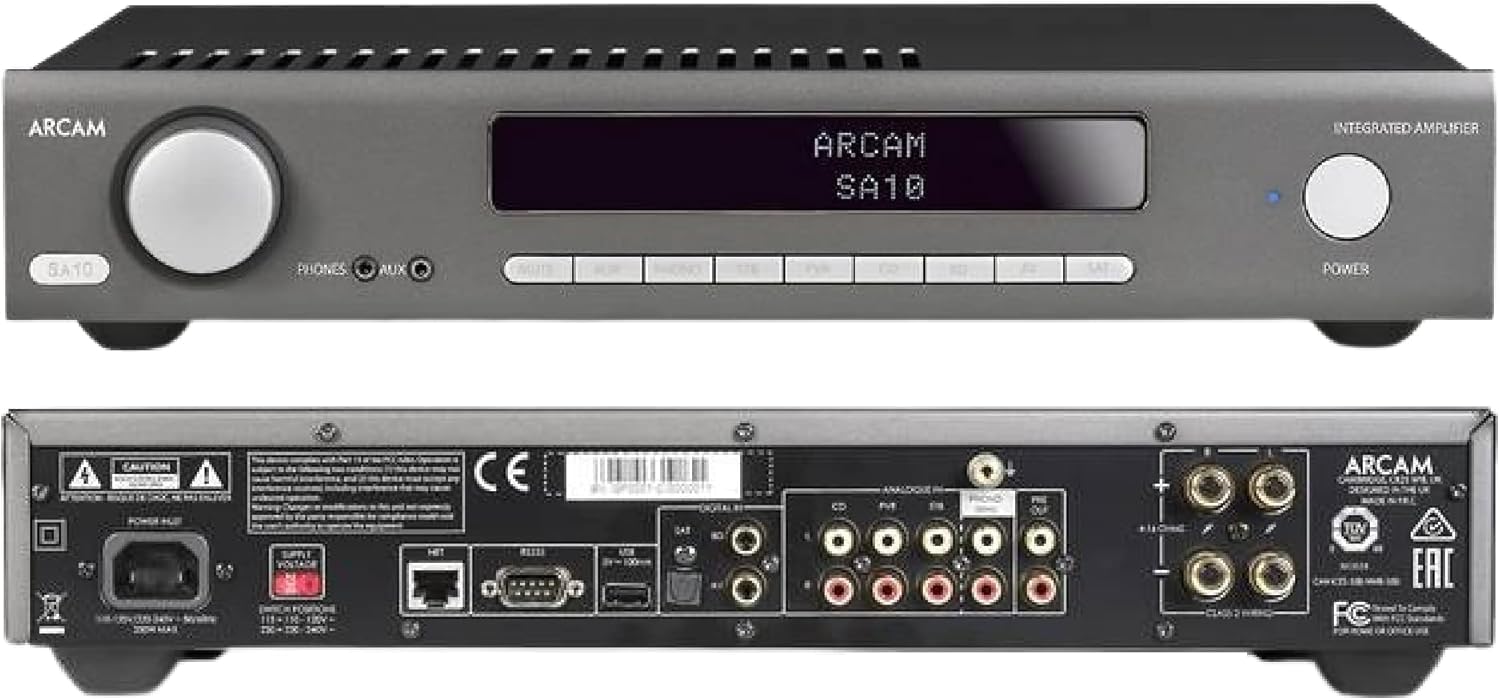
Figure 4.1: Front and Rear Panels of the Arcam SA10. The front panel features a large volume knob on the left, a display screen in the center, input selection buttons below the display, and a power button on the right. Headphone and auxiliary inputs are also present.
- Knoflík hlasitosti: Upravuje celkovou výstupní hlasitost.
- Displej: Zobrazuje aktuální vstup, úroveň hlasitosti a další informace o stavu.
- Tlačítka pro výběr vstupu: Allows selection between various audio sources (CD, Tuner, AV, SAT, etc.).
- Vypínač: Přepíná amplifier between standby and operational modes.
- Výstup pro sluchátka: 3.5mm jack pro připojení sluchátek.
- Pomocný vstup: 3.5mm jack for connecting portable audio devices.
4.2 Zadní panel
The rear panel provides all the necessary connections for your audio system.
Figure 4.2: Detailed Rear Panel Connections. This view highlights the speaker terminals, analog RCA inputs (including Phono), digital optical and coaxial inputs, and the power inlet.
- Koncovky reproduktorů: Connect your passive speakers (left and right channels).
- Analogové vstupy (RCA): Multiple stereo RCA inputs for connecting analog audio sources like CD players, tuners, or other line-level devices.
- Phono vstup (RCA): Dedicated input for turntables with moving magnet (MM) cartridges.
- Digitální vstupy:
- Optické (Toslink): For digital audio sources like TVs or game consoles.
- Koaxiální: For digital audio sources like CD players or network streamers.
- Pre-out: Pro připojení k externímu napájení ampzesilovač nebo aktivní subwoofer.
- USB port: For firmware updates or service.
- Ethernetový port: For network control and future updates.
- Vstup střídavého napájení: Připojuje amplifikátoru k elektrické síti.
5. Nastavení
5.1 Umístění
Place the Arcam SA10 on a stable, level surface away from direct sunlight, heat sources, and excessive moisture. Ensure adequate ventilation around the unit to prevent overheating. Do not place other components directly on top of the ampživější.
5.2 Připojení reproduktorů
Connect your passive speakers to the speaker terminals on the rear panel. Ensure correct polarity (+ to + and - to -) for both left and right channels. Use high-quality speaker cables for optimal sound performance.
5.3 Připojení zdrojů zvuku

Figure 5.3: The Arcam SA10 offers convenient connections including Toslink optical, two digital coaxial inputs, and three stereo analog RCA inputs, plus a dedicated phono input.
- Analogové zdroje: Connect CD players, tuners, or other line-level devices to the RCA analog inputs (CD, Tuner, AV, SAT).
- točna: Connect a turntable with a moving magnet (MM) cartridge to the dedicated PHONO input.
- Digitální zdroje: Connect digital audio sources using either the optical (Toslink) or coaxial digital inputs.
- Přenosná zařízení: Use the 3.5mm AUX input on the front panel for quick connection of portable media players.
5.4 Připojení napájení
Once all audio connections are made, connect the supplied AC power cord to the AC power inlet on the rear panel of the ampa poté do vhodné zásuvky.
6. Návod k obsluze
6.1 Zapnutí/vypnutí
Stiskněte tlačítko MOC button on the front panel or the remote control to switch the amplifier on or into standby mode. The blue LED next to the power button indicates operational status.
6.2 Výběr vstupu
Use the input selection buttons on the front panel or the remote control to choose your desired audio source. The selected input will be displayed on the front panel screen.
6.3 Ovládání hlasitosti
Otočte velký OBJEM knob on the front panel clockwise to increase volume and counter-clockwise to decrease it. Alternatively, use the volume up/down buttons on the remote control.
6.4 Použití sluchátek
Plug your headphones into the 3.5mm TELEFONY jack on the front panel. Connecting headphones will automatically mute the main speaker outputs.
6.5 Dálkové ovládání a ovládání pomocí aplikace

Figure 6.5: Control your SA10 with the included remote or via UPnP audio and basic functions using the FREE MusicLife App on your iPad, iPhone, or Android device.
The included remote control provides full functionality for the SA10. Ensure the supplied AAA batteries are correctly inserted. For advanced control and UPnP audio streaming, download the free Arcam MusicLife App from your device's app store (available for iOS and Android).
7. Údržba
To maintain the appearance and performance of your Arcam SA10:
- Vnější povrchy otřete měkkým, suchým hadříkem, který nepouští vlákna.
- Nepoužívejte abrazivní čisticí prostředky, vosky ani rozpouštědla.
- Ensure the ventilation grilles are free from dust and obstructions.
- Disconnect the power cord from the wall outlet before cleaning.
8. Řešení problémů
If you experience issues with your Arcam SA10, refer to the following common problems and solutions:
| Problém | Možná příčina | Řešení |
|---|---|---|
| Žádná síla | Napájecí kabel není připojen; zásuvka je vadná. | Ujistěte se, že je napájecí kabel bezpečně připojen. Zkuste jinou zásuvku. |
| Žádný zvuk | Incorrect input selected; speaker cables loose; volume too low; mute activated. | Select correct input. Check speaker cable connections. Increase volume. Deactivate mute. |
| Zkreslený zvuk | Source signal too high; speaker impedance mismatch; faulty cables. | Reduce source output level. Ensure speakers are compatible (8 ohms recommended). Check/replace cables. |
| Dálkové ovládání nefunguje | Batteries depleted or incorrectly inserted; obstruction between remote and ampživější. | Vyměňte baterie. Dbejte na správnou polaritu. Odstraňte překážky. |
If the problem persists, please contact Arcam customer support or your authorized dealer.
9. Specifikace
Key technical specifications for the Arcam SA10 Integrated Ampživější:

Figure 9.1: The Arcam SA10 delivers 50 watts per channel, features 5 analog inputs (including phono), 3 digital inputs, a 32-bit DAC, and boasts a low total harmonic distortion + noise of 0.003%.
- Výkon: 50W per channel (8 ohms, 20-20,000 Hz, at 0.5% THD)
- AmpTyp lifikace: Třída A/B
- Digitálně-analogový převodník (DAC): 32-bit ESS9016K2M Sabre DAC
- Analogové vstupy: 5 (including 1 dedicated Phono input for Moving Magnet cartridges)
- Digitální vstupy: 3 (1 Optical Toslink, 2 Coaxial)
- Celkové harmonické zkreslení + šum: 0.003 %
- Rozměry (Š x H x V): 17.05 x 12.72 x 3.43 palce (433 x 323 x 87 mm)
- Hmotnost: 2.03 libry (0.92 kg)
- Řízení: Full I/P control, Remote Control, MusicLife App compatibility
- Baterie pro dálkový ovladač: 2 AAA (součástí balení)
10. Záruka a podpora
Arcam products are designed and manufactured to the highest standards. For information regarding warranty coverage, technical support, or service, please refer to the warranty card included with your product or visit the official Arcam webUschovejte si doklad o koupi pro případ reklamace.


