Zavedení
The Etekcity ESF93 Smart Body Composition Scale is designed to help you track your health and fitness progress. This digital scale provides accurate body weight measurements and, when paired with the VeSync app, offers comprehensive insights into 12 essential body metrics including Body Fat, BMI, Muscle Mass, and more. Its rechargeable design ensures long-lasting use without the need for frequent battery replacements.
Obsah balení
- 1 x inteligentní fitness váha
- 1 x nabíjecí kabel typu C
- 1 x Průvodce rychlým startem
Důležité bezpečnostní informace
VAROVÁNÍ: Consult a healthcare professional before using the smart scale if you use medical electronic equipment such as a pacemaker. The bio-electrical impedance analysis (BIA) technology used by this scale sends a small, safe electrical current through the body to estimate body composition. This current may interfere with medical devices.
Do not use this scale while charging. Always pull out the power cord after charging is complete.
To prevent damage, avoid hitting the edges of the scale or dropping heavy objects on its surface.
CAUTION: SLIPPERY WHEN WET! Nestoupejte na váhu mokrýma nohama.
Průvodce nastavením
1. Charge the Scale
The Etekcity ESF93 scale features a convenient Type-C rechargeable battery. A full charge takes approximately 3 hours and provides 6–8 months of continuous use.

Image: The Etekcity ESF93 Smart Scale connected to a Type-C charging cable, highlighting its rechargeable feature. The display shows '0.00' and 'kg' units.
2. Download the VeSync App
To unlock the full potential of your smart scale, download the free VeSync app from your smartphone's app store. The app allows you to track your progress, view detailed body metrics, and sync data with other fitness applications.

Image: A woman stands on the Etekcity smart scale while viewing her weight and body fat trends on the VeSync app, demonstrating the 'Track Your Progress' feature.
3. Umístěte váhu
For accurate readings, place the scale on a hard, flat surface. Avoid placing it on carpets or uneven flooring, as this can affect measurement precision.

Image: The Etekcity ESF93 Smart Scale, highlighting its large and stable platform with dimensions of 11.8 inches by 11.8 inches.
4. Initial Measurement & Unit Change
- Step on the scale. The display will flash several times before showing your final measurement.
- To change the unit of measurement (kg, lb, or st), turn the scale over and press the unit conversion button on the underside. You can also adjust the unit within the VeSync app settings.
- Ensure your feet are bare and make sure they are in contact with the 4 metal sensors for full body composition analysis.
Operating the Scale
1. Měření
Step onto the scale with bare feet. Stand still until the display shows your weight. For body composition metrics, ensure your bare feet are in contact with all four metal sensors on the scale's surface. The scale will automatically send data to the VeSync app if connected via Bluetooth.
2. Understanding Body Metrics
The VeSync app provides a comprehensive list of 12 essential body metrics, giving you a detailed view of your fitness:
- Hmotnost
- Index tělesné hmotnosti (BMI)
- Procento tělesného tukutage
- Tělová voda
- Viscerální tuk
- Kostní mše
- Protein
- Svalová hmota
- Tělesná hmotnost bez tuku
- Podkožní tuk
- Metabolický věk
- Bazální metabolismus (BMR)

Image: The Etekcity ESF93 Smart Scale display and a smartphone screen showing the VeSync app interface with 13 essential body metrics.
3. Tracking Progress with the App
The VeSync app allows you to view daily, weekly, and monthly data graphs to monitor your health journey. This visual representation helps you understand trends and make informed decisions about your fitness goals.
Video: This video demonstrates the Etekcity scale's cutting-edge BIA technology, showing how it measures full body composition biometrics and syncs results to the VeSync app.
4. Funkce pro více uživatelů
Create unlimited user profiles within the VeSync app, allowing every member of your household to track their individual fitness progress with the same smart scale.

Image: A group of friends or family members looking at a smartphone showing the VeSync app with various user profiles, highlighting the unlimited user feature.
5. Baby Mode
Utilize the new Baby Mode feature in the VeSync app to accurately weigh your baby or pet. This mode simplifies tracking the weight of smaller individuals.

Image: A split image showing a mother weighing her baby and a woman weighing her pet, demonstrating the 'Baby Mode' feature for tracking weight.
6. Syncing with Other Fitness Apps
The VeSync app can easily sync your data via Bluetooth with popular fitness apps such as Fitbit, Google Fit, Apple Health, Samsung Health, and MyFitnessPal. This allows you to consolidate all your health information in one convenient location.
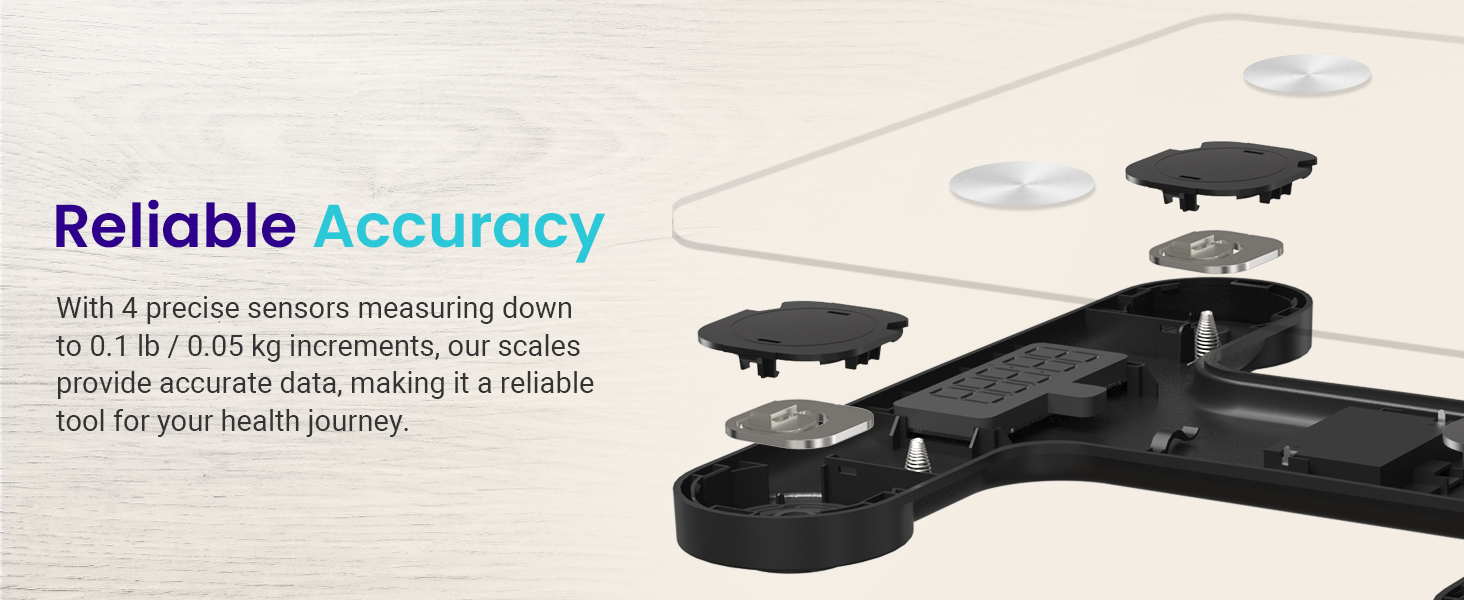
Image: A man running outdoors, with icons of various fitness apps (Google Fit, Apple Health, Fitbit, MyFitnessPal, Samsung Health) indicating data synchronization.
7. Integrace hlasového asistenta
Connect the VeSync app to Amazon Alexa to get answers to your health-related questions, such as your recent weight changes, directly through voice commands.

Image: A woman exercising, with a speech bubble showing an Alexa command related to weight tracking via the VeSync app.
Údržba
Čištění váhy
- Otřete povrch váhy reklamouamp hadříkem a jemným čisticím prostředkem.
- Nepoužívejte abrazivní čisticí prostředky ani váhu neponořujte do vody.
- Před uskladněním nebo dalším použitím se ujistěte, že je váha zcela suchá.
Skladování
Váhu skladujte na chladném a suchém místě mimo dosah přímého slunečního záření a extrémních teplot. Pokud váhu nepoužíváte, nestavte na ni těžké předměty.
Odstraňování problémů
Nepřesná čtení
- Ujistěte se, že váha je umístěna na tvrdém a rovném povrchu.
- Step on the scale with bare, dry feet, ensuring contact with all four metal sensors for body composition analysis.
- Váhu kalibrujte tak, že na ni krátce stoupnete, poté z ní sestoupíte a před měřením počkáte, až se zobrazí „0.0“.
- Zkontrolujte stav baterie a v případě potřeby ji dobijte.
Problémy s připojením aplikací
- Ujistěte se, že je na vašem smartphonu povoleno Bluetooth.
- Make sure the VeSync app is open and the scale is within range of your smartphone.
- Restart your smartphone and the VeSync app.
- If issues persist, try re-pairing the scale with the app.
Specifikace
| Funkce | Detail |
|---|---|
| Rozměry produktu | 11.8 x 11.8 x 0.9 palce |
| Číslo modelu položky | ESF93 |
| Hmotnost | 3.62 libry |
| Zdroj napájení | Rechargeable Type-C |
| Typ zobrazení | LCD displej s podsvícením |
| Hmotnostní kapacita | Až 400 180 lb (XNUMX kg) |
| Přírůstky měření | 0.1 lb / 0.05 kg |
| Senzory | 4 vysoce přesné senzory |
| Konektivita | Bluetooth |
Záruka a zákaznická podpora
Informace o záruce
Etekcity products typically come with a 2-year warranty. To register your product and receive exclusive news, scan the QR code provided in your Quick Start Guide or visit the Etekcity website. Registration ensures access to warranty information and quality customer support.
Zákaznická podpora
For any questions or concerns, please contact our helpful customer support team:
- E-mail: support@etekcity.com
- Zdarma: (855) 686-3835
Pracovní doba podpory: Monday - Friday, 9:00 am - 5:00 pm PST/PDT

Image: The Etekcity brand logo.


