Zavedení
The NEXX X-Com 2 is a communication system designed for seamless integration with NEXX X.Vilitur and NEXX X.Vilijord helmets. This system allows riders to connect with their technology and communicate with up to 8 other riders over a distance of up to 1.6 kilometers (1.0 mile) in open terrain. It features Bluetooth 4.1, advanced audio distribution, noise cancellation, and an integrated FM radio.
Obsah balení
Před zahájením instalace se prosím ujistěte, že jsou přítomny všechny komponenty:
- 1 x X-Com 2 Main Module
- 1 x Dálkové ovládání
- Mounting Hardware (e.g., clamps, adhesive mounts) - (Assumed)
- Speakers and Microphone Kit - (Assumed)
- USB Charging Cable - (Assumed)
- Uživatelská příručka (tento dokument)
Konec produktuview
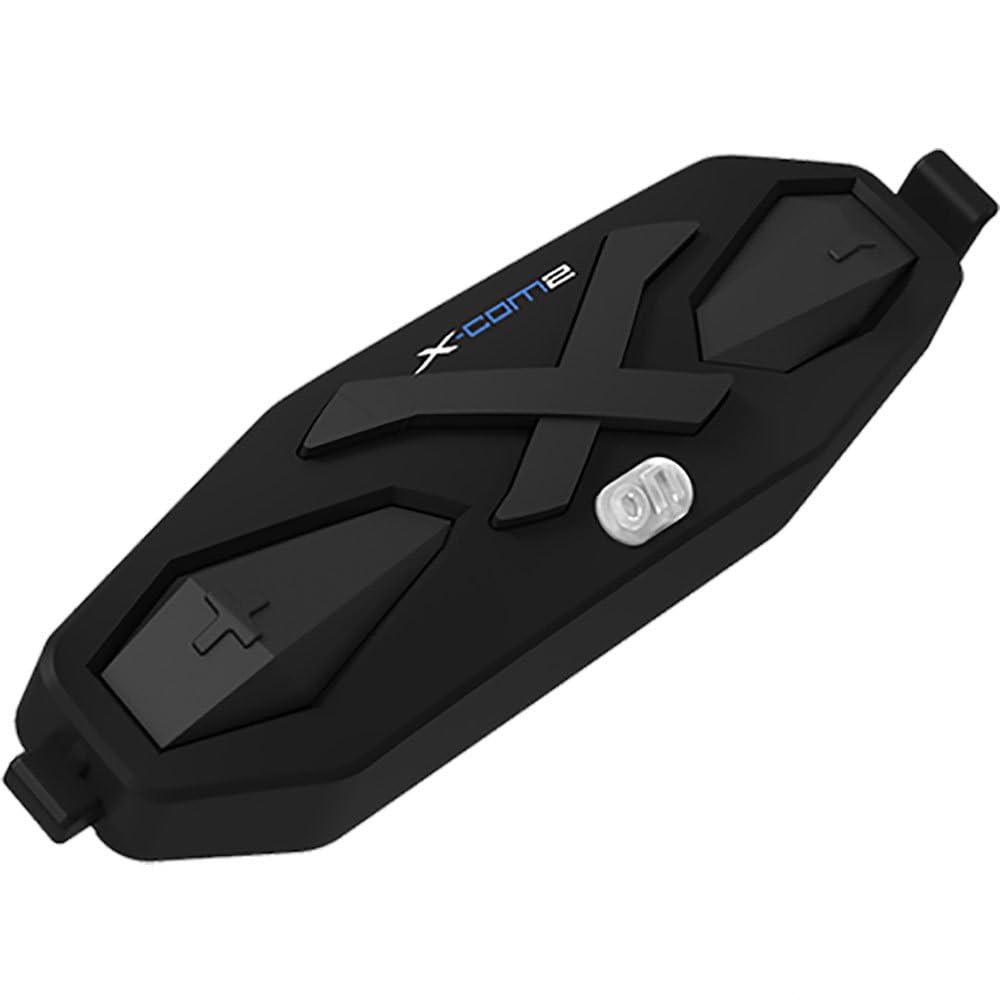
Obrázek 1: The NEXX X-Com 2 main module. This black, elongated unit features a prominent 'X' design, the 'X-Com2' logo, and several tactile buttons for operation, including a central power/function button and volume/navigation controls.
Main Module Components:
- Tlačítko napájení/funkce: Central button for powering on/off, pairing, and accessing main functions.
- Tlačítko pro zvýšení hlasitosti/následující skladbu: Typically located on one side, used to increase volume or navigate forward.
- Tlačítko pro snížení hlasitosti/předchozí skladba: Typically located on the opposite side, used to decrease volume or navigate backward.
- Nabíjecí port: Pro připojení nabíjecího kabelu USB.
- Speaker/Microphone Ports: For connecting the helmet's audio components.
Nastavení a instalace
1. Mounting the Main Module:
- Identify the designated mounting area on your NEXX X.Vilitur or X.Vilijord helmet, usually on the left side.
- Vyberte si mezi clamp mount or adhesive mount based on your helmet type and preference.
- Securely attach the mounting bracket to the helmet.
- Slide the X-Com 2 main module onto the mounted bracket until it clicks into place.
2. Installing Speakers and Microphone:
- Carefully remove the helmet's interior padding to access the ear pockets.
- Place the speakers into the designated ear pockets, ensuring they are centered over your ears.
- Route the microphone boom towards your mouth, securing it within the helmet's chin bar area.
- Connect the speaker and microphone cables to the corresponding ports on the X-Com 2 main module.
- Reinstall the helmet's interior padding, ensuring cables are neatly tucked away and do not interfere with comfort or safety.
Návod k obsluze
Zapnutí/vypnutí:
- Zapnutí: Press and hold the Power/Function button for approximately 2 seconds until you hear an audible prompt.
- Vypnout: Press and hold the Power/Function button for approximately 5 seconds until you hear an audible prompt.
Bluetooth párování:
- With the X-Com 2 powered off, press and hold the Power/Function button for 7 seconds until the LED flashes red and blue, indicating pairing mode.
- On your mobile device, enable Bluetooth and search for "NEXX X-Com 2".
- Vyberte zařízení, které chcete spárovat. Úspěšné spárování potvrdí hlasový pokyn.
Funkce interkomu:
- The X-Com 2 supports intercom communication with up to 8 riders.
- Zahájení interkomu: Briefly press the Intercom button (if available, or a specific combination of main buttons) to connect with the last paired intercom.
- Ukončení interkomu: Briefly press the Intercom button again.
- Refer to the full manual for detailed instructions on multi-rider intercom pairing and group management.
FM rádio:
- Zapnutí/vypnutí FM rádia: Double-tap the Power/Function button.
- Skenovací stanice: Press the Volume Up or Volume Down button to scan for the next available station.
- The unit supports 10 preset station memory.
Ovládání hlasitosti:
- Press the Volume Up button to increase audio volume.
- Press the Volume Down button to decrease audio volume.
Údržba
- Čištění: Použijte měkký, damp cloth to wipe the main module. Do not use harsh chemicals or abrasive cleaners.
- Nabíjení: Charge the device using the provided USB cable. A full charge takes approximately 2.5 hours. Avoid overcharging.
- Skladování: Store the X-Com 2 in a cool, dry place when not in use. If storing for extended periods, charge the battery every few months to maintain its lifespan.
- Péče o baterie: The unit uses a Lithium Polymer Battery. Do not expose to extreme temperatures.
Odstraňování problémů
| Problém | Možná příčina | Řešení |
|---|---|---|
| Zařízení se nezapne. | Baterie je vybitá. | Nabíjejte zařízení alespoň 30 minut. |
| Nelze spárovat s telefonem. | Device not in pairing mode; Bluetooth on phone is off; too many paired devices. | Ensure device is in pairing mode (flashing red/blue). Turn phone's Bluetooth off and on. Delete old Bluetooth connections on phone. |
| Problémy s připojením interkomu. | Mimo dosah; rušení; nesprávné párování. | Ensure riders are within 1.6 km (1.0 mile) in open terrain. Move away from sources of strong electromagnetic interference. Re-pair intercom units. |
| Špatná kvalita zvuku / šum. | Microphone not positioned correctly; excessive wind noise; Advanced Noise Control not active. | Adjust microphone closer to mouth. Ensure helmet vents are closed if causing excessive wind noise. Verify Advanced Noise Control is enabled (automatic). |
Specifikace
- Model: 09SEN99200099999X-COM2
- Verze Bluetooth: 4.1
- Bluetooth Profiles: Headset Profile (HSP), Hands-Free Profile (HFP), Advanced Audio Distribution Profile (A2DP), Audio Video Remote Control Profile (AVRCP)
- Intercom Working Distance: Up to 1.6 kilometers (1.0 mile) in open terrain
- Max Intercom Riders: Supports up to 8 riders
- Zrušení hluku: pokročilá regulace hluku
- kodek: Vestavěný kodek SBC
- Frekvence FM rádia: 76 ~ 108MHz (10 preset station memory)
- Doba hovoru: 10 hodin
- Doba nabíjení: 2.5 hodin
- Typ baterie: Lithiová polymerová baterie
- Provozní teplota: -10 °C ~ 55 °C (-14 °F ~ 131 °F)
- Main Module Weight: 100 g (3.53 oz)
- Rozměry produktu: 8 x 7 x 8 palce
- Hmotnost položky: 1.01 libry
Záruka a podpora
For specific warranty information and detailed support, please refer to the official NEXX website or contact NEXX customer service directly. Keep your proof of purchase for warranty claims.
NEXX Official Webmísto: www.nexx-helmets.com (Poznámka: Toto je zástupný symbol URL, prosím ověřte si skutečného oficiálního website for NEXX products)
Služby zákazníkům: Refer to the contact information provided on the NEXX official webna webu nebo v obalu vašeho produktu.


